
3DAIStudio vs Image2Prompt

3DAIStudio
3DAIStudio instantly creates professional 3D models from just a text prompt or image, no experience required.
Last updated: April 4, 2026

Image2Prompt
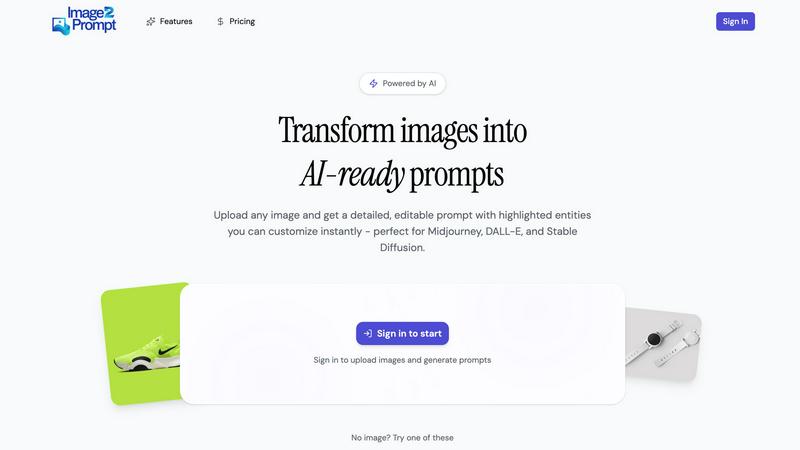
Transform any image into a perfect AI prompt for instant, stunning edits.
Last updated: February 28, 2026
Visual Comparison
3DAIStudio
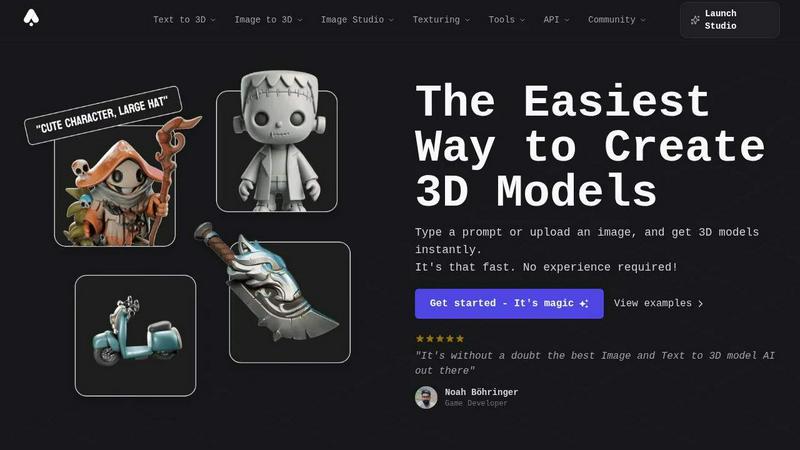
Image2Prompt
Feature Comparison
3DAIStudio
Text to 3D
Describe it, and you'll have it. This core feature allows you to generate fully textured 3D models from a simple text description. Type a prompt like "realistic fantasy orc warrior" and watch as the AI creates a detailed, export-ready 3D asset in seconds. It's the fastest way to go from a concept in your mind to a usable model in your project, eliminating the need for manual modeling from scratch.
Image to 3D
Turn any 2D reference into a 3D masterpiece. Upload a sketch, illustration, or photograph, and 3DAIStudio's advanced AI will interpret the image and construct a three-dimensional model from it. This is perfect for prototyping, creating assets from concept art, or bringing existing 2D designs into a 3D space for games, AR, or 3D printing.
AI Texturing
Apply stunning, realistic textures to your models with AI-powered precision. This tool lets you generate PBR (Physically Based Rendering) materials from text prompts or paint custom details directly onto your model's surface. Achieve professional material quality without the complexity of traditional UV unwrapping and texture painting software.
Quad-Remesh & Optimization
Ensure your models are production-ready. The Quad-Remesh tool automatically optimizes mesh topology, reduces polygon counts, and generates LODs (Levels of Detail). This cleans up your AI-generated models, fixing mesh issues and preparing them for seamless use in major engines like Unity and Unreal Engine without manual retopology work.
Image2Prompt
Intelligent Visual Analysis
Our core AI doesn't just look at your image; it understands it. The system performs a deep analysis to identify and articulate the fundamental components that make your image unique. This includes recognizing artistic styles (like cyberpunk or watercolor), dissecting complex compositions, noting lighting conditions (e.g., cinematic rim light), and detailing subjects with precision. It translates pixels into the descriptive language that AI image models crave, providing a comprehensive starting point that captures the essence of your visual inspiration.
Editable, Entity-Highlighted Prompts
Say goodbye to rewriting entire prompts for small changes. Image2Prompt presents your generated prompt in a structured, editable format where different entities are visually highlighted. You can easily identify and modify specific sections such as the main subject, background environment, color palette, or camera angle. This modular approach gives you unparalleled control, allowing for rapid experimentation and refinement to get the exact output you envision from your AI generator of choice.
Seamless AI Generator Integration
Image2Prompt is built for your real-world creative pipeline. The prompts are crafted to be directly compatible and highly effective with leading AI image generation platforms like Midjourney, DALL-E 3, and Stable Diffusion. The output is formatted to leverage each platform's strengths, whether it's proper weighting for Stable Diffusion or descriptive chunks ideal for Midjourney. This seamless integration means you can copy, paste, and generate immediately, making it an indispensable tool in any AI artist's toolkit.
Learning and Discovery Platform
Beyond being a utility, Image2Prompt is a powerful educational tool. By reverse-engineering any image into a well-structured prompt, it demystifies the art of prompt engineering. Users can learn what descriptive elements lead to specific visual outcomes, understand how to combine stylistic keywords, and discover new techniques by analyzing images they admire. It's the fastest way to level up your prompt-crafting skills and develop an intuitive understanding of how AI interprets textual instructions.
Use Cases
3DAIStudio
Game Development
Accelerate game production by rapidly generating characters, props, weapons, and environmental assets. Studios and indie developers can prototype ideas, fill game worlds with unique content, and create consistent art styles from text descriptions, drastically cutting down on asset creation time and costs.
Film & Animation Production
Create detailed pre-visualization models, storyboard assets, and even final VFX elements in a fraction of the time. Production teams can quickly visualize scenes, generate custom props, and iterate on creature or character designs directly from concept art or script descriptions.
Product Design & 3D Printing
Visualize product concepts instantly. Designers can upload a sketch or describe a product idea to generate a 3D model for review, presentation, or direct preparation for 3D printing. This enables rapid prototyping and client presentations without needing advanced CAD modeling skills.
Education & Creative Learning
Democratize 3D design for students and educators. 3DAIStudio provides a frictionless entry point into 3D creation, allowing learners to explore spatial design, art, and digital storytelling by simply describing or drawing their ideas, making complex 3D concepts accessible and engaging.
Image2Prompt
AI Artwork Recreation and Variation
Found an stunning piece of digital art or a captivating photograph online? Upload it to Image2Prompt to get the precise prompt that describes it. Use this prompt to recreate a similar image in your preferred AI generator, or use it as a foundation to create endless variations—change the season, swap the character, alter the art style—all by editing the highlighted entities in your generated prompt. It's perfect for building mood boards and exploring creative directions.
Accelerated Concept Design and Ideation
Concept artists, game designers, and creative directors can supercharge their brainstorming sessions. Instead of spending hours writing prompts from scratch, quickly feed style references, mood images, or rough sketches into Image2Prompt. Instantly generate a batch of descriptive prompts to produce a wide array of visual concepts, accelerating the early ideation phase and helping teams visualize possibilities faster than ever before.
Professional Social Media and Marketing Content
Content creators and marketers can maintain a consistent visual brand by using Image2Prompt. Upload a successful branded image to decode its "visual recipe." Then, use that structured prompt to generate a series of on-brand graphics, ads, or social posts with cohesive style, lighting, and composition. This ensures visual consistency across campaigns and saves immense time in briefing and prompt development for regular content creation.
Educational Tool for Prompt Engineering
Aspiring AI artists and students can use Image2Prompt as a hands-on learning lab. By uploading diverse images—from classical paintings to modern CGI—and studying the detailed prompts generated, users gain practical insight into how specific words and phrases correlate with visual elements. This active deconstruction is the most effective way to master the nuanced skill of crafting prompts that yield predictable and high-quality AI-generated imagery.
Overview
About 3DAIStudio
Welcome to the future of 3D content creation. 3DAIStudio is a revolutionary AI-powered platform that transforms simple text prompts or 2D images into stunning, high-quality 3D models in seconds. It's designed to shatter the traditional barriers of 3D modeling, making professional-grade asset creation accessible to everyone. Whether you're a seasoned game developer, a film production artist, a product designer, or a complete beginner with a vision, 3DAIStudio empowers you to bring your ideas to life faster than ever before. The core value proposition is breathtakingly simple: generate production-ready 3D assets in minutes, not days. With a suite of over 50 integrated tools for texturing, mesh optimization, and image generation, it's more than just a converter; it's a complete AI toolkit for the modern creator. Join over 1,000,000 creators and experience the magic of instant 3D model generation.
About Image2Prompt
Stop wrestling with words and start creating! Image2Prompt is the revolutionary visual-to-prompt engine that instantly unlocks the secret language of any image. Designed for creators, designers, and AI artists, this tool is your fast pass from inspiration to execution. Simply upload a photo, artwork, or screenshot, and our advanced AI analyzes it to generate a rich, meticulously structured text prompt. It expertly deconstructs the image's core elements—style, composition, lighting, subjects, and artistic details—giving you the perfect blueprint for AI image generators.
What truly sets Image2Prompt apart is its intelligent, editable prompt system. The generated prompt isn't just a block of text; it's a dynamic canvas. Key entities like characters, environments, colors, and camera details are clearly highlighted and separated, allowing you to tweak, refine, or remix elements with a click. This means you can fine-tune your results for Midjourney, DALL-E, or Stable Diffusion without starting from scratch every time. Whether you're aiming to recreate a specific visual, explore endless variations, or simply learn how masterful prompts are built, Image2Prompt dramatically accelerates your workflow, turning trial-and-error into a streamlined process of precision and creativity.
Frequently Asked Questions
3DAIStudio FAQ
What 3D file formats can I export?
3DAIStudio focuses on providing production-ready output. You can export optimized meshes with clean topology and PBR textures that are fully compatible with major industry-standard software and game engines like Unity, Unreal Engine, Blender, and Three.js.
Do I need any 3D modeling experience to use it?
Absolutely not! 3DAIStudio is built specifically to require no prior 3D experience. The platform is designed for both complete beginners and seasoned professionals. You create models by typing what you want or uploading an image, with the AI handling all the complex technical work.
How fast is the model generation process?
It's incredibly fast. As highlighted, you can generate a textured 3D model from a text prompt or image in a matter of seconds. What traditionally takes days of manual modeling, sculpting, and texturing is accomplished in minutes, allowing for rapid iteration and creativity.
What kind of tools are included beyond model generation?
3DAIStudio is a comprehensive AI toolkit. In addition to Text-to-3D and Image-to-3D, it includes an AI Image Studio for generating and editing 2D images, AI Video Generation, the powerful AI Texturing and Quad-Remesh tools, and API access for developers—over 50+ tools in total to support your entire creative pipeline.
Image2Prompt FAQ
How accurate are the prompts generated by Image2Prompt?
Image2Prompt is highly accurate at identifying and describing the core visual elements of an image, such as subjects, style, and composition. The accuracy is exceptional for clear, well-defined images. For abstract or highly complex imagery, the prompt provides an excellent foundational interpretation that you can then easily refine using the editable interface to perfect the description for your needs.
Which AI image generators work best with Image2Prompt prompts?
The prompts generated by Image2Prompt are specifically structured to be universally effective across all major platforms. They work seamlessly with Midjourney, DALL-E 3, Stable Diffusion (including SDXL), and other popular models. The tool formats key details in a way that each generator can interpret effectively, though minor manual tweaking may help you optimize for a specific platform's unique syntax.
Can I use Image2Prompt for commercial projects?
Yes, you can use the prompts generated by Image2Prompt for your commercial projects. The prompts you create and modify are your own. It's always recommended to check the terms of service of your target AI image generator (like Midjourney or DALL-E) regarding the commercial usage rights of the images you generate using those prompts.
Is there a limit to how many images I can process?
The free version of Image2Prompt offers generous access to start transforming your inspiration. For high-volume users, professional creators, and commercial teams, upgrading to the Pro version provides priority, queue-free processing, superior editing capabilities, and a commercial license, ensuring your workflow remains fast and uninterrupted during critical projects.
Alternatives
3DAIStudio Alternatives
3DAIStudio is a cutting-edge AI toolkit that instantly transforms text or images into high-quality 3D models. It belongs to the exciting category of AI-powered content creation tools, designed to give designers, developers, and creatives a massive speed boost. By generating custom 3D assets in seconds, it opens up new possibilities for game development, product visualization, and digital art. Even with its powerful capabilities, users often explore other options. Common reasons include finding a tool that better fits a specific budget, offers different export formats for their workflow, or provides unique features like animation or more granular control. Platform compatibility, such as needing a web app versus desktop software, can also drive the search for a different solution. When evaluating alternatives, focus on what matters most for your projects. Consider the quality and style of the 3D output, the speed of generation, and how easily the models integrate into your existing pipeline. Also, assess the learning curve, community support, and the overall value the tool provides for its cost to ensure it fuels your creative engine effectively.
Image2Prompt Alternatives
Image2Prompt is a leading tool in the visual-to-prompt category, designed to instantly transform any uploaded image into a detailed, AI-ready text prompt. It captures the essence of an image—from artistic style to lighting and composition—and structures it for use with popular AI art generators. This streamlines the creative process, turning inspiration into actionable instructions in seconds. Users often explore alternatives for various reasons. Some may seek different pricing models, from free tiers to subscription plans that better fit their budget. Others might prioritize specific features, like batch processing, different output formats, or integration with a particular AI platform or workflow. The need for a desktop application versus a web tool can also influence the search. When evaluating other options, focus on core capabilities. Look for accuracy in describing images, the depth and editability of the generated prompts, and how well the tool integrates into your existing creative pipeline. The best alternative will feel intuitive, save you time, and give you the control you need to refine prompts for perfect AI-generated results.