
AdaptlyPost vs Snap Shots

AdaptlyPost
AdaptlyPost creates and schedules one post that automatically adapts to publish perfectly across all your social media platforms.
Last updated: March 11, 2026

Snap Shots
Transform ordinary screenshots into eye-catching visuals with overlays, animations, and customizable backgrounds in.
Last updated: February 28, 2026
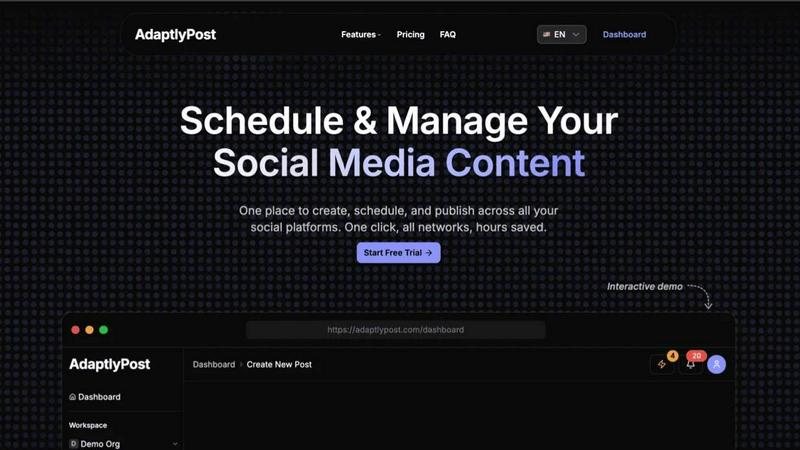
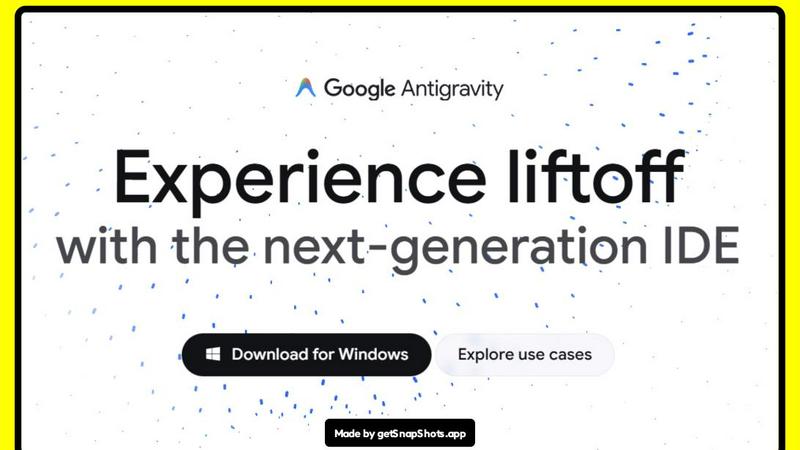
Visual Comparison
AdaptlyPost
Snap Shots
Feature Comparison
AdaptlyPost
Multi-Platform Posting Hub
Ditch the dozen browser tabs. AdaptlyPost's core dashboard lets you connect and manage all your social accounts—from Instagram and TikTok to YouTube and X—in one unified workspace. Craft your post, and our system handles the rest, automatically adapting it to fit the specific requirements and best practices of each platform with a single click. This seamless integration ensures your message is optimized everywhere, saving you from manual, error-prone cross-posting.
AI Caption Co-pilot
Never stare at a blank caption box again. Our AI-powered writing assistant is your creative partner. Simply provide a prompt like "write a caption for our new product launch," and it generates engaging copy. Even better, it automatically rewrites and tailors that caption to match the unique voice, style, and character limits of each social platform you're targeting, ensuring maximum relevance and impact with zero extra work from you.
AI Image Studio
Create professional, eye-catching visuals in seconds, no design skills required. The AI Image Studio turns your ideas into reality. Just describe the image you envision—"a minimalist laptop on a bamboo desk with morning light"—and watch as AI generates unique, brand-appropriate graphics. This feature is perfect for creating scroll-stopping content that boosts engagement without the need for expensive software or stock photo subscriptions.
Unified Content Pipeline & Calendar
Gain crystal-clear visibility and control over your entire content strategy. The visual calendar provides a week-at-a-glance view of all your drafts, scheduled posts, and published content across every platform. The organized pipeline clearly shows what's in draft, what's queued up, and what has already gone live. This holistic view prevents double-booking, helps you maintain a consistent posting schedule, and ensures you never miss a prime posting time.
Snap Shots
Pre-built Templates
Snap Shots offers a vast library of pre-built templates specifically designed for various platforms such as Twitter, LinkedIn, and Product Hunt. These templates are optimized for size and layout, ensuring that your visuals look fantastic no matter where they are shared. This feature allows users to jump right into creation without worrying about the technical details, making it perfect for quick and efficient graphic design.
Extensive Customization Options
With Snap Shots, you have the freedom to customize every aspect of your visuals. Choose from a wide array of backgrounds, adjust padding to fit your content perfectly, and add text overlays to convey your message clearly. This feature ensures that every graphic is unique and tailored to your specific needs, empowering you to create a stunning visual identity.
3D Animations (Beta)
Take your graphics to the next level with Snap Shots' exciting 3D animations feature, currently in beta. This innovative addition allows users to add depth and motion to their visuals, making them more engaging and dynamic. Whether you're showcasing a product or crafting a social media post, 3D effects can significantly enhance the visual appeal and draw in viewers.
User-Friendly Interface
Designed with users in mind, Snap Shots features an intuitive, easy-to-navigate interface that makes the design process a breeze. Even those with no design experience can quickly learn how to use the platform, allowing for fast creation of high-quality graphics. This feature enables users to focus on their ideas rather than getting bogged down by complex design tools.
Use Cases
AdaptlyPost
The Solopreneur & Content Creator
For individuals building a personal brand or business alone, time is the most precious resource. AdaptlyPost empowers solopreneurs to batch-create a week's worth of content in one sitting. Using the AI tools to quickly generate captions and images, they can schedule everything across Instagram, TikTok, and YouTube from a single dashboard, freeing up countless hours to focus on creating products, services, or deeper community engagement.
The Growing Small Business & Marketing Team
Small businesses need to compete with larger players without a massive budget. AdaptlyPost gives small teams agency-level tools. They can maintain a consistent, multi-platform presence, plan campaigns visually on the calendar, and use the AI Co-pilot to ensure their messaging is sharp and platform-optimized. The team collaboration features allow multiple members to draft, review, and schedule posts seamlessly, streamlining their entire marketing workflow.
The Social Media Agency
Agencies managing multiple client accounts require efficiency and clarity. AdaptlyPost's multi-workspace functionality is a game-changer. They can separate each client's accounts, schedules, and content pipelines while using the powerful AI tools to generate fresh ideas and visuals at scale. The unified calendar makes reporting and strategy overviews simple, proving value to clients and allowing the agency to manage more accounts without sacrificing quality.
The Tech-Savvy Innovator Using AI Automation
For users who want to push automation to the next level, AdaptlyPost offers deep integration capabilities. Through API access and the unique OpenClaw skill, you can connect your social strategy to other tools or even let an AI agent manage posts via natural language commands. This use case is for those looking to build a truly hands-off, intelligent content distribution system integrated into their broader tech stack.
Snap Shots
Social Media Marketing
Snap Shots is an invaluable tool for social media marketers looking to create eye-catching posts and banners that stand out in crowded feeds. With pre-built templates and customization options, marketers can quickly generate visuals that boost engagement and brand awareness, ensuring their messages reach their target audience effectively.
Product Showcases
Entrepreneurs and product developers can utilize Snap Shots to create stunning mockups and showcases for their products. By transforming simple screenshots into professional graphics, users can present their offerings in a visually appealing way that highlights features and benefits, helping to drive sales and interest.
Content Creation
Bloggers and content creators can leverage Snap Shots to generate captivating visuals for their articles, websites, and promotional materials. By enhancing screenshots with overlays and effects, creators can add a professional touch to their content, making it more attractive and shareable across various platforms.
Presentations and Reports
Professionals can use Snap Shots to enhance their presentations and reports with visually compelling graphics. By turning data and screenshots into engaging visuals, users can better convey their messages and captivate their audience during meetings, webinars, or pitches.
Overview
About AdaptlyPost
Stop the app-switching madness and launch your social media strategy into hyperdrive. AdaptlyPost is the all-in-one command center built for creators, entrepreneurs, and modern marketing teams who are serious about growth. It transforms the chaotic, time-consuming process of managing multiple social platforms into a streamlined, powerful workflow. Imagine this: you create a single piece of content, and with one click, it's intelligently adapted and scheduled to go live on X, Instagram, TikTok, YouTube, and more. No more manual tweaking for each platform's unique tone and format. The secret sauce? Our built-in AI Co-pilot generates platform-perfect captions on demand, while the AI Image Studio crafts scroll-stopping visuals from a simple text prompt. Add a unified visual calendar and a clear content pipeline, and you've got a tool that doesn't just manage posts—it amplifies your reach and gives you hours of your week back. AdaptlyPost is for anyone ready to create once, post everywhere, and finally see consistent, engaging results across their entire social universe.
About Snap Shots
Snap Shots is an innovative tool designed to elevate the mundane task of capturing screenshots into a creative powerhouse for visual content creation. This platform empowers users of all skill levels to transform ordinary screenshots into visually stunning graphics, mockups, and social media banners in mere seconds. Whether you are a marketer, entrepreneur, or simply someone looking to enhance your online presence, Snap Shots has got you covered. Its intuitive interface requires no design expertise, making it accessible to everyone. With pre-built templates optimized for major platforms like Twitter, LinkedIn, and Product Hunt, users can effortlessly craft professional-quality visuals. Snap Shots also boasts extensive customization options, including backgrounds, padding, text overlays, and even 3D effects, allowing for a personalized touch. The main value proposition lies in its ability to save time while delivering high-quality graphics that capture attention and engage audiences. Say goodbye to tedious design tasks and hello to Snap Shots, where creativity meets simplicity.
Frequently Asked Questions
AdaptlyPost FAQ
Which social media platforms do you support?
AdaptlyPost supports all major social media platforms to power your omnichannel strategy. This includes X (formerly Twitter), Instagram (Feed, Stories, Reels), TikTok, YouTube, Facebook, LinkedIn, and more. We constantly update our connectors to support new features and networks, ensuring you can reach your audience wherever they are.
How does the AI caption writer work?
Our AI Caption Co-pilot uses advanced language models trained on successful social media content. You start by giving it a basic prompt or idea. The AI then generates a primary caption and, crucially, automatically rewrites and adapts it for each connected platform. It adjusts the tone, length, hashtag suggestions, and formatting to match what performs best on Instagram vs. X vs. LinkedIn, all from your single input.
Can I schedule posts in advance?
Absolutely! Advanced scheduling is a core feature of AdaptlyPost. You can schedule posts days, weeks, or even months in advance using the intuitive visual calendar. This allows you to plan entire campaigns, batch your content creation, and maintain a consistent posting schedule even during holidays or busy periods, all without being logged in.
What happens when my free trial ends?
After your 7-day free trial, you will need to choose a paid subscription plan (Creator, Business, or Enterprise) to continue using AdaptlyPost's full features. If you do not enter payment information, your account will be downgraded, and you may lose access to scheduling, AI credits, and posting capabilities. You can cancel anytime during the trial without being charged.
Snap Shots FAQ
What types of files can I upload to Snap Shots?
Snap Shots supports various image formats, including PNG, JPEG, and GIF. This flexibility allows users to upload different types of screenshots and images for transformation into stunning visuals.
Is there a learning curve for using Snap Shots?
No! Snap Shots is designed with user experience in mind. Its intuitive interface makes it easy for anyone, regardless of design experience, to create professional-quality graphics quickly and efficiently.
Are there any limitations to the customization options?
While Snap Shots provides extensive customization options, the platform is continually evolving. Users can expect regular updates and new features to enhance the customization capabilities even further over time.
Can I use Snap Shots for commercial purposes?
Yes! Snap Shots allows users to create graphics that can be used for commercial purposes, including marketing materials, social media posts, and product showcases, ensuring you have the tools needed to promote your business effectively.
Alternatives
AdaptlyPost Alternatives
AdaptlyPost is a dynamic content creation and publishing platform designed to streamline your social media workflow. It belongs to the category of all-in-one social media management tools, helping creators and teams write once and adapt their content for seamless posting across multiple channels like X, Instagram, and TikTok. Users often explore alternatives for various reasons. Budget constraints, the need for specific niche features, or support for different social platforms can all lead someone to shop around. It's a common step in finding the perfect tool that aligns with both a team's operational needs and financial reality. When evaluating other options, focus on your core requirements. Consider the range of platforms supported, the depth of automation and AI assistance, the intuitiveness of the content calendar, and of course, the overall value for the price. The goal is to find a solution that genuinely saves you time and amplifies your content's impact.
Snap Shots Alternatives
Snap Shots is an innovative tool designed to revolutionize the way you create visuals from ordinary screenshots. Positioned in the content creation and marketing categories, it empowers users to easily transform mundane images into eye-catching graphics, mockups, and social media banners in just seconds. With its user-friendly interface and pre-built templates optimized for popular platforms, Snap Shots caters to both novices and seasoned marketers alike. However, as users explore their options, they often seek alternatives for various reasons, such as pricing, feature sets, and compatibility with different platforms. The ideal alternative should maintain a balance of affordability and functionality while offering a seamless user experience. When searching for a suitable replacement, consider the ease of use, customization options, and the range of templates available to ensure you find a solution that meets your creative needs.