
Amovera vs Klipzy

Amovera
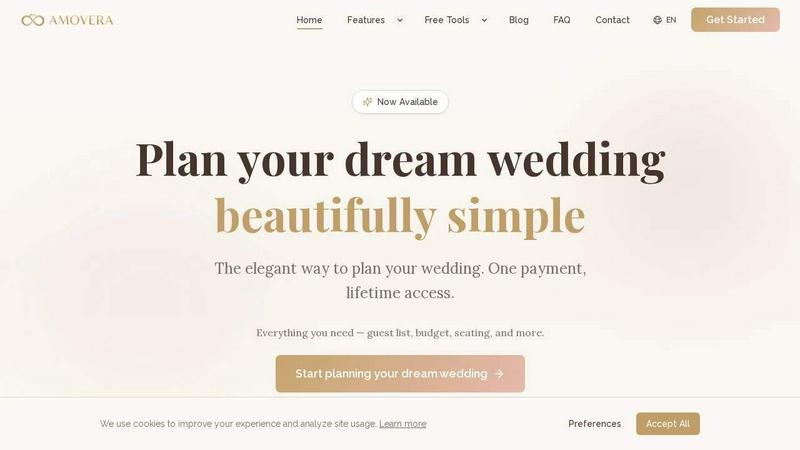
Amovera is your elegant, private wedding planner with lifetime access to every tool you need.
Last updated: April 13, 2026

Klipzy
Klipzy instantly transforms your photos into cinematic Instagram Reels with AI effects.
Last updated: February 28, 2026
Visual Comparison
Amovera
Klipzy
Feature Comparison
Amovera
Guest List & RSVP Manager
Ditch the spreadsheets forever. Amovera's guest list tool lets you easily import, categorize, and manage your entire invitee list. Track RSVPs in real-time with personalized invitation links, manage meal preferences, plus-ones, and send updates seamlessly. All your guest data is organized, searchable, and ready to export, making final headcounts a breeze.
Interactive Seating Chart Builder
Visualize and create your perfect reception layout with a simple drag-and-drop interface. Drag guests onto tables, move tables around your venue floor plan, and experiment with different arrangements until you find the ideal setup. It's an intuitive and fun way to solve the seating puzzle, ensuring your loved ones are seated just right.
Comprehensive Budget Tracker
Take control of your wedding finances. This feature provides a clear, centralized dashboard to log every estimated and actual expense, from the venue deposit to the final cupcake. Set an overall budget, track payments to vendors, and monitor your spending across categories to avoid surprises and stay confidently on track.
Collaborative Moodboards & Task Lists
Capture inspiration and execute plans in one spot. Create beautiful digital moodboards to collect images, colors, and ideas for your vision. Alongside, manage your entire wedding timeline with shared, assignable task lists. Set deadlines, check items off together, and ensure nothing falls through the cracks as you build your perfect day.
Klipzy
20+ AI-Powered Cinematic Effects
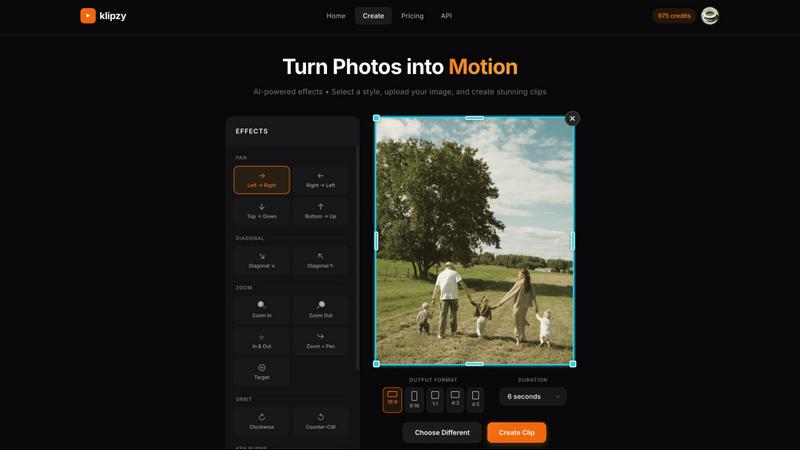
Klipzy is packed with a diverse library of professional motion styles to give your photos life and depth. Go beyond the basic Ken Burns effect with options like dramatic Zoom In & Out, smooth Parallax, dynamic Swing, immersive Pan shots, and even realistic touches like Motion Blur and Hand Shake. Each effect is intelligently applied to your image, creating a unique and engaging video narrative without any manual keyframing or timeline editing required.
Native macOS App with Local Processing
Experience blazing-fast performance and full control with Klipzy's dedicated Mac application. Unlike web-based tools, Klipzy runs natively on your machine. This means your images and videos are processed locally, ensuring privacy, speed, and the ability to work offline. Enjoy a seamless, optimized workflow that feels like a natural part of your macOS ecosystem, without relying on an internet connection or uploading sensitive content to the cloud.
Built-in Watermark Remover
Klipzy includes a powerful bonus tool: an integrated AI watermark remover. This feature allows you to clean up images before animating them, effortlessly erasing unwanted logos, text, or watermarks from your photos. It streamlines your content creation pipeline, letting you prepare and perfect your assets all within one single, efficient application before applying stunning cinematic effects.
Flexible Export & Aspect Ratios
Create content perfectly tailored for any platform. Klipzy lets you export your videos in multiple aspect ratios including square (1:1), portrait (9:16 for Reels/TikTok), and landscape (16:9). Export directly to MP4 format in high definition, ready to be shared instantly on social media, embedded in presentations, or used in marketing campaigns. The app provides clear control over where your final videos are saved on your Mac.
Use Cases
Amovera
The Collaborative Couple
For partners who want to plan together without chaos. Both of you can log in simultaneously to update the guest list, adjust the budget, or design the seating chart in real-time. No more emailing spreadsheets back and forth or worrying about who has the latest version. Amovera keeps you perfectly in sync.
The Privacy-Conscious Planner
For couples tired of their data being a product. If you've signed up for "free" tools only to be bombarded by vendor emails and calls, Amovera is your solution. Our one-time payment model means we work for you, not advertisers. Your contact list and wedding details remain private and secure, always.
The Detail-Oriented Organizer
For those managing a complex event with multiple moving parts. From tracking RSVPs and dietary restrictions for 300 guests to coordinating a dozen vendor contracts and payments, Amovera brings every detail into one streamlined dashboard. Replace a mess of notes, files, and apps with a single source of truth.
The Value-Seeking Partner
For smart couples who hate recurring subscriptions. Amovera offers incredible long-term value with a single, upfront payment for lifetime access and all future updates. Plan at your own pace, revisit your wedding website after the big day, and export your memories—all without another bill.
Klipzy
Viral Social Media Content
Create eye-catching Reels, TikToks, and YouTube Shorts that stop the scroll. Transform a single product photo, a behind-the-scenes snapshot, or a travel moment into a short, looping video with dynamic motion. This instantly makes your content more engaging and professional, helping you grow your audience and boost interaction rates on platforms that prioritize video.
Real Estate Property Showcases
Bring property listings to life by transforming static photos into cinematic video tours. Use smooth panning effects to guide viewers through a room or a subtle zoom to highlight key features like a fireplace or kitchen island. This creates a more immersive and emotionally compelling presentation for potential buyers, setting your listings apart from the competition.
E-commerce Product Highlights
Make your online products pop and demonstrate them in action. Animate product photos to show details from different angles using orbit or swing effects, simulate a "unboxing" feel with a zoom, or add elegant motion to lifestyle images. This dynamic presentation can significantly increase dwell time and conversion rates on product pages and social media ads.
Travel & Personal Memory Videos
Easily turn your favorite vacation photos into beautiful, moving memories. Create a stunning video montage from a single panoramic landscape shot using a Ken Burns effect, or add a gentle parallax motion to a group photo to make it feel alive. It’s a quick way to produce shareable recaps for friends and family or engaging content for a travel blog or Instagram feed.
Overview
About Amovera
Stop the app-hopping, spreadsheet chaos, and vendor spam. Amovera is the elegant, all-in-one wedding planning platform designed for modern couples who value simplicity, privacy, and joy. This is your central command center for the entire wedding journey, beautifully organized in one intuitive place. Built for two, Amovera lets both partners collaborate in real-time on everything from the guest list and budget to the seating chart and mood boards—no more version confusion or stepping on each other's toes. We reject the "freemium" model that sells your data. Instead, you make one simple payment for lifetime access to every feature, with no subscriptions, no hidden upsells, and a firm promise: your inbox will never be flooded with spam from caterers. Available in English and German, Amovera is the stress-free, privacy-first partner you need to plan your dream wedding, start to finish.
About Klipzy
Klipzy is the game-changing Mac app that instantly transforms your static photos into dynamic, cinematic video clips. Built for the modern creator, it eliminates the complexity of traditional video editing software. With Klipzy, anyone can add professional motion to their images in just a few clicks. Simply upload your photo, choose from over 20 AI-powered cinematic effects, and download a ready-to-share HD video. It’s designed for content creators, marketers, social media managers, real estate agents, e-commerce sellers, and travel enthusiasts who need to capture attention in a crowded digital landscape. The core value proposition is powerful yet simple: democratize high-quality video creation. Klipzy delivers a native macOS experience with fast, local processing, a one-time license fee (no subscriptions!), and even includes a built-in watermark remover. Stop posting flat images and start creating engaging Reels, TikToks, and Shorts that tell a moving story. Klipzy puts the power of cinematic storytelling directly on your desktop.
Frequently Asked Questions
Amovera FAQ
How does the one-time payment work?
You pay once, and you own Amovera for life. There are no monthly or annual subscriptions. Your single payment grants you and your partner immediate, unlimited access to every current and future feature for your wedding planning. No hidden fees, no tiers, and no upsells.
Can we both use Amovera at the same time?
Absolutely! Amovera is built for collaboration. You can easily share access with your partner, and both of you can be logged in, editing the budget, checking off tasks, or moving guests on the seating chart simultaneously. All changes sync in real-time so you're always on the same page.
What happens to our data after the wedding?
Your data always belongs to you. You can export your guest lists, seating charts, budget breakdowns, and more as CSV or PDF files to keep for your records. Your lifetime access also means you can log back in anytime to reminisce or use the tools for future events.
Is there a limit to the number of guests or events?
No. Whether you're planning an intimate elopement or a grand celebration with hundreds of guests, Amovera can handle it. There are no caps on your guest list, and you can manage multiple related events like the rehearsal dinner or post-wedding brunch within the same platform.
Klipzy FAQ
What image formats are supported?
Klipzy supports all major image formats including JPG, PNG, and WebP. You can upload any image file up to 50MB in size, ensuring high-quality source material for your final HD video exports.
Is this a subscription?
No! Klipzy is offered with a simple, one-time purchase license. Pay once and own it forever, including all current features and future updates. There are no monthly or annual subscription fees, making it a cost-effective and predictable tool for your creative toolkit.
What platforms are supported?
Klipzy is currently a native application built exclusively for macOS. This allows for deep integration with the Apple ecosystem, optimized performance, and a smooth user experience designed specifically for Mac users.
How many effects are available?
Klipzy comes loaded with over 20 different AI-powered cinematic motion effects. This includes classics like Ken Burns, as well as modern styles like Parallax, Swing, Zoom, Pan, Motion Blur, and Hand Shake, giving you a wide creative palette to choose from.
Alternatives
Amovera Alternatives
Amovera is a modern wedding planning tool built for couples who want a simple, private, and unified planning experience. It falls into the category of productivity and management software, designed to replace a jumble of spreadsheets, apps, and sticky notes with one cohesive platform. People explore alternatives for various reasons. Some might be on a strict budget and need a free tier, while others require specific integrations or platform availability. The desire for different feature sets, like advanced website builders or more robust guest communication tools, also leads couples to shop around. When evaluating other options, focus on your core needs. Consider your budget model preference—subscription versus one-time payment—and the importance of data privacy. Look for true collaborative features that allow seamless co-planning and ensure the tool’s design and functionality match your wedding's vision and complexity.
Klipzy Alternatives
Klipzy is a dynamic productivity tool designed to instantly transform your static photos into captivating video clips. It empowers creators, marketers, and social media enthusiasts to produce professional-looking video content without any complex editing skills, making video creation accessible to everyone. Users often explore alternatives for various reasons. Some might need a different pricing model or subscription plan that better fits their budget. Others may be looking for specific advanced features, integration with other platforms, or a different user experience that aligns with their unique creative workflow and content needs. When searching for a different tool, focus on what matters most for your projects. Consider the ease of use, the quality and style of the video output, and how well it integrates into your existing toolkit. The right platform should feel intuitive, elevate your content, and streamline your creative process without adding unnecessary complexity.