
Anymelo vs Read PDF Aloud

Anymelo
Anymelo instantly transforms your words into professional, royalty-free AI music for any project.
Last updated: February 28, 2026

Read PDF Aloud
Effortlessly listen to any PDF with natural AI voices in 142 languages for free.
Last updated: February 27, 2026
Visual Comparison
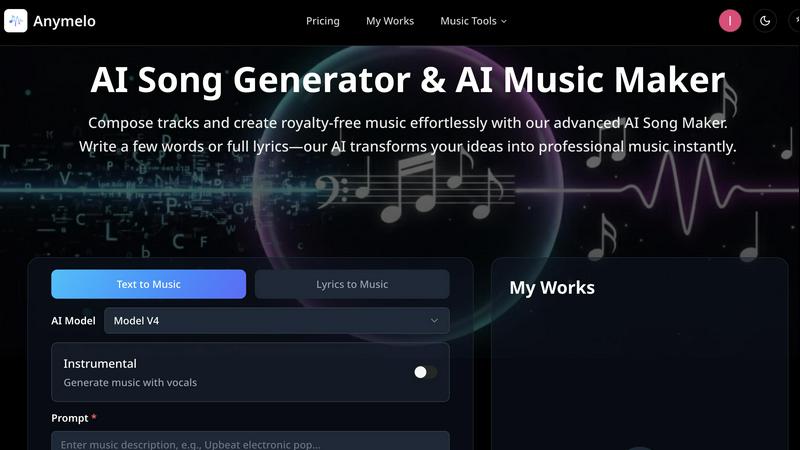
Anymelo
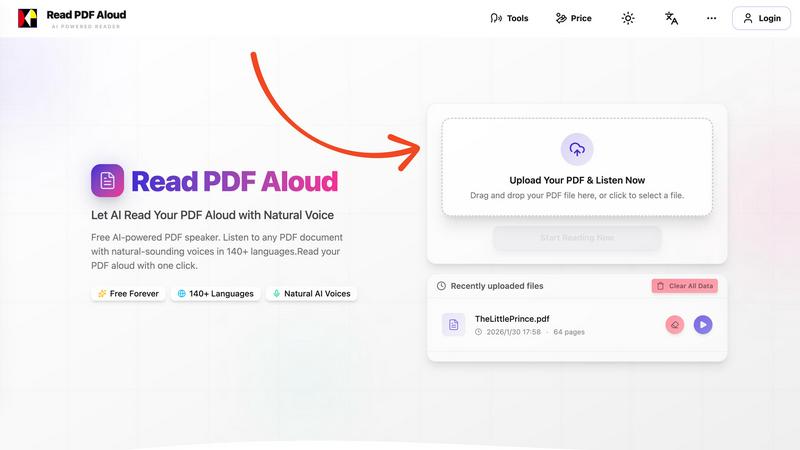
Read PDF Aloud
Feature Comparison
Anymelo
AI Song Generator
This is the heart of Anymelo. Input a text prompt or full lyrics, and the AI composes an entire track from scratch. It intelligently adds melodies, harmonies, drums, bass, and even AI-generated vocals that match the described style and mood. You can fine-tune generations with advanced controls for style weight, creativity, and audio quality, ensuring the output is exactly what you need, from a lo-fi beat to a full orchestral piece.
AI Music Extender
Have a great track but need it longer for your video's runtime? The AI Music Extender solves this seamlessly. Upload any audio file, and Anymelo's AI analyzes its structure, style, and key to intelligently extend it. It can add new choruses, develop instrumental bridges, or create a natural-sounding outro, perfectly preserving the original track's vibe and flow without any manual editing.
AI Song Cover Generator
Reimagine any song with AI-powered vocals. Upload an instrumental track, and this feature allows you to generate a cover with a customizable AI voice. Choose between different vocal genders and styles to transform the track into something entirely new, perfect for creating unique versions for content or exploring creative remixes without needing a singer.
AI Vocal Remover & Stem Splitter
Need a clean backing track or isolated vocals? Anymelo's precision audio splitting technology can separate any song into its individual stems. Instantly extract crystal-clear vocal tracks or instrumentals for karaoke, sampling, remixing, or practice. This professional-grade isolation empowers producers and creators with flexibility previously requiring complex software.
Read PDF Aloud
Free to Use
Take advantage of our completely free AI-powered PDF speaker that allows you to read any PDF aloud without any hidden fees. We provide daily credits to registered users, enabling you to enjoy seamless access to all features.
PDF OCR Support
Our advanced Optical Character Recognition (OCR) technology allows you to upload scanned PDF documents and convert them into readable text. This feature ensures that no document is off-limits, making it perfect for students and professionals dealing with non-searchable files.
Natural AI Voices
Read PDF Aloud offers a vast library of realistic AI voices, allowing you to choose from hundreds of options across various accents and tones. This diversity in voice selection enhances the listening experience, making it enjoyable and relatable.
Instant Audio Conversion
With our intuitive interface, you can convert your PDF documents into audio within seconds. The local-first processing ensures that there are no long loading times, allowing you to start listening immediately without any interruptions.
Use Cases
Anymelo
Content Creators & Video Producers
YouTubers, TikTokers, and filmmakers can generate unique, copyright-safe soundtracks in minutes. Describe the scene—"upbeat tech review intro" or "emotional documentary backdrop"—and get a perfect score that elevates your production value without licensing headaches or expensive composers.
Podcasters & Audio Storytellers
Enhance your podcast episodes with custom intro/outro music, transition jingles, and atmospheric beds that match your show's tone. Quickly create audio branding that sounds professional and is tailored specifically to your content, making your podcast stand out in any directory.
Game Developers & Indie Creators
Rapidly prototype and produce original soundtracks for games, apps, or interactive projects. Generate everything from energetic level music to ambient exploration tracks and tense boss fight scores, allowing small teams to have a dynamic, full audio landscape without a dedicated composer.
Social Media & Marketing Teams
Create engaging, brand-consistent audio for advertisements, Instagram Reels, YouTube Shorts, and commercial campaigns. Produce multiple variations of a jingle or background track A/B testing, ensuring your marketing content has the perfect sonic identity to capture audience attention.
Read PDF Aloud
Academic Support
Students can utilize Read PDF Aloud to listen to their study materials or lecture notes while multitasking. This auditory learning approach enhances retention and understanding, making it easier to absorb complex concepts.
Professional Document Review
Professionals can benefit from this tool by listening to reports, proposals, and other essential documents as they go about their day. This increases productivity by allowing users to consume information while performing other tasks.
eBook Listening
For avid readers, Read PDF Aloud transforms your favorite eBooks into an audio format, enabling you to enjoy literature on the go. Whether commuting or working out, you can immerse yourself in stories without needing to read.
Accessibility Enhancement
Read PDF Aloud serves as a crucial tool for individuals with visual impairments or reading difficulties. By providing a natural-sounding audio alternative to written text, it makes content accessible to everyone, regardless of their reading abilities.
Overview
About Anymelo
Anymelo is the revolutionary AI music creation platform that shatters the barrier between idea and finished track. It's built for the modern creator—whether you're a video producer, podcaster, game developer, or digital content creator—who needs high-quality, original music fast, without the steep learning curve of traditional production software. At its core, Anymelo transforms simple text descriptions or raw lyrics into fully produced, studio-quality songs complete with vocals, layered instrumentals, and professional arrangements. The magic lies in its simplicity and power: you don't need a single note of music theory. Just describe a mood like "epic cinematic trailer with haunting female vocals" or paste your own lyrics, and Anymelo's advanced AI does the rest, generating royalty-free music tailored to your vision. With support for multiple genres and languages, it's your all-in-one suite to score any project instantly, turning creative sparks into polished soundtracks for anything from YouTube videos to mobile games.
About Read PDF Aloud
Read PDF Aloud is a revolutionary browser-based application that redefines how you interact with your PDF documents. By transforming text into natural-sounding speech, it allows users to listen to any PDF file instantly, offering an engaging and accessible experience. The application stands out with its high-quality neural voices that support over 142 languages, making it an ideal tool for diverse users around the globe. Whether you are a student needing to proofread or absorb study materials, a professional reviewing complex reports, or simply someone who enjoys listening to eBooks on the go, Read PDF Aloud is designed to meet your needs. Best of all, this powerful tool operates entirely within your browser, ensuring that your data remains private and secure while delivering a smooth, responsive listening experience across all devices.
Frequently Asked Questions
Anymelo FAQ
Do I own the music I create with Anymelo?
Yes, you own the full rights to the music you generate on Anymelo. All tracks are royalty-free, meaning you can use them commercially in your videos, podcasts, games, and other projects without worrying about copyright claims or needing to pay additional licenses.
Do I need any musical experience to use Anymelo?
Not at all! Anymelo is specifically designed for creators with no musical background. The platform guides you to create music using simple text descriptions or lyrics. The AI handles all the complex aspects of composition, arrangement, and production, delivering a polished track ready to use.
What audio formats does Anymelo support for generation and upload?
Anymelo generates high-quality MP3 files for your finished tracks. For uploads to features like the Music Extender or Cover Generator, it supports common audio formats including MP3, WAV, and others, giving you flexibility to work with your existing audio files.
Can I customize the AI-generated music after it's created?
While the core generation happens automatically, Anymelo provides advanced controls before generation to guide the AI, including style weight, creativity, and vocal gender settings. For post-generation editing, you can use the Extender and Layering tools to modify and build upon your created tracks directly within the platform.
Read PDF Aloud FAQ
How does Read PDF Aloud work?
Read PDF Aloud operates by allowing users to upload a PDF file, which is then parsed to extract text directly in the browser. The extracted text is processed locally, ensuring a quick transition to audio playback.
Can I use Read PDF Aloud on my mobile device?
Absolutely! Read PDF Aloud is designed to work seamlessly on any modern browser, so you can use it on your PC, Mac, iPhone, iPad, Android, or Linux devices, making your PDFs accessible anywhere.
Is my data secure when using Read PDF Aloud?
Yes! Read PDF Aloud maintains a local-first philosophy, meaning that most processing occurs on your device, and your data never leaves your browser. This ensures a secure and private experience.
Can I download the audio files created by Read PDF Aloud?
Yes! Read PDF Aloud allows you to export the audio generated from your documents as MP3 files. This feature enables you to listen offline or share the audio with others easily.
Alternatives
Anymelo Alternatives
Anymelo is a dynamic AI music generator in the speech and voice category, designed to turn simple text prompts into fully produced, professional-sounding tracks. It empowers creators to quickly score their videos, podcasts, and digital projects without needing any musical expertise. Users often explore alternatives for various reasons, such as finding a different pricing model, needing specific features like advanced audio editing, or requiring compatibility with other creative platforms. The search for the right tool is a natural part of finding the perfect creative fit for a project's unique demands. When evaluating other options, consider the core value: how effortlessly can you translate an idea into a polished track? Look for a balance of speed, output quality, and intuitive controls that match your workflow. The goal is to maintain that creative momentum without getting bogged down in complexity.
Read PDF Aloud Alternatives
Read PDF Aloud is a cutting-edge, browser-based application designed to convert your PDF documents into natural-sounding speech, belonging to the Audio & Music category. Users often seek alternatives for various reasons, including pricing concerns, specific feature requirements, or compatibility with their preferred platforms. When exploring alternatives, it’s essential to consider factors such as the quality of the voice output, language support, ease of use, and whether the application meets your accessibility needs. --- [{"question": "What is Read PDF Aloud?", "answer": "Read PDF Aloud is a browser-based application that converts PDF documents into natural-sounding speech using high-quality neural voices."}, {"question": "Who is Read PDF Aloud for?", "answer": "Read PDF Aloud is ideal for anyone looking to enhance their reading experience, including students, professionals, and individuals with visual impairments."}, {"question": "Is Read PDF Aloud free?", "answer": "The pricing details for Read PDF Aloud are not specified, so users should check the website for the latest information on any potential costs."}, {"question": "What are the main features of Read PDF Aloud?", "answer": "Key features of Read PDF Aloud include high-quality neural voices in multiple languages, offline capabilities, and a responsive design for seamless use on any device."}]