
Browsilla vs Mailopoly

Browsilla
Transform your browsing with Browsilla, the clean new tab that keeps you focused with tasks, bookmarks, and daily.
Last updated: February 28, 2026

Mailopoly
Transform your inbox into a smart assistant that organizes, prioritizes, and replies for.
Last updated: February 27, 2026
Visual Comparison
Browsilla

Mailopoly
Feature Comparison
Browsilla
Task Manager Built-In
Browsilla includes a robust task manager that allows you to add and organize tasks directly within your new tab. No need to switch between apps; see your to-do list every time you open a new tab, ensuring nothing slips through the cracks. You can easily check off completed tasks and maintain a clear focus on your daily objectives.
Quick Bookmarks
Access your most-used websites instantly with Browsilla's quick bookmarks feature. Pin your favorite links directly on the new tab dashboard, eliminating the hassle of digging through folders. You can add, organize, and launch bookmarks all in one place, making your browsing experience seamless and efficient.
Local Weather
Stay informed about the weather without opening additional tabs. Browsilla displays current weather conditions and temperatures tailored to your location, updated automatically. This feature enables you to plan your day effectively before diving into your online tasks, keeping you prepared for any changes.
Daily Inspiration
Start each browsing session on a high note with a fresh motivational quote displayed prominently on your new tab. This daily dose of inspiration helps set a positive tone for your work ahead, encouraging creativity and productivity as you navigate your tasks.
Mailopoly
Cleanbox
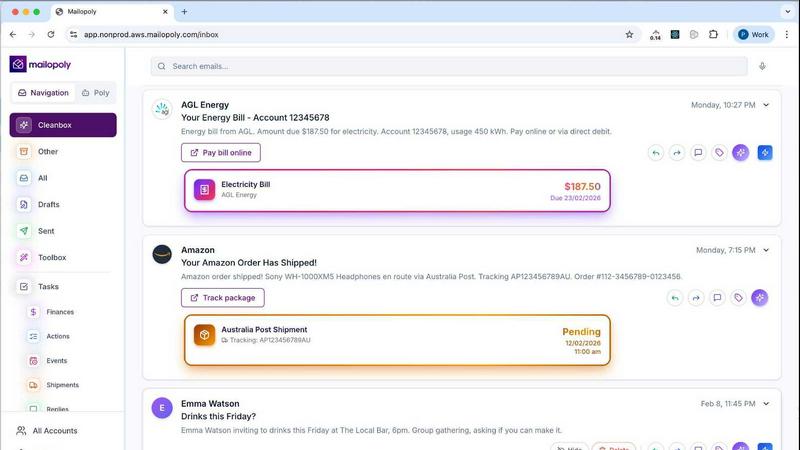
Cleanbox is your solution for a clutter-free inbox. It intelligently filters incoming emails, ensuring you only see what matters. With no setup or complex rules required, Mailopoly learns your preferences from day one, allowing you to focus on priorities without the noise of irrelevant messages.
AI-Powered Replies
Mailopoly takes the hassle out of writing emails. With its AI-Powered Replies feature, you receive instant draft responses that match your tone, style, and energy. It provides multiple suggestions to choose from, allowing you to edit or send your replies in seconds, streamlining your communication process.
Poly, Your AI Life Assistant
Meet Poly, your personal AI assistant built into Mailopoly. Poly knows your inbox, schedule, and priorities, helping you manage everything from bills to travel plans. You can ask Poly anything, like your upcoming meetings or payment deadlines, making life administration a breeze.
Instant Unsubscriber
Tired of unwanted emails? Mailopoly features an Instant Unsubscriber that helps you unsubscribe from unwanted senders with just one click. It simplifies the decluttering process, ensuring your inbox remains focused on what truly matters to you.
Use Cases
Browsilla
For Busy Professionals
Professionals juggling multiple tasks can benefit immensely from Browsilla's task manager and quick bookmarks. With everything they need at their fingertips, they can focus on their work without the distraction of irrelevant content or apps.
For Students
Students can streamline their study sessions with Browsilla by organizing tasks, accessing study materials quickly, and keeping an eye on local weather conditions for outdoor study plans. The motivational quotes also serve as perfect reminders to stay positive and motivated.
For Content Creators
Content creators can utilize Browsilla to manage their projects effectively. They can pin useful resources, track deadlines with the task manager, and find inspiration with daily quotes, all while maintaining a clutter-free workspace.
For Remote Workers
Remote workers looking to maximize productivity can leverage Browsilla's clean interface to keep their tasks organized and accessible. By having all necessary tools in one place, they reduce the need for multiple tabs and distractions, making their workflow more efficient.
Mailopoly
Busy Professionals
For busy professionals juggling multiple responsibilities, Mailopoly streamlines email management, allowing them to focus on core tasks. With only the essential emails surfacing, users can prioritize their work without the constant distraction of irrelevant notifications.
Side Hustlers
Side hustlers can benefit immensely from Mailopoly’s organization capabilities. By tracking tasks, deadlines, and important communications in one place, users can ensure they never miss a crucial email, keeping their entrepreneurial efforts on track and efficient.
Event Planners
Event planners can utilize Mailopoly to manage invitations and track responses seamlessly. The integrated event manager allows for custom invitations, ensuring all details are in one location, which simplifies the planning process and enhances communication with attendees.
Finance Management
Mailopoly assists users in managing personal finances by extracting invoice amounts and payment deadlines from emails. This feature ensures that users stay informed about their financial commitments and deadlines, eliminating the stress of missed payments or overdue bills.
Overview
About Browsilla
Browsilla is a groundbreaking Chrome extension that transforms your browser's new tab into a focused, productivity-enhancing workspace. Designed specifically for creators, entrepreneurs, and professionals, it eliminates distractions such as news feeds and advertisements, allowing users to concentrate on what truly matters. With a single installation, Browsilla provides a streamlined dashboard that features essential tools like a built-in task manager, quick bookmarks, local weather updates, and daily motivational quotes. This privacy-first extension operates without requiring accounts or data tracking, ensuring your information remains secure and anonymous. Say goodbye to clutter and hello to a new tab experience that supports your productivity, keeps your tasks organized, and inspires you each day.
About Mailopoly
Mailopoly revolutionizes the way you manage your emails and life admin tasks. It's more than an email client; it’s an intelligent assistant that organizes your day before you even check your inbox. By automatically extracting critical information from your emails, Mailopoly minimizes the need for you to read every message, effectively reducing inbox clutter and notifications by over half. Designed for busy professionals, side hustlers, and anyone feeling overwhelmed by email, Mailopoly transforms your inbox into a personal command center. With integrated AI capabilities, it manages personal finances, tracks deliveries, and schedules events, ensuring that you are always on top of your priorities. The built-in AI chatbot, Poly, is there to assist you with any queries, making managing your life as seamless as possible. Experience the future of email management and reclaim your time with Mailopoly.
Frequently Asked Questions
Browsilla FAQ
Is Browsilla really free?
Yes, Browsilla is completely free to use. You can install it without any hidden fees or subscriptions.
Do I need to create an account?
No account creation is necessary. Browsilla allows you to use the extension instantly upon installation, prioritizing your privacy and convenience.
Does Browsilla work offline?
While Browsilla requires an internet connection for some features like weather updates, its core functionalities, including task management and bookmarks, can still be accessed offline.
Is my data private and secure?
Absolutely! Browsilla is designed with privacy in mind. It does not collect personal data, and your information remains anonymous, with no tracking involved.
Mailopoly FAQ
How does Mailopoly reduce email volume?
Mailopoly reduces email volume by automatically filtering and extracting essential information from your messages. It prioritizes relevant emails and hides less important ones, significantly decluttering your inbox.
Is Mailopoly compatible with all email providers?
Yes, Mailopoly is designed to work seamlessly with a variety of email providers, including Gmail, Outlook, Yahoo, Hotmail, and any IMAP provider. It also offers a private, secure @mly.life address for users.
Do I need to set up rules to use Mailopoly effectively?
No setup or rules are necessary to utilize Mailopoly effectively. The software learns your preferences and adapts automatically, ensuring you receive notifications only for the most important emails.
Is my data secure with Mailopoly?
Absolutely. Mailopoly is SOC 2 certified and designed with privacy in mind. Your data security is a top priority, ensuring that your information remains private and protected while using the service.
Alternatives
Browsilla Alternatives
Browsilla is a powerful Chrome extension that transforms your new tab into a focused, productivity-centric workspace. As part of the productivity and management category, it eliminates distractions such as news feeds and advertisements, allowing users to concentrate on what's truly important. This streamlined approach makes Browsilla particularly appealing to creators, entrepreneurs, and professionals looking for an efficient way to kick-start their work sessions. Users often seek alternatives to Browsilla for a variety of reasons, including differences in pricing, unique feature sets, or compatibility with specific platforms. When searching for an alternative, consider what features matter most to you, such as customization options, user interface design, and overall functionality. It’s essential to identify the specific needs that align with your productivity goals to find the best fit for your workflow.
Mailopoly Alternatives
Mailopoly is an innovative email client designed to revolutionize the way you manage your digital communications. By leveraging advanced AI technology, it extracts essential information from your emails, reducing the need for you to sift through clutter. This powerful tool not only streamlines your inbox but also offers comprehensive features that encompass personal finance management, event tracking, and integrated task management, turning your email experience into a personal command center. However, users often seek alternatives to Mailopoly for various reasons, including pricing structures, specific feature sets, or compatibility with different platforms. When choosing an alternative, consider factors such as ease of use, integration capabilities, customer support, and whether it meets your unique productivity needs. Finding the right fit can enhance your efficiency and help you regain control over your digital life.