
ChatXOS vs Opal

ChatXOS
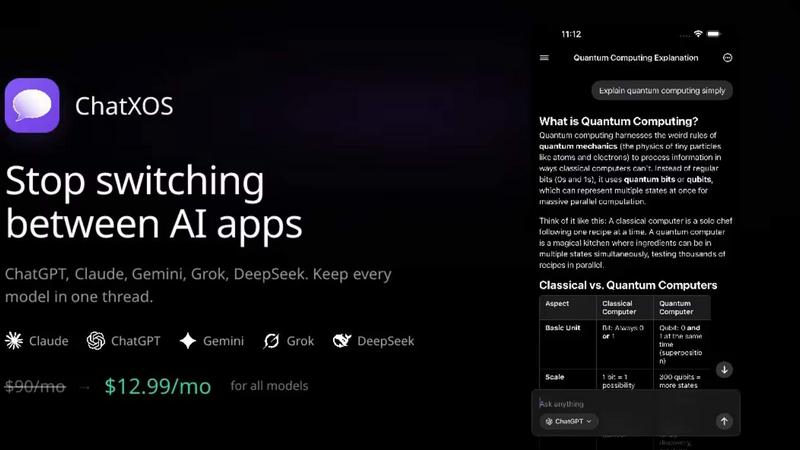
ChatXOS combines all major AI models in one app, letting you switch and compare answers seamlessly for ultimate.
Last updated: February 28, 2026

Opal
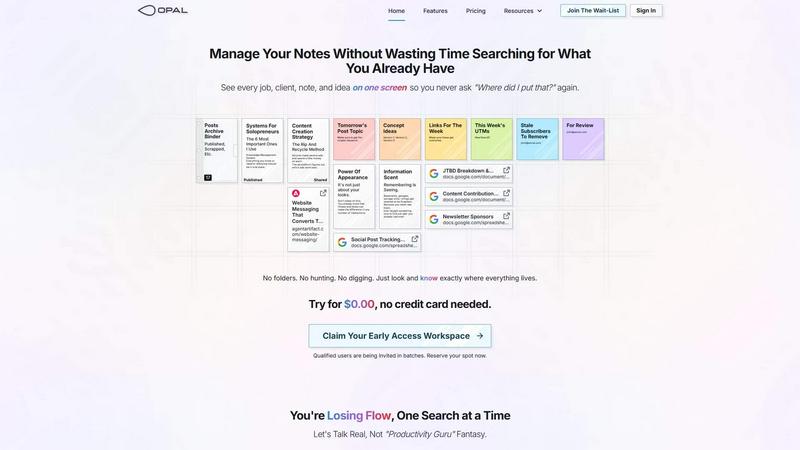
Opal organizes all your notes, ideas, and client details on one screen, saving you time and eliminating the search for lost information.
Last updated: April 13, 2026
Visual Comparison
ChatXOS
Opal
Feature Comparison
ChatXOS
Switch Models Mid-Conversation
This feature allows users to change AI models on the fly, offering the flexibility to find the best answer without the need to start a new conversation. This means you can explore varied responses seamlessly, making your interactions richer and more informative.
Compare Mode
In Compare Mode, users can run up to four models simultaneously, enabling side-by-side evaluation of responses. This unique feature is perfect for critical tasks where the best answer matters, allowing you to discern which AI model performs best for your needs.
Chat Organization
ChatXOS offers robust chat organization tools, including the ability to pin important conversations and assign custom titles. This ensures that users can easily navigate their chat history and quickly access vital discussions, streamlining workflow and enhancing productivity.
Web Search Capabilities
Integrating web search into the chat experience allows users to gather real-time information and updates directly within the app. This powerful feature enhances research capabilities and ensures that users are always equipped with the latest data and insights.
Opal
Visual Infinite Canvas
The visual infinite canvas allows users to arrange and organize their notes, documents, and projects spatially. You can drag and drop content wherever you want, making it easy to group related items and keep them visible. This feature transforms your workspace into a dynamic environment where everything important is accessible at a glance.
Markdown-based Block Editor
Create rich content using the markdown-based block editor, which supports various media types. You can effortlessly write scripts, manuals, and standard operating procedures, all while utilizing internal item links to connect ideas seamlessly. This feature enhances your writing experience by keeping everything organized and interlinked.
Real-Time Collaboration
Opal empowers teams by allowing real-time collaboration. You can share your workspace with colleagues and work together on projects, notes, or ideas without losing track of who contributed what. This feature streamlines communication and enhances productivity by keeping everyone on the same page.
AI Integration
Connect your AI agent to Opal through the API with the Opal Recall skill. This integration allows for smarter organization and retrieval of information, making your workflow even more efficient. You can leverage AI capabilities to enhance your productivity, ensuring that you can focus on your core tasks while the technology handles the details.
Use Cases
ChatXOS
Developers
Developers can leverage ChatXOS to debug code with one AI model while seeking explanations or alternative solutions from another. This flexibility allows for efficient problem-solving and enhances coding productivity.
Writers & Students
For writers and students, ChatXOS provides a platform to draft content using Claude while fact-checking and sourcing information with Gemini. This dual approach ensures that their work is both creative and accurate, elevating the quality of their outputs.
Founders & Operators
Entrepreneurs can utilize ChatXOS to make swift decisions by accessing the best tools for specific tasks. Whether they need market research from Gemini or real-time news from Grok, ChatXOS enables informed decision-making on the go.
AI Power Users
For those who are heavy users of AI tools, ChatXOS eliminates the need to manage multiple subscriptions and apps. With all major AI models available in one place, users can maximize their productivity and streamline their workflows effectively.
Opal
Project Management
Opal is perfect for managing projects where multiple elements need to be organized and tracked. You can place all client notes, tasks, and deadlines visually on your digital desk, ensuring that nothing falls through the cracks. This spatial organization helps you maintain clarity and focus throughout the project's lifecycle.
Client Management
For professionals who handle client relationships, Opal offers a structured way to keep track of all communications, documents, and commitments. You can visualize every client interaction and important note, which allows you to respond quickly and maintain strong relationships without the chaos of disorganization.
Content Creation
Whether you are a writer, marketer, or content creator, Opal can streamline your content production process. Use the markdown editor to draft articles, scripts, and marketing materials while linking related ideas and resources. This organized approach helps you stay creative and productive without losing valuable insights.
Knowledge Management
Opal serves as a robust knowledge management system where all your insights, learnings, and important documents can be stored in one place. By visually organizing your knowledge, you can easily reference past experiences, strategies, and information whenever needed, thereby enhancing your decision-making process.
Overview
About ChatXOS
ChatXOS is the ultimate all-in-one AI chat application designed specifically for iPhone users. It consolidates access to top-tier AI models, including ChatGPT, Claude, Gemini, Grok, and DeepSeek, allowing users to utilize multiple AI capabilities without the hassle of managing multiple subscriptions. With a single subscription of just $13 per month, users can experience the power of 18+ AI models from industry giants like OpenAI and Google all in one native app. This innovative platform is perfect for developers, writers, students, and AI enthusiasts who require versatile tools for coding, writing, research, and real-time information. ChatXOS elevates the user experience by enabling seamless switching between models mid-conversation, ensuring that users have the most effective AI solutions at their fingertips for any task.
About Opal
Opal is a revolutionary productivity tool designed for individuals and teams who are tired of traditional organization methods that bury important information in folders and categories. It provides a unique visual workspace that resembles a digital desk, allowing users to manage notes, documents, and files on an infinite canvas. This innovative platform is specifically tailored for busy professionals, solopreneurs, and teams who thrive on clarity and accessibility. With Opal, your brain can focus on what truly matters—your work—without the distraction of searching for lost notes or documents. By spatially organizing your content, Opal keeps everything in sight, enabling you to act swiftly and efficiently. Whether you're writing scripts, collaborating in real-time, or managing projects, Opal ensures that everything you need is at your fingertips, ready to go without the hassle of digging through layers of disorganization.
Frequently Asked Questions
ChatXOS FAQ
How much does ChatXOS cost?
ChatXOS offers an unbeatable subscription rate of just $13 per month, providing access to multiple AI models, which is significantly lower than the combined cost of individual subscriptions.
Why is it so much cheaper than individual subscriptions?
By consolidating access to multiple AI models into one app, ChatXOS reduces overhead costs and eliminates the need for users to manage multiple subscriptions, passing those savings directly to users.
Which AI models does ChatXOS support?
ChatXOS supports a wide array of AI models, including ChatGPT, Claude, Gemini, Grok, and DeepSeek, each designed to excel in different tasks, ensuring users have the right tool for their specific needs.
Is ChatXOS available on Android?
Currently, ChatXOS is available exclusively on iOS, providing a native mobile experience designed to optimize performance and usability for iPhone users. Future expansions to other platforms may be considered based on user demand.
Opal FAQ
How does Opal differ from other productivity tools?
Opal stands out by offering a visual, spatial workspace that allows you to see everything at once rather than burying information in folders. This approach aligns with how our brains naturally work, making it easier to organize thoughts and tasks.
Can I collaborate with my team in Opal?
Yes, Opal enables real-time collaboration, allowing you to share your workspace with team members. You can all contribute to projects and notes simultaneously, which enhances teamwork and communication.
Is there an integration with AI tools?
Absolutely! Opal allows you to connect your AI agent through the Opal Recall skill via the API. This feature enhances your organizational capabilities and improves the efficiency of retrieving information.
Is there a free trial available for Opal?
Yes! You can try Opal for $0.00 without needing to enter a credit card. This allows you to explore all the features and see how it can transform your productivity before committing.
Alternatives
ChatXOS Alternatives
ChatXOS is an innovative AI chat application designed specifically for iPhone users, allowing them to access multiple AI models from leading developers in a single platform. As a productivity tool, it simplifies the user experience by consolidating various subscriptions into one affordable monthly payment, making it easier for users to tap into the power of AI for various tasks. Users often seek alternatives to ChatXOS for reasons such as pricing, desired features, or specific platform compatibility. When exploring alternatives, look for options that offer a wide range of AI models, competitive pricing, seamless user experience, and features that align with your needs, whether for coding, research, or general knowledge inquiries.
Opal Alternatives
Opal is a cutting-edge productivity and management tool designed for creative minds who excel at spatial thinking. By providing an infinite canvas for organizing notes, documents, and essential files, it transforms how users manage information, ensuring that everything remains visible and easily accessible. This innovative approach helps users avoid the frustration of traditional productivity apps that often require navigating through complex folder structures. Many users seek alternatives to Opal due to varying needs such as pricing, feature sets, or platform compatibility. When exploring alternatives, it’s important to consider factors like user interface, collaboration capabilities, and the extent to which the tool can integrate with existing workflows. Identifying the right features that align with your specific requirements will ensure you find a solution that enhances your productivity.