
CIOOffice: the CIO-Software vs Opal

CIOOffice: the CIO-Software
CIOOffice unifies IT strategy, budget, and governance into one powerful platform for modern IT leaders.
Last updated: February 28, 2026

Opal
Opal organizes all your notes, ideas, and client details on one screen, saving you time and eliminating the search for lost information.
Last updated: April 13, 2026
Visual Comparison
CIOOffice: the CIO-Software
Opal
Feature Comparison
CIOOffice: the CIO-Software
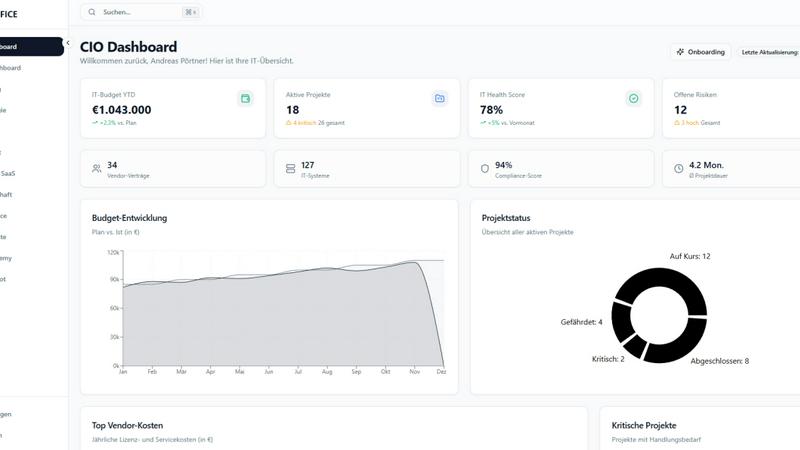
Unified CIO Dashboard
Gain instant, panoramic visibility into your IT performance with a centralized executive cockpit. This dynamic dashboard aggregates all critical KPIs, from budget spend versus forecast to project portfolio health and risk levels. Automatically generate polished PDF or PowerPoint reports for management meetings, turning complex data into compelling narratives at the click of a button. See everything that matters on one screen.
AI-Powered CIO Copilot
Supercharge your decision-making with embedded artificial intelligence. The CIO Copilot feature acts as your intelligent assistant, automatically generating management summaries, conducting deep-dive risk analyses, identifying cost-saving opportunities across your vendor landscape, and even creating draft presentations. It transforms raw data into actionable insights, saving you hours of manual analysis.
Integrated Portfolio & Project Management
Move beyond chaotic project tracking. Categorize all IT initiatives into clear Run, Grow, and Transform portfolios. Use detailed project briefs, status traffic lights (red/amber/green), and dependency mapping to maintain perfect oversight. Prioritize strategically, allocate resources effectively, and ensure every project directly contributes to your overarching IT and business goals.
Proactive Vendor & SaaS Management
Take control of your software ecosystem and supplier relationships. Maintain a centralized inventory of all vendors and SaaS applications, complete with contract details, renewal dates, and costs. Set up automated alerts for upcoming renewals and budget deviations. Systematically assess vendor risks to optimize your stack, avoid shadow IT, and unlock significant savings.
Opal
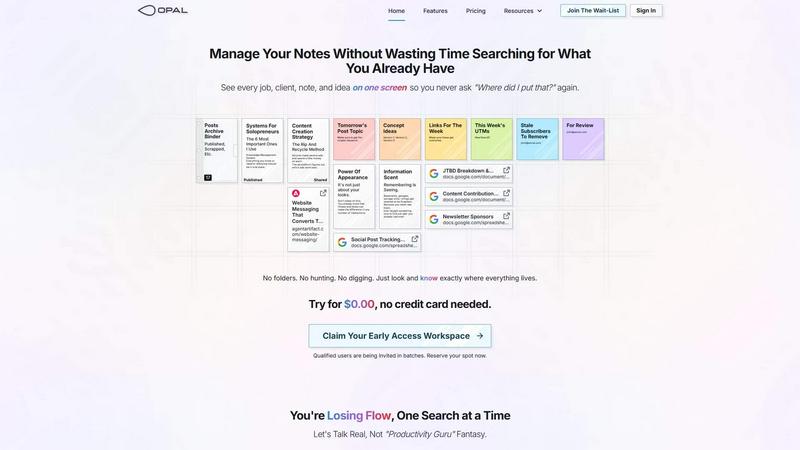
Visual Infinite Canvas
The visual infinite canvas allows users to arrange and organize their notes, documents, and projects spatially. You can drag and drop content wherever you want, making it easy to group related items and keep them visible. This feature transforms your workspace into a dynamic environment where everything important is accessible at a glance.
Markdown-based Block Editor
Create rich content using the markdown-based block editor, which supports various media types. You can effortlessly write scripts, manuals, and standard operating procedures, all while utilizing internal item links to connect ideas seamlessly. This feature enhances your writing experience by keeping everything organized and interlinked.
Real-Time Collaboration
Opal empowers teams by allowing real-time collaboration. You can share your workspace with colleagues and work together on projects, notes, or ideas without losing track of who contributed what. This feature streamlines communication and enhances productivity by keeping everyone on the same page.
AI Integration
Connect your AI agent to Opal through the API with the Opal Recall skill. This integration allows for smarter organization and retrieval of information, making your workflow even more efficient. You can leverage AI capabilities to enhance your productivity, ensuring that you can focus on your core tasks while the technology handles the details.
Use Cases
CIOOffice: the CIO-Software
Streamlining Annual IT Planning & Budget Approval
Replace cumbersome spreadsheet battles with a unified platform. Define your multi-year IT strategy with built-in templates, link strategic goals directly to proposed projects and budget lines (OPEX/CAPEX), and create accurate forecasts. Present a coherent, data-backed plan to the board or CFO with clear visuals from the CIO Dashboard, speeding up approval and aligning everyone from the start.
Gaining Control During Mergers & Acquisitions (M&A)
Rapidly integrate and assess the IT landscape of an acquired company. Use CIOOffice to inventory all new systems, applications, and vendor contracts in one place. Map dependencies, evaluate technical debt, and consolidate overlapping SaaS licenses. The platform provides the single source of truth needed to execute a smooth IT merger, manage risks, and realize synergy savings faster.
Automating IT Governance & Compliance Reporting
Simplify audit preparation and continuous compliance. Use the Governance, Risk & Compliance (GRC) module to maintain a live IT risk register, manage GDPR checklists, and store all related documentation securely. Automate the collection of evidence and generate compliance reports on demand, turning a traditionally stressful, manual process into a streamlined, controlled operation.
Enabling Data-Driven IT Performance Reviews
Move IT department reviews from anecdotal to analytical. With real-time data flowing into the CIO Dashboard, you can objectively demonstrate IT's value. Show quantifiable metrics on cost savings from vendor negotiations, project delivery rates, system uptime, and progress on strategic initiatives. This empowers the CIO to communicate effectively with business stakeholders in the language of business outcomes.
Opal
Project Management
Opal is perfect for managing projects where multiple elements need to be organized and tracked. You can place all client notes, tasks, and deadlines visually on your digital desk, ensuring that nothing falls through the cracks. This spatial organization helps you maintain clarity and focus throughout the project's lifecycle.
Client Management
For professionals who handle client relationships, Opal offers a structured way to keep track of all communications, documents, and commitments. You can visualize every client interaction and important note, which allows you to respond quickly and maintain strong relationships without the chaos of disorganization.
Content Creation
Whether you are a writer, marketer, or content creator, Opal can streamline your content production process. Use the markdown editor to draft articles, scripts, and marketing materials while linking related ideas and resources. This organized approach helps you stay creative and productive without losing valuable insights.
Knowledge Management
Opal serves as a robust knowledge management system where all your insights, learnings, and important documents can be stored in one place. By visually organizing your knowledge, you can easily reference past experiences, strategies, and information whenever needed, thereby enhancing your decision-making process.
Overview
About CIOOffice: the CIO-Software
Welcome to the future of IT leadership! CIOOffice is the all-in-one, cloud-native platform that redefines how CIOs and IT leaders drive their digital organizations. Built specifically for the dynamic needs of mid-sized companies, it shatters the old model of fragmented spreadsheets and disconnected tools. Imagine a single, intuitive command center where your entire IT universe aligns: from high-level strategy and budget forecasts down to individual project statuses and SaaS subscription renewals. That's CIOOffice. It centralizes IT strategy management, project portfolio oversight, budget control, software/vendor management, and powerful performance analytics into one seamless system. This isn't just software; it's your strategic partner for achieving full transparency, slashing operational complexity, and enabling truly data-driven decisions. With real-time dashboards and enterprise-grade security, CIOOffice empowers you to lead digital transformation with confidence, improve business-IT collaboration, and scale your operations efficiently. Get ready to modernize your IT management and lead with clarity.
About Opal
Opal is a revolutionary productivity tool designed for individuals and teams who are tired of traditional organization methods that bury important information in folders and categories. It provides a unique visual workspace that resembles a digital desk, allowing users to manage notes, documents, and files on an infinite canvas. This innovative platform is specifically tailored for busy professionals, solopreneurs, and teams who thrive on clarity and accessibility. With Opal, your brain can focus on what truly matters—your work—without the distraction of searching for lost notes or documents. By spatially organizing your content, Opal keeps everything in sight, enabling you to act swiftly and efficiently. Whether you're writing scripts, collaborating in real-time, or managing projects, Opal ensures that everything you need is at your fingertips, ready to go without the hassle of digging through layers of disorganization.
Frequently Asked Questions
CIOOffice: the CIO-Software FAQ
Is CIOOffice suitable for a small business or startup?
CIOOffice is specifically engineered for the needs of mid-sized companies and enterprise IT departments. While a very small startup might find it feature-rich, the platform truly shines for organizations with growing IT complexity, multiple projects, and a need for formalized governance. The Starter plan is designed for small IT teams beginning their consolidation journey.
How does the CIO Copilot AI ensure data security and privacy?
The CIO Copilot is built with enterprise security as a core principle. It operates within the strict boundaries of your own CIOOffice instance and data. The AI analyzes only the data you input into the platform; it does not train external models or share your confidential information. This ensures all insights and summaries are generated securely within your compliant environment.
Can we integrate CIOOffice with our existing tools (e.g., ERP, Jira)?
Yes, the Professional plan includes API access, allowing for custom integrations with other critical business systems like ERP software, finance tools, or project management applications like Jira. This enables bidirectional data flow, ensuring CIOOffice remains your central dashboard while syncing with operational tools your teams already use.
What kind of support and onboarding can we expect?
Support scales with your plan. All tiers include email support, with Priority Support for Business and Dedicated Support for Professional customers. The Professional package also includes an onboarding workshop to ensure your team is set up for success. Additionally, the CIO Academy offers self-paced eLearning courses on IT strategy and management.
Opal FAQ
How does Opal differ from other productivity tools?
Opal stands out by offering a visual, spatial workspace that allows you to see everything at once rather than burying information in folders. This approach aligns with how our brains naturally work, making it easier to organize thoughts and tasks.
Can I collaborate with my team in Opal?
Yes, Opal enables real-time collaboration, allowing you to share your workspace with team members. You can all contribute to projects and notes simultaneously, which enhances teamwork and communication.
Is there an integration with AI tools?
Absolutely! Opal allows you to connect your AI agent through the Opal Recall skill via the API. This feature enhances your organizational capabilities and improves the efficiency of retrieving information.
Is there a free trial available for Opal?
Yes! You can try Opal for $0.00 without needing to enter a credit card. This allows you to explore all the features and see how it can transform your productivity before committing.
Alternatives
CIOOffice: the CIO-Software Alternatives
CIOOffice: the CIO-Software is your digital IT command center, a powerful cloud-based platform that redefines IT management and governance. It falls squarely into the productivity and management software category, designed to give CIOs and digital leaders a unified workspace to oversee strategy, projects, budgets, and vendors. It’s the all-in-one cockpit for modern IT leadership. Even with a standout product, exploring alternatives is a smart move. Teams might be looking for a different pricing model, a specific niche feature, or a platform that aligns with their existing tech stack. The needs of a scaling startup differ from those of a large enterprise, so finding the right fit is crucial. When evaluating other options, focus on what truly matters for your command center. Look for core capabilities in IT portfolio management, real-time analytics, and robust security. The goal is to find a solution that delivers transparency, reduces operational complexity, and empowers your team with data-driven insights, just like a top-tier CIO platform should.
Opal Alternatives
Opal is a cutting-edge productivity and management tool designed for creative minds who excel at spatial thinking. By providing an infinite canvas for organizing notes, documents, and essential files, it transforms how users manage information, ensuring that everything remains visible and easily accessible. This innovative approach helps users avoid the frustration of traditional productivity apps that often require navigating through complex folder structures. Many users seek alternatives to Opal due to varying needs such as pricing, feature sets, or platform compatibility. When exploring alternatives, it’s important to consider factors like user interface, collaboration capabilities, and the extent to which the tool can integrate with existing workflows. Identifying the right features that align with your specific requirements will ensure you find a solution that enhances your productivity.