
Clipt vs ProspectBuddy

Clipt
Clipt creates custom AI characters for consistent, royalty-free video testimonials and ads.
Last updated: February 28, 2026

Last updated: April 13, 2026
Visual Comparison
Clipt
ProspectBuddy
Feature Comparison
Clipt
AI Character Generator
Create your own stable of unique, brand-consistent AI spokespeople in minutes. Simply describe your ideal character—like "Tech Reviewer" or "Relatable Mom"—in plain language, and the AI generates four distinct, realistic variations. These characters are royalty-free, avoid stock photo licensing issues, and maintain perfect consistency across every video you produce. This allows you to build recognizable brand ambassadors, host content series, and scale personalized video campaigns without ever filming a real person.
Smart Caption & Video Editor
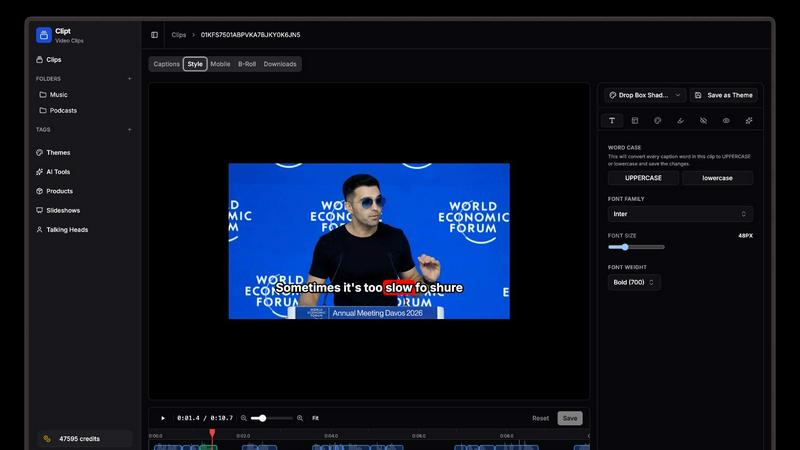
Ingest videos from YouTube, X, LinkedIn, TikTok, Instagram, or upload raw files directly. Clipt's powerful engine then generates word-accurate captions automatically. Go beyond basic text with full creative control: apply custom fonts, colors, and dynamic animation presets to make your captions pop. The parallelized cloud rendering system processes your queue at lightning speed, ensuring you can style and export multiple videos without waiting, keeping your content pipeline moving fast.
Slideshow Maker
Transform a fleeting idea into a viral carousel or video slideshow with a single sentence. Describe your concept, and the AI plans the entire structure: writing a script, generating 5+ slides with detailed captions and image prompts. Pick a visual style, and watch as AI creates all the accompanying graphics. Add professional voice narration with one click and post directly to TikTok and Instagram. It's the fastest way to create educational, promotional, or storytelling content.
Talking Head Video Creator
Produce professional spokesperson videos without any filming equipment. Type your script, and AI plans the scene delivery and style. Browse a library of pre-made AI personas (like "Unboxing" or "Post-Gym") or use your own custom-generated characters. These avatars deliver your script with unique expressions and lifelike presence. Customize backgrounds, add captions, and export a polished video ready for any social platform or to embed directly on your website.
ProspectBuddy
One-Click Save to Airtable or Trello
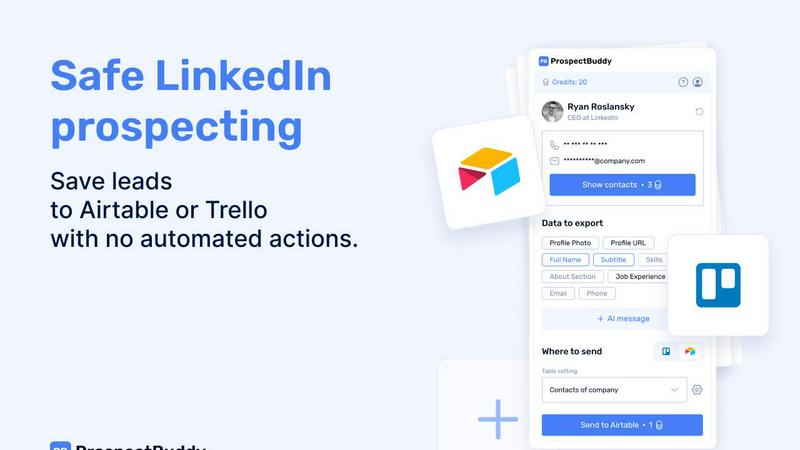
Eliminate tedious switching between tabs and messy copy-paste forever. With ProspectBuddy installed, you can save any LinkedIn profile directly to your connected Airtable base or Trello board with a single click. The extension seamlessly integrates into your LinkedIn experience, capturing leads instantly and keeping your prospecting workflow incredibly fast and focused. No more manual entry errors or lost leads.
Smart, Selective Data Capture
Not every field on a LinkedIn profile is relevant to your process. ProspectBuddy gives you complete control by letting you select only the specific data points you need—like name, current role, skills, about section, or job experience—before sending. This ensures your Airtable or Trello records are clean, structured, and contain only the most valuable information for your outreach or recruitment pipeline.
Verified Contact Enrichment
Go beyond the public profile. ProspectBuddy helps you find verified business emails and direct phone numbers (for B2B users) associated with the LinkedIn profile. This powerful enrichment feature, powered by secure credits, puts accurate contact information directly into your workflow, dramatically increasing your reachability and saving you hours of manual searching across different platforms.
AI-Personalized Outreach Generation
Turn profile data into compelling conversations in seconds. Using the rich data from the LinkedIn profile, ProspectBuddy's AI can generate tailored outreach messages for you. This feature helps you craft personalized connection requests or follow-up emails that resonate, boosting your response rates without sacrificing the personal touch that manual prospecting requires.
Use Cases
Clipt
Brand Building & Consistent Marketing
Establish and maintain a strong, consistent brand identity across all video content. Use the AI Character Generator to create a custom brand ambassador that appears in every social media ad, explainer video, and website testimonial. This builds instant recognition and trust with your audience, making your marketing feel cohesive and professional, whether you're running campaigns in one market or ten.
Rapid Social Media Content Production
Ideal for creators and marketers who need to publish high volumes of engaging short-form content daily. Quickly repurpose long-form YouTube videos into captioned TikToks, generate idea-based slideshow carousels for Instagram, and create topical talking-head commentary videos in minutes. Clipt's streamlined tools and fast rendering let you capitalize on trends and maintain a relentless posting schedule without burnout.
User-Generated Content (UGC) Simulation
Generate authentic-feeling testimonials and product reviews without recruiting real users. Select from UGC-style AI presets like "Kitchen Quick," "Student," or "Unboxing" to create relatable, platform-native videos that showcase your product in real-world scenarios. This is perfect for e-commerce brands, SaaS companies, and advertisers looking to build social proof and drive conversions with scalable, cost-effective content.
Agency & Client Content Services
Agencies can dramatically scale their video production offerings. Create libraries of unique AI characters for different clients, ensuring each brand has its own consistent face. Use the suite of tools to rapidly produce diverse content—from ad campaigns to social series—delivering high-value assets faster and more efficiently than traditional production allows, all within a manageable, credit-based budget.
ProspectBuddy
Sales Teams & SDRs Building Pipelines
Sales development representatives and account executives can rapidly build targeted prospect lists. By saving ideal customer profiles from LinkedIn directly into a structured Airtable base, they can enrich leads with verified emails, track engagement stages in Trello, and launch personalized AI-assisted outreach campaigns—all from one streamlined, manual workflow.
Recruiters & Talent Acquisition Specialists
Recruiters managing high-volume candidate sourcing can save precious time. ProspectBuddy allows them to capture promising candidate profiles from LinkedIn and instantly add them as structured cards to a Trello hiring pipeline or an Airtable talent database. This ensures all candidate information is organized, accessible, and ready for the next stage without administrative drag.
Founders & Startup Operators Networking
Founders and operators building their network or seeking partnerships can do so efficiently. Instead of losing track of interesting contacts, they can one-click save profiles to a dedicated Airtable or Trello board. They can then capture key details and use the AI to help draft a relevant, personalized outreach message, making every new connection intentional and impactful.
Agencies Managing Client Prospecting
Marketing, PR, or lead gen agencies managing prospecting for multiple clients can maintain clean, separate workflows. By using different Airtable bases or Trello boards for each client, teams can use ProspectBuddy to manually gather and enrich leads from LinkedIn, ensuring all captured data is perfectly formatted and ready for client reporting or handoff.
Pricing Comparison
Clipt
Clipt operates on a simple, transparent credit-based system. You only pay for what you use, with credits refreshing weekly and no hidden fees.
Free Plan: Start risk-free with 200 credits to explore core features, including auto-captions and AI images. Exports include a watermark and max out at 1080p quality.
Lite Plan (Launch Price $9/month): For casual creators ready to publish. Get 1,200 credits monthly for auto-captions and AI images, clean exports without any watermark, 1080p max video quality, and access to all caption styles.
ProspectBuddy
ProspectBuddy offers simple, transparent pricing plans to suit different needs. Start for free and upgrade as you grow.
Starter - $10/month
Includes 500 credits. Perfect for solo professionals and small teams beginning their LinkedIn prospecting journey. This plan includes finding verified business emails, revealing direct phone numbers (for B2B), generating AI outreach messages, sending leads to Airtable/Trello, and capturing structured profile data.
Growth - $20/month
Includes 1000 credits. Designed for active prospecting teams that need higher volume. It includes everything in the Starter plan, plus higher enrichment capacity, more credits for active use, and consistent CRM sync for reliable performance.
Custom - Contact for Pricing
Tailored for high-volume teams with specific needs. This plan can include custom credit packages, white-label options, custom feature development, dedicated support, custom CRM integrations, and team-based setup. Contact the ProspectBuddy team to discuss a solution built for your workflow.
Overview
About Clipt
Clipt is the all-in-one AI video suite built for the modern creator, designed to turn ideas into viral-ready content at the speed of thought. It's the engine for short-form video, eliminating the complex, time-consuming production process. Whether you're a solo creator, a marketer, or an agency, Clipt empowers you to produce professional, engaging videos without a camera, studio, or editing degree. The platform revolves around three core, interconnected pillars: transforming existing videos with word-accurate, stylized captions; generating AI-powered slideshow carousels from a single sentence; and creating dynamic "Talking Head" spokesperson videos with unique, customizable AI characters. By combining powerful AI generation with intuitive, fast-paced editing tools and parallelized cloud rendering, Clipt provides a seamless workflow from concept to publish. It's the ultimate tool for anyone looking to dominate platforms like TikTok, Instagram, YouTube, and LinkedIn with consistent, high-quality, and brand-aligned video content.
About ProspectBuddy
Tired of the messy, time-consuming copy-paste dance from LinkedIn to your CRM? Your search is over. ProspectBuddy is the game-changing LinkedIn prospecting tool engineered for modern, manual workflows. Built specifically for Airtable and Trello, it empowers sales teams, recruiters, founders, and operators to capture LinkedIn leads in a single click and transform rich profile data into perfectly structured, actionable records. Forget about risky automation bots that put your account in jeopardy. ProspectBuddy is the safe, compliant, and powerful alternative that keeps you firmly in the driver's seat. You work directly on the LinkedIn profile, and with one effortless action, you can save the contact, find verified contact details, and even generate a personalized AI outreach message—all while sending clean, consistent data directly to your Airtable base or Trello board. It’s not just a tool; it’s the ultimate productivity upgrade for anyone who relies on LinkedIn for business growth, turning hours of manual data entry into seconds of streamlined, controlled prospecting.
Frequently Asked Questions
Clipt FAQ
How many AI characters can I create?
You can create multiple unique AI characters to build a diverse roster for different campaigns or client needs. The platform is designed to let you generate and save as many characters as your workflow requires, allowing you to have a "talent library" for various video types and brand personalities.
Can I use my AI characters across different video types?
Absolutely! Once you create or select an AI character, it becomes a reusable asset across the entire Clipt platform. You can use the same consistent character to generate Talking Head videos, simulate UGC content, and star in any other video format Clipt offers, ensuring brand uniformity everywhere.
Are the AI-generated characters unique to my account?
Yes, the AI characters you generate are created based on your specific text descriptions and are for your use. They are designed to be unique visuals that help you avoid the licensing issues and overuse commonly associated with stock photography or pre-made avatars.
How consistent is the character's appearance across multiple videos?
Clipt's AI technology ensures exceptional consistency. Once you select a character variation, its core appearance—facial features, style, and overall look—remains stable and identical in every single video you generate. This allows you to build a recognizable brand face over time.
ProspectBuddy FAQ
Is ProspectBuddy safe to use with LinkedIn?
Absolutely. ProspectBuddy is built explicitly for safe, manual LinkedIn prospecting. It does not perform any automated actions, scraping, or bot-like behavior on your behalf. You remain in full control, working directly from the LinkedIn profile page. This manual approach makes it a fully compliant and safer alternative to bulk scraping tools and risky automation workflows that can jeopardize your account.
How do I connect my Airtable base?
Connecting is quick and easy. Simply click “Airtable” on the Connect screen within the ProspectBuddy extension. You'll then select the specific bases or workspaces you want to grant access to and click “Grant access.” Once connected, the status will be visible on your Profile page. You can disconnect this access at any time with just a few clicks.
How do credits work in ProspectBuddy?
Credits are your internal balance used for specific premium actions within the extension, such as searching for a verified business email. You purchase credits securely via Stripe, and your balance updates automatically after successful payment. For example, an email search costs 10 credits, and importantly, credits are only consumed if a valid email is successfully found.
Why are some of my Airtable fields not showing up?
ProspectBuddy supports specific, compatible Airtable field types to ensure data integrity. Supported types include: Attachment (for photos), URL, Text (for name, skills, about, etc.), Email, and Phone. If you have a field in your table with an unsupported type (like a checkbox, formula, or rollup), it will not appear in the dropdown menu for field mapping during setup.
Alternatives
Clipt Alternatives
Clipt is an AI-powered content creation suite designed for marketers, transforming video and ideas into clips, slideshows, and spokesperson videos. It belongs to the fast-growing category of AI video and visual content tools that help teams produce professional-grade assets quickly and at scale. Users often explore alternatives for various reasons, such as budget constraints, specific feature needs not covered by one platform, or requirements for different social media integrations. The search for the right tool is common as teams scale their content operations and look for the perfect fit. When evaluating other options, consider core capabilities like AI script generation, multi-platform source ingestion, rendering speed, and the quality of automated voiceovers and avatars. The ideal platform should match your primary content formats—short clips, carousels, or talking-head videos—and integrate smoothly into your existing workflow.
ProspectBuddy Alternatives
ProspectBuddy is a specialized LinkedIn prospecting tool designed for modern teams. It falls into the category of sales intelligence and workflow automation, specifically built to integrate with Airtable and Trello. Its core mission is to make manual prospecting faster and cleaner by turning LinkedIn profiles into structured data with a single click. Users often explore alternatives for various reasons. Some need different pricing models or specific integrations beyond Airtable and Trello. Others might be looking for more advanced automation features or a different approach to data enrichment. It's a common step in finding the perfect fit for a team's unique workflow and budget. When evaluating options, focus on safety, control, and workflow fit. The best tool should enhance your manual process without risky automation that could jeopardize your account. Look for seamless integration with your existing stack and the ability to capture precisely the data points that matter to your outreach strategy.