
CoPilly vs ProspectBuddy

CoPilly
CoPilly is your AI co-pilot for LinkedIn, ensuring online safety while crafting human-like interactions effortlessly.
Last updated: February 28, 2026

Last updated: April 13, 2026
Visual Comparison
CoPilly
ProspectBuddy
Feature Comparison
CoPilly
Smart Comments
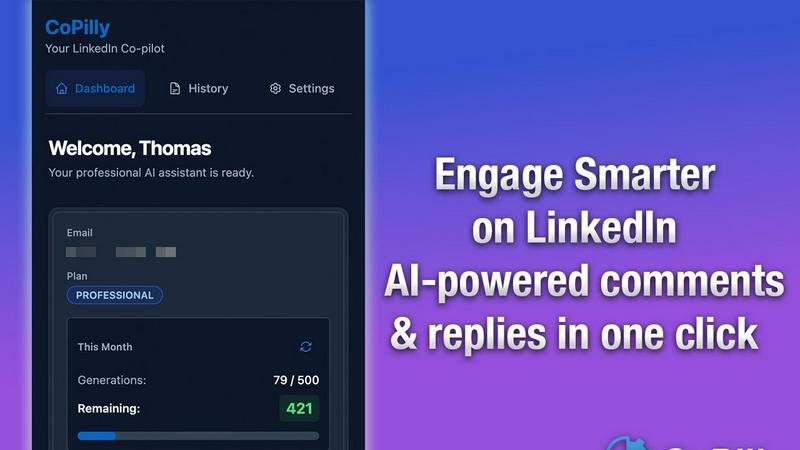
With CoPilly's Smart Comments feature, the AI analyzes the context of posts to generate relevant responses that resonate with your audience. This means you can engage in conversations that feel natural and thoughtful, enhancing your interactions without spending hours crafting each response.
DM Assistant
The DM Assistant provides quick reply suggestions for your messages, allowing you to respond to direct inquiries swiftly and efficiently. This feature helps you maintain a consistent communication flow, ensuring you never miss an opportunity to connect or engage.
Connection Invites
CoPilly’s Connection Invites feature crafts personalized invite messages that significantly increase the chances of acceptance. By tailoring your invitations to reflect genuine interest, you can expand your network with meaningful connections that matter.
Custom Persona
Train the AI to match your unique writing style with the Custom Persona feature. This capability ensures that the content generated aligns with your voice, making your interactions feel authentic and true to your personal brand.
ProspectBuddy
One-Click Save to Airtable or Trello
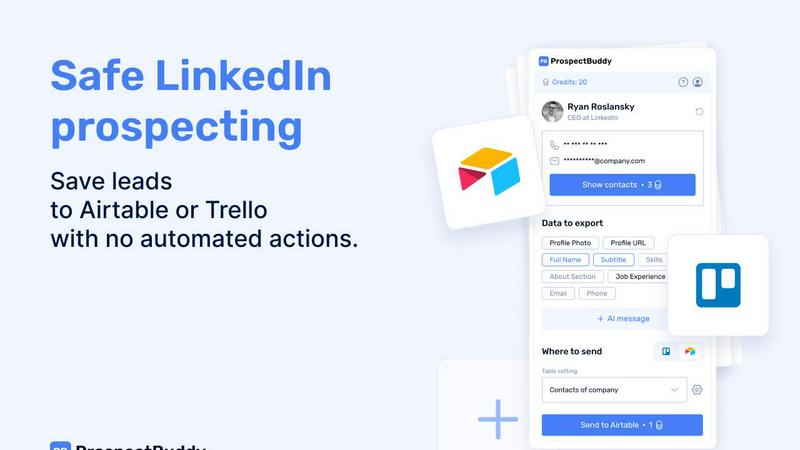
Eliminate tedious switching between tabs and messy copy-paste forever. With ProspectBuddy installed, you can save any LinkedIn profile directly to your connected Airtable base or Trello board with a single click. The extension seamlessly integrates into your LinkedIn experience, capturing leads instantly and keeping your prospecting workflow incredibly fast and focused. No more manual entry errors or lost leads.
Smart, Selective Data Capture
Not every field on a LinkedIn profile is relevant to your process. ProspectBuddy gives you complete control by letting you select only the specific data points you need—like name, current role, skills, about section, or job experience—before sending. This ensures your Airtable or Trello records are clean, structured, and contain only the most valuable information for your outreach or recruitment pipeline.
Verified Contact Enrichment
Go beyond the public profile. ProspectBuddy helps you find verified business emails and direct phone numbers (for B2B users) associated with the LinkedIn profile. This powerful enrichment feature, powered by secure credits, puts accurate contact information directly into your workflow, dramatically increasing your reachability and saving you hours of manual searching across different platforms.
AI-Personalized Outreach Generation
Turn profile data into compelling conversations in seconds. Using the rich data from the LinkedIn profile, ProspectBuddy's AI can generate tailored outreach messages for you. This feature helps you craft personalized connection requests or follow-up emails that resonate, boosting your response rates without sacrificing the personal touch that manual prospecting requires.
Use Cases
CoPilly
Networking for Professionals
For sales teams and professionals, CoPilly is a game-changer in networking. By utilizing context-aware comments and tailored connection requests, users can cultivate relationships that lead to valuable business opportunities and collaborations.
Efficient Engagement for Recruiters
Recruiters can leverage CoPilly to streamline their outreach efforts. With personalized DM responses and engaging comments, they can connect with potential candidates more effectively, making their recruitment process smoother and more efficient.
Brand Building for Founders
Founders looking to establish their personal brand can use CoPilly to generate impactful comments on industry-related posts. This helps them position themselves as thought leaders while engaging meaningfully with other professionals in their field.
Time-Saving Tool for Busy Professionals
For busy professionals who struggle to find time for social media engagement, CoPilly offers a solution. By generating comments and replies in under 2 seconds, it allows users to maintain an active LinkedIn presence without the time-consuming effort typically required.
ProspectBuddy
Sales Teams & SDRs Building Pipelines
Sales development representatives and account executives can rapidly build targeted prospect lists. By saving ideal customer profiles from LinkedIn directly into a structured Airtable base, they can enrich leads with verified emails, track engagement stages in Trello, and launch personalized AI-assisted outreach campaigns—all from one streamlined, manual workflow.
Recruiters & Talent Acquisition Specialists
Recruiters managing high-volume candidate sourcing can save precious time. ProspectBuddy allows them to capture promising candidate profiles from LinkedIn and instantly add them as structured cards to a Trello hiring pipeline or an Airtable talent database. This ensures all candidate information is organized, accessible, and ready for the next stage without administrative drag.
Founders & Startup Operators Networking
Founders and operators building their network or seeking partnerships can do so efficiently. Instead of losing track of interesting contacts, they can one-click save profiles to a dedicated Airtable or Trello board. They can then capture key details and use the AI to help draft a relevant, personalized outreach message, making every new connection intentional and impactful.
Agencies Managing Client Prospecting
Marketing, PR, or lead gen agencies managing prospecting for multiple clients can maintain clean, separate workflows. By using different Airtable bases or Trello boards for each client, teams can use ProspectBuddy to manually gather and enrich leads from LinkedIn, ensuring all captured data is perfectly formatted and ready for client reporting or handoff.
Overview
About CoPilly
CoPilly is the innovative solution for professionals looking to enhance their LinkedIn presence without compromising their account safety. Designed for sales teams, founders, recruiters, and anyone eager to grow their network, CoPilly is a Chrome extension that enables users to generate high-quality, context-aware content for interactions on LinkedIn. Unlike other automation tools that risk account bans by violating LinkedIn's Terms of Service, CoPilly operates on a manual trigger workflow. This means you can generate meaningful comments, direct message replies, and personalized connection invites at lightning speed, all while maintaining complete control over your interactions. By prioritizing safety and compliance, CoPilly allows you to engage authentically, build relationships, and bolster your professional reputation without the fear of automation pitfalls.
About ProspectBuddy
Tired of the messy, time-consuming copy-paste dance from LinkedIn to your CRM? Your search is over. ProspectBuddy is the game-changing LinkedIn prospecting tool engineered for modern, manual workflows. Built specifically for Airtable and Trello, it empowers sales teams, recruiters, founders, and operators to capture LinkedIn leads in a single click and transform rich profile data into perfectly structured, actionable records. Forget about risky automation bots that put your account in jeopardy. ProspectBuddy is the safe, compliant, and powerful alternative that keeps you firmly in the driver's seat. You work directly on the LinkedIn profile, and with one effortless action, you can save the contact, find verified contact details, and even generate a personalized AI outreach message—all while sending clean, consistent data directly to your Airtable base or Trello board. It’s not just a tool; it’s the ultimate productivity upgrade for anyone who relies on LinkedIn for business growth, turning hours of manual data entry into seconds of streamlined, controlled prospecting.
Frequently Asked Questions
CoPilly FAQ
Is CoPilly compliant with LinkedIn's Terms of Service?
Yes, CoPilly is 100% compliant with LinkedIn's Terms of Service. The tool operates on a manual trigger workflow, eliminating the risks associated with automation.
How does CoPilly ensure my privacy?
CoPilly prioritizes user privacy by being GDPR compliant and never storing LinkedIn credentials. Your data remains secure while you use the tool.
How fast can I generate comments and replies?
CoPilly is designed for speed, generating high-quality comments and replies in under 2 seconds, allowing you to engage swiftly and effectively.
Can I customize the tone of the generated content?
Absolutely! CoPilly provides multiple tone options, including professional, casual, and friendly, allowing you to tailor your communication style according to your audience.
ProspectBuddy FAQ
Is ProspectBuddy safe to use with LinkedIn?
Absolutely. ProspectBuddy is built explicitly for safe, manual LinkedIn prospecting. It does not perform any automated actions, scraping, or bot-like behavior on your behalf. You remain in full control, working directly from the LinkedIn profile page. This manual approach makes it a fully compliant and safer alternative to bulk scraping tools and risky automation workflows that can jeopardize your account.
How do I connect my Airtable base?
Connecting is quick and easy. Simply click “Airtable” on the Connect screen within the ProspectBuddy extension. You'll then select the specific bases or workspaces you want to grant access to and click “Grant access.” Once connected, the status will be visible on your Profile page. You can disconnect this access at any time with just a few clicks.
How do credits work in ProspectBuddy?
Credits are your internal balance used for specific premium actions within the extension, such as searching for a verified business email. You purchase credits securely via Stripe, and your balance updates automatically after successful payment. For example, an email search costs 10 credits, and importantly, credits are only consumed if a valid email is successfully found.
Why are some of my Airtable fields not showing up?
ProspectBuddy supports specific, compatible Airtable field types to ensure data integrity. Supported types include: Attachment (for photos), URL, Text (for name, skills, about, etc.), Email, and Phone. If you have a field in your table with an unsupported type (like a checkbox, formula, or rollup), it will not appear in the dropdown menu for field mapping during setup.
Alternatives
CoPilly Alternatives
CoPilly is a cutting-edge tool designed to enhance your LinkedIn experience while ensuring your online safety. As a marketing solution, it leverages AI technology to generate high-quality content for user engagement, all while adhering to LinkedIn's Terms of Service. Users often seek alternatives to CoPilly for various reasons, including pricing, specific features that may better suit their needs, or compatibility with their preferred platforms. When choosing an alternative, it’s essential to consider factors such as compliance with LinkedIn’s policies, ease of use, the quality of generated content, and the level of customization offered. A good alternative should also provide robust support and a positive user experience, ensuring that you can effectively grow your professional network without compromising your online safety.
ProspectBuddy Alternatives
ProspectBuddy is a specialized LinkedIn prospecting tool designed for modern teams. It falls into the category of sales intelligence and workflow automation, specifically built to integrate with Airtable and Trello. Its core mission is to make manual prospecting faster and cleaner by turning LinkedIn profiles into structured data with a single click. Users often explore alternatives for various reasons. Some need different pricing models or specific integrations beyond Airtable and Trello. Others might be looking for more advanced automation features or a different approach to data enrichment. It's a common step in finding the perfect fit for a team's unique workflow and budget. When evaluating options, focus on safety, control, and workflow fit. The best tool should enhance your manual process without risky automation that could jeopardize your account. Look for seamless integration with your existing stack and the ability to capture precisely the data points that matter to your outreach strategy.