
Crawlkit vs Playwriter

Crawlkit
Transform any website into structured data effortlessly with Crawlkit's powerful API for seamless web scraping.
Last updated: February 28, 2026

Last updated: March 18, 2026
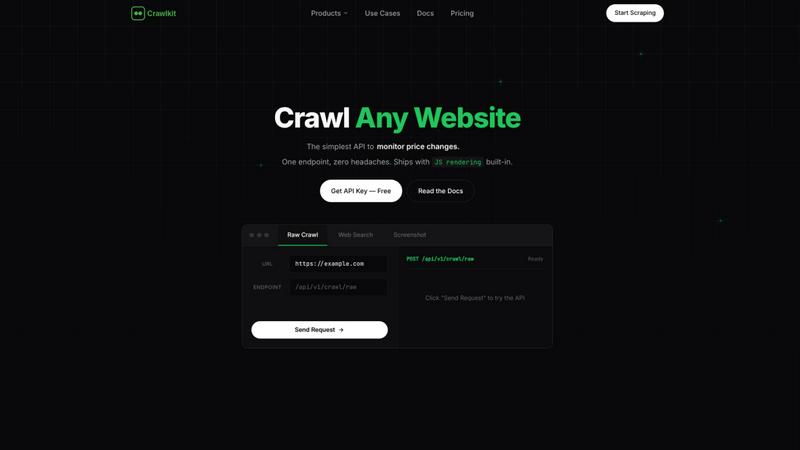
Visual Comparison
Crawlkit
Playwriter

Feature Comparison
Crawlkit
Unified API Access
CrawlKit simplifies data extraction by providing a single API that connects you to multiple data sources such as LinkedIn, Instagram, and app stores. No more juggling different APIs or tools; you can extract structured data from any platform with just one request, enhancing your productivity and efficiency.
Automatic Proxy Management
Forget about the headache of managing proxies and anti-bot measures. CrawlKit automatically handles proxy rotation, browser rendering, and retry logic, ensuring that your data requests are both reliable and effective. This feature allows you to concentrate on utilizing the data instead of worrying about the mechanics of data collection.
Comprehensive Data Outputs
With CrawlKit, you receive clean, structured data that is ready for use. The platform ensures complete and valid responses by waiting for full page loads and validating outputs, eliminating the frustration of dealing with partial or broken data. This quality assurance means you can confidently integrate the data into your workflows.
Transparent Pricing Model
CrawlKit offers a straightforward credit-based pricing system with no hidden fees or surprise charges. You can pay as you go, with the option to buy more credits at discounted rates. This transparency ensures that you know exactly what you are paying for, making budgeting easier and more predictable.
Playwriter
Your Real Browser Session
Playwriter doesn't spawn a new, sterile browser. It attaches directly to your existing Chrome tabs via a debugger connection. This means every website you're already logged into—Gmail, GitHub, admin dashboards—is instantly available to your AI agent. Your extensions (like password managers or ad blockers) are active, and your cookies are present, completely bypassing the bot detection that plagues fresh, headless instances. It's browsing with your identity, without the overhead.
Full Playwright API Through a Single Tool
Instead of limiting agents to a fixed set of pre-defined tools (like "click" or "type"), Playwriter exposes one powerful execute tool. Your agent can run any valid Playwright code, unlocking the entire automation library: complex selectors, network interception, performance profiling, and setting breakpoints. This keeps the AI's context window lean by avoiding schema bloat from dozens of tool definitions and grants unparalleled flexibility.
Advanced Debugging & Collaboration Suite
Playwriter is built for real-world debugging and human-AI teamwork. It includes a live debugger with breakpoints, live code editing, and network request interception. You can watch the agent work in real-time on your screen. When it hits a CAPTCHA or a consent wall, you simply solve it and let the agent continue. If it gets stuck, you can temporarily disable control, fix the page manually, and re-enable it—seamless collaboration.
Lightweight Accessibility Snapshots & Recording
Forget massive, context-consuming screenshots. Playwriter generates compact accessibility snapshots (only 5-20KB) that provide the AI with a structured, semantic view of the page. It also includes visual labeling for elements and can record full video of the agent's session. Combined with network interception, this gives your AI deep, efficient insight into page state and behavior.
Use Cases
Crawlkit
CRM Enrichment
CrawlKit is ideal for enriching your Customer Relationship Management (CRM) system with valuable LinkedIn profile data. Automatically pull job titles, company information, and contact details for leads, streamlining your sales process and improving lead quality.
Social Media Growth Tracking
For social media marketers, CrawlKit provides the tools to track competitors' Instagram growth metrics. Monitor follower counts, engagement rates, and top-performing posts over time, allowing you to refine your marketing strategies based on solid data insights.
App Review Analysis
CrawlKit empowers product managers and marketers to analyze app reviews from platforms like the Play Store and App Store. Gather insights on user feedback, ratings, and trends to make informed decisions about product enhancements and marketing strategies.
Market Research and Competitive Intelligence
Utilize CrawlKit to conduct comprehensive market research and gather competitive intelligence. Extract data on pricing, product features, and customer sentiment from various websites, helping you stay ahead of the competition and make data-driven business decisions.
Playwriter
Automated Web Testing & Debugging
Developers can instruct their AI assistant to run complex, multi-step user flows on their already-logged-in development or staging environments. The agent can click through UIs, fill forms, intercept API calls to verify payloads, and profile performance—all within the exact browser context a real user would have, making tests more reliable and context-aware.
AI-Powered Research & Data Extraction
Researchers and analysts can task an AI with gathering information from websites that require login or have complex interactive elements. Since Playwriter uses the real browser, it can navigate paywalls, logged-in databases, and JavaScript-heavy dashboards that are completely inaccessible to traditional, headless agent tools.
Routine Task Automation
Automate repetitive daily web tasks without writing a single line of code yourself. Have your AI agent log in to platforms, generate reports, schedule posts, or monitor status pages. Because it works in your browser session, it can handle two-factor authentication flows where you approve the login prompt.
Enhanced AI Assistant Capabilities
Supercharge coding assistants like Cursor or Claude. Instead of just writing hypothetical code, your AI can now execute Playwright scripts to interact with live documentation, pull examples from a web API, test a component in Storybook, or even debug a live web application by manipulating the DOM and inspecting network traffic in real-time.
Overview
About Crawlkit
CrawlKit is a revolutionary web data extraction platform tailored for developers and data teams seeking seamless, scalable access to web data without the burden of building or maintaining scraping infrastructure. In the intricate world of modern web scraping, challenges like rotating proxies, headless browsers, and stringent anti-bot protections often hinder efficiency. CrawlKit elegantly removes these complexities, allowing users to focus on leveraging data rather than collecting it. With a single API call, it offers a consistent interface to extract various types of data, including raw page content, search results, and professional insights from platforms like LinkedIn. Whether you are involved in CRM enrichment, competitive intelligence, or social media growth tracking, CrawlKit empowers your projects with reliable, structured data from any website or platform. As a scalable solution, it is designed to meet the needs of both small startups and large enterprises, ensuring that data retrieval becomes a streamlined part of your workflow.
About Playwriter
Stop fighting with headless browsers and bot detection. Playwriter is the game-changing bridge that lets your AI agents operate directly within your real, logged-in Chrome browser. It's a Chrome extension and CLI that gives any MCP client (like Cursor, Claude Desktop, or VS Code) the full power of the Playwright automation API, but executed in your existing browser session. This means your agents have immediate access to all your extensions, cookies, and logins—no fresh Chrome instance, no extra memory load, and no instant red flags from websites. It turns the brittle, limited browsing of today's AI into a seamless, powerful, and collaborative experience. Built for developers, researchers, and power users who need their AI assistants to interact with the modern web as a human would, Playwriter is open-source (MIT licensed) and runs entirely locally on your machine, putting you in full control.
Frequently Asked Questions
Crawlkit FAQ
What types of data can I extract using Crawlkit?
CrawlKit allows you to extract structured data from a wide range of sources, including LinkedIn profiles, Instagram accounts, app reviews from the Play Store and App Store, and much more, all through a single API.
How does Crawlkit handle anti-bot protections?
CrawlKit automatically manages proxy rotation and implements advanced techniques to bypass anti-bot protections, ensuring your data requests are successful and minimizing the chances of being blocked.
Is there a limit on API calls?
CrawlKit operates on a credit-based system with no monthly commitments or rate limits. Your credits never expire, allowing you to scale your data extraction needs without worrying about hitting usage caps.
Can I integrate Crawlkit with my existing tools?
Absolutely! CrawlKit is designed to work with any programming language and automation tool, making integration seamless. You can easily use it alongside platforms like Node.js, AWS, and more, without any restrictions.
Playwriter FAQ
Is my browsing data sent to a remote server?
No. Playwriter is designed with privacy and security first. All communication happens via a WebSocket relay running on localhost:19988 on your own machine. The Chrome extension, CLI, and your AI client communicate directly with this local relay. No browsing data, credentials, or session cookies are ever transmitted to any remote server.
How does Playwriter avoid bot detection?
It avoids detection by not acting like a typical bot. It controls your genuine, user-initiated Chrome browser session, which already has a normal history, cookies, and likely some browser extensions installed. This fingerprint matches that of a regular human user, unlike a fresh, headless Chrome instance which lacks these signals and is easily flagged.
Can I use it with any AI or just specific MCP clients?
Playwriter works with any client that supports the Model Context Protocol (MCP), which is becoming a standard for AI tool integration. This includes popular environments like Cursor, Claude Desktop, VS Code with extensions, and more. The provided skill teaches these clients how to use Playwriter effectively.
What happens if the AI gets stuck or makes a mistake?
This is where the collaboration features shine. You watch the actions happen live in your browser. If the agent enters an error state or gets stuck in a loop, you can immediately click the extension icon to detach it from that tab (turning it gray), manually correct the situation, and then re-attach control. The agent can then continue from the corrected state.
Alternatives
Crawlkit Alternatives
Crawlkit is an innovative web data extraction platform that simplifies the complex world of web scraping for developers and data teams. By providing reliable and scalable access to web data, it eliminates the need for users to build or maintain their own scraping infrastructure. This allows teams to focus on utilizing the data rather than getting bogged down by the technicalities of data collection. Users often seek alternatives to Crawlkit for various reasons, including pricing, specific feature sets, or compatibility with their existing platforms. When exploring alternatives, it's crucial to consider factors such as ease of use, the range of data types that can be extracted, and the level of support provided. A good alternative should not only meet your technical needs but also enhance your overall data collection strategy.
Playwriter Alternatives
Playwriter is a developer tool that bridges AI agents directly to your real browser session. It solves the core problem of AI automation by providing access to your actual logged-in state, extensions, and settings, instead of a fresh, empty browser that gets instantly flagged. Developers often look for alternatives for various reasons. They might need different pricing models, require specific integrations with other tools in their stack, or be looking for a particular feature set that matches their unique workflow. The landscape of browser automation and AI agent tools is constantly evolving. When evaluating options, consider the core capability of session persistence, the depth of debugging and control features, compatibility with your preferred AI clients and IDEs, and the overall philosophy of the project regarding openness, security, and extensibility. The right tool should feel like a natural extension of your development process.