
DeleteThreads vs Opal

DeleteThreads
DeleteThreads lets you effortlessly bulk delete posts and replies with smart automation and real-time progress tracking.
Last updated: February 28, 2026

Opal
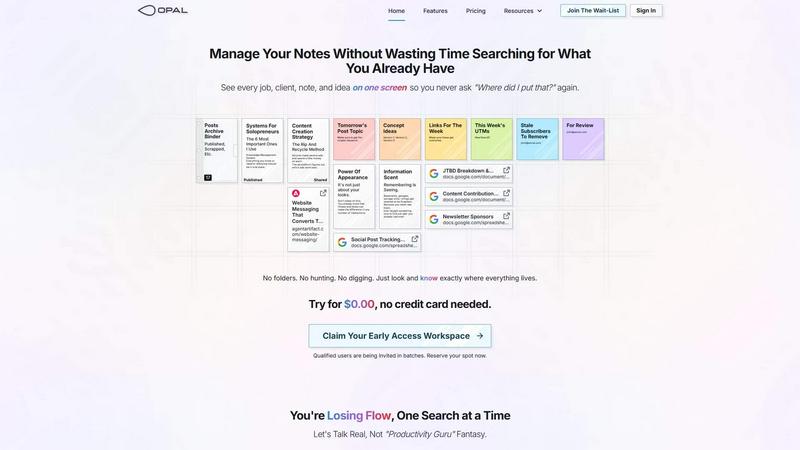
Opal organizes all your notes, ideas, and client details on one screen, saving you time and eliminating the search for lost information.
Last updated: April 13, 2026
Visual Comparison
DeleteThreads

Opal
Feature Comparison
DeleteThreads
One-Stop Manual Cleanup
DeleteThreads offers a powerful manual cleanup feature that allows users to leverage instant deletion capabilities. With full content search and multi-dimensional filtering, users can easily batch select and delete posts, reposts, quotes, and replies in real-time. The system provides progress tracking, ensuring users are always aware of their cleanup status.
Automated Deletion
Take the hassle out of content management with DeleteThreads' automated deletion feature. Users can create flexible rules based on content type, keywords, and dates, allowing the system to execute these rules automatically in the background. Set it and forget it – DeleteThreads will keep your Threads profile pristine without further effort.
Smart Management
DeleteThreads features a unified pending deletion queue management system. This smart management tool automatically checks Threads API daily quotas and manages excess deletion requests to ensure compliance and safety. Users can rest easy knowing their deletion activities are handled efficiently and within guidelines.
Multi-Account Support
Managing multiple Threads accounts has never been easier. DeleteThreads supports the management of multiple accounts from a single dashboard, secured by OAuth authorization. This feature enables users to switch seamlessly between accounts while maintaining a high level of security and compliance.
Opal
Visual Infinite Canvas
The visual infinite canvas allows users to arrange and organize their notes, documents, and projects spatially. You can drag and drop content wherever you want, making it easy to group related items and keep them visible. This feature transforms your workspace into a dynamic environment where everything important is accessible at a glance.
Markdown-based Block Editor
Create rich content using the markdown-based block editor, which supports various media types. You can effortlessly write scripts, manuals, and standard operating procedures, all while utilizing internal item links to connect ideas seamlessly. This feature enhances your writing experience by keeping everything organized and interlinked.
Real-Time Collaboration
Opal empowers teams by allowing real-time collaboration. You can share your workspace with colleagues and work together on projects, notes, or ideas without losing track of who contributed what. This feature streamlines communication and enhances productivity by keeping everyone on the same page.
AI Integration
Connect your AI agent to Opal through the API with the Opal Recall skill. This integration allows for smarter organization and retrieval of information, making your workflow even more efficient. You can leverage AI capabilities to enhance your productivity, ensuring that you can focus on your core tasks while the technology handles the details.
Use Cases
DeleteThreads
Personal Content Cleanup
Individuals looking to refresh their Threads profile can use DeleteThreads to remove outdated or unwanted posts quickly. With bulk deletion capabilities, users can tidy up their digital presence in just a few clicks, making it ideal for anyone wanting to improve their online image.
Social Media Managers
For social media managers handling multiple client accounts, DeleteThreads is a game changer. The tool allows for efficient content management across various Threads accounts, ensuring that all posts remain relevant and engaging while adhering to brand guidelines.
Influencers and Content Creators
DeleteThreads is perfect for influencers and content creators who need to maintain a curated feed. With automated rules and smart management features, they can keep their profiles aligned with their personal brand, ensuring only the best content is visible to followers.
Businesses with Multiple Threads Accounts
Companies managing multiple Threads accounts can benefit from DeleteThreads' multi-account support. This feature streamlines content management processes, allowing businesses to maintain a professional and consistent online presence across all their accounts.
Opal
Project Management
Opal is perfect for managing projects where multiple elements need to be organized and tracked. You can place all client notes, tasks, and deadlines visually on your digital desk, ensuring that nothing falls through the cracks. This spatial organization helps you maintain clarity and focus throughout the project's lifecycle.
Client Management
For professionals who handle client relationships, Opal offers a structured way to keep track of all communications, documents, and commitments. You can visualize every client interaction and important note, which allows you to respond quickly and maintain strong relationships without the chaos of disorganization.
Content Creation
Whether you are a writer, marketer, or content creator, Opal can streamline your content production process. Use the markdown editor to draft articles, scripts, and marketing materials while linking related ideas and resources. This organized approach helps you stay creative and productive without losing valuable insights.
Knowledge Management
Opal serves as a robust knowledge management system where all your insights, learnings, and important documents can be stored in one place. By visually organizing your knowledge, you can easily reference past experiences, strategies, and information whenever needed, thereby enhancing your decision-making process.
Overview
About DeleteThreads
DeleteThreads is an innovative web-based solution crafted for users looking to take control of their digital footprint on the Threads platform. In an age where digital presence matters, DeleteThreads empowers individuals and teams to efficiently manage, clean, and curate their content. Whether you are a casual user wanting to declutter your posts or a professional managing multiple accounts, this tool is designed to streamline the cleanup process. With features like bulk deletion, automated schedules, and smart quota management, DeleteThreads simplifies the task of managing Threads posts, replies, and reposts. Say goodbye to tedious content management and hello to a refreshed digital presence with DeleteThreads, where efficiency meets security.
About Opal
Opal is a revolutionary productivity tool designed for individuals and teams who are tired of traditional organization methods that bury important information in folders and categories. It provides a unique visual workspace that resembles a digital desk, allowing users to manage notes, documents, and files on an infinite canvas. This innovative platform is specifically tailored for busy professionals, solopreneurs, and teams who thrive on clarity and accessibility. With Opal, your brain can focus on what truly matters—your work—without the distraction of searching for lost notes or documents. By spatially organizing your content, Opal keeps everything in sight, enabling you to act swiftly and efficiently. Whether you're writing scripts, collaborating in real-time, or managing projects, Opal ensures that everything you need is at your fingertips, ready to go without the hassle of digging through layers of disorganization.
Frequently Asked Questions
DeleteThreads FAQ
How does DeleteThreads ensure security?
DeleteThreads is committed to user security and compliance. It is GDPR compliant, features encrypted token storage, and employs row-level data security to protect user information and maintain privacy.
Can I manage multiple Threads accounts with DeleteThreads?
Yes! DeleteThreads offers multi-account support, allowing users to manage several Threads accounts from a single dashboard securely. This feature simplifies the content management process for users with multiple profiles.
What types of content can I delete with DeleteThreads?
Users can delete a variety of content types, including posts, reposts, replies, and quotes. The tool offers advanced filtering options, making it easy to find and select specific content for deletion.
Is there a limit to how much content I can delete?
Yes, DeleteThreads has different tiers with varying limits. Users can delete up to 15 posts per day with the Starter plan, while the Pro and Advanced plans offer significantly higher monthly deletion quotas, allowing for more extensive content management.
Opal FAQ
How does Opal differ from other productivity tools?
Opal stands out by offering a visual, spatial workspace that allows you to see everything at once rather than burying information in folders. This approach aligns with how our brains naturally work, making it easier to organize thoughts and tasks.
Can I collaborate with my team in Opal?
Yes, Opal enables real-time collaboration, allowing you to share your workspace with team members. You can all contribute to projects and notes simultaneously, which enhances teamwork and communication.
Is there an integration with AI tools?
Absolutely! Opal allows you to connect your AI agent through the Opal Recall skill via the API. This feature enhances your organizational capabilities and improves the efficiency of retrieving information.
Is there a free trial available for Opal?
Yes! You can try Opal for $0.00 without needing to enter a credit card. This allows you to explore all the features and see how it can transform your productivity before committing.
Alternatives
DeleteThreads Alternatives
DeleteThreads is an innovative web-based tool crafted to empower users in managing their digital presence on the Threads platform. As a part of the Productivity & Management software category, it stands out by offering a speedy and efficient means to bulk delete threads, ensuring a streamlined experience for users looking to declutter their online interactions. However, users often find themselves exploring alternatives to DeleteThreads for various reasons, such as pricing, feature sets, and specific platform needs. It’s essential to consider these factors when searching for alternatives, as well as the user experience, ease of use, and the specific functionalities that align with your personal or organizational goals. Finding the right tool can enhance productivity and provide the ideal solution for managing your digital footprint effectively.
Opal Alternatives
Opal is a cutting-edge productivity and management tool designed for creative minds who excel at spatial thinking. By providing an infinite canvas for organizing notes, documents, and essential files, it transforms how users manage information, ensuring that everything remains visible and easily accessible. This innovative approach helps users avoid the frustration of traditional productivity apps that often require navigating through complex folder structures. Many users seek alternatives to Opal due to varying needs such as pricing, feature sets, or platform compatibility. When exploring alternatives, it’s important to consider factors like user interface, collaboration capabilities, and the extent to which the tool can integrate with existing workflows. Identifying the right features that align with your specific requirements will ensure you find a solution that enhances your productivity.