
Dubvid vs Klipzy

Dubvid
Dub your videos into any language with natural voices in minutes for global reach.
Last updated: February 27, 2026

Klipzy
Klipzy instantly transforms your photos into cinematic Instagram Reels with AI effects.
Last updated: February 28, 2026
Visual Comparison
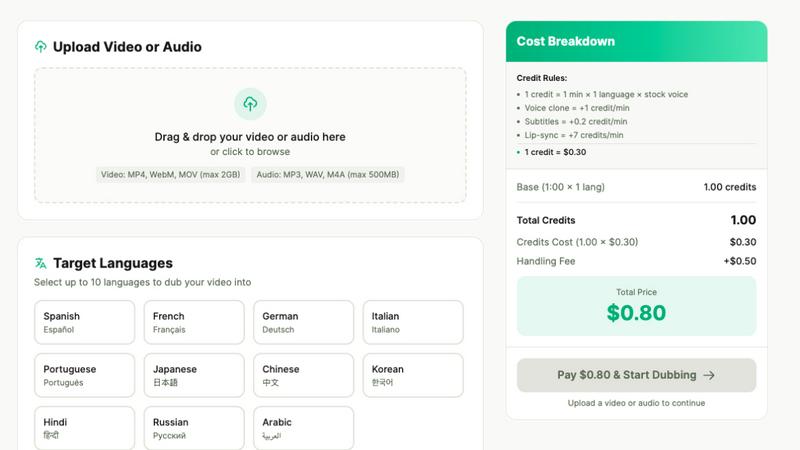
Dubvid
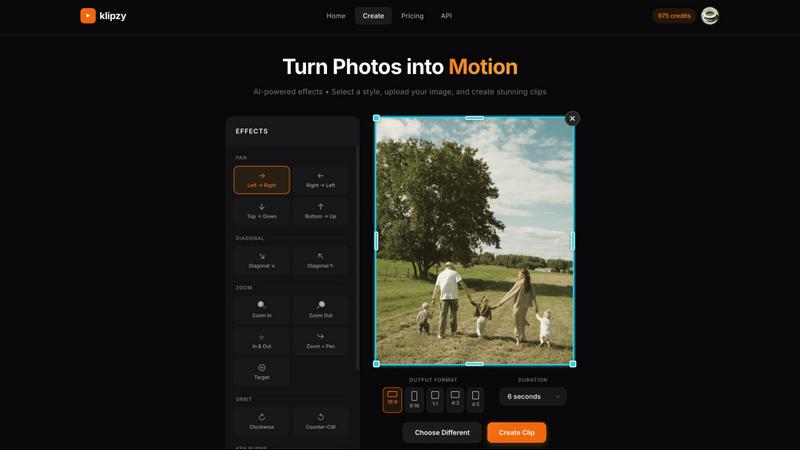
Klipzy
Feature Comparison
Dubvid
AI Voice Cloning with Emotion Preservation
Dubvid offers state-of-the-art AI voice cloning technology that captures the unique nuances of your voice, preserving emotion and delivering an authentic audio experience. This ensures that your message remains impactful and resonates with your audience, regardless of the language.
Multi-language Video Dubbing
With support for over ten languages, Dubvid allows you to reach a wider audience by dubbing your videos into multiple languages. This feature makes it easy to cater to different demographics and expand your global presence, all while maintaining the integrity of your original content.
Fast Automated Processing
Say goodbye to time-consuming editing processes! Dubvid's fast automated processing means you can have your videos dubbed and ready for distribution in mere minutes. This efficiency allows you to focus on content creation rather than getting bogged down in tedious workflows.
Natural Lip-sync Alignment
Dubvid takes video dubbing to the next level with its natural lip-sync alignment feature. This premium offering ensures that the dubbed audio matches the mouth movements of the original video, creating a seamless viewing experience that feels authentic and professional.
Klipzy
20+ AI-Powered Cinematic Effects
Klipzy is packed with a diverse library of professional motion styles to give your photos life and depth. Go beyond the basic Ken Burns effect with options like dramatic Zoom In & Out, smooth Parallax, dynamic Swing, immersive Pan shots, and even realistic touches like Motion Blur and Hand Shake. Each effect is intelligently applied to your image, creating a unique and engaging video narrative without any manual keyframing or timeline editing required.
Native macOS App with Local Processing
Experience blazing-fast performance and full control with Klipzy's dedicated Mac application. Unlike web-based tools, Klipzy runs natively on your machine. This means your images and videos are processed locally, ensuring privacy, speed, and the ability to work offline. Enjoy a seamless, optimized workflow that feels like a natural part of your macOS ecosystem, without relying on an internet connection or uploading sensitive content to the cloud.
Built-in Watermark Remover
Klipzy includes a powerful bonus tool: an integrated AI watermark remover. This feature allows you to clean up images before animating them, effortlessly erasing unwanted logos, text, or watermarks from your photos. It streamlines your content creation pipeline, letting you prepare and perfect your assets all within one single, efficient application before applying stunning cinematic effects.
Flexible Export & Aspect Ratios
Create content perfectly tailored for any platform. Klipzy lets you export your videos in multiple aspect ratios including square (1:1), portrait (9:16 for Reels/TikTok), and landscape (16:9). Export directly to MP4 format in high definition, ready to be shared instantly on social media, embedded in presentations, or used in marketing campaigns. The app provides clear control over where your final videos are saved on your Mac.
Use Cases
Dubvid
Short-form Creators
If you are a creator producing short-form content like TikToks, Instagram Reels, or YouTube Shorts, Dubvid is your go-to solution. Dubbing your videos into multiple languages can significantly enhance your reach and engagement, allowing you to tap into diverse audience segments.
Course Creators
Educators and course creators can leverage Dubvid to translate lessons and tutorials quickly, making them accessible to global learners. This feature is ideal for online courses, webinars, and instructional videos, ensuring that educational content transcends language barriers.
Help Center & Onboarding
Reduce support tickets and improve user experience by localizing your help center videos and onboarding materials. Dubvid allows you to create support content in multiple languages, making it easier for customers to understand your product and reducing the need for extensive customer support.
Podcast Dubbing
For podcasters looking to grow their audience, Dubvid offers the ability to dub episodes in different languages without the hassle of additional production. Whether it’s audio or video podcasts, you can easily release content in new languages, expanding your listener base globally.
Klipzy
Viral Social Media Content
Create eye-catching Reels, TikToks, and YouTube Shorts that stop the scroll. Transform a single product photo, a behind-the-scenes snapshot, or a travel moment into a short, looping video with dynamic motion. This instantly makes your content more engaging and professional, helping you grow your audience and boost interaction rates on platforms that prioritize video.
Real Estate Property Showcases
Bring property listings to life by transforming static photos into cinematic video tours. Use smooth panning effects to guide viewers through a room or a subtle zoom to highlight key features like a fireplace or kitchen island. This creates a more immersive and emotionally compelling presentation for potential buyers, setting your listings apart from the competition.
E-commerce Product Highlights
Make your online products pop and demonstrate them in action. Animate product photos to show details from different angles using orbit or swing effects, simulate a "unboxing" feel with a zoom, or add elegant motion to lifestyle images. This dynamic presentation can significantly increase dwell time and conversion rates on product pages and social media ads.
Travel & Personal Memory Videos
Easily turn your favorite vacation photos into beautiful, moving memories. Create a stunning video montage from a single panoramic landscape shot using a Ken Burns effect, or add a gentle parallax motion to a group photo to make it feel alive. It’s a quick way to produce shareable recaps for friends and family or engaging content for a travel blog or Instagram feed.
Overview
About Dubvid
Dubvid is a cutting-edge, AI-powered video and audio dubbing platform designed to empower creators, businesses, and brands to connect with global audiences effortlessly. By simply uploading your original video, you can select from a variety of target languages, and Dubvid will automatically translate and recreate your voice with a natural tone, pacing, and emotion. This innovative solution eliminates the need for expensive studios, voice actors, or complex editing workflows. Whether you're a YouTuber looking to expand your reach, an educator aiming to make lessons accessible to diverse learners, a SaaS founder promoting your product, or a marketing team crafting campaigns, Dubvid enables you to scale your content internationally in minutes, not weeks. With Dubvid, communication barriers are broken down, allowing you to engage with audiences in their native languages and unlock new opportunities for growth.
About Klipzy
Klipzy is the game-changing Mac app that instantly transforms your static photos into dynamic, cinematic video clips. Built for the modern creator, it eliminates the complexity of traditional video editing software. With Klipzy, anyone can add professional motion to their images in just a few clicks. Simply upload your photo, choose from over 20 AI-powered cinematic effects, and download a ready-to-share HD video. It’s designed for content creators, marketers, social media managers, real estate agents, e-commerce sellers, and travel enthusiasts who need to capture attention in a crowded digital landscape. The core value proposition is powerful yet simple: democratize high-quality video creation. Klipzy delivers a native macOS experience with fast, local processing, a one-time license fee (no subscriptions!), and even includes a built-in watermark remover. Stop posting flat images and start creating engaging Reels, TikToks, and Shorts that tell a moving story. Klipzy puts the power of cinematic storytelling directly on your desktop.
Frequently Asked Questions
Dubvid FAQ
How does Dubvid work?
Dubvid simplifies the dubbing process into three easy steps: upload your video, select the desired languages and voice options, and download the localized videos. This user-friendly workflow is designed for creators of all backgrounds.
What file formats does Dubvid support?
Dubvid supports a variety of file formats, including MP4, MOV, WebM, MP3, and WAV. You can upload files up to 500MB, making it versatile for different content types.
Is there a free trial available?
Yes! Dubvid offers a free trial that includes 2 credits, allowing you to dub up to 60 seconds of audio or video without the need for a credit card. This way, you can experience the quality before making a commitment.
What is the pricing model for Dubvid?
Dubvid operates on a usage-based credit system, meaning you only pay for the minutes you localize. There are no subscriptions required, and you can easily estimate costs using their pricing calculator, allowing for flexibility based on your project's needs.
Klipzy FAQ
What image formats are supported?
Klipzy supports all major image formats including JPG, PNG, and WebP. You can upload any image file up to 50MB in size, ensuring high-quality source material for your final HD video exports.
Is this a subscription?
No! Klipzy is offered with a simple, one-time purchase license. Pay once and own it forever, including all current features and future updates. There are no monthly or annual subscription fees, making it a cost-effective and predictable tool for your creative toolkit.
What platforms are supported?
Klipzy is currently a native application built exclusively for macOS. This allows for deep integration with the Apple ecosystem, optimized performance, and a smooth user experience designed specifically for Mac users.
How many effects are available?
Klipzy comes loaded with over 20 different AI-powered cinematic motion effects. This includes classics like Ken Burns, as well as modern styles like Parallax, Swing, Zoom, Pan, Motion Blur, and Hand Shake, giving you a wide creative palette to choose from.
Alternatives
Dubvid Alternatives
Dubvid is an innovative AI-powered video and audio dubbing platform designed to help creators, businesses, and brands effortlessly reach global audiences. By allowing users to upload their original videos just once and select their target languages, Dubvid streamlines the content localization process with remarkable efficiency. This platform is primarily categorized under content creation, leveraging advanced technology to eliminate the need for traditional studios and voice actors. Users often seek alternatives to Dubvid for various reasons, including pricing, specific feature sets, or unique platform needs that may better suit their projects. When searching for an alternative, it's essential to consider factors such as voice quality, language support, processing speed, ease of use, and the ability to export videos in formats compatible with social media and other distribution channels. Ultimately, the right choice will enhance content accessibility and engage diverse audiences effectively.
Klipzy Alternatives
Klipzy is a dynamic productivity tool designed to instantly transform your static photos into captivating video clips. It empowers creators, marketers, and social media enthusiasts to produce professional-looking video content without any complex editing skills, making video creation accessible to everyone. Users often explore alternatives for various reasons. Some might need a different pricing model or subscription plan that better fits their budget. Others may be looking for specific advanced features, integration with other platforms, or a different user experience that aligns with their unique creative workflow and content needs. When searching for a different tool, focus on what matters most for your projects. Consider the ease of use, the quality and style of the video output, and how well it integrates into your existing toolkit. The right platform should feel intuitive, elevate your content, and streamline your creative process without adding unnecessary complexity.