
FanPage vs The Ultimate Piano

FanPage
Transform your music career with FanPage, the ultimate link-in-bio tool for artists to engage fans and boost sales.
Last updated: February 28, 2026

The Ultimate Piano
Practice piano online with interactive tools, real-time feedback, and a rich library of features to elevate your skills.
Last updated: March 3, 2026
Visual Comparison
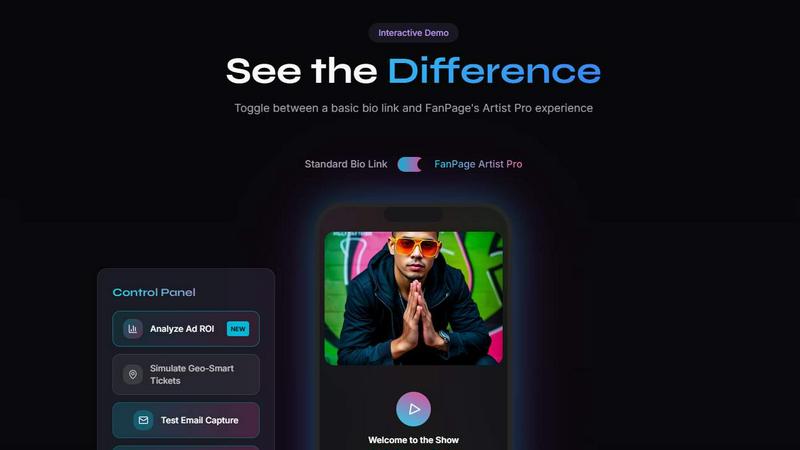
FanPage
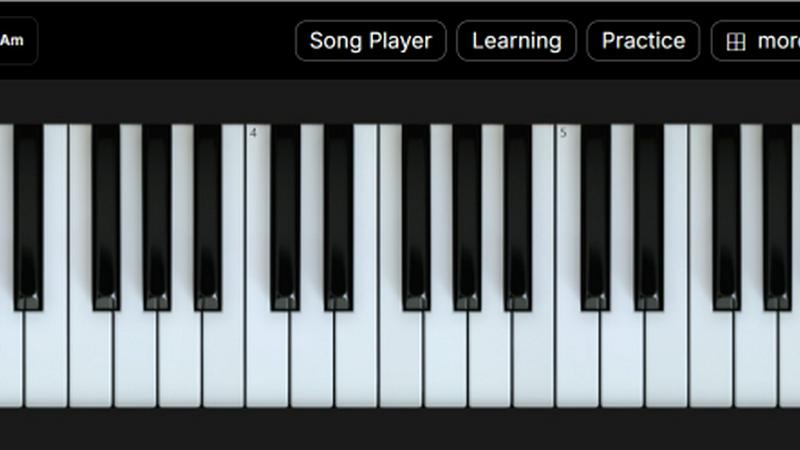
The Ultimate Piano
Feature Comparison
FanPage
Smart Deep Linking
Smart Deep Linking automatically opens popular music apps like Spotify and Apple Music instead of a browser link. This feature enhances user experience by reducing friction, allowing fans to dive straight into listening to their favorite tracks without any extra steps.
Geo-Fenced Tour Dates
This feature uses geolocation to show fans the nearest concert or event, ensuring that they never miss a chance to see their favorite artists live. With a convenient "buy tickets" button, it simplifies the process of purchasing tickets, making it easier for fans to attend shows.
Social Unlocks
Social Unlocks enables artists to trade exclusive content for follows, subscribes, or email signups. This unique engagement tool helps musicians grow their fanbase effortlessly while providing fans with special perks, fostering a deeper connection between artists and their audience.
Playlist Tracker
With the Playlist Tracker feature, musicians can monitor their Spotify playlist follower growth in real-time. This tool provides visual insights through beautiful charts, helping artists analyze their reach and effectiveness in drawing in new listeners.
The Ultimate Piano
Play Piano Online
Experience the joy of playing piano directly in your web browser without the hassle of installations. Utilize your mouse, computer keyboard, or connect a MIDI keyboard to produce beautiful sounds with realistic piano samples, making practice sessions feel alive and engaging.
MIDI Player & Falling Notes
Load any MIDI file and watch as the notes light up on the keyboard in real time. This feature allows you to slow down the tempo, loop tricky sections, or step through notes one at a time—perfect for mastering challenging passages in your favorite tunes.
Chord Detection & Learning
As you play, The Ultimate Piano automatically recognizes and displays chord names in real time. This interactive feature helps users understand harmonic relationships while playing freely, making it an essential tool for building chord recognition skills.
Learning Modes
Engage with interactive support for learning chords and scales. Choose a specific scale, like the Blues Scale in Ab, and see it visualized on the keyboard as it plays. The Scale Trainer provides detailed performance analysis to help you track your progress and improve your skills effectively.
Use Cases
FanPage
Launching a New Album
When an artist releases a new album, they can use FanPage to create a special link that showcases the album, includes streaming options, and highlights upcoming tour dates. This centralized hub helps maximize exposure and drives engagement.
Promoting a Live Show
Artists can utilize geo-fenced tour dates to promote their upcoming live shows. By allowing fans to see which events are closest to their location, musicians can boost ticket sales and ensure a packed venue.
Building a Community
Musicians can leverage the Marketplace feature to create and sell courses or digital products. This not only diversifies their income streams but also fosters a community of dedicated fans eager to learn more about their craft.
Analyzing Marketing Efforts
With server-side tracking and analytics sharing, musicians can effectively analyze their marketing efforts. By calculating ad ROI and tracking playlist growth, they can make informed decisions to enhance their promotional strategies.
The Ultimate Piano
Practice Alongside Your Favorite Songs
With the audio player, you can load any MP3 or audio file to play along with your favorite music. Adjust the playback speed to match your skill level, making it easier to learn complex pieces at your own pace.
YouTube Tutorial Integration
Utilize the YouTube Player to practice along with tutorials and performances. Simply paste a YouTube URL, slow down the playback for difficult sections, and set loop points to repeat specific parts, allowing for focused practice sessions.
Child-Friendly Learning
Children can enjoy learning piano with the Kids Mode, featuring adorable animal icons that represent each note. This visual aid helps young learners associate notes with fun characters, making the learning process enjoyable and engaging.
MIDI Recording for Self-Analysis
Capture your performances with the integrated MIDI recorder, which automatically saves your playing as a MIDI file. This feature allows you to revisit your performances, analyze your progress, and make necessary adjustments to improve your skills.
Overview
About FanPage
FanPage is an innovative platform tailored specifically for musicians seeking to optimize their online presence and grow their fanbase. Unlike typical link-in-bio solutions that offer a one-size-fits-all approach, FanPage employs intelligent automation to create a personalized experience for every visitor. This growth engine empowers artists to engage fans meaningfully by showcasing their music, tour dates, and merchandise all in one beautiful link. With features like Smart Deep Linking that seamlessly directs users to Spotify or Apple Music, geo-fenced tour dates that highlight the nearest events, and server-side tracking for precise ad attribution, musicians can effectively measure their return on investment (ROI) and track playlist growth. FanPage transforms a simple link into a fully functional digital storefront and community hub, allowing artists to list digital products and build paid communities directly on their profiles. With 0% transaction fees on Pro plans, FanPage is designed to help musicians turn casual listeners into dedicated superfans.
About The Ultimate Piano
The Ultimate Piano is a revolutionary browser-based practice tool designed specifically for pianists and music learners of all levels. With no downloads required, users can instantly connect their MIDI keyboards and dive into a comprehensive piano practice experience. This platform is not just about playing; it offers a rich suite of features tailored to enhance your musical journey. From real-time chord detection to an extensive scale trainer, Ultimate Piano empowers users to grasp music theory while honing their skills. It is perfect for musicians who seek an all-in-one solution to practice chords, learn scales, and develop ear training abilities. Whether you are a beginner looking to learn the basics or an advanced player aiming for detailed performance analysis, The Ultimate Piano provides the tools necessary to improve in a fun and interactive way. Additionally, it caters to a wide audience, including teachers who need effective visual aids and kids who want a playful learning environment.
Frequently Asked Questions
FanPage FAQ
Can I cancel my subscription anytime?
Yes, users can cancel their subscription at any time without penalties. This flexibility ensures that artists can manage their financial commitments according to their needs.
Can I switch between monthly and annual billing?
Absolutely! Users have the option to switch between monthly and annual billing plans, allowing them to choose the payment structure that best fits their financial situation.
What happens when I upgrade from Free to a paid plan?
Upgrading from the Free plan to a paid plan unlocks additional features and capabilities, enhancing the artist's ability to engage with fans and analyze performance metrics.
Is there a limit on the number of fans I can engage with?
No, FanPage allows artists to engage with an unlimited number of fans, providing tools to grow their audience without restrictions or limitations on outreach.
The Ultimate Piano FAQ
Do I need to install anything to use Ultimate Piano?
No, Ultimate Piano is entirely browser-based, meaning you can start practicing right away without any downloads or installations.
Can I connect my MIDI keyboard?
Absolutely! You can easily connect your MIDI keyboard to The Ultimate Piano, enhancing your practice experience with real-time feedback and interactive features.
What chords and scales can I learn?
The Ultimate Piano offers a variety of chords and scales to learn, including 14 different scale types and real-time chord detection, allowing you to explore harmonic relationships effortlessly.
Does Ultimate Piano have ear training?
Yes, it includes ear training features that help you develop your listening skills for intervals and chords, critical for any aspiring musician looking to improve their musical ear.
Alternatives
FanPage Alternatives
FanPage is an innovative solution in the marketing category, specifically crafted for musicians looking to streamline their online presence. It serves as an all-in-one link and market, transforming a simple bio link into a powerful growth engine. Musicians often seek alternatives to FanPage for various reasons, including pricing, feature sets, or specific platform needs that may align better with their goals. When exploring alternatives, users should consider essential factors such as personalization capabilities, ease of use, transaction fees, and integrated marketing tools. It’s crucial to find a solution that not only meets immediate needs but also supports long-term growth and fan engagement.
The Ultimate Piano Alternatives
The Ultimate Piano is an innovative, browser-based practice tool designed specifically for pianists and music learners. It offers a unique blend of features that enhance practice sessions, such as real-time chord detection, scale training, ear training, and music theory visualization, all without the need for downloads. This makes it an accessible option for musicians eager to improve their skills in a digital environment. Users often seek alternatives to The Ultimate Piano due to various reasons, including pricing concerns, specific feature requirements, or compatibility with certain devices. When searching for an alternative, it's essential to consider factors such as the range of features offered, ease of use, and whether the platform meets your individual learning needs and preferences. The right tool should empower your musical journey, so take the time to explore the options available.