
Assentia vs Hush Touch | Voice-to-Text for MacOS

Assentia
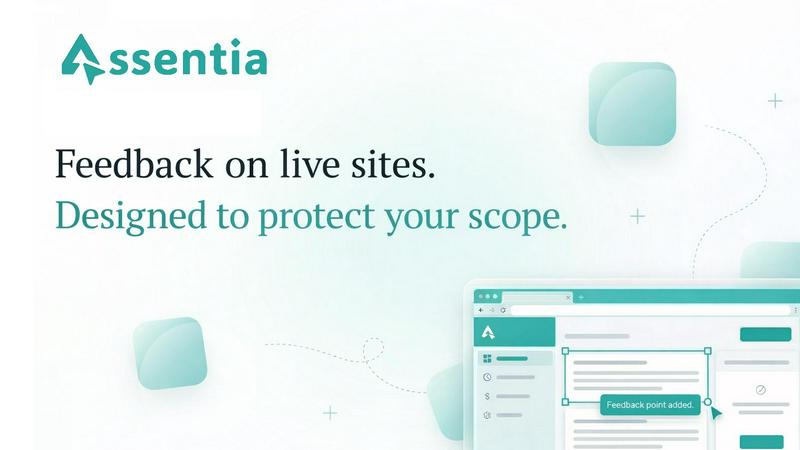
Assentia enables seamless feedback on live websites while ensuring clear scope management between clients and freelancers.
Last updated: April 13, 2026

Hush Touch | Voice-to-Text for MacOS
Hush Touch is on-device Mac dictation that learns your vocabulary and removes filler words.
Last updated: February 28, 2026
Visual Comparison
Assentia
Hush Touch | Voice-to-Text for MacOS
Feature Comparison
Assentia
Visual Feedback
With Assentia's visual feedback feature, clients can click anywhere on your live site to pin comments. This eliminates the need for lengthy email threads or Slack messages filled with vague references. Each feedback item is captured with automatic screenshots and context, making it crystal clear what changes are being requested. This streamlined process reduces confusion and enhances collaboration between clients and creators.
One-Click Scope Approval
The one-click scope approval feature allows you to send a clean approval link to your clients before commencing work. Clients can quickly approve the project scope with a single click, ensuring that both parties are aligned on what is included in the project. This professional sign-off process not only boosts transparency but also minimizes potential disputes regarding project deliverables.
AI-Powered Scope Generation
Assentia’s AI-powered scope generation can transform your project brief into a detailed deliverables list in under 30 seconds. Simply paste your brief into the platform, and the AI will generate a comprehensive list of tasks required to complete the project. This feature drastically reduces the time spent in scoping sessions, allowing you to focus on delivering quality work.
Scope Protection Mechanism
The scope protection mechanism ensures that every piece of feedback is checked against the approved project scope. If a feedback item falls outside of the agreed-upon scope, Assentia flags it, giving you the option to upsell additional services or decline the request. This feature helps you maintain control over your projects, reducing the risk of scope creep and ensuring you can manage client expectations effectively.
Hush Touch | Voice-to-Text for MacOS
Dual-Engine AI Recognition
Hush Touch leverages a powerful dual-engine system for unmatched accuracy. It runs both Apple's DictationTranscriber for natural flow and punctuation and SFSpeechRecognizer to spot your custom vocabulary. These outputs are then blended and refined through a final on-device Apple Intelligence pass, resulting in cleaner, more context-aware transcriptions that understand technical terms and everyday speech with precision.
Custom Vocabulary & Adaptive Learning
Stop fighting with your dictation software over jargon. Hush Touch supports a 500-term custom vocabulary and features auto-learn from your corrections. When you fix a word, it's intelligently added to your personal lexicon. This adaptive learning is frequency-weighted and can even boost specific terms per application, ensuring it nails brand names, medical terminology, and your unique phrasing every time.
100% On-Device Privacy & Processing
Your voice data is yours alone. Hush Touch operates with zero cloud dependency, meaning all audio processing, transcription, and the AI final pass happen entirely on your Mac. This guarantees complete privacy, allows for full offline functionality, and eliminates the latency associated with sending data to remote servers, making it the most secure voice-to-text option available.
Smart Text Processing & Hands-Free Commands
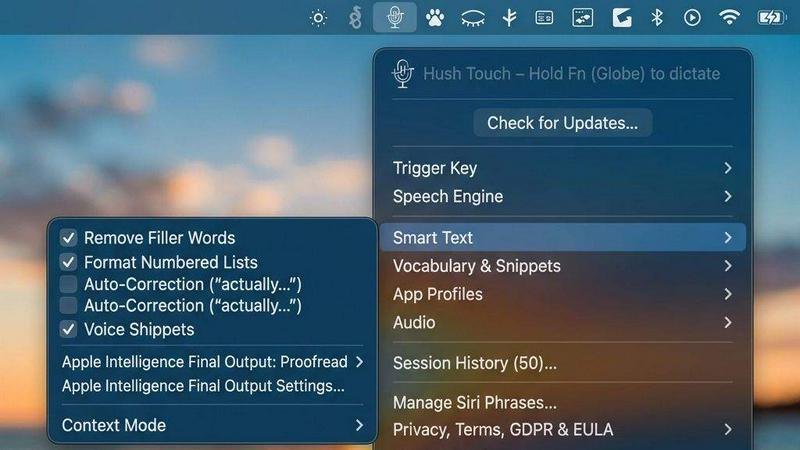
Go beyond basic transcription with intelligent local processing. Hush Touch automatically removes filler words ("um," "like"), applies auto-correction for common slips, and can format numbered lists. Use voice snippets for frequent phrases and switch between context modes like Email or Code. Enable fully hands-free operation with Siri, and use voice commands like "okay send message" to automate your workflow.
Use Cases
Assentia
Freelance Web Development
Freelance web developers can utilize Assentia to streamline the feedback process with their clients. By allowing clients to pin comments directly on the live site, developers can quickly address issues and concerns without the back-and-forth of traditional communication methods. This leads to faster project turnaround and enhanced client satisfaction.
Agency Project Management
Agencies can leverage Assentia to standardize their feedback and approval processes across multiple projects. With clear scope definitions and organized feedback, team members can collaborate more effectively, reducing delivery friction and ensuring that everyone is on the same page regarding project expectations.
UI/UX Design Projects
UI/UX designers can benefit from Assentia by using it to collect focused feedback on their designs. The ability to capture visual context allows designers to make informed adjustments based on client input, leading to a more refined design process and a product that meets client needs more effectively.
Client Training and Onboarding
Assentia can also be utilized in client training and onboarding processes. By allowing clients to interact with their live site and provide feedback, agencies can identify areas where clients may need additional training or support. This proactive approach not only enhances the client experience but also fosters long-term relationships.
Hush Touch | Voice-to-Text for MacOS
Drafting Long-Form Content & Documents
Writers, researchers, and students can break through writer's block and capture ideas at the speed of thought. Dictate blog posts, essays, reports, or chapters hands-free. The app's natural flow processing and punctuation allow you to maintain your narrative voice, while filler word removal delivers a cleaner first draft instantly, saving hours of editing and typing.
Managing Professional Communication
Professionals drowning in emails and Slack messages can reclaim their time. Use Hush Touch to quickly compose and send replies, project updates, or client communications entirely by voice. The dedicated Email context mode optimizes formatting, and the "send message" voice command lets you dispatch communications without ever touching the keyboard, streamlining your entire inbox workflow.
Capturing Technical Notes & Code Snippets
Developers, engineers, and IT professionals can document processes or even dictate code comments and snippets with confidence. The custom vocabulary learns technical terms like "Kubernetes" or "API endpoint," and the Code context mode helps structure your notes. This turns verbal brainstorming into precise, actionable documentation without breaking your flow.
Clinical Documentation & Specialized Dictation
Doctors, therapists, and legal professionals can generate accurate notes on the fly. Hush Touch's ability to learn and perfectly transcribe complex medical, legal, or industry-specific terminology from the get-go eliminates frustrating errors. This ensures patient records, case notes, and reports are both accurate and created efficiently during or immediately after consultations.
Overview
About Assentia
Assentia is a game-changing feedback tool designed for web developers, freelancers, and agencies alike. It allows clients to leave direct feedback on live websites, fostering a seamless communication flow that eliminates confusion and misinterpretations. By capturing screenshots and context in real-time, Assentia ensures that every request is organized and managed effectively. The platform is built with a primary goal: to help users protect their project scope and manage client expectations. With features like one-click approvals and an automated scope-check system, Assentia empowers users to maintain control over their work, ensuring that they only deliver what has been agreed upon. This tool is perfect for anyone looking to streamline their feedback process, reduce scope creep, and enhance client satisfaction.
About Hush Touch | Voice-to-Text for MacOS
Meet Hush Touch, the AI-powered voice-to-text revolution for your Mac that ditches the cloud and supercharges your workflow. This isn't just another dictation app; it's a fully on-device intelligence engine that makes speaking your thoughts faster, smarter, and infinitely more private than typing. Designed for professionals, creators, and anyone who writes, Hush Touch combines two powerful Apple transcription engines with a final Apple Intelligence pass to deliver shockingly accurate, clean text—all processed locally on your Mac. No subscriptions, no lag, no data ever leaving your machine. With a lightning-fast launch from a tiny 5.5MB footprint, it integrates seamlessly into your daily routine for drafting emails, messages, notes, and documents. Simply hit a hotkey, speak naturally, and watch as polished text auto-inserts after a brief pause. For those tired of cloud-dependent, error-prone dictation, Hush Touch is the definitive upgrade: a one-time purchase that learns your unique vocabulary, removes filler words, and gets smarter with every use, all while guaranteeing complete privacy.
Frequently Asked Questions
Assentia FAQ
How does feedback collection work?
Clients can click directly on your live website to leave pinned comments. Assentia captures screenshot context automatically, ensuring that feedback is clear and actionable, which streamlines the revision process.
Can I prevent scope creep with this?
Yes. Assentia allows you to define and approve project scope, then systematically compares incoming requests against that scope. This feature ensures that you can decide what is included or billed as a change request, protecting your time and resources.
Do I need a credit card to start?
No, you can start with Assentia's free plan without needing to provide a credit card. You can upgrade to a paid plan only when your project volume increases, making it accessible for everyone.
Is this built for freelancers or agencies?
Assentia is designed for both freelancers and agencies. Solo freelancers can use it to keep their projects organized, while agencies can employ it to standardize approvals and reduce delivery friction across teams, making it versatile for all types of users.
Hush Touch | Voice-to-Text for MacOS FAQ
How does Hush Touch work offline?
Hush Touch is architected for complete offline functionality. It uses Apple's native speech recognition engines (DictationTranscriber and SFSpeechRecognizer) which are built into macOS, along with an on-device Apple Intelligence model for the final polish. All audio processing and transcription occur locally on your Mac, requiring no internet connection for core dictation features.
What is the difference between the free trial and the full license?
The 7-day free trial offers full access to all features of Hush Touch, including unlimited dictation, custom vocabulary, and all smart processing capabilities. After the trial period ends, you will need to purchase a one-time lifetime license to continue using the app. No features are restricted during the trial.
Can I use Hush Touch with other applications like Google Docs or Word?
Absolutely. Hush Touch works system-wide on your macOS. You can dictate into any text field or application that accepts keyboard input, including web browsers (for Gmail, Google Docs), native apps like Notes and Pages, Microsoft Word, Slack, and many more. It acts as a superior, intelligent replacement for your keyboard.
How does the custom vocabulary and learning feature work?
You can manually add up to 500 terms to your custom dictionary. More powerfully, Hush Touch employs adaptive learning: when you manually correct a transcribed word in any text field, the app detects this and can automatically add the correct spelling and pronunciation to your personal vocabulary, making it smarter and more accurate with each use.
Alternatives
Assentia Alternatives
Assentia is a cutting-edge tool designed to streamline feedback collection directly on live websites, making it an indispensable asset for freelancers and clients alike. This innovative solution not only simplifies communication but also helps manage project scope, ensuring that both parties remain aligned throughout the development process. Falling under categories like Chrome Extensions, Productivity & Management, and Web Development, Assentia is tailored to enhance collaboration and clarity. Users often seek alternatives to Assentia for various reasons, including pricing considerations, desired features, or specific platform compatibility. The quest for the perfect tool may stem from unique project needs or the desire for more robust functionality. When exploring alternatives, it’s essential to evaluate factors such as ease of use, integration capabilities, customer support, and the overall value provided to ensure that your chosen solution meets your project requirements.
Hush Touch | Voice-to-Text for MacOS Alternatives
Hush Touch | Voice-to-Text for MacOS is a powerful, privacy-first dictation tool that transforms your spoken words into clean, accurate text entirely on your Mac. It’s part of a growing category of productivity apps designed to help you write faster and more naturally, hands-free. Users often explore alternatives for various reasons. Maybe they need a free tier to test the waters, require specific features like multi-language support, or are looking for a solution that works across different operating systems beyond macOS. Budget, workflow integration, and privacy concerns are also common drivers for the search. When evaluating other options, focus on what matters most for your daily use. Key considerations include accuracy and speed of transcription, whether processing happens on-device for privacy, how well it integrates into your existing apps, and the overall cost structure. The right tool should feel like a natural extension of how you already work.