
Decode This Text vs Hush Touch | Voice-to-Text for MacOS

Decode This Text
Decode This Text reveals the true meaning behind your conversations in just 30 seconds.
Last updated: February 27, 2026

Hush Touch | Voice-to-Text for MacOS
Hush Touch is on-device Mac dictation that learns your vocabulary and removes filler words.
Last updated: February 28, 2026
Visual Comparison
Decode This Text

Hush Touch | Voice-to-Text for MacOS
Feature Comparison
Decode This Text
Share Your Story
Easily share the context of your conversation by pasting text, uploading a screenshot, or describing what happened. This user-friendly interface ensures that you can get the insights you need without any hassle.
Insightful Analysis
Our advanced algorithms assess the words, timing, and tone of the message to uncover the true intentions behind the communication. You receive an analysis that feels not just accurate but also intuitive and human-like.
Tone Evaluation
Decode This Text doesn't just stop at what was said; it evaluates the emotional tone of the message. Whether the sender is being sarcastic, friendly, or dismissive, we provide you with a clear understanding of the emotional context.
Response Suggestions
Unsure how to reply? We offer tailored response options based on the analysis, allowing you to choose from calm, direct, or assertive replies. This feature helps you communicate effectively and with confidence.
Hush Touch | Voice-to-Text for MacOS
Dual-Engine AI Recognition
Hush Touch leverages a powerful dual-engine system for unmatched accuracy. It runs both Apple's DictationTranscriber for natural flow and punctuation and SFSpeechRecognizer to spot your custom vocabulary. These outputs are then blended and refined through a final on-device Apple Intelligence pass, resulting in cleaner, more context-aware transcriptions that understand technical terms and everyday speech with precision.
Custom Vocabulary & Adaptive Learning
Stop fighting with your dictation software over jargon. Hush Touch supports a 500-term custom vocabulary and features auto-learn from your corrections. When you fix a word, it's intelligently added to your personal lexicon. This adaptive learning is frequency-weighted and can even boost specific terms per application, ensuring it nails brand names, medical terminology, and your unique phrasing every time.
100% On-Device Privacy & Processing
Your voice data is yours alone. Hush Touch operates with zero cloud dependency, meaning all audio processing, transcription, and the AI final pass happen entirely on your Mac. This guarantees complete privacy, allows for full offline functionality, and eliminates the latency associated with sending data to remote servers, making it the most secure voice-to-text option available.
Smart Text Processing & Hands-Free Commands
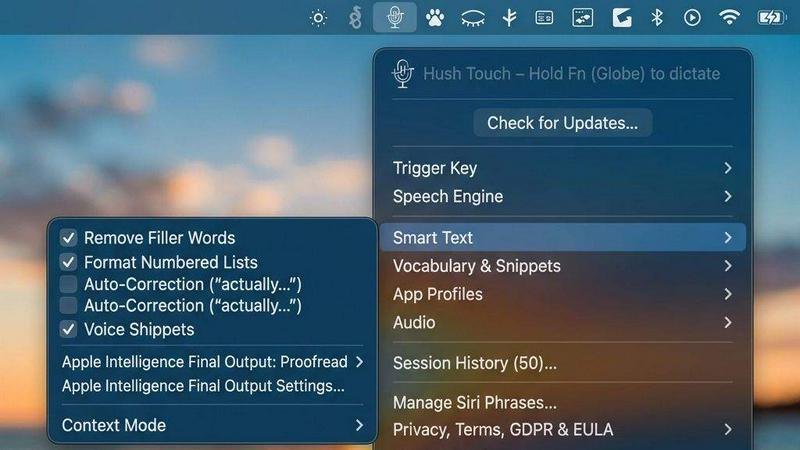
Go beyond basic transcription with intelligent local processing. Hush Touch automatically removes filler words ("um," "like"), applies auto-correction for common slips, and can format numbered lists. Use voice snippets for frequent phrases and switch between context modes like Email or Code. Enable fully hands-free operation with Siri, and use voice commands like "okay send message" to automate your workflow.
Use Cases
Decode This Text
Workplace Communication
Imagine receiving a one-word email from your boss. Are they upset? Confused? Decode This Text can clarify professional messages, so you know exactly how to respond and maintain a positive work environment.
Friendships and Social Media
When friends go silent after a group chat, it can leave you feeling anxious. Our service helps you interpret their lack of response, giving you context and peace of mind about your friendships.
Family Dynamics
Family conversations can sometimes be fraught with misunderstandings. Whether it's a vague text from a sibling or an unclear message from a parent, Decode This Text can help you navigate family communication with ease.
Client Interactions
Clients can be tricky to read, especially when their messages are short or ambiguous. With our tool, you can decipher their intentions and craft appropriate responses that keep your professional relationships strong.
Hush Touch | Voice-to-Text for MacOS
Drafting Long-Form Content & Documents
Writers, researchers, and students can break through writer's block and capture ideas at the speed of thought. Dictate blog posts, essays, reports, or chapters hands-free. The app's natural flow processing and punctuation allow you to maintain your narrative voice, while filler word removal delivers a cleaner first draft instantly, saving hours of editing and typing.
Managing Professional Communication
Professionals drowning in emails and Slack messages can reclaim their time. Use Hush Touch to quickly compose and send replies, project updates, or client communications entirely by voice. The dedicated Email context mode optimizes formatting, and the "send message" voice command lets you dispatch communications without ever touching the keyboard, streamlining your entire inbox workflow.
Capturing Technical Notes & Code Snippets
Developers, engineers, and IT professionals can document processes or even dictate code comments and snippets with confidence. The custom vocabulary learns technical terms like "Kubernetes" or "API endpoint," and the Code context mode helps structure your notes. This turns verbal brainstorming into precise, actionable documentation without breaking your flow.
Clinical Documentation & Specialized Dictation
Doctors, therapists, and legal professionals can generate accurate notes on the fly. Hush Touch's ability to learn and perfectly transcribe complex medical, legal, or industry-specific terminology from the get-go eliminates frustrating errors. This ensures patient records, case notes, and reports are both accurate and created efficiently during or immediately after consultations.
Overview
About Decode This Text
Decode This Text is your go-to solution for unraveling the complexities of communication. Have you ever found yourself staring at a confusing email, text, or chat message, wondering what the sender really means? You're not alone! Our platform is designed to help you decode those messages and gain clarity in just a matter of seconds. Simply paste the conversation or describe the situation, and we’ll analyze the nuances of the exchange to provide you with insightful interpretations. Our mission is to empower you to respond with confidence, eliminating the stress and overanalysis that often accompany unclear communications. Whether you're navigating workplace dynamics, trying to understand a friend's message, or deciphering a client's intentions, Decode This Text is here to simplify your interactions and enhance your connections. Understanding each other should be a breeze, and we're committed to making that a reality for everyone.
About Hush Touch | Voice-to-Text for MacOS
Meet Hush Touch, the AI-powered voice-to-text revolution for your Mac that ditches the cloud and supercharges your workflow. This isn't just another dictation app; it's a fully on-device intelligence engine that makes speaking your thoughts faster, smarter, and infinitely more private than typing. Designed for professionals, creators, and anyone who writes, Hush Touch combines two powerful Apple transcription engines with a final Apple Intelligence pass to deliver shockingly accurate, clean text—all processed locally on your Mac. No subscriptions, no lag, no data ever leaving your machine. With a lightning-fast launch from a tiny 5.5MB footprint, it integrates seamlessly into your daily routine for drafting emails, messages, notes, and documents. Simply hit a hotkey, speak naturally, and watch as polished text auto-inserts after a brief pause. For those tired of cloud-dependent, error-prone dictation, Hush Touch is the definitive upgrade: a one-time purchase that learns your unique vocabulary, removes filler words, and gets smarter with every use, all while guaranteeing complete privacy.
Frequently Asked Questions
Decode This Text FAQ
How does Decode This Text work?
You simply paste a conversation, upload a screenshot, or describe the situation. Our algorithms analyze the wording, tone, and context to provide you with a clear interpretation of the message.
Is my conversation data safe?
Absolutely! We prioritize your privacy and anonymity. No human reads your texts, and all interactions are fully confidential.
Can I use Decode This Text for personal and professional messages?
Yes! Decode This Text is designed for anyone looking to enhance their understanding of communication, whether it's for work, friends, family, or clients.
How quickly will I receive my analysis?
You can expect your analysis within 30 seconds, making it a fast and convenient way to gain clarity on confusing messages.
Hush Touch | Voice-to-Text for MacOS FAQ
How does Hush Touch work offline?
Hush Touch is architected for complete offline functionality. It uses Apple's native speech recognition engines (DictationTranscriber and SFSpeechRecognizer) which are built into macOS, along with an on-device Apple Intelligence model for the final polish. All audio processing and transcription occur locally on your Mac, requiring no internet connection for core dictation features.
What is the difference between the free trial and the full license?
The 7-day free trial offers full access to all features of Hush Touch, including unlimited dictation, custom vocabulary, and all smart processing capabilities. After the trial period ends, you will need to purchase a one-time lifetime license to continue using the app. No features are restricted during the trial.
Can I use Hush Touch with other applications like Google Docs or Word?
Absolutely. Hush Touch works system-wide on your macOS. You can dictate into any text field or application that accepts keyboard input, including web browsers (for Gmail, Google Docs), native apps like Notes and Pages, Microsoft Word, Slack, and many more. It acts as a superior, intelligent replacement for your keyboard.
How does the custom vocabulary and learning feature work?
You can manually add up to 500 terms to your custom dictionary. More powerfully, Hush Touch employs adaptive learning: when you manually correct a transcribed word in any text field, the app detects this and can automatically add the correct spelling and pronunciation to your personal vocabulary, making it smarter and more accurate with each use.
Alternatives
Decode This Text Alternatives
Decode This Text is an innovative tool designed to help users understand key conversations by decoding messages and providing clarity. It falls under the Productivity & Management category, making it an essential resource for anyone looking to improve their communication skills and enhance relationships. Users often seek alternatives to Decode This Text due to various reasons, such as pricing, specific features, or compatibility with different platforms. When searching for an alternative, it's crucial to consider factors like ease of use, the accuracy of insights provided, customer support, and overall user experience. A good alternative should empower users to gain clarity in their communications without adding unnecessary stress or complexity to the process.
Hush Touch | Voice-to-Text for MacOS Alternatives
Hush Touch | Voice-to-Text for MacOS is a powerful, privacy-first dictation tool that transforms your spoken words into clean, accurate text entirely on your Mac. It’s part of a growing category of productivity apps designed to help you write faster and more naturally, hands-free. Users often explore alternatives for various reasons. Maybe they need a free tier to test the waters, require specific features like multi-language support, or are looking for a solution that works across different operating systems beyond macOS. Budget, workflow integration, and privacy concerns are also common drivers for the search. When evaluating other options, focus on what matters most for your daily use. Key considerations include accuracy and speed of transcription, whether processing happens on-device for privacy, how well it integrates into your existing apps, and the overall cost structure. The right tool should feel like a natural extension of how you already work.