
AI Botkit vs Interhubz

AI Botkit
AI Botkit empowers you to launch a no-code AI chatbot in minutes, automating support and capturing leads 24/7 with ease and personalization.
Last updated: March 18, 2026

Interhubz
Interhubz simplifies Intercom and HubSpot integration with seamless syncing and organized conversation logging.
Last updated: February 28, 2026
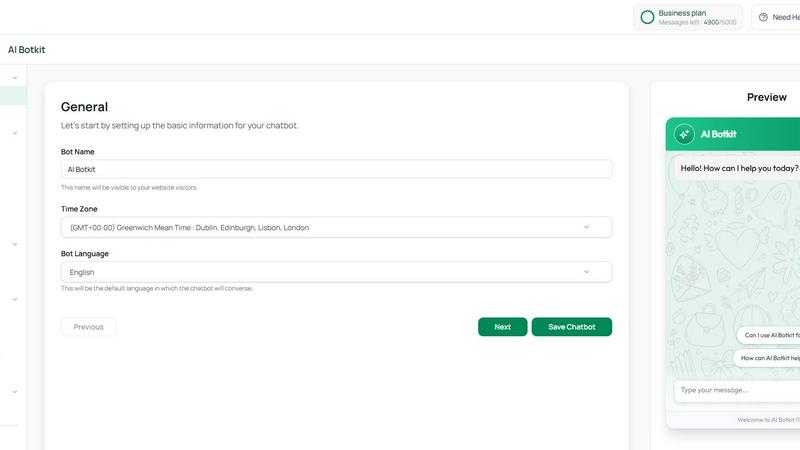
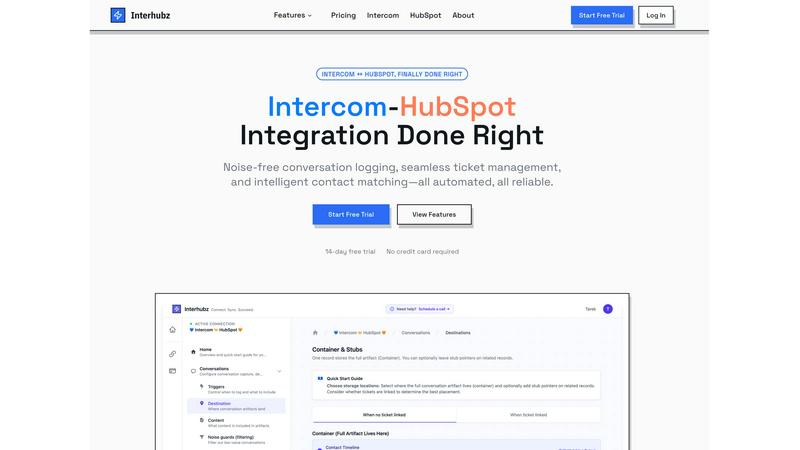
Visual Comparison
AI Botkit
Interhubz
Feature Comparison
AI Botkit
Easy Setup
AI Botkit allows users to deploy their AI-powered chatbots in just a few simple steps. With no coding required, anyone can have a chatbot up and running in minutes, ready to automate conversations and provide customer support around the clock.
Multi-channel Support
This feature enables businesses to use AI Botkit across various platforms, ensuring a consistent customer experience wherever interactions occur. Whether it's on a website, social media, or customer support portals, the chatbot remains accessible.
Lead Capturing
AI Botkit’s smart contact form capabilities allow businesses to capture leads, feedback, and queries directly within the chat interface. This eliminates the need for separate lead generation tools, streamlining data collection and enhancing conversion rates.
Comprehensive Analytics
With AI Botkit, users have access to detailed analytics that track chatbot performance. This includes chat logs, statistics, and insights on lead volume and missed queries, enabling businesses to make data-driven decisions to optimize their chatbot's effectiveness.
Interhubz
One Note Per Conversation
This feature consolidates each Intercom conversation into a single, readable HubSpot timeline entry. By presenting a clean and formatted note that includes the full transcript, summary, and attachments, it eliminates the clutter of multiple entries and enhances readability for sales and support teams.
Intelligent Contact Matching
Interhubz employs advanced algorithms to match contacts and companies based on email, phone numbers, and custom properties. This intelligent matching process ensures zero duplicates and maintains accurate records, allowing teams to focus on meaningful engagements without the hassle of managing duplicate data.
One-Click Ticket Creation
With Interhubz, users can create HubSpot tickets directly from Intercom with a simple click. This feature streamlines ticket management, enabling bi-directional status synchronization, so updates on either platform are reflected in real-time, reducing the risk of manual errors and ensuring smooth workflows.
Noise Guards
Interhubz includes smart noise filters that automatically block bot conversations and spam from cluttering your CRM. Users can configure these filters to set thresholds based on message counts or conversation duration, ensuring only meaningful interactions are logged in HubSpot.
Use Cases
AI Botkit
E-commerce Support
E-commerce businesses can utilize AI Botkit to provide instant answers to customer inquiries about products, shipping, and returns. This not only enhances customer satisfaction but also drives sales by ensuring that potential buyers receive timely information.
Hospitality Engagement
Hotels can leverage AI Botkit to handle guest inquiries about room availability, offers, and bookings. By automating these conversations, hotels can improve customer service and increase booking rates significantly.
Event Management
Event venues can implement AI Botkit to manage inquiries related to venue availability, pricing, and services. This allows event coordinators to focus on planning while the chatbot handles initial customer interactions.
Real Estate Assistance
Real estate agencies can use AI Botkit to provide property information, schedule viewings, and answer common buyer questions. This streamlines the inquiry process, helping agents manage leads more efficiently.
Interhubz
Efficient Support Operations
Support teams using Intercom can maintain organized records of customer interactions without the hassle of cluttered timelines. Interhubz allows them to capture conversations as single entries with full context, making it easier to track customer issues and resolutions.
Streamlined Sales Processes
Sales teams can access clean, structured notes of customer interactions directly in HubSpot. With intelligent matching and one-click ticket creation, they can follow up on leads more effectively without losing context, leading to an increase in conversion rates.
Enhanced Collaboration Between Teams
Interhubz fosters collaboration by bridging the gap between support and sales teams. With synchronized data and clear conversation histories, teams can work together more efficiently, leading to improved customer experiences and quicker response times.
Simplified Onboarding for New Users
With a straightforward setup process that takes just minutes, new users can quickly integrate Intercom and HubSpot without extensive training or technical knowledge. This allows organizations to get up and running with Interhubz and start reaping the benefits immediately.
Overview
About AI Botkit
AI Botkit is an innovative, no-code platform designed to empower businesses by simplifying the creation and management of AI chatbots. This solution is perfect for anyone looking to enhance customer engagement without needing technical expertise. In just a few minutes, users can train their chatbots using their own content, such as FAQs, documents, or website links, allowing for quick deployment on their sites. The main value proposition of AI Botkit lies in its ability to automate customer support, capture leads, and provide instant answers, ensuring that businesses can effectively engage with visitors 24/7. Whether you are a business owner, marketer, or an agency, AI Botkit provides a seamless way to integrate smart chatbots into your operations, enhancing both customer interactions and overall satisfaction.
About Interhubz
Interhubz is a cutting-edge integration tool designed to seamlessly connect Intercom and HubSpot, addressing the common pain points faced by support and sales teams. With Interhubz, users can say goodbye to the cluttered timelines that typically accompany standard integrations. Instead of receiving multiple fragmented entries for every conversation, teams get a single, organized note that includes the full transcript and any relevant attachments. This innovative solution is ideal for businesses that rely on Intercom for customer support while managing their sales and customer success operations in HubSpot. By automating contact matching, ticket creation, and conversation logging, Interhubz helps streamline workflows, reduce manual effort, and maintain a clean CRM environment. It ensures that support and sales teams stay in sync, enabling them to collaborate more effectively and provide a better overall customer experience.
Frequently Asked Questions
AI Botkit FAQ
How quickly can I set up my chatbot with AI Botkit?
You can set up your chatbot in just a few minutes, requiring no coding skills. Simply upload your content, and your bot will be ready to engage customers.
Can I customize the chatbot to match my brand?
Yes, AI Botkit allows for easy customization of fonts, colors, and icons, ensuring that your chatbot reflects your brand's identity perfectly.
Is AI Botkit multilingual?
Absolutely! AI Botkit supports over 75 languages, allowing your chatbot to engage with a global audience seamlessly. It can be set to auto-detect languages or allow users to choose their preferred language.
What kind of analytics does AI Botkit provide?
AI Botkit offers comprehensive analytics that includes chat logs, performance metrics, and insights into lead generation, allowing you to track the effectiveness of your chatbot and refine its responses.
Interhubz FAQ
How does Interhubz help reduce timeline clutter?
Interhubz consolidates multiple entries from Intercom into a single, organized note in HubSpot, ensuring that support and sales teams can easily find and reference key conversations without sifting through numerous entries.
What types of noise does Interhubz filter out?
Interhubz filters out low-value conversations, such as bot interactions and spam, using customizable noise guards. This keeps your CRM clean and focused on meaningful engagements.
Can I create tickets from Intercom using Interhubz?
Yes, Interhubz allows users to create HubSpot tickets directly from Intercom with just one click, ensuring real-time synchronization of ticket statuses between both platforms.
How long does it take to set up Interhubz?
Setting up Interhubz is quick and easy, taking only a few minutes. Users can connect their Intercom and HubSpot accounts, configure contact matching, and set noise filters without technical expertise.
Alternatives
AI Botkit Alternatives
AI Botkit is a no-code platform designed to empower businesses to create and manage AI chatbots effortlessly. This innovative tool falls within the customer support category, allowing users to engage with visitors, capture leads, and answer customer inquiries automatically. It’s perfect for those who want to implement smart chat functionality without needing technical expertise. However, users often seek alternatives to AI Botkit for various reasons, including pricing structures, specific features, or compatibility with existing platforms. When evaluating alternatives, it’s essential to consider factors such as ease of use, customization options, multi-channel support, and the ability to seamlessly integrate with your current systems to ensure a smooth transition and optimal performance.
Interhubz Alternatives
Interhubz is an innovative integration solution designed to streamline the communication between Intercom and HubSpot. As part of the customer support category, it tackles the common challenges of managing interactions across these platforms, ensuring a clean and organized flow of information. Users often seek alternatives to Interhubz for various reasons, including pricing considerations, specific feature sets, or the need for compatibility with different platforms. When evaluating alternatives, it’s essential to consider factors such as ease of use, the ability to sync data seamlessly, and the overall impact on team productivity. A great alternative should not only match the core functionalities you need but also enhance your workflow without adding unnecessary complexity or costs.