
AdaptlyPost vs Klipzy

AdaptlyPost
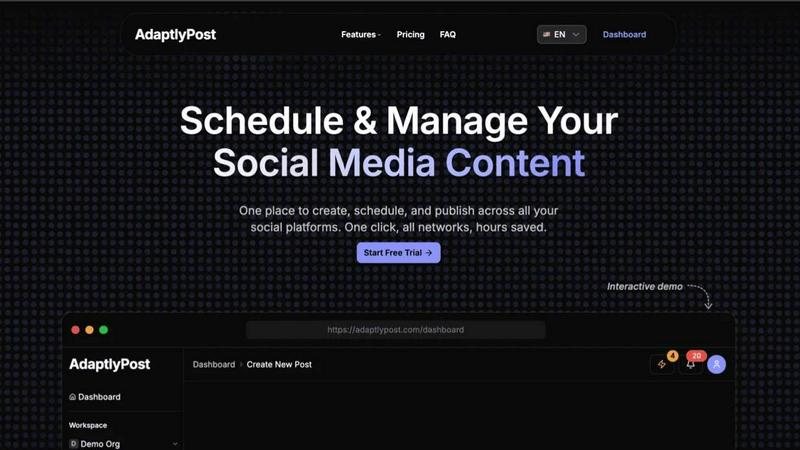
AdaptlyPost creates and schedules one post that automatically adapts to publish perfectly across all your social media platforms.
Last updated: March 11, 2026

Klipzy
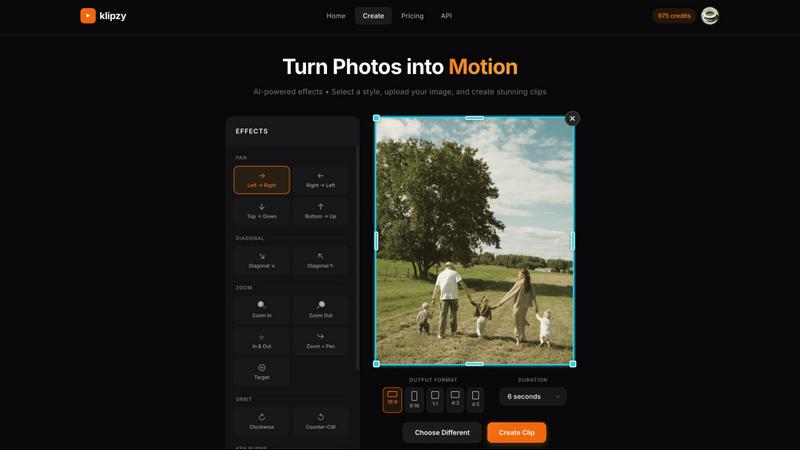
Klipzy instantly transforms your photos into cinematic Instagram Reels with AI effects.
Last updated: February 28, 2026
Visual Comparison
AdaptlyPost
Klipzy
Feature Comparison
AdaptlyPost
Multi-Platform Posting Hub
Ditch the dozen browser tabs. AdaptlyPost's core dashboard lets you connect and manage all your social accounts—from Instagram and TikTok to YouTube and X—in one unified workspace. Craft your post, and our system handles the rest, automatically adapting it to fit the specific requirements and best practices of each platform with a single click. This seamless integration ensures your message is optimized everywhere, saving you from manual, error-prone cross-posting.
AI Caption Co-pilot
Never stare at a blank caption box again. Our AI-powered writing assistant is your creative partner. Simply provide a prompt like "write a caption for our new product launch," and it generates engaging copy. Even better, it automatically rewrites and tailors that caption to match the unique voice, style, and character limits of each social platform you're targeting, ensuring maximum relevance and impact with zero extra work from you.
AI Image Studio
Create professional, eye-catching visuals in seconds, no design skills required. The AI Image Studio turns your ideas into reality. Just describe the image you envision—"a minimalist laptop on a bamboo desk with morning light"—and watch as AI generates unique, brand-appropriate graphics. This feature is perfect for creating scroll-stopping content that boosts engagement without the need for expensive software or stock photo subscriptions.
Unified Content Pipeline & Calendar
Gain crystal-clear visibility and control over your entire content strategy. The visual calendar provides a week-at-a-glance view of all your drafts, scheduled posts, and published content across every platform. The organized pipeline clearly shows what's in draft, what's queued up, and what has already gone live. This holistic view prevents double-booking, helps you maintain a consistent posting schedule, and ensures you never miss a prime posting time.
Klipzy
20+ AI-Powered Cinematic Effects
Klipzy is packed with a diverse library of professional motion styles to give your photos life and depth. Go beyond the basic Ken Burns effect with options like dramatic Zoom In & Out, smooth Parallax, dynamic Swing, immersive Pan shots, and even realistic touches like Motion Blur and Hand Shake. Each effect is intelligently applied to your image, creating a unique and engaging video narrative without any manual keyframing or timeline editing required.
Native macOS App with Local Processing
Experience blazing-fast performance and full control with Klipzy's dedicated Mac application. Unlike web-based tools, Klipzy runs natively on your machine. This means your images and videos are processed locally, ensuring privacy, speed, and the ability to work offline. Enjoy a seamless, optimized workflow that feels like a natural part of your macOS ecosystem, without relying on an internet connection or uploading sensitive content to the cloud.
Built-in Watermark Remover
Klipzy includes a powerful bonus tool: an integrated AI watermark remover. This feature allows you to clean up images before animating them, effortlessly erasing unwanted logos, text, or watermarks from your photos. It streamlines your content creation pipeline, letting you prepare and perfect your assets all within one single, efficient application before applying stunning cinematic effects.
Flexible Export & Aspect Ratios
Create content perfectly tailored for any platform. Klipzy lets you export your videos in multiple aspect ratios including square (1:1), portrait (9:16 for Reels/TikTok), and landscape (16:9). Export directly to MP4 format in high definition, ready to be shared instantly on social media, embedded in presentations, or used in marketing campaigns. The app provides clear control over where your final videos are saved on your Mac.
Use Cases
AdaptlyPost
The Solopreneur & Content Creator
For individuals building a personal brand or business alone, time is the most precious resource. AdaptlyPost empowers solopreneurs to batch-create a week's worth of content in one sitting. Using the AI tools to quickly generate captions and images, they can schedule everything across Instagram, TikTok, and YouTube from a single dashboard, freeing up countless hours to focus on creating products, services, or deeper community engagement.
The Growing Small Business & Marketing Team
Small businesses need to compete with larger players without a massive budget. AdaptlyPost gives small teams agency-level tools. They can maintain a consistent, multi-platform presence, plan campaigns visually on the calendar, and use the AI Co-pilot to ensure their messaging is sharp and platform-optimized. The team collaboration features allow multiple members to draft, review, and schedule posts seamlessly, streamlining their entire marketing workflow.
The Social Media Agency
Agencies managing multiple client accounts require efficiency and clarity. AdaptlyPost's multi-workspace functionality is a game-changer. They can separate each client's accounts, schedules, and content pipelines while using the powerful AI tools to generate fresh ideas and visuals at scale. The unified calendar makes reporting and strategy overviews simple, proving value to clients and allowing the agency to manage more accounts without sacrificing quality.
The Tech-Savvy Innovator Using AI Automation
For users who want to push automation to the next level, AdaptlyPost offers deep integration capabilities. Through API access and the unique OpenClaw skill, you can connect your social strategy to other tools or even let an AI agent manage posts via natural language commands. This use case is for those looking to build a truly hands-off, intelligent content distribution system integrated into their broader tech stack.
Klipzy
Viral Social Media Content
Create eye-catching Reels, TikToks, and YouTube Shorts that stop the scroll. Transform a single product photo, a behind-the-scenes snapshot, or a travel moment into a short, looping video with dynamic motion. This instantly makes your content more engaging and professional, helping you grow your audience and boost interaction rates on platforms that prioritize video.
Real Estate Property Showcases
Bring property listings to life by transforming static photos into cinematic video tours. Use smooth panning effects to guide viewers through a room or a subtle zoom to highlight key features like a fireplace or kitchen island. This creates a more immersive and emotionally compelling presentation for potential buyers, setting your listings apart from the competition.
E-commerce Product Highlights
Make your online products pop and demonstrate them in action. Animate product photos to show details from different angles using orbit or swing effects, simulate a "unboxing" feel with a zoom, or add elegant motion to lifestyle images. This dynamic presentation can significantly increase dwell time and conversion rates on product pages and social media ads.
Travel & Personal Memory Videos
Easily turn your favorite vacation photos into beautiful, moving memories. Create a stunning video montage from a single panoramic landscape shot using a Ken Burns effect, or add a gentle parallax motion to a group photo to make it feel alive. It’s a quick way to produce shareable recaps for friends and family or engaging content for a travel blog or Instagram feed.
Overview
About AdaptlyPost
Stop the app-switching madness and launch your social media strategy into hyperdrive. AdaptlyPost is the all-in-one command center built for creators, entrepreneurs, and modern marketing teams who are serious about growth. It transforms the chaotic, time-consuming process of managing multiple social platforms into a streamlined, powerful workflow. Imagine this: you create a single piece of content, and with one click, it's intelligently adapted and scheduled to go live on X, Instagram, TikTok, YouTube, and more. No more manual tweaking for each platform's unique tone and format. The secret sauce? Our built-in AI Co-pilot generates platform-perfect captions on demand, while the AI Image Studio crafts scroll-stopping visuals from a simple text prompt. Add a unified visual calendar and a clear content pipeline, and you've got a tool that doesn't just manage posts—it amplifies your reach and gives you hours of your week back. AdaptlyPost is for anyone ready to create once, post everywhere, and finally see consistent, engaging results across their entire social universe.
About Klipzy
Klipzy is the game-changing Mac app that instantly transforms your static photos into dynamic, cinematic video clips. Built for the modern creator, it eliminates the complexity of traditional video editing software. With Klipzy, anyone can add professional motion to their images in just a few clicks. Simply upload your photo, choose from over 20 AI-powered cinematic effects, and download a ready-to-share HD video. It’s designed for content creators, marketers, social media managers, real estate agents, e-commerce sellers, and travel enthusiasts who need to capture attention in a crowded digital landscape. The core value proposition is powerful yet simple: democratize high-quality video creation. Klipzy delivers a native macOS experience with fast, local processing, a one-time license fee (no subscriptions!), and even includes a built-in watermark remover. Stop posting flat images and start creating engaging Reels, TikToks, and Shorts that tell a moving story. Klipzy puts the power of cinematic storytelling directly on your desktop.
Frequently Asked Questions
AdaptlyPost FAQ
Which social media platforms do you support?
AdaptlyPost supports all major social media platforms to power your omnichannel strategy. This includes X (formerly Twitter), Instagram (Feed, Stories, Reels), TikTok, YouTube, Facebook, LinkedIn, and more. We constantly update our connectors to support new features and networks, ensuring you can reach your audience wherever they are.
How does the AI caption writer work?
Our AI Caption Co-pilot uses advanced language models trained on successful social media content. You start by giving it a basic prompt or idea. The AI then generates a primary caption and, crucially, automatically rewrites and adapts it for each connected platform. It adjusts the tone, length, hashtag suggestions, and formatting to match what performs best on Instagram vs. X vs. LinkedIn, all from your single input.
Can I schedule posts in advance?
Absolutely! Advanced scheduling is a core feature of AdaptlyPost. You can schedule posts days, weeks, or even months in advance using the intuitive visual calendar. This allows you to plan entire campaigns, batch your content creation, and maintain a consistent posting schedule even during holidays or busy periods, all without being logged in.
What happens when my free trial ends?
After your 7-day free trial, you will need to choose a paid subscription plan (Creator, Business, or Enterprise) to continue using AdaptlyPost's full features. If you do not enter payment information, your account will be downgraded, and you may lose access to scheduling, AI credits, and posting capabilities. You can cancel anytime during the trial without being charged.
Klipzy FAQ
What image formats are supported?
Klipzy supports all major image formats including JPG, PNG, and WebP. You can upload any image file up to 50MB in size, ensuring high-quality source material for your final HD video exports.
Is this a subscription?
No! Klipzy is offered with a simple, one-time purchase license. Pay once and own it forever, including all current features and future updates. There are no monthly or annual subscription fees, making it a cost-effective and predictable tool for your creative toolkit.
What platforms are supported?
Klipzy is currently a native application built exclusively for macOS. This allows for deep integration with the Apple ecosystem, optimized performance, and a smooth user experience designed specifically for Mac users.
How many effects are available?
Klipzy comes loaded with over 20 different AI-powered cinematic motion effects. This includes classics like Ken Burns, as well as modern styles like Parallax, Swing, Zoom, Pan, Motion Blur, and Hand Shake, giving you a wide creative palette to choose from.
Alternatives
AdaptlyPost Alternatives
AdaptlyPost is a dynamic content creation and publishing platform designed to streamline your social media workflow. It belongs to the category of all-in-one social media management tools, helping creators and teams write once and adapt their content for seamless posting across multiple channels like X, Instagram, and TikTok. Users often explore alternatives for various reasons. Budget constraints, the need for specific niche features, or support for different social platforms can all lead someone to shop around. It's a common step in finding the perfect tool that aligns with both a team's operational needs and financial reality. When evaluating other options, focus on your core requirements. Consider the range of platforms supported, the depth of automation and AI assistance, the intuitiveness of the content calendar, and of course, the overall value for the price. The goal is to find a solution that genuinely saves you time and amplifies your content's impact.
Klipzy Alternatives
Klipzy is a dynamic productivity tool designed to instantly transform your static photos into captivating video clips. It empowers creators, marketers, and social media enthusiasts to produce professional-looking video content without any complex editing skills, making video creation accessible to everyone. Users often explore alternatives for various reasons. Some might need a different pricing model or subscription plan that better fits their budget. Others may be looking for specific advanced features, integration with other platforms, or a different user experience that aligns with their unique creative workflow and content needs. When searching for a different tool, focus on what matters most for your projects. Consider the ease of use, the quality and style of the video output, and how well it integrates into your existing toolkit. The right platform should feel intuitive, elevate your content, and streamline your creative process without adding unnecessary complexity.