
Klipzy vs Opal

Klipzy
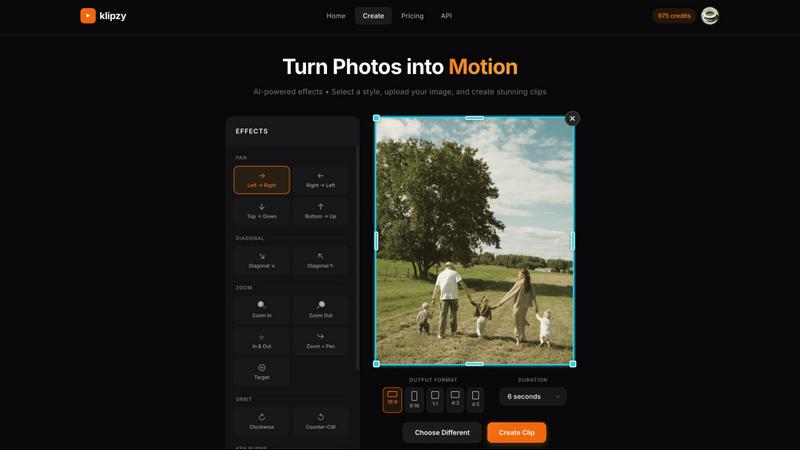
Klipzy instantly transforms your photos into cinematic Instagram Reels with AI effects.
Last updated: February 28, 2026

Opal
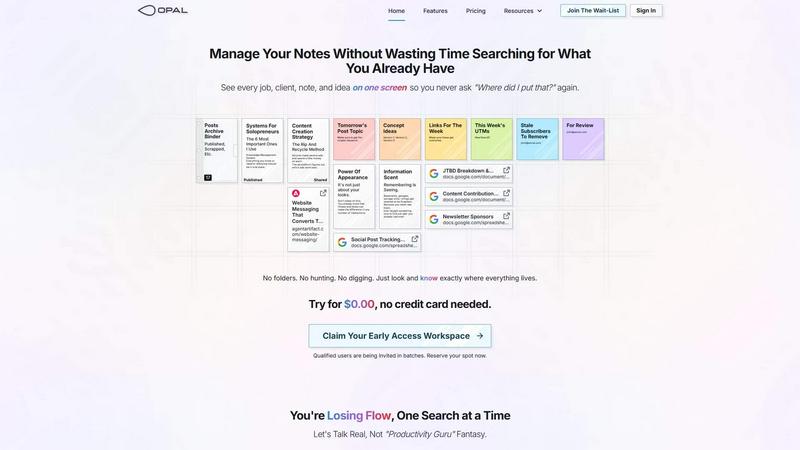
Opal organizes all your notes, ideas, and client details on one screen, saving you time and eliminating the search for lost information.
Last updated: April 13, 2026
Visual Comparison
Klipzy
Opal
Feature Comparison
Klipzy
20+ AI-Powered Cinematic Effects
Klipzy is packed with a diverse library of professional motion styles to give your photos life and depth. Go beyond the basic Ken Burns effect with options like dramatic Zoom In & Out, smooth Parallax, dynamic Swing, immersive Pan shots, and even realistic touches like Motion Blur and Hand Shake. Each effect is intelligently applied to your image, creating a unique and engaging video narrative without any manual keyframing or timeline editing required.
Native macOS App with Local Processing
Experience blazing-fast performance and full control with Klipzy's dedicated Mac application. Unlike web-based tools, Klipzy runs natively on your machine. This means your images and videos are processed locally, ensuring privacy, speed, and the ability to work offline. Enjoy a seamless, optimized workflow that feels like a natural part of your macOS ecosystem, without relying on an internet connection or uploading sensitive content to the cloud.
Built-in Watermark Remover
Klipzy includes a powerful bonus tool: an integrated AI watermark remover. This feature allows you to clean up images before animating them, effortlessly erasing unwanted logos, text, or watermarks from your photos. It streamlines your content creation pipeline, letting you prepare and perfect your assets all within one single, efficient application before applying stunning cinematic effects.
Flexible Export & Aspect Ratios
Create content perfectly tailored for any platform. Klipzy lets you export your videos in multiple aspect ratios including square (1:1), portrait (9:16 for Reels/TikTok), and landscape (16:9). Export directly to MP4 format in high definition, ready to be shared instantly on social media, embedded in presentations, or used in marketing campaigns. The app provides clear control over where your final videos are saved on your Mac.
Opal
Visual Infinite Canvas
The visual infinite canvas allows users to arrange and organize their notes, documents, and projects spatially. You can drag and drop content wherever you want, making it easy to group related items and keep them visible. This feature transforms your workspace into a dynamic environment where everything important is accessible at a glance.
Markdown-based Block Editor
Create rich content using the markdown-based block editor, which supports various media types. You can effortlessly write scripts, manuals, and standard operating procedures, all while utilizing internal item links to connect ideas seamlessly. This feature enhances your writing experience by keeping everything organized and interlinked.
Real-Time Collaboration
Opal empowers teams by allowing real-time collaboration. You can share your workspace with colleagues and work together on projects, notes, or ideas without losing track of who contributed what. This feature streamlines communication and enhances productivity by keeping everyone on the same page.
AI Integration
Connect your AI agent to Opal through the API with the Opal Recall skill. This integration allows for smarter organization and retrieval of information, making your workflow even more efficient. You can leverage AI capabilities to enhance your productivity, ensuring that you can focus on your core tasks while the technology handles the details.
Use Cases
Klipzy
Viral Social Media Content
Create eye-catching Reels, TikToks, and YouTube Shorts that stop the scroll. Transform a single product photo, a behind-the-scenes snapshot, or a travel moment into a short, looping video with dynamic motion. This instantly makes your content more engaging and professional, helping you grow your audience and boost interaction rates on platforms that prioritize video.
Real Estate Property Showcases
Bring property listings to life by transforming static photos into cinematic video tours. Use smooth panning effects to guide viewers through a room or a subtle zoom to highlight key features like a fireplace or kitchen island. This creates a more immersive and emotionally compelling presentation for potential buyers, setting your listings apart from the competition.
E-commerce Product Highlights
Make your online products pop and demonstrate them in action. Animate product photos to show details from different angles using orbit or swing effects, simulate a "unboxing" feel with a zoom, or add elegant motion to lifestyle images. This dynamic presentation can significantly increase dwell time and conversion rates on product pages and social media ads.
Travel & Personal Memory Videos
Easily turn your favorite vacation photos into beautiful, moving memories. Create a stunning video montage from a single panoramic landscape shot using a Ken Burns effect, or add a gentle parallax motion to a group photo to make it feel alive. It’s a quick way to produce shareable recaps for friends and family or engaging content for a travel blog or Instagram feed.
Opal
Project Management
Opal is perfect for managing projects where multiple elements need to be organized and tracked. You can place all client notes, tasks, and deadlines visually on your digital desk, ensuring that nothing falls through the cracks. This spatial organization helps you maintain clarity and focus throughout the project's lifecycle.
Client Management
For professionals who handle client relationships, Opal offers a structured way to keep track of all communications, documents, and commitments. You can visualize every client interaction and important note, which allows you to respond quickly and maintain strong relationships without the chaos of disorganization.
Content Creation
Whether you are a writer, marketer, or content creator, Opal can streamline your content production process. Use the markdown editor to draft articles, scripts, and marketing materials while linking related ideas and resources. This organized approach helps you stay creative and productive without losing valuable insights.
Knowledge Management
Opal serves as a robust knowledge management system where all your insights, learnings, and important documents can be stored in one place. By visually organizing your knowledge, you can easily reference past experiences, strategies, and information whenever needed, thereby enhancing your decision-making process.
Overview
About Klipzy
Klipzy is the game-changing Mac app that instantly transforms your static photos into dynamic, cinematic video clips. Built for the modern creator, it eliminates the complexity of traditional video editing software. With Klipzy, anyone can add professional motion to their images in just a few clicks. Simply upload your photo, choose from over 20 AI-powered cinematic effects, and download a ready-to-share HD video. It’s designed for content creators, marketers, social media managers, real estate agents, e-commerce sellers, and travel enthusiasts who need to capture attention in a crowded digital landscape. The core value proposition is powerful yet simple: democratize high-quality video creation. Klipzy delivers a native macOS experience with fast, local processing, a one-time license fee (no subscriptions!), and even includes a built-in watermark remover. Stop posting flat images and start creating engaging Reels, TikToks, and Shorts that tell a moving story. Klipzy puts the power of cinematic storytelling directly on your desktop.
About Opal
Opal is a revolutionary productivity tool designed for individuals and teams who are tired of traditional organization methods that bury important information in folders and categories. It provides a unique visual workspace that resembles a digital desk, allowing users to manage notes, documents, and files on an infinite canvas. This innovative platform is specifically tailored for busy professionals, solopreneurs, and teams who thrive on clarity and accessibility. With Opal, your brain can focus on what truly matters—your work—without the distraction of searching for lost notes or documents. By spatially organizing your content, Opal keeps everything in sight, enabling you to act swiftly and efficiently. Whether you're writing scripts, collaborating in real-time, or managing projects, Opal ensures that everything you need is at your fingertips, ready to go without the hassle of digging through layers of disorganization.
Frequently Asked Questions
Klipzy FAQ
What image formats are supported?
Klipzy supports all major image formats including JPG, PNG, and WebP. You can upload any image file up to 50MB in size, ensuring high-quality source material for your final HD video exports.
Is this a subscription?
No! Klipzy is offered with a simple, one-time purchase license. Pay once and own it forever, including all current features and future updates. There are no monthly or annual subscription fees, making it a cost-effective and predictable tool for your creative toolkit.
What platforms are supported?
Klipzy is currently a native application built exclusively for macOS. This allows for deep integration with the Apple ecosystem, optimized performance, and a smooth user experience designed specifically for Mac users.
How many effects are available?
Klipzy comes loaded with over 20 different AI-powered cinematic motion effects. This includes classics like Ken Burns, as well as modern styles like Parallax, Swing, Zoom, Pan, Motion Blur, and Hand Shake, giving you a wide creative palette to choose from.
Opal FAQ
How does Opal differ from other productivity tools?
Opal stands out by offering a visual, spatial workspace that allows you to see everything at once rather than burying information in folders. This approach aligns with how our brains naturally work, making it easier to organize thoughts and tasks.
Can I collaborate with my team in Opal?
Yes, Opal enables real-time collaboration, allowing you to share your workspace with team members. You can all contribute to projects and notes simultaneously, which enhances teamwork and communication.
Is there an integration with AI tools?
Absolutely! Opal allows you to connect your AI agent through the Opal Recall skill via the API. This feature enhances your organizational capabilities and improves the efficiency of retrieving information.
Is there a free trial available for Opal?
Yes! You can try Opal for $0.00 without needing to enter a credit card. This allows you to explore all the features and see how it can transform your productivity before committing.
Alternatives
Klipzy Alternatives
Klipzy is a dynamic productivity tool designed to instantly transform your static photos into captivating video clips. It empowers creators, marketers, and social media enthusiasts to produce professional-looking video content without any complex editing skills, making video creation accessible to everyone. Users often explore alternatives for various reasons. Some might need a different pricing model or subscription plan that better fits their budget. Others may be looking for specific advanced features, integration with other platforms, or a different user experience that aligns with their unique creative workflow and content needs. When searching for a different tool, focus on what matters most for your projects. Consider the ease of use, the quality and style of the video output, and how well it integrates into your existing toolkit. The right platform should feel intuitive, elevate your content, and streamline your creative process without adding unnecessary complexity.
Opal Alternatives
Opal is a cutting-edge productivity and management tool designed for creative minds who excel at spatial thinking. By providing an infinite canvas for organizing notes, documents, and essential files, it transforms how users manage information, ensuring that everything remains visible and easily accessible. This innovative approach helps users avoid the frustration of traditional productivity apps that often require navigating through complex folder structures. Many users seek alternatives to Opal due to varying needs such as pricing, feature sets, or platform compatibility. When exploring alternatives, it’s important to consider factors like user interface, collaboration capabilities, and the extent to which the tool can integrate with existing workflows. Identifying the right features that align with your specific requirements will ensure you find a solution that enhances your productivity.