
Klipzy vs Seedance 2.0

Klipzy
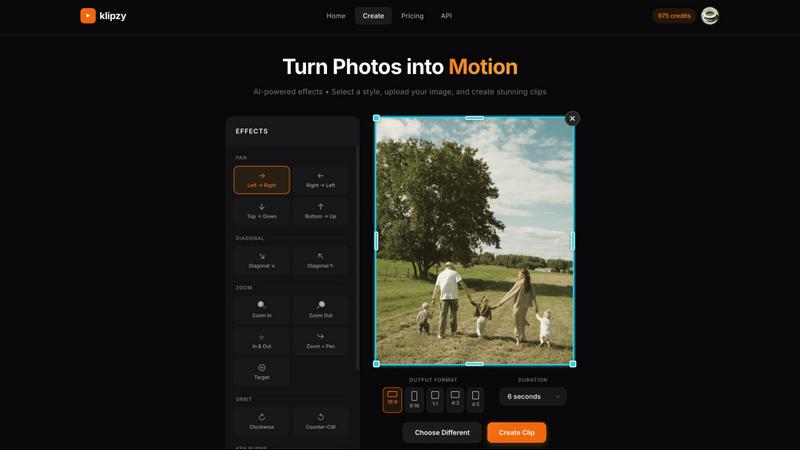
Klipzy instantly transforms your photos into cinematic Instagram Reels with AI effects.
Last updated: February 28, 2026

Seedance 2.0
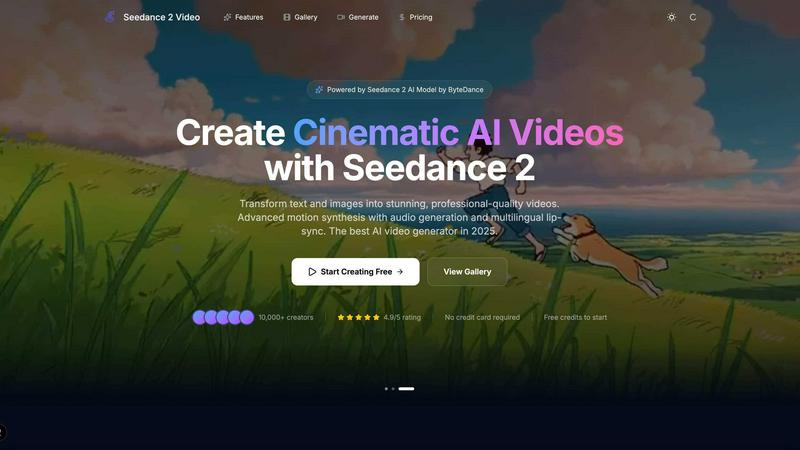
Transform your ideas into stunning cinematic videos with Seedance 2.0's AI magic.
Last updated: February 27, 2026
Visual Comparison
Klipzy
Seedance 2.0
Feature Comparison
Klipzy
20+ AI-Powered Cinematic Effects
Klipzy is packed with a diverse library of professional motion styles to give your photos life and depth. Go beyond the basic Ken Burns effect with options like dramatic Zoom In & Out, smooth Parallax, dynamic Swing, immersive Pan shots, and even realistic touches like Motion Blur and Hand Shake. Each effect is intelligently applied to your image, creating a unique and engaging video narrative without any manual keyframing or timeline editing required.
Native macOS App with Local Processing
Experience blazing-fast performance and full control with Klipzy's dedicated Mac application. Unlike web-based tools, Klipzy runs natively on your machine. This means your images and videos are processed locally, ensuring privacy, speed, and the ability to work offline. Enjoy a seamless, optimized workflow that feels like a natural part of your macOS ecosystem, without relying on an internet connection or uploading sensitive content to the cloud.
Built-in Watermark Remover
Klipzy includes a powerful bonus tool: an integrated AI watermark remover. This feature allows you to clean up images before animating them, effortlessly erasing unwanted logos, text, or watermarks from your photos. It streamlines your content creation pipeline, letting you prepare and perfect your assets all within one single, efficient application before applying stunning cinematic effects.
Flexible Export & Aspect Ratios
Create content perfectly tailored for any platform. Klipzy lets you export your videos in multiple aspect ratios including square (1:1), portrait (9:16 for Reels/TikTok), and landscape (16:9). Export directly to MP4 format in high definition, ready to be shared instantly on social media, embedded in presentations, or used in marketing campaigns. The app provides clear control over where your final videos are saved on your Mac.
Seedance 2.0
Text-to-Video Generation
Seedance 2.0's text-to-video feature allows users to describe any scene using natural language and transforms it into a cinematic video. The AI understands complex prompts and artistic styles, ensuring that the generated content is visually stunning and aligns closely with the user's vision.
Image-to-Video Animation
With the image-to-video feature, users can upload photos, illustrations, or concept art to create dynamic videos. Seedance 2.0 intelligently analyzes the uploaded content, applying natural motion and physics-aware animation to produce fluid and engaging visual storytelling.
Audio & Voice Synthesis
Seedance 2.0 excels in audio generation, enabling users to create synchronized audio tracks, including voiceovers and sound effects. The platform also supports multilingual lip-sync, allowing creators to produce comprehensive videos with sound in a single generation pass, simplifying the production process.
Cinematic Motion Control
The platform's advanced motion synthesis capabilities deliver cinema-grade camera movements. Users can apply dolly shots, crane movements, and smooth zooms, ensuring that the videos not only look great but also feel dynamic and engaging, enhancing the overall viewer experience.
Use Cases
Klipzy
Viral Social Media Content
Create eye-catching Reels, TikToks, and YouTube Shorts that stop the scroll. Transform a single product photo, a behind-the-scenes snapshot, or a travel moment into a short, looping video with dynamic motion. This instantly makes your content more engaging and professional, helping you grow your audience and boost interaction rates on platforms that prioritize video.
Real Estate Property Showcases
Bring property listings to life by transforming static photos into cinematic video tours. Use smooth panning effects to guide viewers through a room or a subtle zoom to highlight key features like a fireplace or kitchen island. This creates a more immersive and emotionally compelling presentation for potential buyers, setting your listings apart from the competition.
E-commerce Product Highlights
Make your online products pop and demonstrate them in action. Animate product photos to show details from different angles using orbit or swing effects, simulate a "unboxing" feel with a zoom, or add elegant motion to lifestyle images. This dynamic presentation can significantly increase dwell time and conversion rates on product pages and social media ads.
Travel & Personal Memory Videos
Easily turn your favorite vacation photos into beautiful, moving memories. Create a stunning video montage from a single panoramic landscape shot using a Ken Burns effect, or add a gentle parallax motion to a group photo to make it feel alive. It’s a quick way to produce shareable recaps for friends and family or engaging content for a travel blog or Instagram feed.
Seedance 2.0
Marketing Campaigns
Marketers can utilize Seedance 2.0 to generate captivating promotional videos that showcase their products or services. By creating engaging content quickly, they can enhance their brand visibility and connect more effectively with their target audience.
Social Media Content
Social media managers can leverage the platform to produce eye-catching videos tailored for various platforms. With the ability to generate content rapidly, they can maintain a consistent posting schedule and experiment with different styles and formats to engage followers.
Storytelling and Narratives
Writers and content creators can bring their stories to life by transforming scripts into visually compelling videos. Seedance 2.0 allows for the integration of narrative elements, enhancing the storytelling experience and captivating audiences.
Product Demonstrations
Businesses can create informative product demo videos using Seedance 2.0, showcasing features and benefits in an engaging manner. This helps potential customers understand products better and can lead to increased conversions and sales.
Overview
About Klipzy
Klipzy is the game-changing Mac app that instantly transforms your static photos into dynamic, cinematic video clips. Built for the modern creator, it eliminates the complexity of traditional video editing software. With Klipzy, anyone can add professional motion to their images in just a few clicks. Simply upload your photo, choose from over 20 AI-powered cinematic effects, and download a ready-to-share HD video. It’s designed for content creators, marketers, social media managers, real estate agents, e-commerce sellers, and travel enthusiasts who need to capture attention in a crowded digital landscape. The core value proposition is powerful yet simple: democratize high-quality video creation. Klipzy delivers a native macOS experience with fast, local processing, a one-time license fee (no subscriptions!), and even includes a built-in watermark remover. Stop posting flat images and start creating engaging Reels, TikToks, and Shorts that tell a moving story. Klipzy puts the power of cinematic storytelling directly on your desktop.
About Seedance 2.0
Seedance 2.0 is a revolutionary AI video generation platform that transforms text prompts and creative ideas into stunning, cinematic-quality videos. Designed for creators, marketers, and developers, Seedance 2.0 harnesses advanced video models, including the powerful Seedance 2, to deliver exceptional video content without the need for cameras, crews, or extensive editing skills. Users can effortlessly create videos for a variety of purposes, such as marketing campaigns, social media posts, storytelling, product demonstrations, music visuals, and creative projects. The platform offers unparalleled control over style, motion, duration, and visual quality, significantly reducing both production time and costs. With its AI-driven automation and scalability, Seedance 2.0 opens up new creative possibilities, empowering over 10,000 creators to bring their visions to life and achieve professional-grade results in just moments.
Frequently Asked Questions
Klipzy FAQ
What image formats are supported?
Klipzy supports all major image formats including JPG, PNG, and WebP. You can upload any image file up to 50MB in size, ensuring high-quality source material for your final HD video exports.
Is this a subscription?
No! Klipzy is offered with a simple, one-time purchase license. Pay once and own it forever, including all current features and future updates. There are no monthly or annual subscription fees, making it a cost-effective and predictable tool for your creative toolkit.
What platforms are supported?
Klipzy is currently a native application built exclusively for macOS. This allows for deep integration with the Apple ecosystem, optimized performance, and a smooth user experience designed specifically for Mac users.
How many effects are available?
Klipzy comes loaded with over 20 different AI-powered cinematic motion effects. This includes classics like Ken Burns, as well as modern styles like Parallax, Swing, Zoom, Pan, Motion Blur, and Hand Shake, giving you a wide creative palette to choose from.
Seedance 2.0 FAQ
How does Seedance 2.0 generate videos?
Seedance 2.0 uses advanced AI models to transform text prompts and images into videos. Users simply describe their vision, and the platform takes care of the video generation process, including motion synthesis and audio integration.
What types of content can be created with Seedance 2.0?
Users can create various types of videos, including marketing materials, social media posts, storytelling clips, product demonstrations, and music visuals. The platform caters to diverse creative needs and industries.
Are there any limitations on video length or quality?
Seedance 2.0 offers customizable options for video duration and resolution. Users can select settings based on their project requirements, ensuring that videos meet the desired quality and length specifications.
Can I use the videos generated for commercial purposes?
Yes, all videos generated through Seedance 2.0 can be used for commercial purposes. This allows creators to leverage the platform for business-related projects without any restrictions on usage.
Alternatives
Klipzy Alternatives
Klipzy is a dynamic productivity tool designed to instantly transform your static photos into captivating video clips. It empowers creators, marketers, and social media enthusiasts to produce professional-looking video content without any complex editing skills, making video creation accessible to everyone. Users often explore alternatives for various reasons. Some might need a different pricing model or subscription plan that better fits their budget. Others may be looking for specific advanced features, integration with other platforms, or a different user experience that aligns with their unique creative workflow and content needs. When searching for a different tool, focus on what matters most for your projects. Consider the ease of use, the quality and style of the video output, and how well it integrates into your existing toolkit. The right platform should feel intuitive, elevate your content, and streamline your creative process without adding unnecessary complexity.
Seedance 2.0 Alternatives
Seedance 2.0 is an innovative AI video generation platform that transforms text prompts and creative concepts into stunning cinematic videos. As part of the content creation category, it empowers creators, marketers, and developers to produce professional-grade videos without the need for traditional filming equipment or editing expertise. The platform leverages advanced AI technologies to streamline video production, making it accessible to a wider audience. Users often seek alternatives to Seedance 2.0 for various reasons, such as pricing considerations, feature sets that better align with their specific needs, or compatibility with existing workflows and platforms. When exploring alternatives, it's essential to consider aspects like ease of use, the variety of available styles and customization options, as well as the scalability and support offered by the platform. Balancing these factors will ensure you find a solution that meets your creative and operational requirements.