
LeapCount vs Opal

LeapCount
LeapCount is the free all-in-one platform that runs your entire SME's finances, projects, and inventory.
Last updated: February 28, 2026

Opal
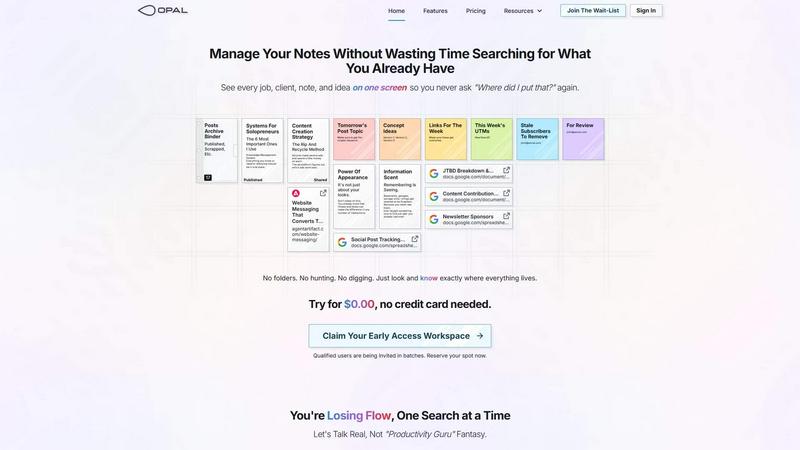
Opal organizes all your notes, ideas, and client details on one screen, saving you time and eliminating the search for lost information.
Last updated: April 13, 2026
Visual Comparison
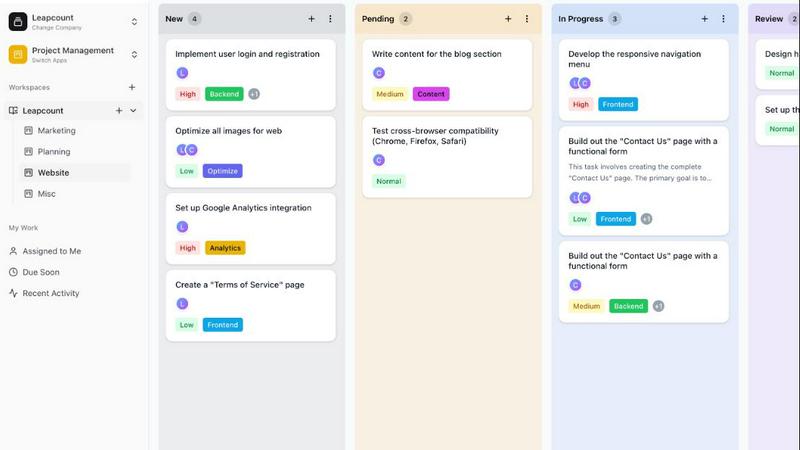
LeapCount
Opal
Feature Comparison
LeapCount
Professional Accounting
Ditch expensive subscriptions to Xero or QuickBooks. LeapCount's full-featured accounting module gives you beautiful invoice creation, automated bank statement processing, and meticulous tracking of Accounts Receivable and Payable. Manage your complete Chart of Accounts, generate automated journals, and gain crystal-clear financial insights. It's professional finance management designed to save your business hundreds of dollars per year, all within the same platform where your projects and inventory live.
Drag-and-Drop Project Management
Unleash your team's potential with visual Kanban boards that rival Trello and ClickUp. Organize tasks, set priorities, and track timelines with effortless drag-and-drop functionality. Foster real-time collaboration with in-task comments, maintain full accountability with detailed activity audit trails, and break down work with checklists and subtasks. Keep every project moving forward smoothly, with all context and communication centralized.
Multi-Location Inventory Control
Gain absolute command over your stock with a sophisticated inventory system built for growth. Manage multiple warehouses, streamline stock-in and stock-out workflows, and execute inter-warehouse transfers seamlessly. Track running balances in real-time, manage items and SKUs, and generate detailed stock reports. This module ensures you always know what you have, where it is, and can optimize your supply chain directly from your main business dashboard.
Secure Cloud Drive & File Management
Collaborate without chaos using LeapCount's workspace-based Cloud Drive. Securely store, organize, and share files with your team or via public links for client deliveries. It includes 1GB of free storage to get you started, supports folder organization for perfect structure, and allows you to download entire folders as ZIP files. Keep all project documents, financial records, and assets in one secure, easily accessible place tied directly to your work.
Opal
Visual Infinite Canvas
The visual infinite canvas allows users to arrange and organize their notes, documents, and projects spatially. You can drag and drop content wherever you want, making it easy to group related items and keep them visible. This feature transforms your workspace into a dynamic environment where everything important is accessible at a glance.
Markdown-based Block Editor
Create rich content using the markdown-based block editor, which supports various media types. You can effortlessly write scripts, manuals, and standard operating procedures, all while utilizing internal item links to connect ideas seamlessly. This feature enhances your writing experience by keeping everything organized and interlinked.
Real-Time Collaboration
Opal empowers teams by allowing real-time collaboration. You can share your workspace with colleagues and work together on projects, notes, or ideas without losing track of who contributed what. This feature streamlines communication and enhances productivity by keeping everyone on the same page.
AI Integration
Connect your AI agent to Opal through the API with the Opal Recall skill. This integration allows for smarter organization and retrieval of information, making your workflow even more efficient. You can leverage AI capabilities to enhance your productivity, ensuring that you can focus on your core tasks while the technology handles the details.
Use Cases
LeapCount
The Bootstrapped Startup
A new tech startup needs to manage developer tasks, track early-stage expenses, and share pitch decks with co-founders and investors. Instead of draining capital on separate tools like Trello, QuickBooks, and Dropbox, they use LeapCount. They manage their product roadmap on Kanban boards, create and track invoices for their first clients, and securely share business documents—all for free for their team of five, allowing them to invest more capital into product development.
The Growing E-commerce Business
An online retailer selling handmade goods struggles with tracking inventory across a home studio and a rented storage unit, while also managing orders and freelancer designers. LeapCount's integrated platform lets them manage multi-location stock levels in real-time, use project boards to track design and packaging tasks, and use the accounting module to handle supplier payments and customer invoices, creating a unified operational hub.
The Independent Freelancer or Consultant
A freelance graphic designer juggles multiple client projects, invoicing, and contract storage. Using LeapCount, they create professional invoices and track payments in Accounting, manage each client's deliverables and feedback in separate Project boards, and store all project assets and final files in the Cloud Drive, sharing links directly with clients. This eliminates app-switching and creates a streamlined, professional workflow from a single tool.
The Small Service Fleet Operator
A local delivery or landscaping company needs to manage vehicles, drivers, and proof of service. They utilize LeapCount's Transport module to manage their fleet, provide drivers with a mobile portal for check-ins, and capture proof of delivery. Simultaneously, they handle customer billing through Accounting and manage internal maintenance schedules and inventory for parts using the Project and Inventory modules, unifying field and office operations.
Opal
Project Management
Opal is perfect for managing projects where multiple elements need to be organized and tracked. You can place all client notes, tasks, and deadlines visually on your digital desk, ensuring that nothing falls through the cracks. This spatial organization helps you maintain clarity and focus throughout the project's lifecycle.
Client Management
For professionals who handle client relationships, Opal offers a structured way to keep track of all communications, documents, and commitments. You can visualize every client interaction and important note, which allows you to respond quickly and maintain strong relationships without the chaos of disorganization.
Content Creation
Whether you are a writer, marketer, or content creator, Opal can streamline your content production process. Use the markdown editor to draft articles, scripts, and marketing materials while linking related ideas and resources. This organized approach helps you stay creative and productive without losing valuable insights.
Knowledge Management
Opal serves as a robust knowledge management system where all your insights, learnings, and important documents can be stored in one place. By visually organizing your knowledge, you can easily reference past experiences, strategies, and information whenever needed, thereby enhancing your decision-making process.
Overview
About LeapCount
LeapCount is the all-in-one business platform that's flipping the script on expensive, fragmented software. Built for the modern hustler—freelancers, ambitious startups, and scaling SMEs—it delivers a powerhouse suite of integrated tools designed to streamline your entire operation. Tired of juggling subscriptions for accounting, project management, file storage, and inventory? LeapCount consolidates it all into a single, intuitive dashboard, eliminating clutter and skyrocketing your team's efficiency. Its core mission is audacious yet simple: empower you to take complete control of your business without the crippling costs of traditional software stacks. With five powerful, seamlessly connected modules, you can manage finances with professional-grade accounting, orchestrate projects with dynamic Kanban boards, track inventory across multiple locations, share files securely, and even manage fleets—all while saving hundreds, even thousands, of dollars annually. And the best part? It starts free. LeapCount is your launchpad to clarity, control, and scalable growth, proving that you don't have to compromise on functionality to build a smarter, more profitable business.
About Opal
Opal is a revolutionary productivity tool designed for individuals and teams who are tired of traditional organization methods that bury important information in folders and categories. It provides a unique visual workspace that resembles a digital desk, allowing users to manage notes, documents, and files on an infinite canvas. This innovative platform is specifically tailored for busy professionals, solopreneurs, and teams who thrive on clarity and accessibility. With Opal, your brain can focus on what truly matters—your work—without the distraction of searching for lost notes or documents. By spatially organizing your content, Opal keeps everything in sight, enabling you to act swiftly and efficiently. Whether you're writing scripts, collaborating in real-time, or managing projects, Opal ensures that everything you need is at your fingertips, ready to go without the hassle of digging through layers of disorganization.
Frequently Asked Questions
LeapCount FAQ
How does LeapCount's pricing work? Is it really free?
Yes, it's really free! LeapCount offers a powerful "Free Forever" plan that includes all core modules and features for up to 5 users. This means you can use Professional Accounting, Project Management, Inventory Control, the Cloud Drive, and more at no cost for a team of five. This plan is designed to help small businesses and startups get fully operational without any financial barrier. Paid upgrades are available for teams needing more than 5 users or additional premium features like extra cloud storage.
Why should I pay for LeapCount when there are other free tools?
While individual free tools exist, they are often limited, disconnected, and lack professional features like full accounting. LeapCount's value is in its powerful, seamless integration. You get a unified system that replaces 5-6 separate subscriptions (like Xero, Trello, and Dropbox), eliminating data silos and saving you hundreds of dollars annually. Paying for additional users or features supports a sustainable platform that provides a comprehensive, professional-grade suite you can't get from a collection of fragmented free apps.
How secure is my data with LeapCount?
LeapCount takes data security extremely seriously. The platform employs robust security measures to protect your financial, project, and business data. This includes secure encryption for data in transit and at rest, strict access controls, and regular security audits. Your information is housed in secure, reliable cloud infrastructure, ensuring high availability and protection against data loss. You maintain full ownership and control of your data at all times.
What kind of support do you offer?
LeapCount is committed to providing the support you need to succeed. All users have access to comprehensive online documentation and resources to help them navigate the platform. For more direct assistance, support channels are available to help troubleshoot issues and answer questions. The level of support may vary between free and paid plans, with priority support often being a feature of upgraded subscriptions to ensure faster response times for growing businesses.
Opal FAQ
How does Opal differ from other productivity tools?
Opal stands out by offering a visual, spatial workspace that allows you to see everything at once rather than burying information in folders. This approach aligns with how our brains naturally work, making it easier to organize thoughts and tasks.
Can I collaborate with my team in Opal?
Yes, Opal enables real-time collaboration, allowing you to share your workspace with team members. You can all contribute to projects and notes simultaneously, which enhances teamwork and communication.
Is there an integration with AI tools?
Absolutely! Opal allows you to connect your AI agent through the Opal Recall skill via the API. This feature enhances your organizational capabilities and improves the efficiency of retrieving information.
Is there a free trial available for Opal?
Yes! You can try Opal for $0.00 without needing to enter a credit card. This allows you to explore all the features and see how it can transform your productivity before committing.
Alternatives
LeapCount Alternatives
LeapCount is the all-in-one business platform designed to empower freelancers, startups, and SMEs. It falls squarely into the productivity and business management category, consolidating tools like accounting, project management, and inventory into a single, powerful hub. This integrated approach is its superpower, saving teams from the chaos and cost of multiple disconnected subscriptions. Users often explore alternatives for a few key reasons. Budget is a major driver, as the combined cost of specialized software can quickly become unsustainable. Others might find their current tools lack specific features they need to grow, or they're simply overwhelmed by juggling too many separate logins and interfaces. The search for a more streamlined, cost-effective solution is a common journey for ambitious small businesses. When evaluating options, focus on the core value of integration. Look for a platform that genuinely connects your critical operations—like finances and projects—so data flows automatically. Consider the total cost of ownership versus a patchwork of apps, and prioritize intuitive design that your whole team can adopt without a steep learning curve. The goal is to find a unified system that scales with your ambition.
Opal Alternatives
Opal is a cutting-edge productivity and management tool designed for creative minds who excel at spatial thinking. By providing an infinite canvas for organizing notes, documents, and essential files, it transforms how users manage information, ensuring that everything remains visible and easily accessible. This innovative approach helps users avoid the frustration of traditional productivity apps that often require navigating through complex folder structures. Many users seek alternatives to Opal due to varying needs such as pricing, feature sets, or platform compatibility. When exploring alternatives, it’s important to consider factors like user interface, collaboration capabilities, and the extent to which the tool can integrate with existing workflows. Identifying the right features that align with your specific requirements will ensure you find a solution that enhances your productivity.