
Melograph vs Seedance 2.0

Last updated: February 27, 2026

Seedance 2.0
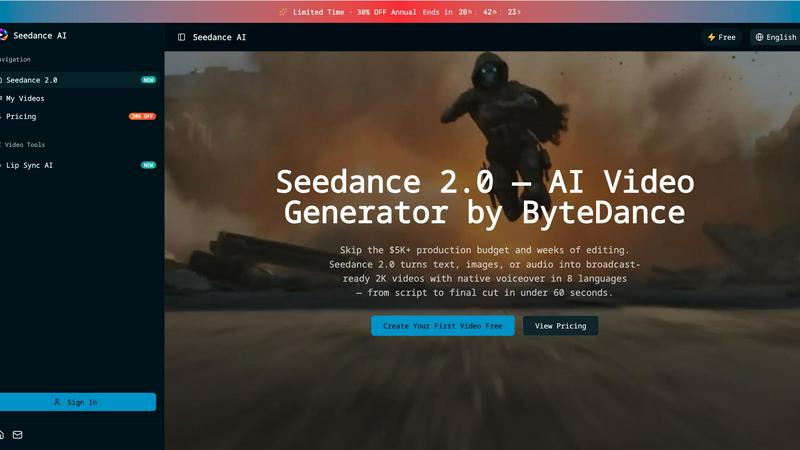
Seedance 2.0 transforms text, images, or audio into stunning 2K videos with voiceovers in 8 languages in under 60.
Last updated: February 28, 2026
Visual Comparison
Melograph
Seedance 2.0
Feature Comparison
Melograph
Easy Template Selection
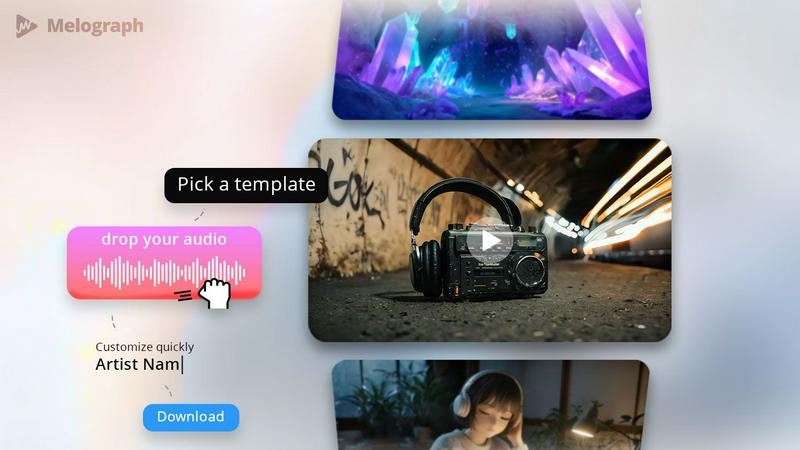
Melograph offers a variety of beautifully designed templates that cater to different musical vibes, from chill and cinematic to retro and futuristic. This feature allows you to quickly choose a look that perfectly matches your track's mood without spending hours on design.
Audio-Reactive Visuals
Experience the magic of audio-reactive visuals as you upload your track. Melograph instantly generates a dynamic waveform that responds to your music, creating a captivating visual experience that engages your audience and enhances the listening atmosphere.
Multiple Export Formats
With Melograph, exporting your video is a breeze. Choose from various formats, including 9:16, 1:1, 4:5, and 16:9, all in stunning 1080p MP4 quality. This flexibility ensures that your visuals are optimized for any platform, be it TikTok, Instagram, or YouTube.
Quick and Hassle-Free Workflow
Forget about the steep learning curves of traditional video editing software. Melograph streamlines your workflow by eliminating unnecessary steps. With just a few clicks—selecting a template, uploading your audio, and exporting—you can create professional-quality visuals in minutes.
Seedance 2.0
Multi-Modal Input
Seedance 2.0 supports a robust multi-modal input system that allows users to drop in any existing media asset, including images, clips, or audio, seamlessly. It recognizes 12 different input types through its innovative @asset tag system, enabling effortless tagging and organization of assets without the need to recreate them from scratch.
Audio-Native Generation
Say goodbye to the hassle of hiring voice actors or synchronizing audio in post-production. Seedance 2.0 automatically generates lip-synced dialogue, Foley effects, and background music, all natively in eight languages. This feature significantly reduces production costs while delivering high-quality audio alongside your video.
Multi-Shot Narrative
Unlike traditional single-clip video generators, Seedance 2.0 allows users to create complex, multi-scene narratives from a single prompt. It ensures consistency in characters, outfits, and lighting across different cuts, enabling creators to build engaging 2-minute stories from 4-15 second video shots without laborious manual editing.
Director-Level Control
Seedance 2.0 offers unparalleled control over video editing, with the ability to make quick adjustments and revisions to any scene using simple commands. Whether you want to swap characters, remove objects, or change camera angles, you can do so without re-prompting the entire video generation, leading to a faster and more efficient workflow.
Use Cases
Melograph
Album Releases
Promote your latest album with stunning visualizers that reflect the essence of your music. Melograph allows you to create unique visuals for each track, ensuring that every release gets the attention it deserves.
Social Media Teasers
Generate buzz for upcoming releases or events by creating engaging teaser videos. Use Melograph's vibrant templates to craft eye-catching clips that grab your audience’s attention as they scroll through their feeds.
Promotional Posts
Enhance your promotional campaigns with consistently branded visuals. Whether you're sharing updates on social media or in promotional emails, Melograph's templates help you maintain a cohesive aesthetic that represents your brand.
Background Visuals for Live Shows
Transform your live performances by using Melograph to create looped background visuals. With audio-reactive elements, your stage presence becomes more captivating, immersing your audience in a multi-sensory experience.
Seedance 2.0
Content Creation
Creators can harness Seedance 2.0 to generate complete video scenes, complete with audio and effects, from a single prompt. This allows for the rapid production of professional-grade content for platforms like YouTube and TikTok, saving time and reducing the need for expensive freelancers.
Film & Animation
For filmmakers and animators, Seedance 2.0 provides the ability to produce multi-scene shorts with consistent characters and cinematic camera work. The automated continuity management cuts production costs by up to 90% compared to traditional methods, making it easier to bring creative visions to life.
Marketing
Marketing teams can utilize Seedance 2.0 to create compelling product demos, brand stories, and spokesperson videos, all enhanced with native audio and lip syncing. Companies have reported a 35% increase in click-through rates (CTR) for AI-generated video ads, showcasing the effectiveness of this powerful tool in driving engagement.
Education
Educators can produce instructor-led tutorials with natural speech in eight languages using Seedance 2.0. By incorporating animated multilingual presenters, completion rates for students can increase by up to 45%, making learning more engaging and accessible compared to traditional static slides.
Overview
About Melograph
Melograph is a revolutionary web-based music visualizer maker designed specifically for musicians, producers, and creators who crave stunning visuals without the hassle of traditional video editing. This innovative tool eliminates the complexity of timelines and editing software, allowing users to start with a premium template that captures the essence of their sound. Simply upload your audio track, customize your artist name and song title, and Melograph will generate a visually striking video ready for posting. Whether you're an indie artist looking to make a mark or a seasoned producer wanting to streamline your promotional efforts, Melograph offers a seamless solution to create eye-catching, audio-reactive music visualizers that elevate your music to new heights.
About Seedance 2.0
Seedance 2.0 is a revolutionary AI video generator designed to empower creators, marketers, educators, and professionals with the ability to produce cinematic-quality videos in mere minutes. Gone are the days of hefty production budgets and extensive editing timelines; Seedance 2.0 transforms text, images, or audio into stunning 2K videos with native voiceovers in eight different languages. Leveraging advanced multi-modal input capabilities, it allows users to seamlessly integrate various media types, making content creation easier and faster than ever. With its user-friendly interface and powerful features, Seedance 2.0 is perfect for everyone, from social media influencers to corporate teams looking to enhance their video marketing strategies. The value proposition is clear: create professional-grade videos in under 60 seconds and eliminate the need for costly freelance services or complex editing software.
Frequently Asked Questions
Melograph FAQ
Do I need editing experience?
No, you don’t need any editing experience to use Melograph. If you can choose a template and enter a title, you can create stunning visuals effortlessly.
Will this work for TikTok, Reels, or Shorts?
Absolutely! Melograph exports your videos in formats optimized for all major platforms, including TikTok, Instagram Reels, and YouTube Shorts, ensuring your visuals look great anywhere.
Can I use it for multiple songs?
Yes, Melograph is designed for versatility. You can create visuals for as many songs as your export credits allow, making it perfect for artists with multiple tracks or projects.
What do I get after payment?
After payment, you'll gain access to all premium templates and export credits based on your chosen plan, allowing you to create high-quality visuals without watermarks and for commercial use.
Seedance 2.0 FAQ
What types of input can I use with Seedance 2.0?
Seedance 2.0 supports a variety of multi-modal inputs, including text, images, audio, and video clips. You can utilize up to 12 different input types to create your videos effectively.
How quickly can I generate a video with Seedance 2.0?
You can create a professional-quality video in under 60 seconds using Seedance 2.0. The platform is designed for rapid video production, allowing you to focus on creativity rather than time-consuming edits.
Is Seedance 2.0 suitable for non-technical users?
Absolutely! Seedance 2.0 is designed with a user-friendly interface that requires no technical skills. Anyone can create stunning videos, making it ideal for personal projects, gifts, or professional use.
Can I create videos in multiple languages?
Yes, Seedance 2.0 offers native audio generation in eight different languages. This feature enables you to reach a broader audience by easily creating multilingual content tailored to various demographics.
Alternatives
Melograph Alternatives
Melograph is a cutting-edge web-based music visualizer designed for musicians and creators who crave stunning audio visuals without the hassle of complex video editing. This platform falls under the video category, offering an intuitive way to create engaging visuals that elevate your music releases. Users often seek alternatives to Melograph for various reasons, such as pricing considerations, specific feature sets, or compatibility with different platforms and workflows. When exploring alternatives, it's crucial to assess factors like ease of use, the quality of visuals, format options, and overall value to ensure you find the right fit for your creative needs.
Seedance 2.0 Alternatives
Seedance 2.0 is an innovative multi-modal AI video generator by ByteDance that empowers users to create cinematic-quality videos using diverse inputs. With its ability to generate videos in 8 languages and export in stunning 2K resolution, it stands out as a versatile tool for content creators seeking to elevate their video production. However, users often explore alternatives due to various factors such as pricing, specific feature sets, or compatibility with different platforms. When choosing an alternative, it's essential to consider the unique features that cater to your video creation needs, such as language support, quality of output, and user interface. Additionally, evaluating pricing structures and the ease of use will ensure a seamless transition to a new platform that enhances your creative workflow.