
Melograph vs The Ultimate Piano

Melograph
Easily transform your music into stunning, shareable audio-visual videos in minutes.
Last updated: February 27, 2026

The Ultimate Piano
Practice piano online with interactive tools, real-time feedback, and a rich library of features to elevate your skills.
Last updated: March 3, 2026
Visual Comparison
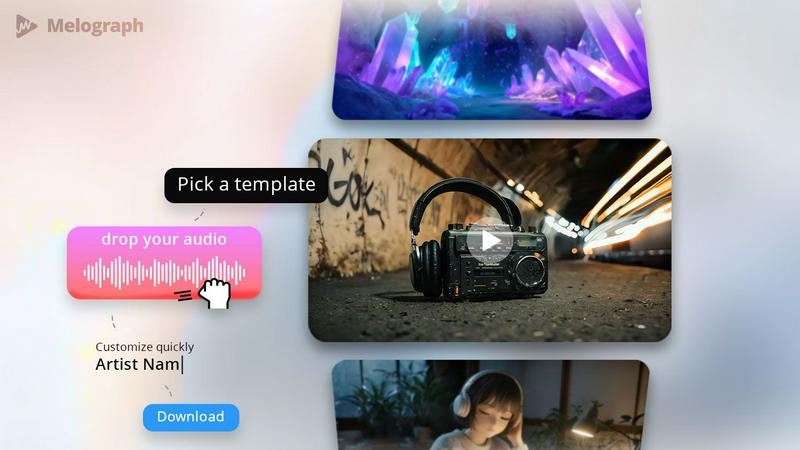
Melograph
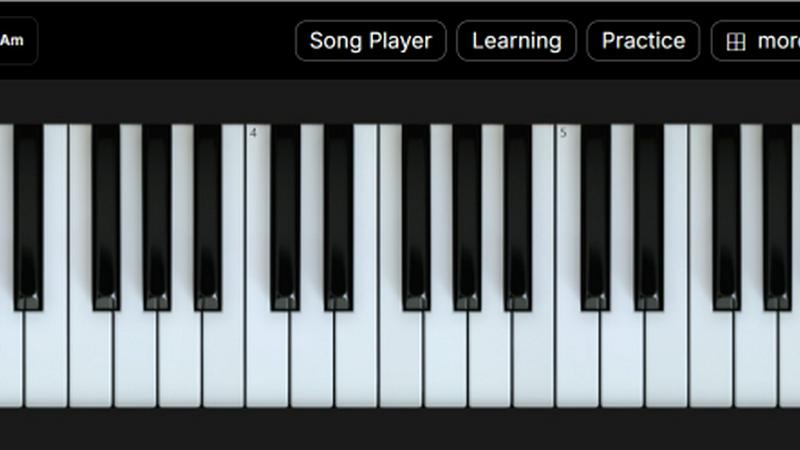
The Ultimate Piano
Feature Comparison
Melograph
Easy Template Selection
Melograph offers a variety of beautifully designed templates that cater to different musical vibes, from chill and cinematic to retro and futuristic. This feature allows you to quickly choose a look that perfectly matches your track's mood without spending hours on design.
Audio-Reactive Visuals
Experience the magic of audio-reactive visuals as you upload your track. Melograph instantly generates a dynamic waveform that responds to your music, creating a captivating visual experience that engages your audience and enhances the listening atmosphere.
Multiple Export Formats
With Melograph, exporting your video is a breeze. Choose from various formats, including 9:16, 1:1, 4:5, and 16:9, all in stunning 1080p MP4 quality. This flexibility ensures that your visuals are optimized for any platform, be it TikTok, Instagram, or YouTube.
Quick and Hassle-Free Workflow
Forget about the steep learning curves of traditional video editing software. Melograph streamlines your workflow by eliminating unnecessary steps. With just a few clicks—selecting a template, uploading your audio, and exporting—you can create professional-quality visuals in minutes.
The Ultimate Piano
Play Piano Online
Experience the joy of playing piano directly in your web browser without the hassle of installations. Utilize your mouse, computer keyboard, or connect a MIDI keyboard to produce beautiful sounds with realistic piano samples, making practice sessions feel alive and engaging.
MIDI Player & Falling Notes
Load any MIDI file and watch as the notes light up on the keyboard in real time. This feature allows you to slow down the tempo, loop tricky sections, or step through notes one at a time—perfect for mastering challenging passages in your favorite tunes.
Chord Detection & Learning
As you play, The Ultimate Piano automatically recognizes and displays chord names in real time. This interactive feature helps users understand harmonic relationships while playing freely, making it an essential tool for building chord recognition skills.
Learning Modes
Engage with interactive support for learning chords and scales. Choose a specific scale, like the Blues Scale in Ab, and see it visualized on the keyboard as it plays. The Scale Trainer provides detailed performance analysis to help you track your progress and improve your skills effectively.
Use Cases
Melograph
Album Releases
Promote your latest album with stunning visualizers that reflect the essence of your music. Melograph allows you to create unique visuals for each track, ensuring that every release gets the attention it deserves.
Social Media Teasers
Generate buzz for upcoming releases or events by creating engaging teaser videos. Use Melograph's vibrant templates to craft eye-catching clips that grab your audience’s attention as they scroll through their feeds.
Promotional Posts
Enhance your promotional campaigns with consistently branded visuals. Whether you're sharing updates on social media or in promotional emails, Melograph's templates help you maintain a cohesive aesthetic that represents your brand.
Background Visuals for Live Shows
Transform your live performances by using Melograph to create looped background visuals. With audio-reactive elements, your stage presence becomes more captivating, immersing your audience in a multi-sensory experience.
The Ultimate Piano
Practice Alongside Your Favorite Songs
With the audio player, you can load any MP3 or audio file to play along with your favorite music. Adjust the playback speed to match your skill level, making it easier to learn complex pieces at your own pace.
YouTube Tutorial Integration
Utilize the YouTube Player to practice along with tutorials and performances. Simply paste a YouTube URL, slow down the playback for difficult sections, and set loop points to repeat specific parts, allowing for focused practice sessions.
Child-Friendly Learning
Children can enjoy learning piano with the Kids Mode, featuring adorable animal icons that represent each note. This visual aid helps young learners associate notes with fun characters, making the learning process enjoyable and engaging.
MIDI Recording for Self-Analysis
Capture your performances with the integrated MIDI recorder, which automatically saves your playing as a MIDI file. This feature allows you to revisit your performances, analyze your progress, and make necessary adjustments to improve your skills.
Overview
About Melograph
Melograph is a revolutionary web-based music visualizer maker designed specifically for musicians, producers, and creators who crave stunning visuals without the hassle of traditional video editing. This innovative tool eliminates the complexity of timelines and editing software, allowing users to start with a premium template that captures the essence of their sound. Simply upload your audio track, customize your artist name and song title, and Melograph will generate a visually striking video ready for posting. Whether you're an indie artist looking to make a mark or a seasoned producer wanting to streamline your promotional efforts, Melograph offers a seamless solution to create eye-catching, audio-reactive music visualizers that elevate your music to new heights.
About The Ultimate Piano
The Ultimate Piano is a revolutionary browser-based practice tool designed specifically for pianists and music learners of all levels. With no downloads required, users can instantly connect their MIDI keyboards and dive into a comprehensive piano practice experience. This platform is not just about playing; it offers a rich suite of features tailored to enhance your musical journey. From real-time chord detection to an extensive scale trainer, Ultimate Piano empowers users to grasp music theory while honing their skills. It is perfect for musicians who seek an all-in-one solution to practice chords, learn scales, and develop ear training abilities. Whether you are a beginner looking to learn the basics or an advanced player aiming for detailed performance analysis, The Ultimate Piano provides the tools necessary to improve in a fun and interactive way. Additionally, it caters to a wide audience, including teachers who need effective visual aids and kids who want a playful learning environment.
Frequently Asked Questions
Melograph FAQ
Do I need editing experience?
No, you don’t need any editing experience to use Melograph. If you can choose a template and enter a title, you can create stunning visuals effortlessly.
Will this work for TikTok, Reels, or Shorts?
Absolutely! Melograph exports your videos in formats optimized for all major platforms, including TikTok, Instagram Reels, and YouTube Shorts, ensuring your visuals look great anywhere.
Can I use it for multiple songs?
Yes, Melograph is designed for versatility. You can create visuals for as many songs as your export credits allow, making it perfect for artists with multiple tracks or projects.
What do I get after payment?
After payment, you'll gain access to all premium templates and export credits based on your chosen plan, allowing you to create high-quality visuals without watermarks and for commercial use.
The Ultimate Piano FAQ
Do I need to install anything to use Ultimate Piano?
No, Ultimate Piano is entirely browser-based, meaning you can start practicing right away without any downloads or installations.
Can I connect my MIDI keyboard?
Absolutely! You can easily connect your MIDI keyboard to The Ultimate Piano, enhancing your practice experience with real-time feedback and interactive features.
What chords and scales can I learn?
The Ultimate Piano offers a variety of chords and scales to learn, including 14 different scale types and real-time chord detection, allowing you to explore harmonic relationships effortlessly.
Does Ultimate Piano have ear training?
Yes, it includes ear training features that help you develop your listening skills for intervals and chords, critical for any aspiring musician looking to improve their musical ear.
Alternatives
Melograph Alternatives
Melograph is a cutting-edge web-based music visualizer designed for musicians and creators who crave stunning audio visuals without the hassle of complex video editing. This platform falls under the video category, offering an intuitive way to create engaging visuals that elevate your music releases. Users often seek alternatives to Melograph for various reasons, such as pricing considerations, specific feature sets, or compatibility with different platforms and workflows. When exploring alternatives, it's crucial to assess factors like ease of use, the quality of visuals, format options, and overall value to ensure you find the right fit for your creative needs.
The Ultimate Piano Alternatives
The Ultimate Piano is an innovative, browser-based practice tool designed specifically for pianists and music learners. It offers a unique blend of features that enhance practice sessions, such as real-time chord detection, scale training, ear training, and music theory visualization, all without the need for downloads. This makes it an accessible option for musicians eager to improve their skills in a digital environment. Users often seek alternatives to The Ultimate Piano due to various reasons, including pricing concerns, specific feature requirements, or compatibility with certain devices. When searching for an alternative, it's essential to consider factors such as the range of features offered, ease of use, and whether the platform meets your individual learning needs and preferences. The right tool should empower your musical journey, so take the time to explore the options available.