
PhotoWeather vs ShinePhoto

PhotoWeather
PhotoWeather alerts outdoor photographers when their perfect shooting conditions arrive.
Last updated: February 28, 2026

ShinePhoto
Transform your photos with precise auto-cropping and AI restoration for stunning, share-ready images in seconds.
Last updated: February 28, 2026
Visual Comparison
PhotoWeather
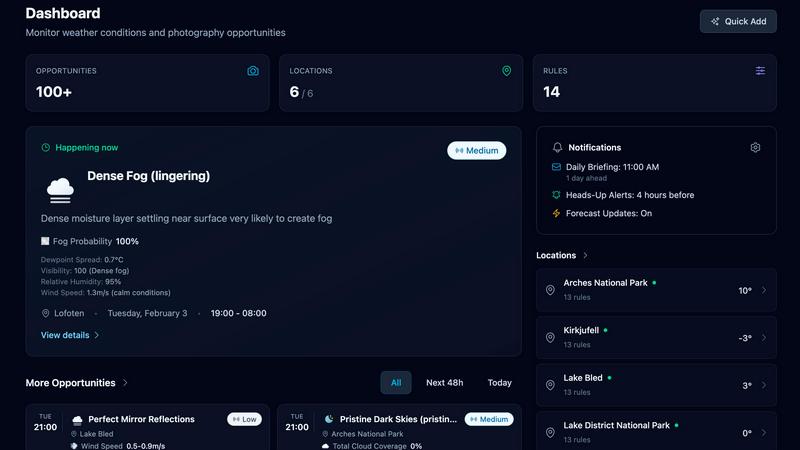
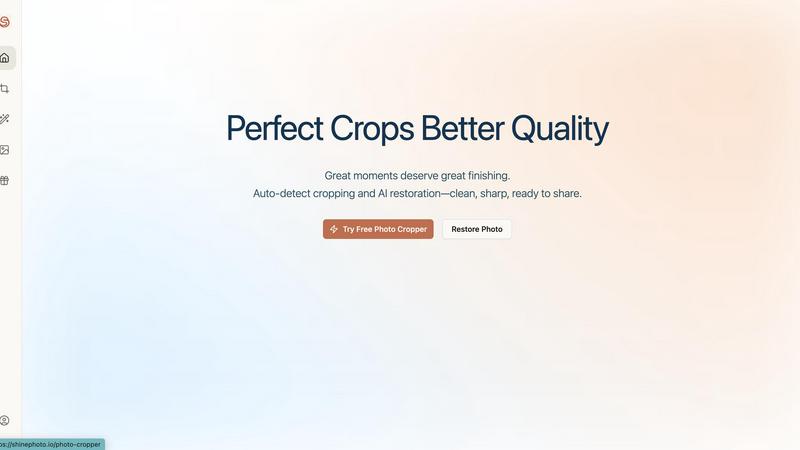
ShinePhoto
Feature Comparison
PhotoWeather
Powerful Rule Builder
Craft hyper-specific condition alerts with an intuitive yet powerful rule builder featuring over 80 parameters. Go beyond basic weather to include clouds (type, coverage, height), visibility, wind, humidity, pressure, dew point, and advanced indices like CAPE for storm prediction. Combine this with comprehensive astronomy data for sun, moon, aurora, and Milky Way visibility. Use AND/OR/NOT logic to create complex rules like "Golden hour + 20–60% cloud cover + wind under 7 m/s" to pinpoint your ideal shooting window with precision.
Ready-Made Photographer Templates
Jumpstart your setup instantly with professionally crafted templates designed for specific photographic phenomena. Choose from a library of pre-configured rules for scenarios like "Fog and Mist," "Epic Golden Cloud Drama," "Aurora Visibility," "Storm Intensity," "Coastal Drama," and "Still Water Reflections." These templates are built on photographer-tested condition thresholds, allowing you to get your first alert in under a minute without needing to be a meteorology expert.
Smart Notifications & Calendar Sync
Receive alerts your way with a multi-channel notification system. Get daily morning digests to plan your day, real-time alerts for time-sensitive opportunities, and reminders before a forecasted window begins. The game-changing Calendar Sync feature automatically creates and updates events in your personal calendar (like Google or Outlook), placing your photo opportunities directly alongside your other commitments for seamless planning.
Horizon-Aware Forecast Data
PhotoWeather provides more than just overhead weather; it delivers horizon-aware data critical for photographers. This means forecasts consider your specific location's topography to give accurate information for sunrise, sunset, and celestial events. Coupled with trend tracking for evolving conditions and multi-model confidence scores from top-tier sources like ECMWF and NOAA, you get trustworthy, location-intelligent data to make confident shooting decisions.
ShinePhoto
Smart Photo Cropper
The smart photo cropper uses advanced AI to automatically detect and crop images with precision. Users can seamlessly trim distractions and focus on the subjects that matter, ensuring every photo is framed beautifully.
Batch Processing
ShinePhoto allows users to handle multiple photos at once, streamlining the workflow for batch cropping and restoration. This feature saves valuable time, especially for those with extensive photo collections needing attention.
AI Image Enhancer & Upscaler
This powerful feature enhances the quality of images by sharpening details, reducing noise, and upscaling resolution in a single click. It is perfect for cleaning up scanned images or reviving older photos that need a modern touch.
Custom Targeting
With custom targeting, users can specify the subject they want to focus on. This ensures that the auto-cropper locks onto the chosen subject for accurate and tailored framing, allowing for personal touch in every photo.
Use Cases
PhotoWeather
Landscape Photography Perfection
For landscape shooters chasing specific light and atmosphere. Set rules for fog formation in a valley, the perfect level of cloud drama over a mountain range, or calm wind for mirror-like water reflections. PhotoWeather monitors these nuanced conditions around the clock, alerting you when your planned composition at your favorite location will come to life, so you can be on-site and ready.
Astro & Night Sky Shooting
Eliminate the guesswork from astrophotography. Create rules for true astronomical darkness, moon phase and position below the horizon, low cloud cover, and optimal atmospheric transparency. PhotoWeather will alert you to the precise nights and times when the Milky Way core is visible or auroral activity is predicted, maximizing your chances for a successful shoot under the stars.
Storm & Extreme Weather Chasing
Safely capture the power of nature with confidence. Use advanced parameters like CAPE (Convective Available Potential Energy), lightning activity, and storm intensity to set alerts for developing severe weather. Get notified of approaching storm fronts with dramatic cloud structures, allowing you to position yourself safely and in advance to photograph lightning, shelf clouds, or turbulent skies.
Wildlife Photography Planning
Plan your wildlife outings around optimal animal activity and shooting conditions. Set rules for gentle wind speeds to avoid spooking subjects, specific temperature ranges, or humidity levels that might influence behavior. Combine this with golden or blue hour alerts to ensure you have the best light for capturing dynamic wildlife portraits in their natural habitat.
ShinePhoto
Family Photo Restoration
Users can easily restore old family photos that have seen better days. ShinePhoto’s tools repair scratches, enhance colors, and improve clarity, making treasured memories last for generations to come.
Social Media Ready Images
Whether you're a blogger, artist, or just someone who loves to share, ShinePhoto helps you create stunning, share-ready images effortlessly. With batch processing, you can prepare multiple photos for social media in no time.
Organizing Digital Collections
ShinePhoto is perfect for those looking to digitize and organize their photo collections. You can quickly crop and enhance a large batch of images, making it easier to archive and retrieve your favorite moments.
Professional Photography Touch-Up
Photographers can use ShinePhoto for quick touch-ups and enhancements. The AI-driven features help in refining images with minimal effort, allowing professionals to focus on their creative process while ensuring top-quality results.
Overview
About PhotoWeather
Stop checking weather apps every hour. PhotoWeather is the intelligent forecast monitor built exclusively for outdoor photographers. It's your 24/7 digital scout, watching the skies so you don't have to. The core mission is simple: to alert you only when the weather conditions perfectly match your creative goals, ensuring you never miss a fleeting moment like sunrise fog, a dramatic storm front, or that perfect cloud break during golden hour. Built for landscape, astro, and wildlife photographers, it transforms chaotic weather data into actionable photo opportunities. Forget sifting through irrelevant forecasts for temperature and precipitation chances. With PhotoWeather, you define the exact parameters that matter for your shot—from cloud layers and wind speed to astronomical events—and get smart, timely notifications. It puts you in control, turning complex meteorological data into a simple go/no-go decision, so you can be ready and in position when the magic happens. The best light won't wait, and PhotoWeather makes sure you're there to capture it.
About ShinePhoto
ShinePhoto is your go-to freemium AI photo toolkit designed to elevate your photography experience. Whether you're a casual user looking to tidy up your photo collection or a professional needing precise batch processing, ShinePhoto has you covered. With its powerful auto-cropping feature, ShinePhoto intelligently detects subjects in your images, ensuring that every frame is perfectly cropped to highlight your most cherished moments. Additionally, the AI Image Enhancer & Upscaler breathes new life into older photos, removing imperfections and enhancing clarity in seconds. Ideal for anyone wanting to digitize, organize, and restore their photo collections, ShinePhoto combines ease of use with advanced technology, making every moment shine brilliantly.
Frequently Asked Questions
PhotoWeather FAQ
How accurate are the forecasts?
PhotoWeather aggregates and analyzes data from the world's most trusted forecast models, including ECMWF, DWD, NOAA, MET Norway, and Météo-France. We provide multi-model confidence scores for your rules, so you can see how much the top services agree on an upcoming opportunity. This gives you a reliable, professional-grade assessment far superior to checking a single consumer app.
Can I create my own custom rules?
Absolutely! While we offer convenient pre-made templates, the full power of PhotoWeather lies in our custom rule builder. You have access to over 80 weather and astronomy parameters which you can combine with advanced logic (AND/OR/NOT) to create rules that match your exact creative vision, no matter how specific or complex.
How do the notifications and calendar sync work?
You can choose from daily digest emails, real-time push notifications (on mobile), and SMS alerts. Our unique calendar sync feature automatically creates events in your connected calendar (e.g., Google Calendar) for upcoming photo opportunities. These events update automatically if the forecast changes, keeping your schedule always current.
What's included in the free tier?
The Free plan is perfect for starting out, offering 1 location, 3 custom rules, forecasts updated every 6 hours, and a 3-day outlook. It includes all essential weather and astronomy data, email digests, and calendar integration. This allows any photographer to fully experience the core alerting functionality at no cost.
ShinePhoto FAQ
What is ShinePhoto?
ShinePhoto is an AI-driven photo toolkit that combines an intuitive photo cropper with advanced restoration features. It helps users enhance, upscale, and perfectly frame their images, making ordinary moments extraordinary.
Is ShinePhoto free to use?
Yes, ShinePhoto offers a free core experience, allowing users to access essential features without any cost. Premium upgrades are available for those needing advanced enhancement or higher usage.
How does photo restoration work?
Photo restoration in ShinePhoto is simple: upload your images and apply the restore tools to reduce blur, noise, and damage. The effectiveness of the restoration depends on the quality of the original image.
Can I choose the subject to crop?
Yes! ShinePhoto allows users to specify the subject for cropping. This feature ensures that the auto-cropper focuses on your chosen target, delivering precise and personalized framing.
Alternatives
PhotoWeather Alternatives
PhotoWeather is a specialized alert service for photographers that monitors complex weather and astronomical conditions 24/7. It belongs to the niche category of photography planning tools, designed to notify you only when the environment matches your creative goals, so you can stop constantly checking forecasts. Photographers might look for alternatives for various reasons. Some may need a different pricing model or a specific feature set not offered. Others might require compatibility with a different platform or prefer a tool with a broader or more simplified focus beyond just weather-driven photo opportunities. When evaluating alternatives, consider the depth of weather parameters, the flexibility of alert rules, and the specificity to photography. The best tool for you will reliably filter the noise of general forecasts to deliver actionable intel for the exact shots you want to capture, whether that's a misty sunrise or a powerful storm.
ShinePhoto Alternatives
ShinePhoto is an innovative AI photo toolkit designed to make every photo shine. Positioned within the image generation category, it offers a freemium experience that allows users to enhance their photo collections effortlessly through advanced batch subject auto-cropping and quality restoration features. As users seek to improve their photo editing experience, they often look for alternatives to address diverse needs such as pricing flexibility, enhanced features, and compatibility with various platforms. When exploring alternatives, it's essential to consider factors like the specific features offered, the ease of use, and the potential for scalability as your photo editing demands grow. Additionally, evaluating the customer support and community around the tool can significantly impact your overall experience. Whether you're looking for a more budget-friendly option or advanced capabilities, making an informed choice ensures you find the perfect fit for your photo editing journey.