
Playwriter vs QRKit

Last updated: March 18, 2026

Last updated: February 28, 2026
Visual Comparison
Playwriter

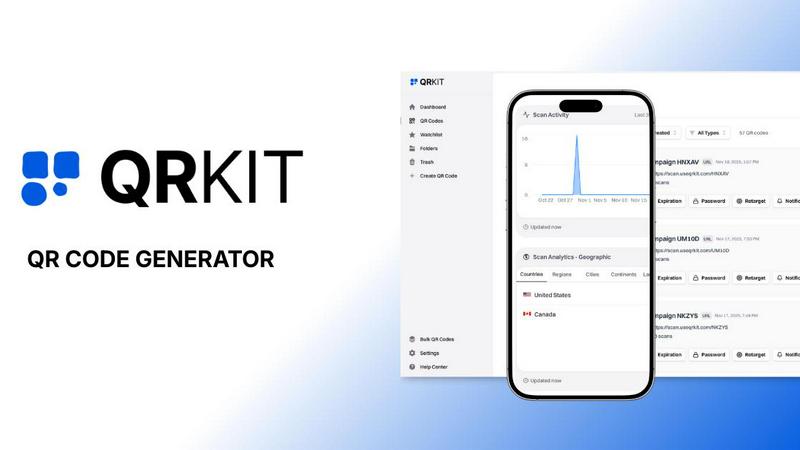
QRKit
Feature Comparison
Playwriter
Your Real Browser Session
Playwriter doesn't spawn a new, sterile browser. It attaches directly to your existing Chrome tabs via a debugger connection. This means every website you're already logged into—Gmail, GitHub, admin dashboards—is instantly available to your AI agent. Your extensions (like password managers or ad blockers) are active, and your cookies are present, completely bypassing the bot detection that plagues fresh, headless instances. It's browsing with your identity, without the overhead.
Full Playwright API Through a Single Tool
Instead of limiting agents to a fixed set of pre-defined tools (like "click" or "type"), Playwriter exposes one powerful execute tool. Your agent can run any valid Playwright code, unlocking the entire automation library: complex selectors, network interception, performance profiling, and setting breakpoints. This keeps the AI's context window lean by avoiding schema bloat from dozens of tool definitions and grants unparalleled flexibility.
Advanced Debugging & Collaboration Suite
Playwriter is built for real-world debugging and human-AI teamwork. It includes a live debugger with breakpoints, live code editing, and network request interception. You can watch the agent work in real-time on your screen. When it hits a CAPTCHA or a consent wall, you simply solve it and let the agent continue. If it gets stuck, you can temporarily disable control, fix the page manually, and re-enable it—seamless collaboration.
Lightweight Accessibility Snapshots & Recording
Forget massive, context-consuming screenshots. Playwriter generates compact accessibility snapshots (only 5-20KB) that provide the AI with a structured, semantic view of the page. It also includes visual labeling for elements and can record full video of the agent's session. Combined with network interception, this gives your AI deep, efficient insight into page state and behavior.
QRKit
Dynamic QR Codes
With QRKit, you can create dynamic QR codes that allow you to edit their destination anytime without the need for reprinting. This feature ensures that your printed materials remain relevant, as you can update URLs or change content in real-time, all while keeping the same QR code.
Advanced Scan Analytics
Track every scan with QRKit's detailed analytics feature. Gain insights into the location, device type, operating system, and timing of each scan. This level of data allows you to monitor performance in real time, helping you make informed adjustments to your marketing strategies.
Custom Designs
QRKit offers extensive customization options so you can make your QR codes stand out. Choose from an array of colors, logos, patterns, corner styles, and frames to create a visually appealing QR code that aligns perfectly with your brand identity.
Permanent Codes
Say goodbye to expiration dates with QRKit's free QR codes that never expire. Both static and dynamic codes remain active, allowing you to leverage them for as long as you need without worrying about limits on scans or usage.
Use Cases
Playwriter
Automated Web Testing & Debugging
Developers can instruct their AI assistant to run complex, multi-step user flows on their already-logged-in development or staging environments. The agent can click through UIs, fill forms, intercept API calls to verify payloads, and profile performance—all within the exact browser context a real user would have, making tests more reliable and context-aware.
AI-Powered Research & Data Extraction
Researchers and analysts can task an AI with gathering information from websites that require login or have complex interactive elements. Since Playwriter uses the real browser, it can navigate paywalls, logged-in databases, and JavaScript-heavy dashboards that are completely inaccessible to traditional, headless agent tools.
Routine Task Automation
Automate repetitive daily web tasks without writing a single line of code yourself. Have your AI agent log in to platforms, generate reports, schedule posts, or monitor status pages. Because it works in your browser session, it can handle two-factor authentication flows where you approve the login prompt.
Enhanced AI Assistant Capabilities
Supercharge coding assistants like Cursor or Claude. Instead of just writing hypothetical code, your AI can now execute Playwright scripts to interact with live documentation, pull examples from a web API, test a component in Storybook, or even debug a live web application by manipulating the DOM and inspecting network traffic in real-time.
QRKit
Restaurants
In the restaurant industry, QRKit can be used to create digital menus and contactless ordering solutions. Customers can scan QR codes placed on tables or at the entrance to access menus, place orders, and even pay, enhancing their dining experience while ensuring safety.
Ecommerce
For ecommerce businesses, QRKit enables the creation of product links and promotional campaigns. By generating QR codes that direct customers to product pages or special offers, businesses can effectively bridge offline marketing with online sales.
Education
Educational institutions can utilize QRKit to create course materials and interactive learning resources. By incorporating QR codes into textbooks or handouts, students can easily access supplementary materials, videos, and quizzes, making learning more engaging.
Events
At events, QRKit can facilitate seamless check-ins and attendee engagement. Organizers can create QR codes for tickets or schedules, allowing attendees to quickly access important information, network, and participate in activities without the hassle of paper tickets.
Overview
About Playwriter
Stop fighting with headless browsers and bot detection. Playwriter is the game-changing bridge that lets your AI agents operate directly within your real, logged-in Chrome browser. It's a Chrome extension and CLI that gives any MCP client (like Cursor, Claude Desktop, or VS Code) the full power of the Playwright automation API, but executed in your existing browser session. This means your agents have immediate access to all your extensions, cookies, and logins—no fresh Chrome instance, no extra memory load, and no instant red flags from websites. It turns the brittle, limited browsing of today's AI into a seamless, powerful, and collaborative experience. Built for developers, researchers, and power users who need their AI assistants to interact with the modern web as a human would, Playwriter is open-source (MIT licensed) and runs entirely locally on your machine, putting you in full control.
About QRKit
QRKit is a cutting-edge QR code generator specifically designed for teams that crave actionable insights beyond mere scan counts. This powerful tool enables users to create dynamic QR codes that not only lead to various digital destinations but also provide real-time tracking of scans. With QRKit, marketers, founders, and developers have the ability to measure the effectiveness of offline campaigns and printed materials through comprehensive analytics and intuitive dashboards. This platform goes beyond basic QR code generation, allowing users to edit destinations, track engagement metrics, and customize codes with brand elements. QRKit empowers businesses to turn every scan into meaningful data, fostering improved decision-making and enhanced marketing strategies.
Frequently Asked Questions
Playwriter FAQ
Is my browsing data sent to a remote server?
No. Playwriter is designed with privacy and security first. All communication happens via a WebSocket relay running on localhost:19988 on your own machine. The Chrome extension, CLI, and your AI client communicate directly with this local relay. No browsing data, credentials, or session cookies are ever transmitted to any remote server.
How does Playwriter avoid bot detection?
It avoids detection by not acting like a typical bot. It controls your genuine, user-initiated Chrome browser session, which already has a normal history, cookies, and likely some browser extensions installed. This fingerprint matches that of a regular human user, unlike a fresh, headless Chrome instance which lacks these signals and is easily flagged.
Can I use it with any AI or just specific MCP clients?
Playwriter works with any client that supports the Model Context Protocol (MCP), which is becoming a standard for AI tool integration. This includes popular environments like Cursor, Claude Desktop, VS Code with extensions, and more. The provided skill teaches these clients how to use Playwriter effectively.
What happens if the AI gets stuck or makes a mistake?
This is where the collaboration features shine. You watch the actions happen live in your browser. If the agent enters an error state or gets stuck in a loop, you can immediately click the extension icon to detach it from that tab (turning it gray), manually correct the situation, and then re-attach control. The agent can then continue from the corrected state.
QRKit FAQ
How do I create a QR code using QRKit?
Creating a QR code is simple! Just choose from over 20 types of QR codes, enter your desired information, and instantly generate a high-quality QR code. You can then customize it with colors, logos, and more before downloading.
Can I track the performance of my QR codes?
Absolutely! QRKit provides advanced analytics that allow you to track every scan. You'll receive detailed insights about the location, device type, and timing of scans, all accessible through your user dashboard.
Are QR codes generated with QRKit free?
Yes! QRKit offers a free QR code generator that allows you to create, track, and customize QR codes at no cost. You can start using the platform without entering any credit card information.
What types of QR codes can I create?
QRKit supports more than 20 types of QR codes, including URLs, vCards, WiFi access, menus, video links, social media profiles, and much more. This versatility makes it easy to create codes tailored to your specific needs.
Alternatives
Playwriter Alternatives
Playwriter is a developer tool that bridges AI agents directly to your real browser session. It solves the core problem of AI automation by providing access to your actual logged-in state, extensions, and settings, instead of a fresh, empty browser that gets instantly flagged. Developers often look for alternatives for various reasons. They might need different pricing models, require specific integrations with other tools in their stack, or be looking for a particular feature set that matches their unique workflow. The landscape of browser automation and AI agent tools is constantly evolving. When evaluating options, consider the core capability of session persistence, the depth of debugging and control features, compatibility with your preferred AI clients and IDEs, and the overall philosophy of the project regarding openness, security, and extensibility. The right tool should feel like a natural extension of your development process.
QRKit Alternatives
QRKit is a cutting-edge QR code generator designed for teams eager to harness the power of real-time analytics. It falls under the categories of Dev Tools and Marketing, providing users with dynamic QR codes that track scans and offer insights into user engagement. Marketers, founders, and developers alike leverage QRKit to transform every scan into meaningful data, enhancing their offline campaigns and printed materials. Users often seek alternatives to QRKit for various reasons, such as pricing, specific feature requirements, or compatibility with their existing platforms. When considering an alternative, it's essential to evaluate the range of features offered, the user interface's simplicity, and the depth of analytics provided. This ensures that you select a tool that not only meets your immediate needs but also aligns with your long-term marketing strategies.