
Hush Touch | Voice-to-Text for MacOS vs Read PDF Aloud

Hush Touch | Voice-to-Text for MacOS
Hush Touch is on-device Mac dictation that learns your vocabulary and removes filler words.
Last updated: February 28, 2026

Read PDF Aloud
Effortlessly listen to any PDF with natural AI voices in 142 languages for free.
Last updated: February 27, 2026
Visual Comparison
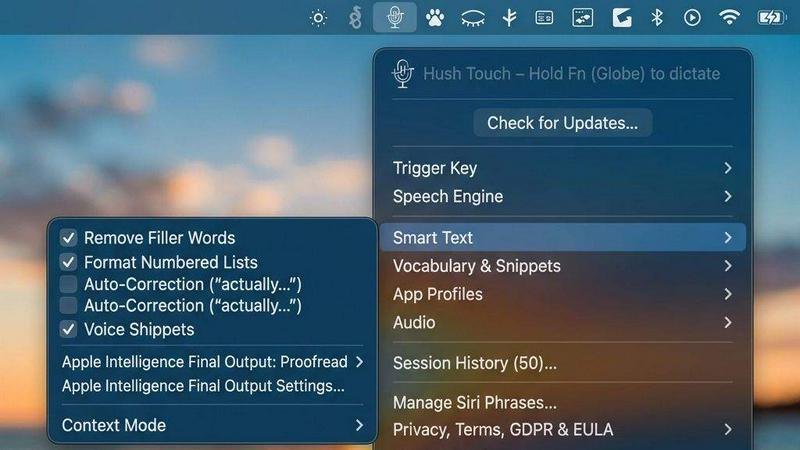
Hush Touch | Voice-to-Text for MacOS
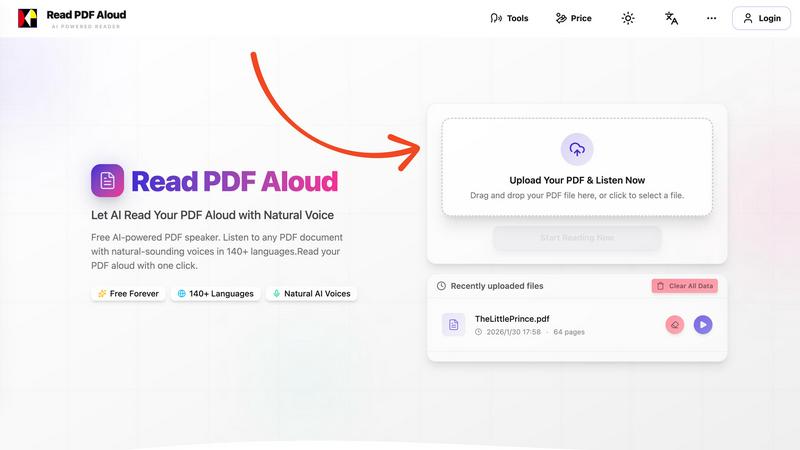
Read PDF Aloud
Feature Comparison
Hush Touch | Voice-to-Text for MacOS
Dual-Engine AI Recognition
Hush Touch leverages a powerful dual-engine system for unmatched accuracy. It runs both Apple's DictationTranscriber for natural flow and punctuation and SFSpeechRecognizer to spot your custom vocabulary. These outputs are then blended and refined through a final on-device Apple Intelligence pass, resulting in cleaner, more context-aware transcriptions that understand technical terms and everyday speech with precision.
Custom Vocabulary & Adaptive Learning
Stop fighting with your dictation software over jargon. Hush Touch supports a 500-term custom vocabulary and features auto-learn from your corrections. When you fix a word, it's intelligently added to your personal lexicon. This adaptive learning is frequency-weighted and can even boost specific terms per application, ensuring it nails brand names, medical terminology, and your unique phrasing every time.
100% On-Device Privacy & Processing
Your voice data is yours alone. Hush Touch operates with zero cloud dependency, meaning all audio processing, transcription, and the AI final pass happen entirely on your Mac. This guarantees complete privacy, allows for full offline functionality, and eliminates the latency associated with sending data to remote servers, making it the most secure voice-to-text option available.
Smart Text Processing & Hands-Free Commands
Go beyond basic transcription with intelligent local processing. Hush Touch automatically removes filler words ("um," "like"), applies auto-correction for common slips, and can format numbered lists. Use voice snippets for frequent phrases and switch between context modes like Email or Code. Enable fully hands-free operation with Siri, and use voice commands like "okay send message" to automate your workflow.
Read PDF Aloud
Free to Use
Take advantage of our completely free AI-powered PDF speaker that allows you to read any PDF aloud without any hidden fees. We provide daily credits to registered users, enabling you to enjoy seamless access to all features.
PDF OCR Support
Our advanced Optical Character Recognition (OCR) technology allows you to upload scanned PDF documents and convert them into readable text. This feature ensures that no document is off-limits, making it perfect for students and professionals dealing with non-searchable files.
Natural AI Voices
Read PDF Aloud offers a vast library of realistic AI voices, allowing you to choose from hundreds of options across various accents and tones. This diversity in voice selection enhances the listening experience, making it enjoyable and relatable.
Instant Audio Conversion
With our intuitive interface, you can convert your PDF documents into audio within seconds. The local-first processing ensures that there are no long loading times, allowing you to start listening immediately without any interruptions.
Use Cases
Hush Touch | Voice-to-Text for MacOS
Drafting Long-Form Content & Documents
Writers, researchers, and students can break through writer's block and capture ideas at the speed of thought. Dictate blog posts, essays, reports, or chapters hands-free. The app's natural flow processing and punctuation allow you to maintain your narrative voice, while filler word removal delivers a cleaner first draft instantly, saving hours of editing and typing.
Managing Professional Communication
Professionals drowning in emails and Slack messages can reclaim their time. Use Hush Touch to quickly compose and send replies, project updates, or client communications entirely by voice. The dedicated Email context mode optimizes formatting, and the "send message" voice command lets you dispatch communications without ever touching the keyboard, streamlining your entire inbox workflow.
Capturing Technical Notes & Code Snippets
Developers, engineers, and IT professionals can document processes or even dictate code comments and snippets with confidence. The custom vocabulary learns technical terms like "Kubernetes" or "API endpoint," and the Code context mode helps structure your notes. This turns verbal brainstorming into precise, actionable documentation without breaking your flow.
Clinical Documentation & Specialized Dictation
Doctors, therapists, and legal professionals can generate accurate notes on the fly. Hush Touch's ability to learn and perfectly transcribe complex medical, legal, or industry-specific terminology from the get-go eliminates frustrating errors. This ensures patient records, case notes, and reports are both accurate and created efficiently during or immediately after consultations.
Read PDF Aloud
Academic Support
Students can utilize Read PDF Aloud to listen to their study materials or lecture notes while multitasking. This auditory learning approach enhances retention and understanding, making it easier to absorb complex concepts.
Professional Document Review
Professionals can benefit from this tool by listening to reports, proposals, and other essential documents as they go about their day. This increases productivity by allowing users to consume information while performing other tasks.
eBook Listening
For avid readers, Read PDF Aloud transforms your favorite eBooks into an audio format, enabling you to enjoy literature on the go. Whether commuting or working out, you can immerse yourself in stories without needing to read.
Accessibility Enhancement
Read PDF Aloud serves as a crucial tool for individuals with visual impairments or reading difficulties. By providing a natural-sounding audio alternative to written text, it makes content accessible to everyone, regardless of their reading abilities.
Overview
About Hush Touch | Voice-to-Text for MacOS
Meet Hush Touch, the AI-powered voice-to-text revolution for your Mac that ditches the cloud and supercharges your workflow. This isn't just another dictation app; it's a fully on-device intelligence engine that makes speaking your thoughts faster, smarter, and infinitely more private than typing. Designed for professionals, creators, and anyone who writes, Hush Touch combines two powerful Apple transcription engines with a final Apple Intelligence pass to deliver shockingly accurate, clean text—all processed locally on your Mac. No subscriptions, no lag, no data ever leaving your machine. With a lightning-fast launch from a tiny 5.5MB footprint, it integrates seamlessly into your daily routine for drafting emails, messages, notes, and documents. Simply hit a hotkey, speak naturally, and watch as polished text auto-inserts after a brief pause. For those tired of cloud-dependent, error-prone dictation, Hush Touch is the definitive upgrade: a one-time purchase that learns your unique vocabulary, removes filler words, and gets smarter with every use, all while guaranteeing complete privacy.
About Read PDF Aloud
Read PDF Aloud is a revolutionary browser-based application that redefines how you interact with your PDF documents. By transforming text into natural-sounding speech, it allows users to listen to any PDF file instantly, offering an engaging and accessible experience. The application stands out with its high-quality neural voices that support over 142 languages, making it an ideal tool for diverse users around the globe. Whether you are a student needing to proofread or absorb study materials, a professional reviewing complex reports, or simply someone who enjoys listening to eBooks on the go, Read PDF Aloud is designed to meet your needs. Best of all, this powerful tool operates entirely within your browser, ensuring that your data remains private and secure while delivering a smooth, responsive listening experience across all devices.
Frequently Asked Questions
Hush Touch | Voice-to-Text for MacOS FAQ
How does Hush Touch work offline?
Hush Touch is architected for complete offline functionality. It uses Apple's native speech recognition engines (DictationTranscriber and SFSpeechRecognizer) which are built into macOS, along with an on-device Apple Intelligence model for the final polish. All audio processing and transcription occur locally on your Mac, requiring no internet connection for core dictation features.
What is the difference between the free trial and the full license?
The 7-day free trial offers full access to all features of Hush Touch, including unlimited dictation, custom vocabulary, and all smart processing capabilities. After the trial period ends, you will need to purchase a one-time lifetime license to continue using the app. No features are restricted during the trial.
Can I use Hush Touch with other applications like Google Docs or Word?
Absolutely. Hush Touch works system-wide on your macOS. You can dictate into any text field or application that accepts keyboard input, including web browsers (for Gmail, Google Docs), native apps like Notes and Pages, Microsoft Word, Slack, and many more. It acts as a superior, intelligent replacement for your keyboard.
How does the custom vocabulary and learning feature work?
You can manually add up to 500 terms to your custom dictionary. More powerfully, Hush Touch employs adaptive learning: when you manually correct a transcribed word in any text field, the app detects this and can automatically add the correct spelling and pronunciation to your personal vocabulary, making it smarter and more accurate with each use.
Read PDF Aloud FAQ
How does Read PDF Aloud work?
Read PDF Aloud operates by allowing users to upload a PDF file, which is then parsed to extract text directly in the browser. The extracted text is processed locally, ensuring a quick transition to audio playback.
Can I use Read PDF Aloud on my mobile device?
Absolutely! Read PDF Aloud is designed to work seamlessly on any modern browser, so you can use it on your PC, Mac, iPhone, iPad, Android, or Linux devices, making your PDFs accessible anywhere.
Is my data secure when using Read PDF Aloud?
Yes! Read PDF Aloud maintains a local-first philosophy, meaning that most processing occurs on your device, and your data never leaves your browser. This ensures a secure and private experience.
Can I download the audio files created by Read PDF Aloud?
Yes! Read PDF Aloud allows you to export the audio generated from your documents as MP3 files. This feature enables you to listen offline or share the audio with others easily.
Alternatives
Hush Touch | Voice-to-Text for MacOS Alternatives
Hush Touch | Voice-to-Text for MacOS is a powerful, privacy-first dictation tool that transforms your spoken words into clean, accurate text entirely on your Mac. It’s part of a growing category of productivity apps designed to help you write faster and more naturally, hands-free. Users often explore alternatives for various reasons. Maybe they need a free tier to test the waters, require specific features like multi-language support, or are looking for a solution that works across different operating systems beyond macOS. Budget, workflow integration, and privacy concerns are also common drivers for the search. When evaluating other options, focus on what matters most for your daily use. Key considerations include accuracy and speed of transcription, whether processing happens on-device for privacy, how well it integrates into your existing apps, and the overall cost structure. The right tool should feel like a natural extension of how you already work.
Read PDF Aloud Alternatives
Read PDF Aloud is a cutting-edge, browser-based application designed to convert your PDF documents into natural-sounding speech, belonging to the Audio & Music category. Users often seek alternatives for various reasons, including pricing concerns, specific feature requirements, or compatibility with their preferred platforms. When exploring alternatives, it’s essential to consider factors such as the quality of the voice output, language support, ease of use, and whether the application meets your accessibility needs. --- [{"question": "What is Read PDF Aloud?", "answer": "Read PDF Aloud is a browser-based application that converts PDF documents into natural-sounding speech using high-quality neural voices."}, {"question": "Who is Read PDF Aloud for?", "answer": "Read PDF Aloud is ideal for anyone looking to enhance their reading experience, including students, professionals, and individuals with visual impairments."}, {"question": "Is Read PDF Aloud free?", "answer": "The pricing details for Read PDF Aloud are not specified, so users should check the website for the latest information on any potential costs."}, {"question": "What are the main features of Read PDF Aloud?", "answer": "Key features of Read PDF Aloud include high-quality neural voices in multiple languages, offline capabilities, and a responsive design for seamless use on any device."}]