
ShinePhoto vs Supermachine

ShinePhoto
Transform your photos with precise auto-cropping and AI restoration for stunning, share-ready images in seconds.
Last updated: February 28, 2026

Supermachine
Supermachine is your AI creative suite for generating stunning images and videos with powerful next-gen models.
Last updated: March 18, 2026
Visual Comparison
ShinePhoto

Supermachine
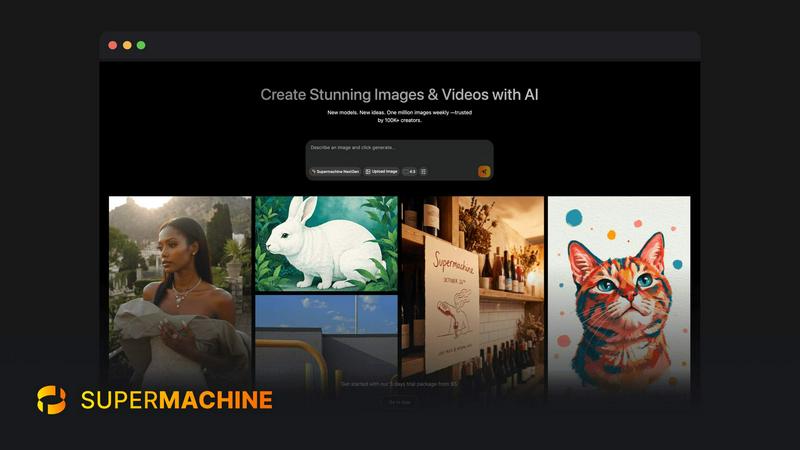
Feature Comparison
ShinePhoto
Smart Photo Cropper
The smart photo cropper uses advanced AI to automatically detect and crop images with precision. Users can seamlessly trim distractions and focus on the subjects that matter, ensuring every photo is framed beautifully.
Batch Processing
ShinePhoto allows users to handle multiple photos at once, streamlining the workflow for batch cropping and restoration. This feature saves valuable time, especially for those with extensive photo collections needing attention.
AI Image Enhancer & Upscaler
This powerful feature enhances the quality of images by sharpening details, reducing noise, and upscaling resolution in a single click. It is perfect for cleaning up scanned images or reviving older photos that need a modern touch.
Custom Targeting
With custom targeting, users can specify the subject they want to focus on. This ensures that the auto-cropper locks onto the chosen subject for accurate and tailored framing, allowing for personal touch in every photo.
Supermachine
Curated Model Library
Supermachine provides access to a handpicked collection of 60+ elite AI models for image and video generation. Instead of overwhelming you with every new release, our team selectively adds models only when they demonstrate clear, significant improvements in output quality, speed, and practical utility. This curated approach ensures you always work with the most reliable and high-performing tools available, guaranteeing professional results without the guesswork of choosing the right engine for your project.
Advanced Creative Control Suite
Move beyond basic text prompts with a full suite of professional editing tools. Utilize image-to-image generation to remix and reimagine existing visuals. Employ the Instruction Model for precise, text-based edits without manual masking. Take advantage of features like Face Swap for character consistency, AI Upscaler to enhance resolution, and custom size outputs for any platform. This suite puts the power of a full digital studio at your fingertips.
Rapid-Fire Video Generation
Create engaging short-form videos and marketing clips directly within the platform. This feature is built for the fast-paced demands of social media, content marketing, and digital storytelling. Generate video content from text prompts or existing images in seconds, allowing you to produce dynamic visual content like Instagram Reels, YouTube Shorts, or product demos without ever needing complex video editing software or lengthy production times.
AI-Powered Image Editing Tool
Edit any image with the power of AI, similar to having a Photoshop AI assistant directly in your browser. This tool allows for intuitive, instruction-based modifications. Simply describe the change you want—like "change the background to a beach" or "make the subject wear a hat"—and the AI intelligently executes the edit. It streamlines the refinement process, turning good initial generations into perfect final assets with incredible ease.
Use Cases
ShinePhoto
Family Photo Restoration
Users can easily restore old family photos that have seen better days. ShinePhoto’s tools repair scratches, enhance colors, and improve clarity, making treasured memories last for generations to come.
Social Media Ready Images
Whether you're a blogger, artist, or just someone who loves to share, ShinePhoto helps you create stunning, share-ready images effortlessly. With batch processing, you can prepare multiple photos for social media in no time.
Organizing Digital Collections
ShinePhoto is perfect for those looking to digitize and organize their photo collections. You can quickly crop and enhance a large batch of images, making it easier to archive and retrieve your favorite moments.
Professional Photography Touch-Up
Photographers can use ShinePhoto for quick touch-ups and enhancements. The AI-driven features help in refining images with minimal effort, allowing professionals to focus on their creative process while ensuring top-quality results.
Supermachine
Marketing & Advertising Visuals
Marketing teams and agencies can instantly generate a vast array of high-quality visuals for campaigns. Create unique stock photos, compelling social media graphics, eye-catching ad banners, and product mockups in under 15 seconds. This drastically reduces dependency on stock photo subscriptions and accelerates campaign launch timelines, allowing for rapid A/B testing of visual concepts and keeping brand content fresh and engaging.
Content Creator Thumbnails & Assets
YouTube creators, streamers, and bloggers can supercharge their content workflow. Generate multiple custom, high-click-rate thumbnail options for videos in moments. Create unique channel art, end screens, and branded illustrations that stand out in crowded feeds. This use case empowers creators to maintain a consistent, professional visual identity without needing graphic design skills or waiting for freelancers.
NFT & Digital Art Creation
Digital artists and NFT projects can leverage Supermachine to explore new artistic frontiers and generate collections. Use the advanced control features like ControlNet and image-to-image to iterate on concepts, create variations of a core character or theme, and produce high-resolution, ready-to-mint artwork. The platform serves as a boundless source of inspiration and a powerful production tool for the web3 creative economy.
Small Business Brand Building
Entrepreneurs and small business owners can craft a complete visual brand identity quickly and affordably. Generate a logo concept, design website hero images, produce photos for product listings, and create consistent marketing materials for email and social media. This use case democratizes high-quality design, enabling any business to look established and professional from day one without a large design budget.
Overview
About ShinePhoto
ShinePhoto is your go-to freemium AI photo toolkit designed to elevate your photography experience. Whether you're a casual user looking to tidy up your photo collection or a professional needing precise batch processing, ShinePhoto has you covered. With its powerful auto-cropping feature, ShinePhoto intelligently detects subjects in your images, ensuring that every frame is perfectly cropped to highlight your most cherished moments. Additionally, the AI Image Enhancer & Upscaler breathes new life into older photos, removing imperfections and enhancing clarity in seconds. Ideal for anyone wanting to digitize, organize, and restore their photo collections, ShinePhoto combines ease of use with advanced technology, making every moment shine brilliantly.
About Supermachine
Supermachine is the AI-powered creative engine for the modern creator. It's a comprehensive platform that transforms simple ideas into stunning, high-quality images and videos in under 15 seconds. Designed for a global community of over 100,000 creators, it eliminates the barrier of complex prompt engineering, making professional-grade visual asset creation accessible to everyone. Whether you're a marketer needing ads, a YouTuber crafting thumbnails, an artist designing NFTs, or a business building its brand visuals, Supermachine is your all-in-one studio. Its core value proposition is unmatched speed and reliability, powered by a curated selection of 60+ top-performing AI models. The platform doesn't just chase every new model; it integrates only those that prove real-world usefulness and superior quality, ensuring you get consistent, breathtaking results every time. From initial concept to final polished asset with tools like AI editing, upscaling, and face enhancement, Supermachine gives you full creative control to bring your boldest ideas to life at an incredible pace.
Frequently Asked Questions
ShinePhoto FAQ
What is ShinePhoto?
ShinePhoto is an AI-driven photo toolkit that combines an intuitive photo cropper with advanced restoration features. It helps users enhance, upscale, and perfectly frame their images, making ordinary moments extraordinary.
Is ShinePhoto free to use?
Yes, ShinePhoto offers a free core experience, allowing users to access essential features without any cost. Premium upgrades are available for those needing advanced enhancement or higher usage.
How does photo restoration work?
Photo restoration in ShinePhoto is simple: upload your images and apply the restore tools to reduce blur, noise, and damage. The effectiveness of the restoration depends on the quality of the original image.
Can I choose the subject to crop?
Yes! ShinePhoto allows users to specify the subject for cropping. This feature ensures that the auto-cropper focuses on your chosen target, delivering precise and personalized framing.
Supermachine FAQ
What makes Supermachine different from other AI image generators?
Supermachine distinguishes itself through its curated model library and integrated creative suite. We don't just offer the latest models; we offer the best-performing models that have been vetted for real-world reliability and quality. Furthermore, we combine this with a full workflow of professional tools—like AI editing, video generation, and upscaling—in one seamless platform. This means faster, more consistent results and greater creative control from start to finish, all designed for practicality.
Do I need to be good at writing AI prompts to use Supermachine?
Not at all! Supermachine is specifically designed to work brilliantly without complex prompt engineering. The platform's intuitive interface and powerful models are optimized to understand your intent from simple descriptions. Additionally, features like the image-to-image tool and the AI instruction-based editor allow you to create and refine visuals using existing images or straightforward text commands, making professional creation accessible to everyone.
What can I create with the video generation feature?
Our video generation feature is perfect for creating short, engaging video clips ideal for social media and digital marketing. You can create content like animated explainers, dynamic product showcases, social media stories (Reels, Shorts, TikTok), atmospheric background loops, and simple animated illustrations from text prompts. It's designed for speed and impact, helping you add motion to your content strategy effortlessly.
How does the 5-day trial work?
Our trial package offers you full access to Supermachine's powerful platform for 5 days. It's the perfect way to explore the curated model library, test drive features like video generation and AI editing, and experience the speed and quality firsthand. You can create a significant volume of images and videos to see how Supermachine integrates into your workflow, all starting at an accessible entry point.
Alternatives
ShinePhoto Alternatives
ShinePhoto is an innovative AI photo toolkit designed to make every photo shine. Positioned within the image generation category, it offers a freemium experience that allows users to enhance their photo collections effortlessly through advanced batch subject auto-cropping and quality restoration features. As users seek to improve their photo editing experience, they often look for alternatives to address diverse needs such as pricing flexibility, enhanced features, and compatibility with various platforms. When exploring alternatives, it's essential to consider factors like the specific features offered, the ease of use, and the potential for scalability as your photo editing demands grow. Additionally, evaluating the customer support and community around the tool can significantly impact your overall experience. Whether you're looking for a more budget-friendly option or advanced capabilities, making an informed choice ensures you find the perfect fit for your photo editing journey.
Supermachine Alternatives
Supermachine is a leading AI image and video generation platform that empowers creators to produce stunning visuals in seconds. It stands out in the crowded AI art space by prioritizing reliable, high-quality output over chasing every new model release. Creators often explore alternatives for various reasons, whether it's budget constraints, a need for different artistic styles, specific platform integrations, or just wanting to compare the creative toolkit available. The right tool depends entirely on your unique workflow and project goals. When evaluating other options, consider the core factors that impact your work: the quality and consistency of the visuals, the speed of generation, the depth of editing controls, the cost structure, and how well the platform supports your specific use cases, from social media thumbnails to commercial marketing assets.