
Postmine vs UseSkill

Postmine
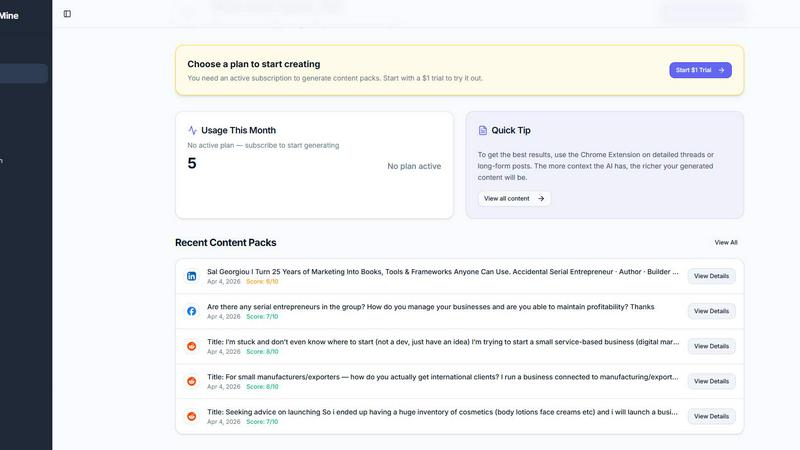
PostMine instantly turns viral social posts into a week's worth of ready-to-publish content with one click.
Last updated: April 13, 2026

UseSkill
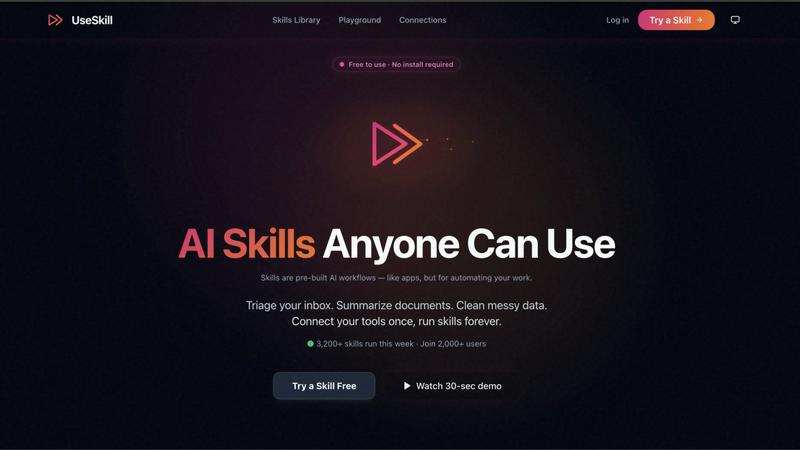
UseSkill automates your workflows with pre-built AI skills and 100+ integrations for seamless, fast results.
Last updated: February 28, 2026
Visual Comparison
Postmine
UseSkill
Feature Comparison
Postmine
One-Click Chrome Extension Capture
Capture trending content without ever leaving your feed. Simply right-click on any compelling post from LinkedIn, Reddit, Facebook, or X and select "Generate Content Pack." A sleek side panel instantly appears, showing your generated content right on the page. This seamless integration eliminates tab-switching chaos and turns inspiration into action in a literal click, keeping you in a state of creative flow.
7-Format AI Content Generation
A single social media discussion becomes a complete, multi-platform content strategy. Postmine's AI doesn't just rewrite; it strategically adapts the core idea into seven distinct, platform-optimized pieces. This includes a long-form blog post, a professional LinkedIn article, an engaging Twitter thread, a Facebook post, an Instagram caption with hashtags, a Reddit post, and a helpful FAQ. It's like having a full content team in your browser.
Custom Brand Voice Profiles
Eradicate generic, robotic AI output forever. Postmine lets you define and save detailed brand voice profiles where you set your preferred tone, target audience, key phrases to include, and terms to avoid. Every single piece of content generated thereafter is meticulously crafted to sound like it came directly from you, building authentic and consistent brand recognition across every channel.
Bulk Capture & Content Calendar
Power through your weekly content planning in one focused session. Activate Bulk Capture mode to select multiple posts from your feed and batch-generate content packs for all of them simultaneously. Then, drag and drop your new content directly into the built-in visual Content Calendar. Schedule publications, see your pipeline at a glance, and mark items as done—all from one centralized command center.
UseSkill
Seamless Integrations
UseSkill boasts over 100 trusted integrations with popular applications including Salesforce, HubSpot, Slack, Gmail, and Jira. This extensive range allows you to connect your tools in one click, eliminating the need for complex technical setups.
Pre-Built AI Workflows
The platform offers a variety of pre-built workflows that automate tasks like syncing your CRM, triaging your inbox, and cleaning messy data. Each skill is tested and refined to deliver consistent results every time you run it, ensuring efficiency and reliability.
Speedy Results
With UseSkill, you can achieve organized, actionable results in about 30 seconds. This is a game changer for professionals who need quick turnaround times without sacrificing quality. No more waiting for lengthy AI prompts—just pick a skill, click run, and get results immediately.
Privacy-First Security
Your data security is paramount to UseSkill. The platform employs OAuth 2.0 for secure connections, ensuring that your passwords are never shared or stored. This robust security protocol allows you to focus on your tasks without worrying about data privacy.
Use Cases
Postmine
The Solopreneur Content Machine
For solo founders and one-person businesses, time is the most precious commodity. Postmine automates the entire content creation process. You can browse your industry feeds for 15 minutes, capture 5-10 relevant discussions using Bulk Capture, and instantly have a month's worth of authentic, on-brand content ready to schedule. This turns hours of writing into minutes, freeing you to focus on running your business.
Agency & Marketing Team Scale
Marketing agencies and in-house teams can standardize quality and output at scale. By creating shared Brand Voice profiles for each client, every team member can generate on-brand content that sounds consistent, whether it's for a tech startup or a lifestyle brand. The Content Calendar provides clear oversight for managers, ensuring a steady stream of scheduled posts across all client accounts without the quality guesswork.
The Consistent Social Media Manager
Social media managers juggling multiple platforms can finally breathe. Instead of manually crafting unique posts for LinkedIn, Instagram, Twitter, and Facebook, one great find fuels them all. The AI handles the platform-specific formatting and best practices, while the manager uses the calendar to orchestrate a cohesive cross-platform narrative and employ AI Reply Suggestions to boost engagement efficiently.
The Freelance Writer's Idea Farm
Freelance writers and bloggers can conquer writer's block and find proven topics instantly. By capturing viral discussions and trending questions in their niche, they get a validated, engaging topic and a fully structured blog post draft in seconds. This drastically cuts research and outlining time, allowing them to produce more high-quality articles for their clients or their own sites faster than ever before.
UseSkill
Sales Team Automation
Sales teams can leverage UseSkill to enrich leads from platforms like Apollo, sync them to Salesforce, and update HubSpot all in a single click. This automation minimizes time spent on administrative tasks, allowing sales professionals to focus on closing deals.
Customer Support Efficiency
Support teams can drastically improve their response times by using UseSkill to automate ticket triaging and customer data retrieval from platforms like Zendesk and Freshdesk. This results in faster resolutions and enhanced customer satisfaction.
DevOps Streamlining
UseSkill can aid DevOps teams by automating task management across tools like Jira and GitHub. For example, it can help sync project updates, manage incident responses, and streamline development processes, making the workflow smoother and more efficient.
Data Analytics Simplification
Data analysts can utilize UseSkill to clean and prepare data from sources such as Snowflake and BigQuery. By automating data cleaning processes, analysts can spend more time on insights and less time on menial tasks, enhancing overall productivity.
Overview
About Postmine
Stop scrolling and start creating. Postmine is the revolutionary content engine that turns viral social media discussions into your next week's content calendar in under 30 seconds. Built for the modern creator, it begins with a simple right-click. Our Chrome Extension captures trending posts from LinkedIn, Reddit, Facebook, and X. Then, the magic happens: your AI transforms that single discussion into 7 platform-ready pieces—a full blog post, LinkedIn article, Twitter thread, Facebook post, Instagram caption, Reddit post, and an FAQ. But it doesn't sound like a robot. You set your unique Brand Voice profiles so every piece is unmistakably you. Need to scale? Use Bulk Capture to process entire feeds at once. Then, manage it all from the built-in Content Calendar to schedule, track, and stay perfectly consistent. With AI Reply Suggestions, you can engage faster and grow your network. Best part? You're in control with BYOK (Bring Your Own Key) for Claude, OpenAI, Gemini, or DeepSeek, so you manage your AI costs. It's the all-in-one system for content creators, social media managers, solopreneurs, and marketing teams who see gold in online conversations but don't have hours to mine it.
About UseSkill
UseSkill is an innovative AI skills library designed to streamline your workflow with over 100 integrations, making it easier than ever to automate tasks across various applications. Whether you're in sales, support, engineering, data analysis, or marketing, UseSkill provides pre-built workflows that deliver consistent results in just 30 seconds. Gone are the days of explaining tasks repeatedly to AI models like ChatGPT, or wasting time copying and pasting data between applications. With UseSkill, you simply select a skill, connect your tools once, and click run to achieve your desired outcome. With a strong focus on privacy, UseSkill ensures that your data is never stored, allowing you to work securely and efficiently. Join the growing community of over 5,000 active users and experience the transformative power of AI in your daily operations.
Frequently Asked Questions
Postmine FAQ
How does the AI content generation work?
When you capture a post, Postmine's AI (or your own BYOK model) analyzes the core discussion, key points, and sentiment. It then uses this analysis, combined with your specific Brand Voice profile settings, to generate seven unique pieces of content. Each piece is tailored to the norms and best practices of its target platform, from a detailed blog structure to a snappy Twitter thread with the right pacing.
Can I use my own AI API key?
Absolutely! Postmine offers full BYOK (Bring Your Own Key) support. You can integrate your own API keys from major providers like OpenAI (GPT), Anthropic (Claude), Google (Gemini), or DeepSeek. This gives you complete control over the AI model used and directly manages your costs through your existing provider account, while still leveraging Postmine's powerful formatting and workflow.
What is included in the $1 trial?
The $1 trial gives you full access to the Starter plan features for 7 days. This includes generating up to 10 content packs, using the Chrome Extension, setting up Brand Voice profiles, accessing the Content Calendar, and all other core features. If you love it, it automatically converts to a $49/month subscription after the trial unless you cancel, which you can do anytime before the 7 days end with no further charge.
What happens if I exceed my content pack limit?
If you are on a monthly plan like the Starter ($49/mo) and use all your allotted content packs before your billing cycle renews, you will need to upgrade to a higher tier or wait for the next cycle to reset your limit. For the 10-Day Pass, you get 50 packs to use within the 10-day window. The system will notify you as you approach your limit so you can plan accordingly.
UseSkill FAQ
How does UseSkill ensure data privacy?
UseSkill employs OAuth 2.0 secure connections, meaning that it never sees your passwords. Your data is processed during skill runs and is not stored after completion, ensuring complete privacy.
Can I use UseSkill without a credit card?
Absolutely! UseSkill offers a free version that allows you to try out its features without needing to provide any credit card information.
What types of integrations does UseSkill support?
UseSkill supports over 100 integrations across various categories including CRM, productivity, DevOps, data analytics, and customer support. This makes it versatile for different professional needs.
How quickly can I see results with UseSkill?
Most users experience results in approximately 30 seconds after running a skill. This quick turnaround is designed to maximize efficiency and minimize downtime in your workflow.
Alternatives
Postmine Alternatives
Postmine is a powerful AI content repurposing tool in the productivity and management category. It instantly captures trending social posts and transforms them into a full suite of platform-ready content, saving creators hours of manual work. Users often explore alternatives for various reasons, such as budget constraints, specific feature needs, or compatibility with different AI models and social platforms. Finding the right fit depends on your unique workflow and goals. When evaluating other options, consider key factors like the number of platforms supported, the quality and customization of AI output, cost transparency, and how well the tool integrates into your existing content creation process. The best choice aligns with your speed, quality, and control requirements.
UseSkill Alternatives
UseSkill is a cutting-edge AI workflows platform designed to streamline productivity and management tasks. With over 100 pre-built integrations, it allows users to achieve consistent results in just 30 seconds, eliminating the hassle of repetitive explanations and time-consuming processes typically associated with other AI tools. Users often seek alternatives due to factors like pricing, specific feature sets that better align with their needs, or compatibility with existing platforms. When considering alternatives, it’s crucial to evaluate factors such as integration capabilities, ease of use, data security, and the quality of customer support. Look for platforms that offer a robust set of features while ensuring a seamless experience that meets your unique workflow requirements.