
AccessAudit vs Blueberry

Last updated: February 28, 2026

Blueberry
Blueberry is the all-in-one workspace for AI-driven web app development and delivery.
Last updated: February 27, 2026
Visual Comparison
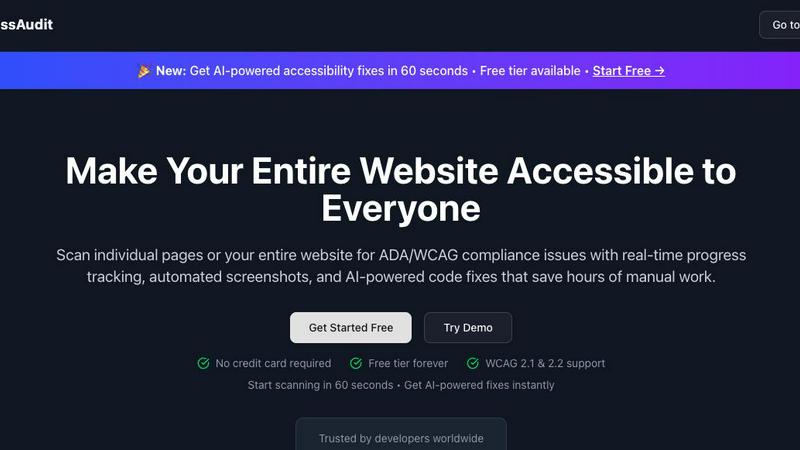
AccessAudit
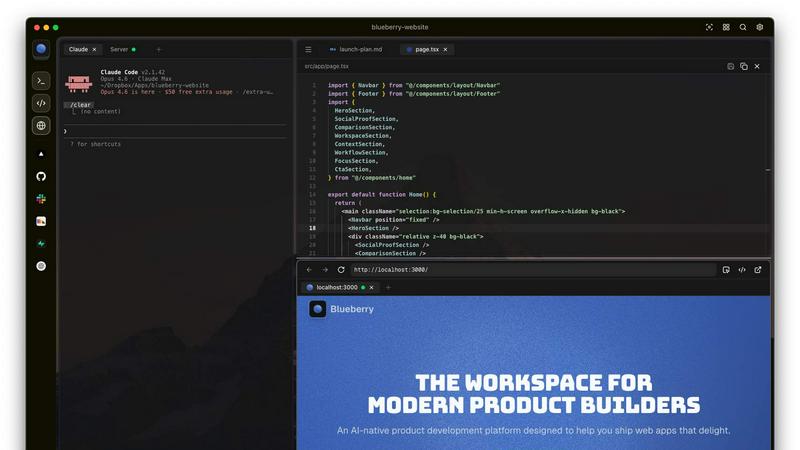
Blueberry
Feature Comparison
AccessAudit
WCAG 2.1 & 2.2 Compliance
AccessAudit offers comprehensive scanning for WCAG 2.1 and 2.2 Level A, AA, and AAA guidelines, ensuring that your website meets the highest accessibility standards. This feature includes 9 additional success criteria to help you cover all bases in your compliance efforts.
Real-Time Progress
With AccessAudit, you can watch your scans in real time with live progress tracking and visual updates. This feature allows you to see exactly where you stand in your compliance journey, making it easy to stay informed and proactive about accessibility issues.
AI Code Fixes
Get production-ready code fixes delivered in just 60 seconds, significantly reducing the time typically required to address compliance issues. What often takes 30 minutes per issue can now be handled almost instantly, allowing you to focus on other critical tasks.
Visual Screenshots
AccessAudit provides automated screenshots for every scan, showing exactly what was tested. This feature helps you visualize issues and understand where improvements are needed, making it easier to communicate findings to your team.
Blueberry
Integrated Workspace
Blueberry combines a terminal, code editor, and preview browser into a single workspace, eliminating the need to switch between applications. This integration enables a fluid workflow where all your tools are accessible in one place, enhancing productivity and focus.
Contextual AI Interaction
With Blueberry's built-in MCP server, your AI can interact with the entire workspace. It has full context of your code, browser, and running apps, allowing it to provide intelligent suggestions and insights based on your current project state.
Pinned Apps
Keep essential tools like GitHub, Linear, Figma, and PostHog docked inside your Blueberry workspace. These pinned apps load alongside your project, sharing live context with your AI and providing a cohesive development experience without interruptions.
Screenshot & Element Selection
Blueberry allows you to capture screenshots or select elements directly from the preview browser, giving your AI visual context. This feature enhances the ability to provide feedback and suggestions based on actual interface elements, making development more intuitive.
Use Cases
AccessAudit
Website Launch Preparations
Before launching a new website or redesigning an existing one, use AccessAudit to scan for accessibility issues. This ensures that your site is compliant from the get-go, avoiding potential legal pitfalls and enhancing user experience.
Ongoing Compliance Monitoring
Set up scheduled scans to automate your compliance monitoring on a daily, weekly, or monthly basis. This feature helps you stay ahead of accessibility issues and ensures ongoing adherence to WCAG standards as your website evolves.
Developer Collaboration
Utilize AccessAudit during the development process to identify and fix accessibility issues in real-time. This fosters a culture of inclusivity within your team and enhances collaboration among developers, designers, and content creators.
Client Reporting
If you're an agency or freelance developer, AccessAudit's detailed reports can be a valuable asset for client presentations. Showcase your commitment to accessibility with comprehensive documentation and compliance badges, demonstrating the value you bring to your clients.
Blueberry
Collaborative Development
Teams can use Blueberry to streamline collaboration by keeping all project files, discussions, and design tools in one integrated workspace. This fosters real-time communication and reduces the time spent switching between different applications.
Rapid Prototyping
Developers can quickly prototype web applications using Blueberry's live preview feature. As you code, you can instantly see changes reflected in the browser, allowing for faster iterations and a more efficient development cycle.
Enhanced Debugging
With a terminal that provides live output and context-aware AI support, debugging becomes a more manageable task. Blueberry helps identify issues in real-time, enabling developers to fix bugs faster and improve overall code quality.
Educational Tool for Developers
Blueberry serves as an excellent educational platform for new developers. By providing integrated tools and contextual AI support, learners can receive immediate assistance while coding, making the learning process more engaging and effective.
Overview
About AccessAudit
AccessAudit is a powerful tool designed to scan your website for compliance with ADA and WCAG standards, ensuring that your digital presence is accessible to everyone. With a focus on developers and teams committed to building accessible products, AccessAudit simplifies the process of identifying and rectifying compliance issues. This innovative platform provides real-time progress tracking, automated screenshots, and AI-powered code fixes that can save you hours of manual work. With AccessAudit, you can effortlessly scan individual pages or your entire website, making it easier than ever to adhere to accessibility guidelines. Our mission is to empower organizations to create inclusive digital experiences without the complexity and time investment typically associated with compliance monitoring.
About Blueberry
Blueberry is a revolutionary macOS application designed for modern product builders, seamlessly integrating your code editor, terminal, and browser into one focused workspace. Gone are the days of juggling multiple windows and losing context; Blueberry allows developers to focus on what truly matters—building exceptional web applications. With its AI-native capabilities, Blueberry connects to powerful models such as Claude, Codex, and Gemini via its built-in MCP server. This means your AI can see your files, understand terminal output, and provide live previews, all while you work. It's tailored for developers, designers, and product managers who want to streamline their workflow and enhance productivity. Experience the future of development with Blueberry, where your tools work together in harmony to help you ship web apps that delight users.
Frequently Asked Questions
AccessAudit FAQ
What is AccessAudit?
AccessAudit is a web accessibility scanning tool that helps ensure your website complies with ADA and WCAG standards, providing real-time tracking, automated screenshots, and AI-driven code fixes.
How does the free tier work?
AccessAudit offers a free tier that allows you to perform one scan per month at no cost, with no credit card required. This enables you to test the tool and understand your site’s accessibility issues before considering an upgrade.
Can I scan multiple pages at once?
Yes, AccessAudit allows you to scan individual pages or your entire website in one go, making it convenient for both small and large sites to identify compliance issues effectively.
What kind of reports does AccessAudit generate?
AccessAudit generates comprehensive reports that detail accessibility issues, severity levels, trends over time, and options for exporting data. This helps you track progress and communicate findings with your team or clients.
Blueberry FAQ
What is Blueberry?
Blueberry is a macOS application that integrates your code editor, terminal, and browser into one workspace, enhancing productivity for modern product builders.
How does Blueberry improve workflow?
By combining essential development tools into a single workspace, Blueberry minimizes the need to switch between applications, allowing developers to focus more on coding and less on managing multiple windows.
Is Blueberry suitable for team collaboration?
Absolutely! Blueberry's integrated workspace and pinned apps facilitate effective collaboration among team members, ensuring everyone has access to the same tools and context.
When will Blueberry be available after the beta period?
While specific details about the post-beta period are not yet available, Blueberry is currently 100% free during its beta phase, allowing users to explore its features without any financial commitment.
Alternatives
AccessAudit Alternatives
AccessAudit is a cutting-edge tool designed to ensure your website is accessible to everyone, meeting the standards of ADA and WCAG compliance. As part of the Dev Tools category, it empowers users to scan individual pages or entire websites for accessibility issues, providing real-time insights and automated solutions to enhance usability. Users often seek alternatives to AccessAudit for various reasons, including pricing structures, specific feature sets, or platform compatibility. When searching for an alternative, it’s crucial to consider the tool’s capabilities in real-time tracking, the robustness of its automated solutions, and how well it integrates with your existing workflows to save valuable time and effort in achieving compliance.
Blueberry Alternatives
Blueberry is a cutting-edge macOS application designed to streamline the product building process by integrating your editor, terminal, and browser into a single focused workspace. This innovative tool falls within the Dev Tools category, catering to developers and creators looking to enhance their workflow and productivity. Users often seek alternatives to Blueberry for various reasons, such as exploring more competitive pricing, discovering additional features, or finding solutions that better align with their specific platform needs. When searching for an alternative to Blueberry, it’s essential to consider several factors, including the ease of integration with your current tools, the range of features offered, and the overall user experience. Look for options that enhance your workflow without adding unnecessary complexity, ensuring that you can maintain your focus and productivity just like you would with Blueberry.