
AdaptlyPost vs RemoveBGVideo

AdaptlyPost
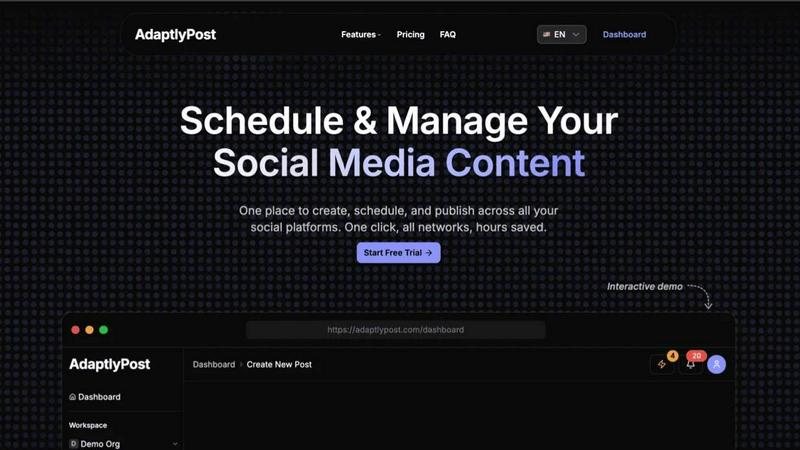
AdaptlyPost creates and schedules one post that automatically adapts to publish perfectly across all your social media platforms.
Last updated: March 11, 2026

RemoveBGVideo
Remove video backgrounds instantly with AI, no green screen needed.
Last updated: February 28, 2026
Visual Comparison
AdaptlyPost
RemoveBGVideo
Feature Comparison
AdaptlyPost
Multi-Platform Posting Hub
Ditch the dozen browser tabs. AdaptlyPost's core dashboard lets you connect and manage all your social accounts—from Instagram and TikTok to YouTube and X—in one unified workspace. Craft your post, and our system handles the rest, automatically adapting it to fit the specific requirements and best practices of each platform with a single click. This seamless integration ensures your message is optimized everywhere, saving you from manual, error-prone cross-posting.
AI Caption Co-pilot
Never stare at a blank caption box again. Our AI-powered writing assistant is your creative partner. Simply provide a prompt like "write a caption for our new product launch," and it generates engaging copy. Even better, it automatically rewrites and tailors that caption to match the unique voice, style, and character limits of each social platform you're targeting, ensuring maximum relevance and impact with zero extra work from you.
AI Image Studio
Create professional, eye-catching visuals in seconds, no design skills required. The AI Image Studio turns your ideas into reality. Just describe the image you envision—"a minimalist laptop on a bamboo desk with morning light"—and watch as AI generates unique, brand-appropriate graphics. This feature is perfect for creating scroll-stopping content that boosts engagement without the need for expensive software or stock photo subscriptions.
Unified Content Pipeline & Calendar
Gain crystal-clear visibility and control over your entire content strategy. The visual calendar provides a week-at-a-glance view of all your drafts, scheduled posts, and published content across every platform. The organized pipeline clearly shows what's in draft, what's queued up, and what has already gone live. This holistic view prevents double-booking, helps you maintain a consistent posting schedule, and ensures you never miss a prime posting time.
RemoveBGVideo
AI-Powered Instant Background Removal
Our core technology uses advanced artificial intelligence to automatically and accurately identify the foreground subject in your video. It intelligently separates people, pets, products, or objects from their surroundings without any manual input. This means you get a perfect cut-out every time, eliminating the need for a physical green screen or hours of tedious frame-by-frame rotoscoping. The AI is trained on diverse datasets to handle complex scenes with ease.
High-Quality 4K Output & Multiple Formats
RemoveBGVideo doesn't compromise on quality. You can process and export your videos in stunning clarity up to 4K resolution, ensuring every detail is preserved. We support a wide range of import formats like MP4, MOV, and WEBM, and offer flexible export options including videos with transparent backgrounds (WebM with alpha channel), ProRes for professionals, MP4, GIF, WebP, and even PNG sequences for maximum compatibility with any editing workflow.
Lightning-Fast GPU Processing
Forget waiting hours for a render. Our platform is engineered for speed, leveraging powerful GPU-accelerated processing to deliver results in minutes, not hours. Most standard videos are processed in under five minutes. This rapid turnaround is powered by an optimized pipeline that gets you your edited video back quickly, so you can keep creating and publishing without frustrating delays.
Flexible Background Customization
Once the background is removed, your creativity is unleashed. Our tool provides complete control over the final look. You can choose a transparent background, select a solid color, or upload your own custom image or video to place your subject into a brand new environment. This feature is perfect for creating professional product shots, dynamic social media content, or educational materials with a consistent branded backdrop.
Use Cases
AdaptlyPost
The Solopreneur & Content Creator
For individuals building a personal brand or business alone, time is the most precious resource. AdaptlyPost empowers solopreneurs to batch-create a week's worth of content in one sitting. Using the AI tools to quickly generate captions and images, they can schedule everything across Instagram, TikTok, and YouTube from a single dashboard, freeing up countless hours to focus on creating products, services, or deeper community engagement.
The Growing Small Business & Marketing Team
Small businesses need to compete with larger players without a massive budget. AdaptlyPost gives small teams agency-level tools. They can maintain a consistent, multi-platform presence, plan campaigns visually on the calendar, and use the AI Co-pilot to ensure their messaging is sharp and platform-optimized. The team collaboration features allow multiple members to draft, review, and schedule posts seamlessly, streamlining their entire marketing workflow.
The Social Media Agency
Agencies managing multiple client accounts require efficiency and clarity. AdaptlyPost's multi-workspace functionality is a game-changer. They can separate each client's accounts, schedules, and content pipelines while using the powerful AI tools to generate fresh ideas and visuals at scale. The unified calendar makes reporting and strategy overviews simple, proving value to clients and allowing the agency to manage more accounts without sacrificing quality.
The Tech-Savvy Innovator Using AI Automation
For users who want to push automation to the next level, AdaptlyPost offers deep integration capabilities. Through API access and the unique OpenClaw skill, you can connect your social strategy to other tools or even let an AI agent manage posts via natural language commands. This use case is for those looking to build a truly hands-off, intelligent content distribution system integrated into their broader tech stack.
RemoveBGVideo
Social Media & Influencer Content Creation
Content creators and influencers can instantly create eye-catching, professional-looking videos for platforms like TikTok, Instagram, and YouTube. Remove distracting or unappealing backgrounds and replace them with trendy, branded, or aesthetically pleasing environments to significantly boost production value and audience engagement without a big production budget.
E-commerce & Product Marketing
Online sellers can generate clean, studio-quality product videos at scale. Showcase jewelry, apparel, gadgets, or any item with a pure white or transparent background for marketplaces, or place the product into lifestyle scenes to help customers visualize it in use. This dramatically improves conversion rates and brand perception with minimal effort and cost.
Professional Presentations & Educational Videos
Educators, trainers, and corporate professionals can produce polished lecture videos, tutorials, and presentations. Remove cluttered office or home backgrounds and replace them with a clean, branded backdrop or relevant educational graphics. This helps maintain viewer focus on the presenter and the content, enhancing clarity and authority.
Personal Branding & Professional Profiles
Individuals looking to strengthen their personal brand can create consistent, high-quality video content for LinkedIn, portfolio websites, or speaker reels. Achieve a uniform, professional look across all your video materials by using a custom branded background, making you stand out to potential employers, clients, or collaborators.
Overview
About AdaptlyPost
Stop the app-switching madness and launch your social media strategy into hyperdrive. AdaptlyPost is the all-in-one command center built for creators, entrepreneurs, and modern marketing teams who are serious about growth. It transforms the chaotic, time-consuming process of managing multiple social platforms into a streamlined, powerful workflow. Imagine this: you create a single piece of content, and with one click, it's intelligently adapted and scheduled to go live on X, Instagram, TikTok, YouTube, and more. No more manual tweaking for each platform's unique tone and format. The secret sauce? Our built-in AI Co-pilot generates platform-perfect captions on demand, while the AI Image Studio crafts scroll-stopping visuals from a simple text prompt. Add a unified visual calendar and a clear content pipeline, and you've got a tool that doesn't just manage posts—it amplifies your reach and gives you hours of your week back. AdaptlyPost is for anyone ready to create once, post everywhere, and finally see consistent, engaging results across their entire social universe.
About RemoveBGVideo
RemoveBGVideo is the revolutionary AI-powered platform that makes professional video background removal accessible to everyone. It's the end of complex, time-consuming editing. Simply upload your video, and our cutting-edge AI technology automatically detects the subject and strips away the background in minutes—no green screen, manual masking, or expensive software like After Effects required. It delivers a clean, precise cut-out with a transparent background or allows you to place your subject into any custom scene you choose. Built for speed and quality, it supports up to 4K resolution and processes most videos in under five minutes using optimized GPU acceleration. This tool is a game-changer for content creators, marketers, e-commerce sellers, educators, and anyone who needs to produce polished, engaging video content quickly and without a steep learning curve. In a landscape where alternatives are shutting down or hiding behind expensive subscriptions, RemoveBGVideo stands out with its transparent, pay-as-you-go pricing and powerful, specialized AI engine designed to make you look like a pro.
Frequently Asked Questions
AdaptlyPost FAQ
Which social media platforms do you support?
AdaptlyPost supports all major social media platforms to power your omnichannel strategy. This includes X (formerly Twitter), Instagram (Feed, Stories, Reels), TikTok, YouTube, Facebook, LinkedIn, and more. We constantly update our connectors to support new features and networks, ensuring you can reach your audience wherever they are.
How does the AI caption writer work?
Our AI Caption Co-pilot uses advanced language models trained on successful social media content. You start by giving it a basic prompt or idea. The AI then generates a primary caption and, crucially, automatically rewrites and adapts it for each connected platform. It adjusts the tone, length, hashtag suggestions, and formatting to match what performs best on Instagram vs. X vs. LinkedIn, all from your single input.
Can I schedule posts in advance?
Absolutely! Advanced scheduling is a core feature of AdaptlyPost. You can schedule posts days, weeks, or even months in advance using the intuitive visual calendar. This allows you to plan entire campaigns, batch your content creation, and maintain a consistent posting schedule even during holidays or busy periods, all without being logged in.
What happens when my free trial ends?
After your 7-day free trial, you will need to choose a paid subscription plan (Creator, Business, or Enterprise) to continue using AdaptlyPost's full features. If you do not enter payment information, your account will be downgraded, and you may lose access to scheduling, AI credits, and posting capabilities. You can cancel anytime during the trial without being charged.
RemoveBGVideo FAQ
How does RemoveBGVideo work without a green screen?
RemoveBGVideo uses sophisticated AI algorithms trained to recognize and differentiate between subjects and backgrounds. It analyzes each frame of your video, pinpointing the main subject (like a person or product) and meticulously separating it from everything else. This advanced computer vision technology replicates the effect of a green screen digitally, requiring only your standard video footage to work its magic.
What video formats and lengths do you support?
We support all major video formats for upload, including MP4, MOV, and WEBM. You can process videos up to 60 minutes in length with a maximum file size of 500MB. For output, we offer a variety of formats including WebM with transparency, MP4, MOV (ProRes), GIF, WebP, and PNG sequences to fit any project need.
Is there a free trial or preview?
Yes! RemoveBGVideo offers a completely free preview. You can upload your video, process it with our AI, and see a full-length, watermarked preview of the result before you pay anything. This allows you to verify the quality and accuracy of the background removal on your specific content with zero risk or commitment.
How is your pricing structured compared to other tools?
We believe in simple, transparent, and fair pricing. Unlike tools that require expensive annual subscriptions (like Canva Pro), RemoveBGVideo operates on a flexible pay-as-you-go model. You only pay for what you use at a rate of $0.50 per minute of processed video. There are no monthly fees, no subscriptions, and you can start with a free preview to ensure you're happy with the results.
Alternatives
AdaptlyPost Alternatives
AdaptlyPost is a dynamic content creation and publishing platform designed to streamline your social media workflow. It belongs to the category of all-in-one social media management tools, helping creators and teams write once and adapt their content for seamless posting across multiple channels like X, Instagram, and TikTok. Users often explore alternatives for various reasons. Budget constraints, the need for specific niche features, or support for different social platforms can all lead someone to shop around. It's a common step in finding the perfect tool that aligns with both a team's operational needs and financial reality. When evaluating other options, focus on your core requirements. Consider the range of platforms supported, the depth of automation and AI assistance, the intuitiveness of the content calendar, and of course, the overall value for the price. The goal is to find a solution that genuinely saves you time and amplifies your content's impact.
RemoveBGVideo Alternatives
RemoveBGVideo is an AI-powered tool that automatically removes the background from any video, placing it in the category of automated video editing software. It’s designed for creators who need professional, transparent-background videos quickly, without the steep learning curve of traditional software like After Effects. Users often explore alternatives for various reasons. Some might need a different pricing model or a free tier to start. Others may require specific features like batch processing, higher resolution exports, or integration with other platforms. The choice often comes down to balancing cost, capability, and ease of use. When choosing an alternative, consider your primary needs. Look at the output quality, especially for complex scenes like fine hair or motion blur. Check the supported video formats and length limits. Also, evaluate the speed of processing and the flexibility of the background replacement options, whether it's transparency, solid colors, or custom images.