
AI PDF Translate vs FlashSlides

AI PDF Translate
AI PDF Translate effortlessly converts your PDFs into multiple languages, unlocking global communication with ease.
Last updated: February 28, 2026

FlashSlides
Transform any topic into stunning presentations in minutes with FlashSlides' AI-powered generator.
Last updated: February 28, 2026
Visual Comparison
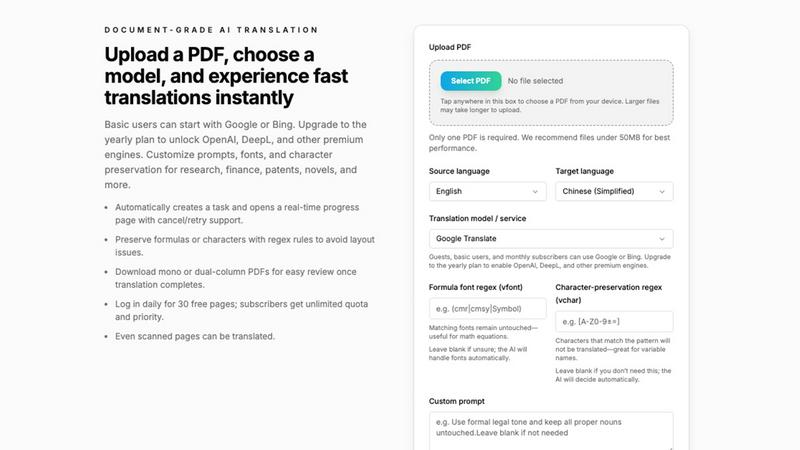
AI PDF Translate
FlashSlides
Feature Comparison
AI PDF Translate
User-Friendly Interface
The intuitive interface allows users to easily upload their PDFs and select source and target languages. With just a few clicks, anyone can start translating, making this tool accessible for those with varying levels of technical expertise.
Versatile Translation Models
AI PDF Translate offers multiple translation models, including Google Translate and Bing Translate for basic users, while premium subscribers can access OpenAI and DeepL for more sophisticated translations. This flexibility caters to a broad audience, ensuring high-quality translations tailored to specific needs.
Layout Preservation
One of the standout features is its ability to maintain the original document's layout during translation. Paragraphs, headings, tables, and figures remain aligned, allowing users to focus on content rather than formatting issues. This is particularly beneficial for intricate documents like reports and manuals.
Real-Time Progress Tracking
After initiating a translation, users are redirected to a live progress page where they can monitor the translation status in real-time. This feature enhances transparency, allowing users to cancel or retry if necessary, ensuring a smooth experience.
FlashSlides
AI Presentation Generator
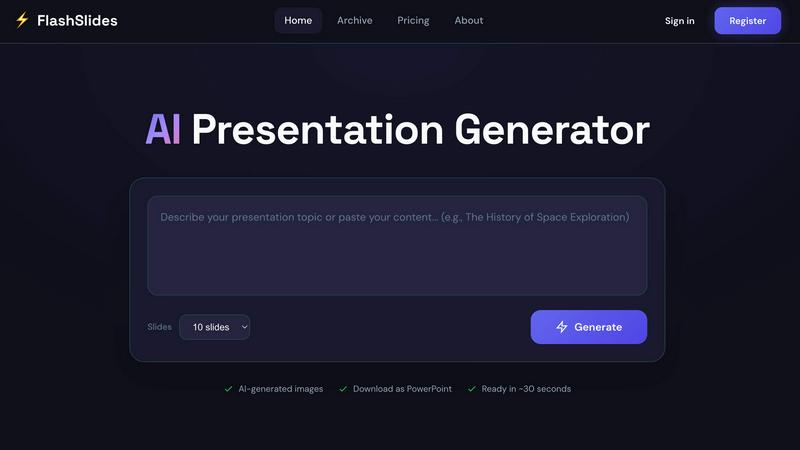
FlashSlides utilizes cutting-edge AI technology to generate complete presentations from any input. Users can describe a topic, paste a URL, or upload documents, and the AI will create slides featuring both text and relevant images. This feature ensures that presentations are not only well-structured but also visually appealing.
Customizable Slide Count
Whether you need a quick one-slide overview or an in-depth 50-slide presentation, FlashSlides accommodates your needs. Users can select from 1 to 50 slides based on their requirements, allowing for flexibility in presentation length and depth of content.
Instant Download and Sharing
Once your presentation is generated, you can easily download it as a PowerPoint file or share it via a unique link. This makes it simple to collaborate with colleagues or share your work with clients and stakeholders without any hassle.
AI-Generated Images
Each slide comes with unique, contextually relevant images generated by AI technology. This feature enhances the visual quality of your presentations and helps convey your message more effectively, making your slides stand out from the crowd.
Use Cases
AI PDF Translate
Academic Research
Researchers can effortlessly translate academic papers and reports into multiple languages, making their work accessible to a wider audience. This not only enhances collaboration but also broadens the impact of their findings globally.
Business Reports
Companies often produce detailed reports that need to be shared with international clients or partners. AI PDF Translate allows for quick translations of these documents, ensuring that critical business information is communicated effectively across language barriers.
Technical Manuals
For technical teams, translating manuals and user guides is essential for global product launches. This tool enables seamless translation while preserving complex formatting, ensuring that users in different regions receive accurate and comprehensible instructions.
Marketing Materials
Marketers can utilize AI PDF Translate to quickly adapt advertisements, brochures, and presentations for different markets. This is crucial for campaigns aimed at diverse linguistic demographics, allowing brands to connect with their audience in a culturally relevant manner.
FlashSlides
Business Presentations
For busy professionals, FlashSlides is a game changer. Users can quickly prepare meeting decks, proposals, and quarterly reports with a professional touch. This allows for more time to focus on the content rather than the design, ultimately maximizing productivity.
Educational Content Creation
Teachers and educators can leverage FlashSlides to generate engaging lesson plans and educational materials that captivate students’ attention. The tool helps in creating interactive presentations that enhance the learning experience.
Student Projects
Students can benefit immensely from FlashSlides by creating impressive class presentations and project reports in a fraction of the time it would typically take. This not only reduces stress but also allows students to explore more creative avenues in their presentations.
Startup Pitch Decks
Startups and founders can build compelling pitch decks and investor presentations that leave a memorable impact. With the ability to generate high-quality content quickly, entrepreneurs can focus on refining their pitch rather than getting bogged down in formatting.
Overview
About AI PDF Translate
AI PDF Translate is a cutting-edge browser-based tool that simplifies the translation of complex PDF documents into multiple languages. Designed for professionals and businesses engaged in global communication, this AI-driven platform allows users to upload their PDF files and obtain accurate translations with remarkable speed and reliability. The primary value proposition lies in its ability to preserve the original document's formatting, including text layout, fonts, tables, images, and even mathematical formulas. This ensures that the translated output retains its professional appearance, making it ready for sharing or publishing without any manual reformatting. Ideal for researchers, educators, and corporate teams, AI PDF Translate facilitates seamless multilingual communication, thereby expanding the reach of ideas and information across linguistic barriers.
About FlashSlides
FlashSlides is an innovative AI presentation generator designed to revolutionize the way users create and share presentations. Whether you are a busy professional, a dedicated student, or an inspiring educator, FlashSlides provides a streamlined solution to transform ideas into beautifully designed slides in mere minutes. With its user-friendly interface, you simply enter your topic—be it a business proposal, a lesson plan, or an investor pitch—and let the AI do the heavy lifting. The platform generates a complete presentation, complete with relevant text and custom AI-generated images. This not only saves time but also ensures that your presentations look polished and professional, making a lasting impact on your audience. FlashSlides empowers users to focus on their content while providing the visual appeal necessary to captivate and engage.
Frequently Asked Questions
AI PDF Translate FAQ
How does AI PDF Translate preserve the original layout?
The tool employs advanced algorithms that ensure all elements of the original PDF, including text formatting, images, and tables, are retained during the translation process, resulting in a polished final product.
What languages are supported for translation?
AI PDF Translate supports a wide array of languages, including but not limited to English, Spanish, Chinese, Arabic, and Russian. Users can select from various source and target languages to suit their needs.
Can I translate scanned PDF documents?
Yes, AI PDF Translate is capable of translating scanned documents. This feature ensures that even images containing text can be accurately translated, making it a versatile choice for all document types.
What subscription options are available?
The platform offers both free and subscription-based plans. Free users can access basic translation engines like Google and Bing, while subscribers can unlock premium models such as OpenAI and DeepL for enhanced translation quality.
FlashSlides FAQ
How does FlashSlides work?
FlashSlides operates in a straightforward manner. Users simply enter a topic, and the AI generates a complete presentation with relevant content and images. The entire process is fast, taking less than a minute for a fully formed presentation.
Is it really free?
Yes! FlashSlides offers a free presentation generation each day to every user. There is no credit card required, making it accessible for anyone looking to enhance their presentation creation process.
What formats can I download?
Presentations created with FlashSlides can be downloaded as PowerPoint (.pptx) files, making it easy to edit them in Microsoft PowerPoint, Google Slides, or any compatible software.
Are my presentations private?
By default, presentations created on FlashSlides are public and may appear in the archive. However, users can choose to make any presentation private from their dashboard, ensuring that their work remains confidential if needed.
Alternatives
AI PDF Translate Alternatives
AI PDF Translate is an innovative browser-based tool designed for seamless PDF translation. It falls under the categories of Productivity & Management, Writing, and Education & Learning, making it an essential asset for professionals and students alike who deal with complex documents requiring multilingual translations. Users often seek alternatives to AI PDF Translate for various reasons including pricing, specific feature sets, and compatibility with different platforms that may better suit their unique needs. When searching for an alternative, it’s vital to consider factors such as translation accuracy, ease of use, document formatting capabilities, and overall cost-effectiveness. Additionally, evaluating customer support, user reviews, and the ability to handle specific document types can significantly impact your choice. The right alternative should align with your translation requirements and enhance your workflow efficiency.
FlashSlides Alternatives
FlashSlides is a cutting-edge AI tool designed for creating stunning presentations that captivate and engage audiences. It falls under the category of productivity and management, empowering users to quickly prepare polished meeting decks, proposals, and reports with ease. Additionally, FlashSlides is exceptional for educators looking to generate engaging lesson plans and for professionals aiming to craft impactful pitch decks and investor presentations. Users often seek alternatives to FlashSlides for various reasons, including pricing considerations, specific feature sets, or compatibility with different platforms. When looking for an alternative, it’s essential to evaluate factors such as ease of use, the versatility of the tool, customer support, and integration capabilities. Ensuring that the alternative meets your unique needs will enhance your presentation-making experience and overall productivity.