
Arabic Calligraphy Generator vs SVG Converter

Arabic Calligraphy Generator
Instantly create beautiful Arabic calligraphy for names and art in authentic styles, ready to download and share.
Last updated: March 19, 2026

SVG Converter
Transform, optimize, and visualize your SVG files effortlessly with our free online SVG Converter tool.
Last updated: February 28, 2026
Visual Comparison
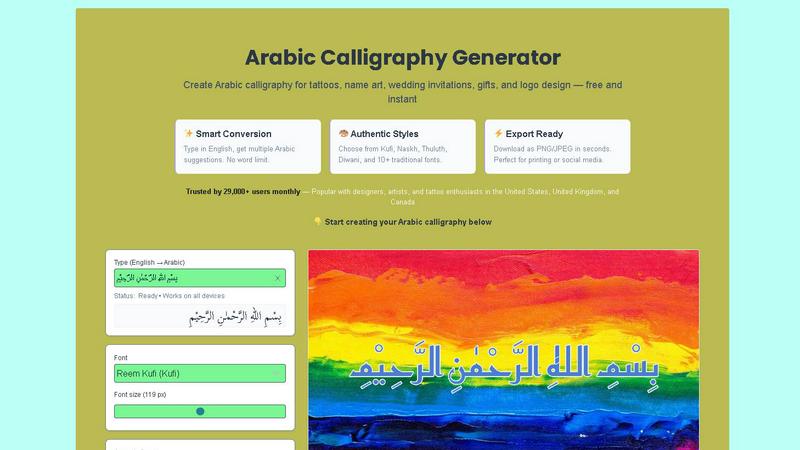
Arabic Calligraphy Generator
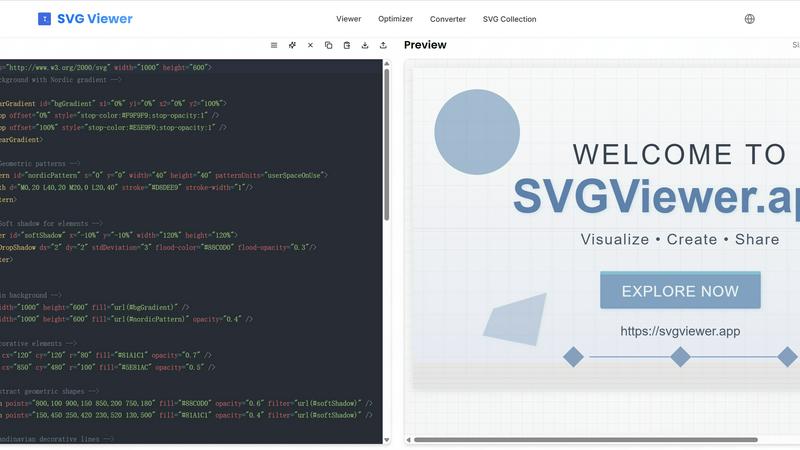
SVG Converter
Feature Comparison
Arabic Calligraphy Generator
Smart English-to-Arabic Conversion
Type anything in English and instantly receive multiple, context-aware Arabic script suggestions. Our intelligent system handles the complex translation and transcription, ensuring linguistic accuracy so you can focus on the design. There's no word limit, allowing you to work on short names or long, meaningful quotes with equal ease, making perfect calligraphy accessible even if you don't know the Arabic alphabet.
Authentic Historical Calligraphy Styles
Choose from a curated library of over 10 traditional and modern Arabic scripts. Each style, from the geometric 7th-century Kufi to the elegant 16th-century Diwani used for royal decrees, is implemented with proper letter connections and proportional rules. This ensures your generated artwork isn't just a font but a true digital representation of each calligraphic tradition's unique character and historical significance.
Professional-Grade Export & Customization
Download your finished artwork in high-resolution PNG or JPEG formats in seconds, with options for transparent backgrounds perfect for logos. Fine-tune every detail with advanced controls for font size, fill color, stroke, rotation, and opacity. Apply textured backgrounds or upload your own to create completely unique compositions ready for professional printing, social media, or product integration.
Integrated Learning Platform & Gallery
Master the art with our structured educational resources. Follow a beginner's learning path from the alphabet to advanced styles, explore step-by-step design tutorials for real projects like wedding invites, and browse an inspirational gallery of user-generated work. This turns the tool from a simple generator into a comprehensive platform for skill development and creative discovery.
SVG Converter
Easy Conversion
SVG Converter simplifies the conversion process by allowing users to upload SVG files and convert them into popular formats like PNG, JPEG, and WebP in just a few clicks. This feature eliminates the hassle of dealing with complex software, making it accessible for users of all skill levels.
High-Quality Outputs
The tool ensures that converted images retain their original quality and clarity. Whether you are converting simple logos or intricate designs, SVG Converter produces outputs that are crisp and professional, suitable for both web and print applications.
Batch Processing
With SVG Converter, users can convert multiple SVG files simultaneously. This batch processing capability saves time and effort, especially for graphic designers or teams working on large projects that require the conversion of numerous files.
User-Friendly Interface
SVG Converter features an intuitive interface that guides users through the conversion process. The easy-to-navigate design allows users to focus on their creative work rather than getting bogged down by complicated software, ensuring a smooth experience from start to finish.
Use Cases
Arabic Calligraphy Generator
Personalized Name Art & Tattoo Design
Create stunning, personalized artwork for names or meaningful words. This is immensely popular for tattoo design, where individuals seek unique and spiritually or culturally significant body art. The generator ensures the script is beautiful and technically correct, providing a vital reference for both the client and the tattoo artist to ensure a perfect final result.
Wedding & Special Event Stationery
Design exquisite, custom Arabic calligraphy for wedding invitations, anniversary gifts, or event decor. The elegance of styles like Diwani or Thuluth adds a layer of luxury and personalization, perfect for couples incorporating cultural heritage or simply adoring the aesthetic. The high-resolution export guarantees print-ready quality for physical stationery.
Business Branding & Logo Creation
Develop distinctive logos and branding materials for businesses, cafes, or personal brands. Using a calligraphy style like Kufi for a modern tech logo or Naskh for a bookstore creates an immediate, memorable visual identity rooted in artistic tradition. The transparent PNG export is ideal for placing the logo on various marketing materials and digital platforms.
Islamic Art & Decorative Quotes
Produce beautiful renderings of Islamic phrases, Quranic verses, or inspirational quotes for home decor, gifts, or digital wallpapers. The tool handles the sacred text with the requisite care and accuracy, allowing users to select an appropriate style like Thuluth for mosque decor or Naskh for readable text, and export it for framing or sharing.
SVG Converter
Graphic Design Projects
Graphic designers can leverage SVG Converter to easily transform their vector designs into raster formats for various applications. Whether for web use, print media, or client presentations, this tool provides a quick solution for all conversion needs.
Website Development
Web developers often need rasterized images for website elements. SVG Converter allows them to convert SVG logos and icons into PNG or JPEG formats, ensuring that their websites load quickly without sacrificing image quality.
Social Media Graphics
Content creators can use SVG Converter to prepare eye-catching graphics for social media platforms. By converting SVG files into suitable formats, they can enhance posts with vibrant images that attract audience engagement.
Educational Materials
Educators and students can utilize SVG Converter to create and convert graphics for presentations, reports, and educational resources. This tool makes it easy to produce high-quality images that effectively communicate ideas and concepts.
Overview
About Arabic Calligraphy Generator
Welcome to the future of Arabic typography! The Arabic Calligraphy Generator is your all-in-one digital studio and educational hub, designed to shatter the barriers to creating authentic, breathtaking Arabic calligraphy. This isn't just another font tool; it's a powerful, web-based platform that meticulously applies the centuries-old rules of Arabic script to transform your words into genuine art. Whether you're typing in English or Arabic, our smart engine provides accurate suggestions and renders your text in historically accurate styles like Thuluth, Diwani, and Naskh. We've built this for everyone: from tattoo artists and graphic designers crafting logos and wedding invitations, to curious learners and small business owners seeking elegant branding. Our mission is crystal clear: to make this profound art form accessible to a global audience while upholding the highest standards of cultural respect and historical accuracy. Join over 29,000 monthly users who are already creating, learning, and designing with confidence.
About SVG Converter
SVG Converter is a powerful, free online tool that allows users to seamlessly convert SVG files into various raster formats such as PNG, JPEG, and more. This tool is designed for graphic designers, web developers, and anyone who works with vector graphics and requires an easy way to transform these graphics into raster images. With its user-friendly interface, SVG Converter enables users to maintain high-quality visuals while converting complex vector files, making it an ideal solution for both professionals and hobbyists. The main value proposition lies in its ability to facilitate quick and efficient conversions without the need for specialized software. By offering a free online platform, SVG Converter democratizes access to essential graphic design tools, allowing users to optimize their workflow and enhance their creative projects with minimal effort.
Frequently Asked Questions
Arabic Calligraphy Generator FAQ
Do I need to know Arabic to use this generator?
Not at all! Our smart conversion feature is designed for everyone. You can type your text in English, and the tool will provide you with accurate Arabic script suggestions. This makes it incredibly easy for non-Arabic speakers to create authentic calligraphy for names, words, or phrases without any prior knowledge of the language.
Are the calligraphy styles historically accurate?
Yes, absolutely. We are committed to cultural respect and historical accuracy. Each script style in our library, from Kufi to Diwani, is based on traditional calligraphic rules, including proper letter proportions, connections, and forms. We provide detailed guides on the history and use of each style to help you make an informed and appropriate choice for your project.
What file formats can I download my design in?
You can download your generated calligraphy instantly as a high-resolution PNG (with or without a transparent background) or as a JPG/JPEG file. You can also scale the export up to 3x for larger print formats. This ensures your design is ready for any use, from web graphics to large-format printing.
Is this tool free to use?
Yes, the core Arabic Calligraphy Generator is completely free to use. You can access all the major calligraphy styles, use the conversion tool, customize your design, and export your artwork without any cost. We operate as an independent platform to make this art form accessible to as many people as possible.
SVG Converter FAQ
What formats can I convert my SVG files into?
SVG Converter supports multiple formats including PNG, JPEG, WebP, and ICO. This flexibility allows you to choose the format that best suits your needs.
Is SVG Converter free to use?
Yes, SVG Converter is completely free. You can convert your SVG files without any hidden fees or subscription plans, making it an accessible tool for everyone.
How long does the conversion process take?
The conversion process is typically very quick, often taking just a few seconds to a minute depending on the size of the SVG files being converted. You can expect instant results, allowing for a smooth workflow.
Can I convert multiple SVG files at once?
Absolutely! SVG Converter offers batch processing, enabling you to upload and convert multiple SVG files in one go. This feature is particularly useful for users handling large projects with numerous graphics.
Alternatives
Arabic Calligraphy Generator Alternatives
Arabic Calligraphy Generator is a dedicated web-based tool that transforms your text into beautiful, authentic Arabic calligraphy instantly. It falls squarely into the category of online design tools, specifically created for typography and cultural art creation. Our platform is built for simplicity, allowing anyone to explore this historic art form with just a few clicks. Users often seek alternatives for various practical reasons. Some might need advanced design features for professional projects, while others may be looking for specific pricing models or software that integrates directly with other platforms like desktop publishing suites. The needs can range from purely aesthetic customization to technical functionality. When evaluating other options, it's crucial to consider a few key factors. Look for tools that prioritize historical accuracy and cultural respect in their font designs. Ease of use and the quality of the final output are paramount, as is the transparency of the platform regarding its capabilities and any associated costs. The best choice aligns with your specific project requirements and creative goals.
SVG Converter Alternatives
SVG Converter is a cutting-edge, free online tool designed to transform SVG files into various formats like PNG and JPEG. It falls under the categories of Design Tools and Dev Tools, making it an essential resource for designers and developers alike who need to convert vector graphics into raster images seamlessly. The user-friendly interface and quick processing capabilities make SVG Converter a standout option for anyone looking to streamline their graphic design workflow. However, users often seek alternatives for a variety of reasons, such as pricing, additional features, or compatibility with specific platforms. When exploring alternatives, it's important to consider factors like ease of use, the range of supported formats, and any unique functionalities that may enhance your conversion experience. Ultimately, the right alternative will depend on your specific needs and preferences, ensuring that you find a solution that aligns with your creative goals.