
Boast Image vs Shrinkpad

Boast Image
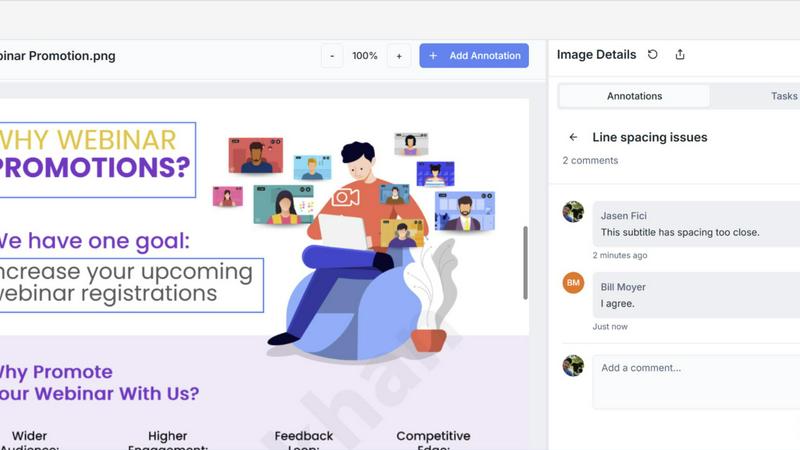
Boast Image collects visual feedback from clients with simple click to comment annotations.
Last updated: February 28, 2026

Shrinkpad
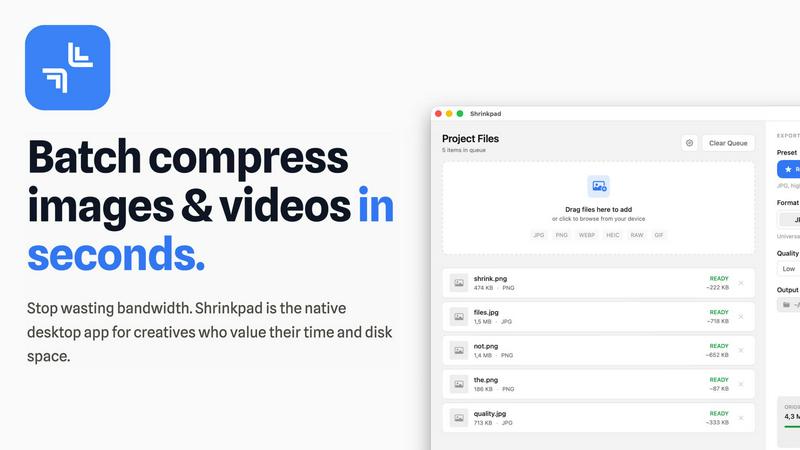
Effortlessly batch compress images and videos on Mac to save time, space, and improve performance with Shrinkpad.
Last updated: February 28, 2026
Visual Comparison
Boast Image
Shrinkpad
Feature Comparison
Boast Image
Zero-Login Client Review
The core magic of Boast Image. Clients never need to create an account or remember a password. You share a single, secure link via email. They click it and are instantly in the review environment, ready to click and comment on your work. This eliminates the biggest barrier to adoption, ensuring feedback comes in fast and consistently, without the dreaded "I'll do it later" ghosting.
Pixel-Perfect Annotation
Move beyond vague emails saying "make it pop." Clients and stakeholders can click directly on any element of your web page, image, or PDF to drop a pin and leave precise feedback. This contextual commenting ensures there's zero confusion about what needs to be changed, turning subjective notes into clear, actionable tasks pinned to the exact spot.
Built-In Task & Version Management
Behind the simple client interface lies a powerful project hub for your team. All incoming comments are automatically organized. You can convert feedback into trackable tasks, manage them in a Kanban board, and upload new versions of your work. Clients see a clear history of changes, eliminating the "which version are we on?" confusion and keeping everyone perfectly aligned.
Instant Web Capture (Chrome Extension)
Streamline your workflow from the very start. Our free Chrome extension lets you capture any live website—full page, visible area, or a custom region—and instantly create a feedback-ready Boast Image item without ever leaving your browser. It’s the fastest way to go from a live site to collecting client comments.
Shrinkpad
Batch Compression
Shrinkpad allows you to drag and drop entire folders filled with images and videos for batch processing. This feature dramatically reduces the time spent on individual file compression, handling everything in seconds rather than hours.
Local Processing
With Shrinkpad, all your files are processed locally on your Mac. This means no uploads, no cloud dependencies, and complete privacy. Your sensitive assets remain on your device, giving you peace of mind.
Format Support
The app supports over 50 file formats, including popular image formats like JPG, PNG, and HEIC, as well as video formats such as MP4 and MOV. You can compress a variety of media types without worrying about compatibility issues.
Customization Options
Shrinkpad provides extensive customization options to fit your workflow. You can choose from quality presets, manually adjust compression settings, and even create custom file naming patterns. This allows for tailored outputs based on your specific needs.
Use Cases
Boast Image
Web Design & Development Agencies
Agencies can finally conquer client feedback chaos. Use Boast Image for website reviews, UI/UX prototypes, and landing page approvals. Collect consolidated feedback from multiple stakeholders simultaneously on live sites or mockups, drastically reducing revision cycles and getting projects to launch faster.
Freelance Designers & Creators
Solo professionals can present a polished, professional process without the overhead. Share logo concepts, branding packages, or marketing imagery with clients. The frictionless review experience impresses clients, while the organized task list helps you manage revisions efficiently and get paid sooner.
PDF & Document Review Teams
Perfect for legal, marketing, or editorial teams reviewing contracts, reports, or brochures. Instead of messy email threads with annotated PDF attachments, provide a single link where reviewers can comment directly on the document. All feedback is centralized, versioned, and easy to action.
Product Management & SaaS Teams
Gather precise bug reports and feature requests from beta testers or internal teams. Testers can pin comments directly on the application interface, providing developers with visual, exact context that replaces vague written descriptions, speeding up the triage and fix process.
Shrinkpad
Photographer Workflow Optimization
Photographers can use Shrinkpad to quickly compress large batches of high-resolution images from a shoot. This not only saves storage space but also speeds up the process of preparing images for sharing or printing.
Web Development and Design
Web designers can benefit from Shrinkpad by optimizing images and videos before uploading them to websites. This leads to faster load times and improved user experience, essential for maintaining visitor engagement.
Content Creation for Social Media
Content creators can leverage Shrinkpad to compress video files for platforms like Instagram and YouTube. By maintaining high visual quality while reducing file sizes, creators can easily share their work without worrying about upload limits.
Team Collaboration in Studios
Small studios can utilize Shrinkpad to streamline their asset management. With the ability to batch process files and maintain quality, teams can collaborate effectively, ensuring that everyone has access to optimized media.
Overview
About Boast Image
Tired of feedback tools that clients ignore? Welcome to Boast Image, the visual feedback platform engineered for client-first simplicity. We solve the #1 agency challenge: client communication. While other tools bog down your clients with logins, accounts, and confusing workflows, Boast Image strips all that away. You simply send a link. Clients click it and immediately start pinning precise comments directly onto your web pages, images, and PDFs—no training required. Behind that effortless client experience is a powerful workspace for you: all feedback is automatically organized into tasks, threaded conversations, and clear versions. Stop the endless email chains, vague requests, and lost screenshots. With Boast Image, clients give clear, actionable feedback in minutes, not days, so you can cut revision time in half and get to final approval faster. It's the tool built for the people who actually need to use it: your clients.
About Shrinkpad
Shrinkpad is an innovative batch compression tool designed specifically for Mac users who want to efficiently manage their media files. It allows you to compress hundreds of images and videos simultaneously, ensuring that everything stays on your device for maximum privacy. With a focus on speed and efficiency, Shrinkpad utilizes native macOS frameworks to process files locally, eliminating the need for cloud uploads or slow server processing. This makes it ideal for photographers, designers, content creators, and anyone overwhelmed by bloated media files. By reducing file sizes by up to 90% without sacrificing quality, Shrinkpad helps you reclaim valuable disk space and optimize your workflow. Its user-friendly interface and powerful features make it an essential tool for anyone looking to streamline their media management.
Frequently Asked Questions
Boast Image FAQ
Do my clients really need to create an account?
Absolutely not! This is the cornerstone of Boast Image. Your clients never need to sign up, log in, or remember a password. They access the review board through a unique link you send them. If they can open an email, they can give you feedback.
What file types can I collect feedback on?
Boast Image is built for visual feedback. You can collect comments directly on live or captured web pages (using our Chrome extension), standard image files (like JPG, PNG), and PDF documents. It's the perfect toolkit for most digital creative and review workflows.
How does version control work?
When you make updates based on feedback, you can upload a new version of your work directly into the same project. The system maintains a clear history, and clients can easily toggle between versions to see what has changed, ensuring everyone is always looking at the latest iteration.
Is there a free plan to try it out?
Yes! Boast Image offers a Free Forever plan that is perfect for trying the core experience. It includes 1 active project, 5 items, and allows you to invite 3 external collaborators, giving you plenty of room to see how it transforms your feedback process at no cost.
Shrinkpad FAQ
Can I use Shrinkpad for free?
Yes, Shrinkpad offers a Free Starter plan that includes essential tools for casual use, allowing you to compress up to 10 files per batch with standard compression.
What file formats does Shrinkpad support?
Shrinkpad supports over 50 formats out of the box, including JPG, PNG, HEIC, WEBP for images, and MP4, MOV for videos, ensuring compatibility with a wide range of media types.
Does Shrinkpad support video compression?
Absolutely! Shrinkpad allows users to compress video files alongside images, making it an all-in-one solution for managing various media formats efficiently.
Can I control the compression quality?
Yes, Shrinkpad offers both automatic and manual compression settings. You can choose from quality presets or fine-tune the compression parameters to achieve the desired balance between file size and visual quality.
Alternatives
Boast Image Alternatives
Boast Image is a visual feedback tool built for product development teams who need precise client input. It belongs to the category of collaborative review and annotation software, designed to streamline how you collect feedback on websites, images, and documents. People explore alternatives for many valid reasons. Perhaps they need specific integrations with other platforms in their stack, or their budget requires a different pricing model. Some teams might be looking for a tool with a different feature emphasis, like built-in project management or more granular user permissions. When evaluating options, focus on the core job: getting clear, actionable feedback from clients. The right tool should minimize friction for your clients above all else. Also, consider how it fits into your existing workflow—does it create more work or seamlessly slot in? Security, version history, and the quality of the feedback collected are other critical factors.
Shrinkpad Alternatives
ShrinkPad is an innovative batch compression tool designed specifically for Mac users, allowing them to effortlessly compress images and videos without sacrificing quality. It stands out in the image and video processing category by offering a seamless drag-and-drop experience, ensuring that users can quickly reduce file sizes while keeping their media files secure and private. However, users often seek alternatives to ShrinkPad for various reasons, including pricing, desired features, or platform compatibility. When looking for an alternative, it's essential to consider factors such as ease of use, the range of supported formats, customization options, and the level of privacy offered. A reliable alternative should meet specific needs while providing a user-friendly experience.