
BudgetSheet vs ExpenseManager

BudgetSheet
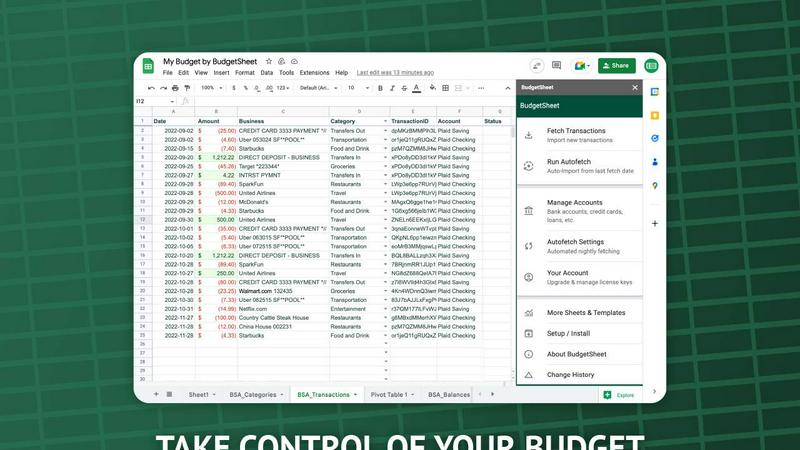
BudgetSheet effortlessly imports your bank transactions into Google Sheets, automating budgeting like never before.
Last updated: February 28, 2026

ExpenseManager
Track, split, and budget all your expenses in one secure app for individuals, couples, and groups.
Last updated: February 28, 2026
Visual Comparison
BudgetSheet
ExpenseManager
Feature Comparison
BudgetSheet
Live Bank Transactions
BudgetSheet allows users to connect their bank accounts securely and import live transactions directly into Google Sheets. This feature eliminates the need for manual data entry, ensuring that your financial records are always up to date and accurate.
Supports 10,000+ Financial Institutions
Whether you have a checking account, savings account, credit card, or investment account, BudgetSheet supports over 10,000 financial institutions. This extensive compatibility means you can manage all your financial data from one centralized location.
Secure Connections with Plaid
BudgetSheet utilizes Plaid to facilitate secure connections to your financial institutions. This means that your sensitive login credentials are never stored or handled by BudgetSheet, providing peace of mind when linking your bank accounts.
Custom Automation with Google Sheets
One of the standout features of BudgetSheet is the ability to automate your budgeting processes using Google Sheets' custom scripts and tools like Zapier. This flexibility allows you to create personalized solutions tailored to your financial needs.
ExpenseManager
AI-Powered Receipt Scanner
Wave goodbye to manual data entry forever. Simply take a photo of any paper or digital receipt, and our advanced Optical Character Recognition (OCR) technology powered by AI gets to work. It instantly and accurately reads the total amount, identifies the merchant, and smartly categorizes the expense (like "Groceries" or "Transport"). Your spending is logged in your personal finance dashboard in seconds, saving you time and ensuring your records are perfectly precise.
Proactive Budgeting with Smart Alerts
Take control of your finances with intuitive, customizable budgets for any spending category. The real power lies in our proactive alert system. You're not just tracking what you've spent; you're guided before you overspend. Set your monthly limit, and ExpenseManager will notify you when you hit 50%, 75%, and 90% of your budget. This early-warning system gives you the chance to adjust your spending behavior in real-time, empowering you to stay on target and reach your savings goals.
Flexible Bill Splitting & Auto-Settlement
Splitting bills is now effortless and argument-free. Whether it's dinner with friends, a group vacation, or monthly rent with roommates, you can split any expense with just a few taps. Choose from equal splits, percentage-based divisions (perfect for income-based sharing), or fully custom amounts. The app automatically calculates who owes whom and maintains a running balance. It even helps with settlement, clearly showing debts so you can resolve them directly, making shared finances transparent and simple.
Multi-Currency & Cash Flow Forecasting
Manage your money across borders without the headache. ExpenseManager natively supports over 30 currencies, allowing travelers and digital nomads to log expenses in the local currency they spent. For freelancers and anyone with variable income, the cash flow forecast feature is a game-changer. It analyzes your logged expenses and income patterns to project your future balance, helping you understand if you're on track to meet your financial commitments weeks or even months ahead.
Use Cases
BudgetSheet
Personal Budgeting
BudgetSheet is ideal for individuals who want to create tailored budgets. By automatically importing transactions, users can easily track their income and expenses, ensuring they stay within their financial limits.
Small Business Financial Management
Small business owners can benefit from BudgetSheet by using it to monitor business expenses and revenues. The automation features help streamline financial reporting, making it easier to prepare for taxes or audits.
Investment Tracking
For those managing investment accounts, BudgetSheet offers a straightforward way to keep track of transactions and portfolio performance. Users can analyze their investments directly in Google Sheets, allowing for informed decision-making.
Family Budget Coordination
Families can use BudgetSheet to coordinate finances by sharing a single Google Sheet. This enables all family members to easily view and contribute to the family budget, promoting transparency and collaboration in financial planning.
ExpenseManager
Couples Managing Household Finances
ExpenseManager transforms how couples handle shared finances, fostering transparency and reducing tension. Partners can seamlessly track joint household expenses like rent, utilities, and groceries. The app clearly shows who paid for what and automatically calculates if one person owes the other, making "money talks" straightforward and factual. Shared budgets for goals like vacations or home projects keep both parties aligned, turning financial management from a source of arguments into a tool for building a future together.
Roommates Splitting Rent and Bills
Simplify the monthly chore of splitting rent, internet, electricity, and shared supplies. One roommate can log a bill, and with a few clicks, split it equally or by custom arrangement among the group. Everyone in the shared house can see the logged expense and their individual share. The auto-calculated balances ensure everyone knows exactly what they owe and to whom, eliminating confusion, forgotten Venmo requests, and ensuring bills are settled fairly and on time.
Group Travel and Multi-Currency Trips
Planning a trip with friends? ExpenseManager is the ultimate travel finance buddy. One person can pay for a hotel, another for flights, and others for meals and activities—all logged in the local currency. The app handles all the complex currency conversions and calculations in the background. At the end of the trip, everyone can see a complete, accurate breakdown of all shared expenses and instantly know who needs to settle up with whom, making group travel finances blissfully simple.
Individuals Seeking Financial Clarity
For anyone looking to understand their spending habits and save more, ExpenseManager is a powerful personal finance tool. By quickly logging expenses via receipt scan or manual entry, you get a real-time, organized view of where your money goes each month. Setting personal budgets and receiving proactive alerts helps curb unnecessary spending. The insightful spending analysis and cash flow forecasting provide the clarity needed to make informed financial decisions and build stronger savings habits.
Overview
About BudgetSheet
BudgetSheet is a powerful Google Sheets add-on designed to streamline your financial management by importing live bank transactions directly into your spreadsheets. Gone are the days of tedious manual exports and cumbersome CSV files. With BudgetSheet, you can easily link to over 10,000 financial institutions, including checking accounts, savings accounts, credit cards, investment accounts, loans, and mortgages. This tool is perfect for anyone looking to take control of their personal finances, from budgeting enthusiasts to busy professionals seeking an efficient way to track expenses. By harnessing the secure connectivity of Plaid, BudgetSheet ensures that your sensitive data remains safe while providing you with a user-friendly interface to manage your finances. With BudgetSheet, you gain full autonomy over your budgeting process, allowing you to customize your spreadsheets to fit your unique financial goals and strategies.
About ExpenseManager
ExpenseManager is the revolutionary all-in-one finance app that finally unites personal budgeting and shared expense management, eliminating the need to juggle multiple tools. It's designed for modern life where finances are often collaborative, whether you're building a future with a partner, sharing an apartment, or exploring the world with friends. At its core, ExpenseManager gives you crystal-clear clarity on your money. Simply snap a photo of any receipt, and our powerful AI-powered OCR technology instantly extracts the amount, merchant, and category, logging the expense in seconds. Go beyond tracking by setting dynamic monthly budgets that send you smart alerts at 50%, 75%, and 90% to prevent overspending before it happens. The magic truly unfolds when you split costs: effortlessly divide bills with anyone using equal shares, percentages, or custom amounts. The app automatically tracks who owes what and even facilitates seamless debt settlement, turning awkward money conversations into a thing of the past. With support for over 30 currencies and bank-grade security, it's the intelligent, secure, and flexible financial companion you've been waiting for.
Frequently Asked Questions
BudgetSheet FAQ
How does BudgetSheet ensure my bank data is secure?
BudgetSheet uses Plaid for secure bank connections, meaning your bank login credentials are never stored or handled by BudgetSheet. All sensitive data is encrypted, ensuring your information remains safe.
Can I try BudgetSheet before purchasing?
Absolutely! BudgetSheet offers a 15-day free trial with no credit card required. This allows you to explore all features and see how it fits your financial management needs.
What types of accounts can I connect with BudgetSheet?
BudgetSheet supports a wide range of account types, including checking accounts, savings accounts, credit cards, investment accounts, and loans. You can check the list of supported banks to see if yours is included.
Is BudgetSheet easy to set up?
Yes! Setting up BudgetSheet is straightforward. Simply enable the add-on in Google Sheets, link your bank accounts, and start importing transactions. The user-friendly interface makes it accessible for everyone, regardless of tech-savviness.
ExpenseManager FAQ
What is the Founding Member offer?
The Founding Member offer is a limited-time launch opportunity for the first 100 users to sign up. As a Founding Member, you gain lifetime access to all of ExpenseManager's current and future premium features completely free, forever. This is a thank you to our earliest supporters who help us build and refine the app. Only a limited number of spots are available, so claiming your spot secures this exclusive, perpetual benefit.
Is my financial data secure?
Absolutely. We prioritize your security above all else. ExpenseManager uses AES-256 bank-grade encryption to protect all your sensitive financial data, both when it's stored and when it's being transmitted. This is the same level of security trusted by major financial institutions worldwide. We are committed to maintaining the highest standards of data privacy and security.
What platforms are supported?
ExpenseManager is built as a modern web application, accessible from any device with a browser, including smartphones, tablets, and desktop computers. This approach ensures you can manage your expenses anywhere, anytime, without waiting for app store updates. We provide a seamless, responsive experience across all your devices.
Do you support multiple currencies?
Yes! We built ExpenseManager for a global audience. The app natively supports over 30 different currencies. This means you can record expenses in the local currency you actually spent, whether you're traveling, living abroad, or dealing with international vendors. The app handles all conversions and calculations for you when splitting bills with others who may use a different base currency.
Alternatives
BudgetSheet Alternatives
BudgetSheet is an innovative tool designed to streamline your personal finance management by integrating live bank transactions directly into Google Sheets. It eliminates the hassle of manual exports and tedious copy-pasting from CSV files, making financial tracking easier and more efficient than ever. Users typically seek alternatives to BudgetSheet for various reasons, including pricing structures, specific feature sets, or compatibility with different platforms. When searching for an alternative, consider what functionalities are essential for your financial management needs. Look for seamless integrations, user-friendly interfaces, and robust automation features that can enhance your budgeting experience while fitting your unique requirements.
ExpenseManager Alternatives
ExpenseManager is a dynamic personal finance app that uniquely combines solo budgeting with shared expense tracking. It’s designed for anyone who wants clarity on their own spending while also easily managing costs with others, like a partner or travel group. People explore alternatives for various reasons. They might need an app that works on a specific platform, prefer a different pricing model, or require a particular feature set that aligns with their unique financial habits. It’s all about finding the perfect tool for your individual or shared money journey. When evaluating options, consider your core needs. Do you primarily track personal spending, or is splitting bills a daily task? Look for key functionalities like receipt scanning, real-time budget alerts, and flexible ways to settle shared debts. The right app should feel effortless and give you back control.