
BudgetSheet vs Redbark

BudgetSheet
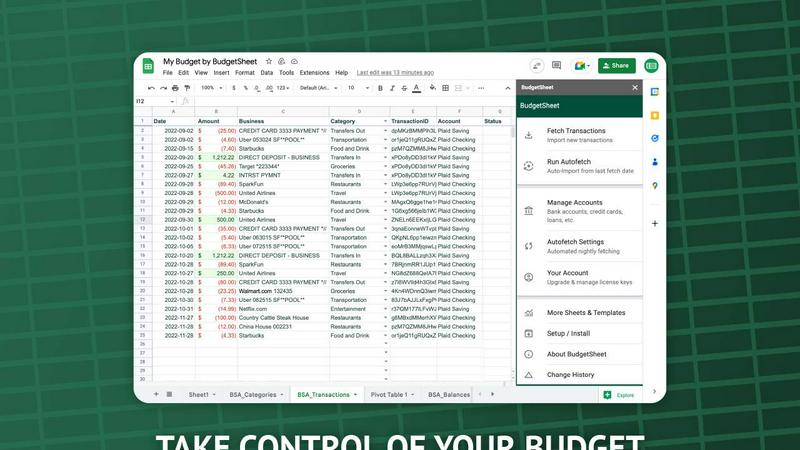
BudgetSheet effortlessly imports your bank transactions into Google Sheets, automating budgeting like never before.
Last updated: February 28, 2026

Redbark
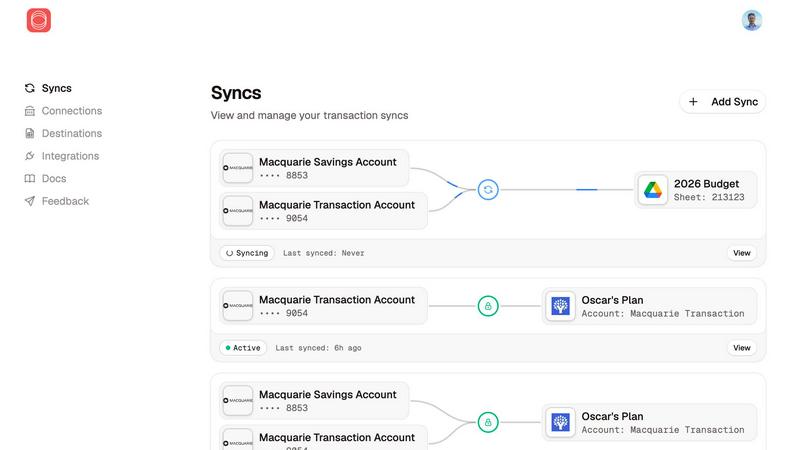
Redbark syncs your Australian bank and brokerage data directly to your favorite tools automatically.
Last updated: February 28, 2026
Visual Comparison
BudgetSheet
Redbark
Feature Comparison
BudgetSheet
Live Bank Transactions
BudgetSheet allows users to connect their bank accounts securely and import live transactions directly into Google Sheets. This feature eliminates the need for manual data entry, ensuring that your financial records are always up to date and accurate.
Supports 10,000+ Financial Institutions
Whether you have a checking account, savings account, credit card, or investment account, BudgetSheet supports over 10,000 financial institutions. This extensive compatibility means you can manage all your financial data from one centralized location.
Secure Connections with Plaid
BudgetSheet utilizes Plaid to facilitate secure connections to your financial institutions. This means that your sensitive login credentials are never stored or handled by BudgetSheet, providing peace of mind when linking your bank accounts.
Custom Automation with Google Sheets
One of the standout features of BudgetSheet is the ability to automate your budgeting processes using Google Sheets' custom scripts and tools like Zapier. This flexibility allows you to create personalized solutions tailored to your financial needs.
Redbark
Secure, Regulated Data Access
Redbark doesn't scrape screens. It uses Australia's Consumer Data Right (CDR) framework via accredited partners for secure, bank-approved data access. This means transparent consent, minimal data collection, and your legal right to withdraw access at any time. For global brokerages and New Zealand banks, secure integrations via SnapTrade and Akahu provide the same level of reliable, official connectivity, moving beyond the fragility and security risks of legacy methods.
Pass-Through Data Architecture
Your privacy is non-negotiable. Redbark's core architecture is designed so your financial data flows directly from your bank or brokerage to your destination tool. We never store your transactions, balances, or account details on our servers. It's a secure conduit, not a data warehouse, ensuring your information remains under your control and is only seen where you intend it to be.
Multi-Destination & Smart Sync
Sync a single bank account to multiple tools simultaneously—like Google Sheets for custom analysis, YNAB for budgeting, and Notion for reporting—all at once. Redbark handles intelligent, ID-based deduplication with overlap buffers to catch late-posting transactions, so you never have duplicate rows. Updates are automated via webhooks, triggering background syncs the moment your bank reports new activity.
100+ Integrations & Portfolio Tracking
Connect to every major Australian bank, credit union, and a growing list of global brokerages and crypto exchanges. Redbark isn't just for transactions; it syncs your full investment portfolio holdings with live profit & loss and complete trade history. This holistic view means your net worth and investment performance are always up-to-date alongside your cash flow.
Use Cases
BudgetSheet
Personal Budgeting
BudgetSheet is ideal for individuals who want to create tailored budgets. By automatically importing transactions, users can easily track their income and expenses, ensuring they stay within their financial limits.
Small Business Financial Management
Small business owners can benefit from BudgetSheet by using it to monitor business expenses and revenues. The automation features help streamline financial reporting, making it easier to prepare for taxes or audits.
Investment Tracking
For those managing investment accounts, BudgetSheet offers a straightforward way to keep track of transactions and portfolio performance. Users can analyze their investments directly in Google Sheets, allowing for informed decision-making.
Family Budget Coordination
Families can use BudgetSheet to coordinate finances by sharing a single Google Sheet. This enables all family members to easily view and contribute to the family budget, promoting transparency and collaboration in financial planning.
Redbark
Automated Business Bookkeeping
Freelancers and small business owners can automate their bookkeeping by syncing business account transactions directly into a dedicated Google Sheet or Airtable base. This eliminates manual data entry, reduces errors, and provides a real-time view of cash flow, making reconciliation and expense tracking effortless and always current.
Live Investment Portfolio Dashboard
Active investors and traders can build a live, consolidated dashboard of their holdings across multiple brokerages (like CommSec and Stake) in Google Sheets or Notion. Automatically track live P&L, dividend income, and trade history without logging into each platform, enabling faster, data-driven investment decisions.
Streamlined Personal Budgeting
Individuals and families using budgeting apps like YNAB or Actual Budget can connect their everyday accounts, savings, and credit cards. Redbark automatically imports new transactions, categorizing them for review, so you can maintain an accurate budget without the tedious manual import of bank statements or CSV files.
Centralized Financial Reporting
Financial analysts, advisors, or anyone managing complex finances can centralize data from multiple banks, loans, and investment accounts into a single Notion page or master Google Sheet. This creates a unified source of truth for net worth tracking, custom reporting, and financial planning without manual aggregation.
Overview
About BudgetSheet
BudgetSheet is a powerful Google Sheets add-on designed to streamline your financial management by importing live bank transactions directly into your spreadsheets. Gone are the days of tedious manual exports and cumbersome CSV files. With BudgetSheet, you can easily link to over 10,000 financial institutions, including checking accounts, savings accounts, credit cards, investment accounts, loans, and mortgages. This tool is perfect for anyone looking to take control of their personal finances, from budgeting enthusiasts to busy professionals seeking an efficient way to track expenses. By harnessing the secure connectivity of Plaid, BudgetSheet ensures that your sensitive data remains safe while providing you with a user-friendly interface to manage your finances. With BudgetSheet, you gain full autonomy over your budgeting process, allowing you to customize your spreadsheets to fit your unique financial goals and strategies.
About Redbark
Redbark is the game-changing financial data pipeline that finally connects your money to your productivity. It's the secure, automated bridge between your Australian bank accounts, global brokerage portfolios, and the tools where you actually manage your life—like Google Sheets, Notion, Airtable, YNAB, and Actual Budget. Forget manual exports, messy CSV files, and unreliable screen-scraping. Redbark leverages Australia's official Consumer Data Right (CDR) framework for bank-approved, regulated access to your data. Your transactions, balances, and investment holdings sync automatically on your schedule, flowing directly from your financial institution to your chosen destination in real time. With a foundational commitment to privacy, Redbark operates on a strict pass-through architecture, meaning your sensitive financial data is never stored on its servers. Built for the modern financial operator—freelancers, investors, small business owners, and spreadsheet power users—Redbark delivers a powerful, set-up-in-minutes automation that brings every account and every transaction into one, unified, and actionable place.
Frequently Asked Questions
BudgetSheet FAQ
How does BudgetSheet ensure my bank data is secure?
BudgetSheet uses Plaid for secure bank connections, meaning your bank login credentials are never stored or handled by BudgetSheet. All sensitive data is encrypted, ensuring your information remains safe.
Can I try BudgetSheet before purchasing?
Absolutely! BudgetSheet offers a 15-day free trial with no credit card required. This allows you to explore all features and see how it fits your financial management needs.
What types of accounts can I connect with BudgetSheet?
BudgetSheet supports a wide range of account types, including checking accounts, savings accounts, credit cards, investment accounts, and loans. You can check the list of supported banks to see if yours is included.
Is BudgetSheet easy to set up?
Yes! Setting up BudgetSheet is straightforward. Simply enable the add-on in Google Sheets, link your bank accounts, and start importing transactions. The user-friendly interface makes it accessible for everyone, regardless of tech-savviness.
Redbark FAQ
Is my financial data secure with Redbark?
Absolutely. Security is our foundation. We use Australia's regulated CDR framework for bank connections—it's not screen scraping. Our pass-through architecture means we never store your financial data. All credentials are encrypted with AES-256-GCM, and our entire infrastructure is 100% hosted in Australia, SOC 2 certified, and compliant with strict data sovereignty laws.
Which banks and brokerages do you support?
We support all major Australian banks (CommBank, Westpac, NAB, ANZ, Macquarie, ING, and more) via CDR Open Banking. We also connect to global brokerages and crypto exchanges via SnapTrade, and New Zealand banks via Akahu. You can view the full, growing list of connections on our website.
Do I need to be a tech expert to set this up?
Not at all! Redbark is built for simplicity. You can connect your accounts, choose your destinations (like Google Sheets), and set your sync schedule in just a few minutes with a straightforward, no-code interface. No programming or technical skills are required to start automating your financial data.
Can I sync data to multiple tools at once?
Yes! This is a powerful feature of Redbark. You can sync the same bank account or brokerage portfolio to multiple destinations simultaneously—for example, sending transactions to both Google Sheets for analysis and YNAB for budgeting at the same time. Each destination can have its own custom formatting rules.
Alternatives
BudgetSheet Alternatives
BudgetSheet is an innovative tool designed to streamline your personal finance management by integrating live bank transactions directly into Google Sheets. It eliminates the hassle of manual exports and tedious copy-pasting from CSV files, making financial tracking easier and more efficient than ever. Users typically seek alternatives to BudgetSheet for various reasons, including pricing structures, specific feature sets, or compatibility with different platforms. When searching for an alternative, consider what functionalities are essential for your financial management needs. Look for seamless integrations, user-friendly interfaces, and robust automation features that can enhance your budgeting experience while fitting your unique requirements.
Redbark Alternatives
Redbark is a modern financial data platform that securely connects your Australian bank accounts and global investment portfolios directly to your favorite productivity tools like Google Sheets, Notion, and Airtable. It operates in the fintech and data automation space, designed to eliminate manual data entry and give you a real-time view of your finances. People often explore alternatives for various reasons, such as needing different pricing plans, specific feature sets, or compatibility with other platforms and banks. Your choice depends on your unique workflow, the financial institutions you use, and the tools where you need your data to live. When evaluating other options, key considerations include the security model for accessing your bank data, the range of supported banks and brokerages, and the flexibility of automation. Look for a solution that respects your privacy, integrates seamlessly with your existing stack, and delivers reliable, scheduled updates without requiring technical expertise.