
CloudBurn vs Datamata Studios

CloudBurn
CloudBurn reveals AWS infrastructure costs in pull requests, preventing costly surprises before deployment.
Last updated: February 28, 2026

Last updated: April 13, 2026
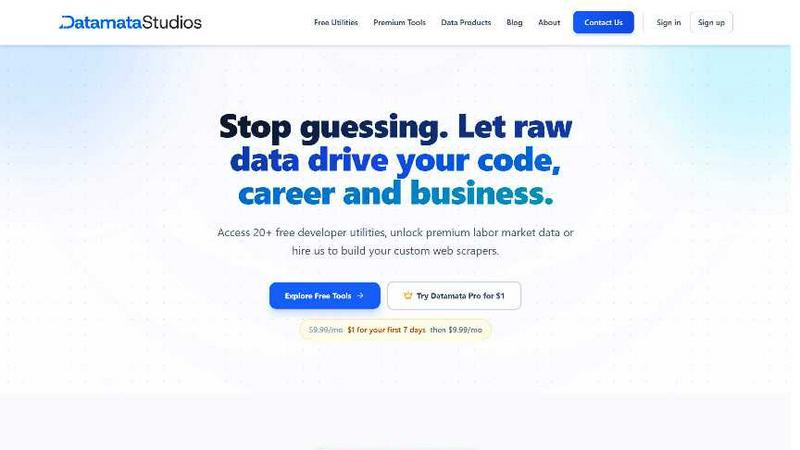
Visual Comparison
CloudBurn

Datamata Studios
Feature Comparison
CloudBurn
Automatic Cost Analysis
CloudBurn delivers automatic cost analysis on every infrastructure pull request, ensuring that all changes are evaluated for their financial impact. This feature allows developers to see the cost implications of their code changes before deployment, promoting cost-conscious decision-making.
Real-Time AWS Pricing
CloudBurn utilizes real-time AWS pricing tailored to your specific region, ensuring that the cost estimates provided are accurate and reflective of the current market. This means you can trust the figures you see, enabling you to make informed choices about your infrastructure.
Resource-Level Cost Breakdown
With CloudBurn, you receive a detailed resource-level breakdown that compares old and new monthly costs. This granular insight allows teams to pinpoint which specific changes will result in financial increases, making it easier to adjust plans or configurations accordingly.
Integration with GitHub Workflow
CloudBurn integrates seamlessly with your existing GitHub workflow, making setup a breeze. With just a few steps, teams can enable automated cost analysis for every pull request, streamlining the process of monitoring and managing cloud infrastructure expenses.
Datamata Studios
Free Developer Utilities
Access over 27 instant, no-signup tools for daily development and data tasks. This includes formatters for JSON and SQL, a regex tester with live pattern matching, converters for Base64, URL encoding, and Unix timestamps, and more. Every utility works directly in your browser with zero friction—no account required, no paywalls, just pure productivity. Bookmark your favorites and share them across your team to standardize workflows and save countless hours.
Live Skill Trends Dashboard
See the tech job market move in real-time with our Skill Trends dashboard. We categorize and track demand across fields like Data, AI, and DevOps, showing you which skills are surging, rising, or holding steady. This isn't guesswork; it's powered by daily analysis of thousands of job listings, giving you an unbiased view of what employers actually want so you can focus your learning and development on high-impact areas.
Pro Market Intelligence Tools
Unlock 10 premium tools with Datamata Pro for deep market analysis. This suite includes live Salary Benchmarking to gauge your worth, Hiring Velocity tracking to see which companies are ramping up, detailed Company Analysis for competitive research, and a data-powered ATS Resume Builder. These tools transform raw labor market data into a strategic advantage for job seekers, recruiters, and business strategists alike.
Custom Automation Consulting
Go beyond our platform and hire our experts to build custom web scrapers and data automation pipelines tailored to your specific needs. Whether you need to monitor competitors, aggregate niche market data, or fuel an internal dashboard with fresh intel, our hands-on consulting service delivers robust, maintainable solutions that turn the public web into your proprietary data source.
Use Cases
CloudBurn
Cost Management for Development Teams
Development teams can use CloudBurn to manage infrastructure costs effectively. By integrating cost analysis into the pull request process, teams can identify potential budget overruns before they occur, leading to more predictable financial planning.
Preventing Costly Production Mistakes
CloudBurn helps prevent costly mistakes from reaching production. By showing real-time cost estimates during the code review phase, teams can adjust their infrastructure changes before they become live, safeguarding against unexpected expenses.
Enhancing Financial Accountability
With CloudBurn's detailed cost reporting, teams can foster a culture of financial accountability. Developers can see the cost impact of their work, encouraging more mindful resource utilization and promoting a shared responsibility for cloud spending.
Streamlining CI/CD Workflows
CloudBurn enhances CI/CD workflows by integrating cost insights into the development pipeline. This automation saves time and effort for teams, allowing them to focus on building innovative solutions without the worry of spiraling costs.
Datamata Studios
Accelerating Development Workflows
A developer receives a messy, unformatted SQL query from a colleague. Instead of manually parsing it, they paste it into the SQL Formatter tool and get a clean, readable version instantly. Later, they debug a complex regular expression in the RegEx Tester before deploying it to production, preventing potential bugs and saving valuable debugging time.
Strategic Career Pivoting
A data analyst considering upskilling into AI engineering uses the Skill Trends dashboard to validate their learning path. They discover "dbt" is surging by 24% in data roles, while demand for "Python" remains steady at 68%. They then use the Pro Salary Benchmarking tool to see the potential salary increase for roles requiring these skills, making a data-driven decision on their next career move.
Competitive Business Intelligence
A startup founder is planning their go-to-market strategy and uses Datamata Pro's Company Analysis and Hiring Velocity tools. They identify that a key competitor has slowed hiring in a specific region, signaling a potential weakness or strategic shift. This live intelligence allows them to adjust their own hiring and sales focus to capitalize on the opportunity.
Building ATS-Optimized Resumes
A job seeker crafts their resume using the ATS Resume Builder within Datamata Pro. The tool suggests high-demand keywords and skills from live job listings for their target role and city. It then scores the resume's compatibility, helping them optimize it to pass automated tracking systems and get seen by real hiring managers.
Overview
About CloudBurn
CloudBurn is an innovative solution designed for teams using Terraform or AWS CDK who want to avoid costly infrastructure mistakes before they reach the production stage. Often, teams find themselves facing unpleasant surprises on their AWS bills weeks after deploying changes, by which time the infrastructure is already in place, and money has been spent. CloudBurn disrupts this cycle by providing real-time cost estimates during the code review process. When a developer opens a pull request with infrastructure modifications, CloudBurn automatically analyzes these changes using current AWS pricing data. This allows teams to see a detailed cost report right in their pull request, enabling informed discussions about costs before deployment. With CloudBurn, teams can catch expensive decisions early, ensuring that budget overruns are avoided and financial efficiency is maintained throughout the development lifecycle.
About Datamata Studios
Datamata Studios is the all-in-one data platform built for the modern developer, analyst, and data-driven team. We bridge the gap between everyday utility and strategic intelligence. Start with our suite of 27+ free, no-signup browser tools that streamline your daily workflow—format JSON, debug SQL, test regex, and convert data in seconds. Then, level up your career and business decisions with Datamata Pro, which unlocks real-time market intelligence powered by live job data. We track thousands of listings daily to deliver precise salary benchmarks, hiring velocity insights, company research, and skill demand analysis. For teams needing custom solutions, our hands-on automation consulting builds bespoke web scrapers to fuel your proprietary data pipelines. Datamata Studios is your command center: from cleaning code to commanding your career trajectory, all driven by raw, actionable data.
Frequently Asked Questions
CloudBurn FAQ
How does CloudBurn analyze cost changes?
CloudBurn analyzes cost changes by automatically examining the pull request's infrastructure modifications and comparing them against real-time AWS pricing data. This analysis provides an accurate cost estimate for each change.
Can CloudBurn be used with any AWS service?
Yes, CloudBurn is designed to work with various AWS services through Terraform and AWS CDK. It provides cost analysis for a wide range of resources, helping teams gain visibility into their cloud spending.
Is there a trial period for CloudBurn?
Yes, CloudBurn offers a 14-day Pro trial that allows users to experience all the premium features for free. Users can cancel at any time or continue using the Community plan indefinitely.
How secure is CloudBurn?
CloudBurn prioritizes security by handling billing, setup, and permissions entirely through GitHub. This ensures that user data and infrastructure configurations are managed securely within a trusted environment.
Datamata Studios FAQ
What's the difference between the free and Pro plans?
The free plan gives you unlimited access to all 27+ developer utilities (like JSON/SQL formatting, regex testing, converters) with no signup required. Datamata Pro unlocks the premium market intelligence suite: 10 tools for salary benchmarking, hiring velocity, company research, skill analysis, watchlists, and the ATS resume builder, all powered by live, scraped job-market data.
How current is the data in the Pro tools?
Our data is updated daily. We continuously scrape and analyze thousands of job listings across multiple sectors to ensure the salary figures, skill demand percentages, hiring velocity metrics, and company insights reflect the very latest market conditions.
Is there a long-term contract for Datamata Pro?
No, Datamata Pro is a flexible monthly subscription. You can take advantage of the launch special for your first month and continue at the standard monthly rate, canceling anytime. This allows you to use the premium tools for specific job searches or projects without long-term commitment.
What is the ATS Resume Builder?
The ATS (Applicant Tracking System) Resume Builder is a premium tool that helps you create resumes optimized to pass through automated screening software. It uses live job data to suggest relevant keywords and skills for your target roles, provides a compatibility score, and guides you to format your resume effectively for both machines and human recruiters.
Alternatives
CloudBurn Alternatives
CloudBurn is an innovative tool designed for teams leveraging Terraform or AWS CDK, enabling them to see potential infrastructure costs during code reviews rather than waiting for the unpleasant surprise on their bill. This product falls into the Dev Tools category, focusing on cost management and infrastructure optimization. Users often seek alternatives to CloudBurn for various reasons, including pricing considerations, specific feature sets, or platform compatibility that better fits their workflow. When choosing an alternative, it’s essential to evaluate the tool’s ability to deliver real-time cost analysis, the granularity of the cost breakdown it provides, and how seamlessly it integrates into existing workflows. Look for solutions that prioritize proactive cost management and enhance team collaboration during the development process, ensuring that potential issues are addressed before deployment.
Datamata Studios Alternatives
Datamata Studios is a dynamic, all-in-one platform for developers and data teams, blending essential developer utilities with powerful market intelligence tools. It's a unique player in the dev tools category, offering both free, instant-access tools and a premium data-driven suite. Users often explore alternatives for various reasons, whether it's budget considerations, a need for more specialized features, or a preference for a different platform approach like desktop software versus web-based tools. The search for the right fit is a natural part of finding the perfect toolkit. When evaluating other options, focus on the core value: does it solve your immediate workflow needs with tools like JSON or SQL formatters, and does it scale with your strategic goals through actionable data and automation? The ideal alternative should match both your technical requirements and your business intelligence ambitions.