
CloudBurn vs qtrl.ai

CloudBurn
CloudBurn reveals AWS infrastructure costs in pull requests, preventing costly surprises before deployment.
Last updated: February 28, 2026

qtrl.ai
qtrl scales your QA from test management to autonomous AI agents without losing control.
Last updated: February 27, 2026
Visual Comparison
CloudBurn

qtrl.ai
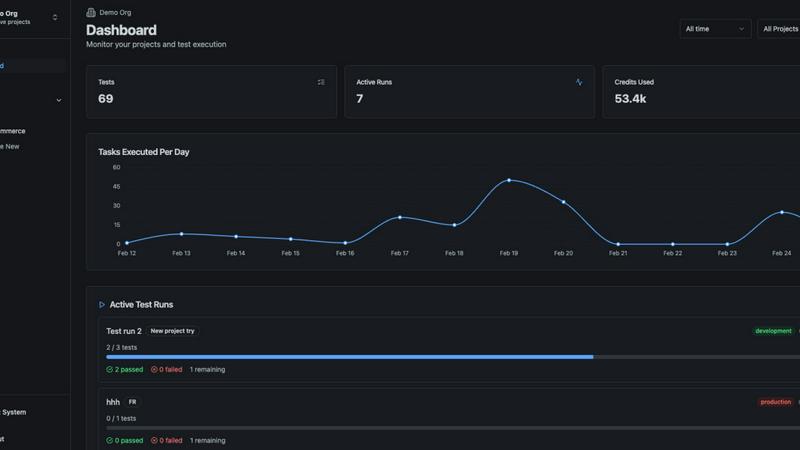
Feature Comparison
CloudBurn
Automatic Cost Analysis
CloudBurn delivers automatic cost analysis on every infrastructure pull request, ensuring that all changes are evaluated for their financial impact. This feature allows developers to see the cost implications of their code changes before deployment, promoting cost-conscious decision-making.
Real-Time AWS Pricing
CloudBurn utilizes real-time AWS pricing tailored to your specific region, ensuring that the cost estimates provided are accurate and reflective of the current market. This means you can trust the figures you see, enabling you to make informed choices about your infrastructure.
Resource-Level Cost Breakdown
With CloudBurn, you receive a detailed resource-level breakdown that compares old and new monthly costs. This granular insight allows teams to pinpoint which specific changes will result in financial increases, making it easier to adjust plans or configurations accordingly.
Integration with GitHub Workflow
CloudBurn integrates seamlessly with your existing GitHub workflow, making setup a breeze. With just a few steps, teams can enable automated cost analysis for every pull request, streamlining the process of monitoring and managing cloud infrastructure expenses.
qtrl.ai
Autonomous QA Agents
This is where qtrl's AI layer truly shines. Built-in autonomous agents can generate robust UI tests directly from natural language descriptions, maintain them as your application evolves, and execute them at scale across multiple browsers and environments. They operate on-demand or continuously, following your defined rules and executing in real browsers—not simulations—for authentic results. This feature transforms test creation from a coding task into a strategic conversation.
Enterprise-Grade Test Management
qtrl provides a centralized command center for all your QA activities. Organize test cases, plan and execute test runs, and maintain full traceability from requirements to coverage. The platform supports both manual and automated workflows and is built with compliance and auditability in mind, creating complete audit trails for every action. It’s the solid foundation of structure and oversight that makes advanced automation safe.
Progressive Automation Model
This isn't an all-or-nothing AI gamble. qtrl's progressive model lets you start with human-written test instructions. As confidence grows, you can move to AI-generated tests, with full review and approval at every step. The platform even analyzes coverage gaps and suggests new tests to fill them. You control the pace, increasing autonomy only when it proves its value, ensuring trust is earned, not assumed.
Governance by Design & Adaptive Memory
qtrl is built for enterprise trust. It offers permissioned autonomy levels, full visibility into agent actions, and enterprise-ready security, ensuring no black-box decisions. Coupled with its Adaptive Memory, which builds a living knowledge base of your application from every interaction, qtrl gets smarter and more context-aware over time while always operating within your governance framework.
Use Cases
CloudBurn
Cost Management for Development Teams
Development teams can use CloudBurn to manage infrastructure costs effectively. By integrating cost analysis into the pull request process, teams can identify potential budget overruns before they occur, leading to more predictable financial planning.
Preventing Costly Production Mistakes
CloudBurn helps prevent costly mistakes from reaching production. By showing real-time cost estimates during the code review phase, teams can adjust their infrastructure changes before they become live, safeguarding against unexpected expenses.
Enhancing Financial Accountability
With CloudBurn's detailed cost reporting, teams can foster a culture of financial accountability. Developers can see the cost impact of their work, encouraging more mindful resource utilization and promoting a shared responsibility for cloud spending.
Streamlining CI/CD Workflows
CloudBurn enhances CI/CD workflows by integrating cost insights into the development pipeline. This automation saves time and effort for teams, allowing them to focus on building innovative solutions without the worry of spiraling costs.
qtrl.ai
Scaling Beyond Manual Testing
For QA teams overwhelmed by repetitive manual checks, qtrl provides a clear path forward. Start by structuring manual test cases in the platform, then gradually introduce AI agents to automate the most tedious flows. This allows teams to scale test coverage and frequency without linearly increasing headcount, freeing human testers for more complex, exploratory work.
Modernizing Legacy QA Workflows
Companies stuck with outdated, script-heavy automation suites can use qtrl to break free from maintenance hell. The AI agents can generate new, maintainable tests from natural language, and the adaptive memory helps understand the application context. This enables a gradual migration to a more intelligent and resilient automation strategy without a risky, full-scale rewrite.
Ensuring Governance in Autonomous QA
Enterprises that require strict compliance, traceability, and audit trails can safely explore AI-powered testing with qtrl. The platform's governance-by-design approach provides permission controls, full audit logs, and the ability to review and approve every AI-generated test before it runs. This makes autonomous QA viable for regulated industries.
Accelerating Product-Led Engineering Teams
Fast-moving product teams need quality to keep pace with development. qtrl integrates with CI/CD pipelines and requirements management tools, creating continuous quality feedback loops. AI agents can execute tests across multiple environments per commit, giving developers immediate confidence and reducing the bottleneck on dedicated QA resources.
Overview
About CloudBurn
CloudBurn is an innovative solution designed for teams using Terraform or AWS CDK who want to avoid costly infrastructure mistakes before they reach the production stage. Often, teams find themselves facing unpleasant surprises on their AWS bills weeks after deploying changes, by which time the infrastructure is already in place, and money has been spent. CloudBurn disrupts this cycle by providing real-time cost estimates during the code review process. When a developer opens a pull request with infrastructure modifications, CloudBurn automatically analyzes these changes using current AWS pricing data. This allows teams to see a detailed cost report right in their pull request, enabling informed discussions about costs before deployment. With CloudBurn, teams can catch expensive decisions early, ensuring that budget overruns are avoided and financial efficiency is maintained throughout the development lifecycle.
About qtrl.ai
qtrl.ai is the modern QA platform that shatters the old trade-off between control and speed. It’s built for engineering and QA teams who are tired of choosing between slow, manual processes and brittle, expensive automation. qtrl brings enterprise-grade test management, intelligent automation, and autonomous AI agents into a single, cohesive platform. Its core value proposition is a progressive automation model: you can start with simple, structured test management on day one and gradually introduce AI-assisted and fully autonomous testing as your team is ready. This makes it perfect for product-led engineering teams, scaling QA departments, and enterprises that need robust governance without sacrificing velocity. qtrl provides clear visibility into quality through real-time dashboards, traces requirements to coverage, and turns every test run into structured data for smarter decision-making. It’s not just another tool; it’s a strategic upgrade designed to scale quality intelligently and sustainably.
Frequently Asked Questions
CloudBurn FAQ
How does CloudBurn analyze cost changes?
CloudBurn analyzes cost changes by automatically examining the pull request's infrastructure modifications and comparing them against real-time AWS pricing data. This analysis provides an accurate cost estimate for each change.
Can CloudBurn be used with any AWS service?
Yes, CloudBurn is designed to work with various AWS services through Terraform and AWS CDK. It provides cost analysis for a wide range of resources, helping teams gain visibility into their cloud spending.
Is there a trial period for CloudBurn?
Yes, CloudBurn offers a 14-day Pro trial that allows users to experience all the premium features for free. Users can cancel at any time or continue using the Community plan indefinitely.
How secure is CloudBurn?
CloudBurn prioritizes security by handling billing, setup, and permissions entirely through GitHub. This ensures that user data and infrastructure configurations are managed securely within a trusted environment.
qtrl.ai FAQ
How does qtrl's AI handle changes in my application's UI?
qtrl's autonomous agents are coupled with an Adaptive Memory system that learns from your application. When the UI evolves, the AI uses this context to understand the changes and can automatically update the affected test steps, significantly reducing maintenance overhead compared to traditional coded scripts. All changes are suggested for review before being applied.
Is my test data and application access secure with an AI agent?
Absolutely. Security is foundational. qtrl operates with enterprise-ready security protocols. For executions, you can use per-environment variables and encrypted secrets, which are never exposed to the AI agent. The system is designed to execute tests without retaining sensitive data, and all access is governed by strict permission controls.
Do I need to be an automation expert to use qtrl?
Not at all! qtrl is designed for progression. You can start by using it as a powerful test management tool with no automation. When you're ready, you can begin by writing simple, natural language instructions for the AI to execute. The platform guides you toward more advanced automation as your team's comfort and needs grow.
Can I integrate qtrl with my existing tools and pipelines?
Yes, qtrl is built for real workflows. It offers integrations for requirements management and full support for CI/CD pipelines. This allows you to trigger test runs automatically from your build processes and feed quality metrics back into your development lifecycle, creating seamless feedback loops without disrupting your current toolkit.
Alternatives
CloudBurn Alternatives
CloudBurn is an innovative tool designed for teams leveraging Terraform or AWS CDK, enabling them to see potential infrastructure costs during code reviews rather than waiting for the unpleasant surprise on their bill. This product falls into the Dev Tools category, focusing on cost management and infrastructure optimization. Users often seek alternatives to CloudBurn for various reasons, including pricing considerations, specific feature sets, or platform compatibility that better fits their workflow. When choosing an alternative, it’s essential to evaluate the tool’s ability to deliver real-time cost analysis, the granularity of the cost breakdown it provides, and how seamlessly it integrates into existing workflows. Look for solutions that prioritize proactive cost management and enhance team collaboration during the development process, ensuring that potential issues are addressed before deployment.
qtrl.ai Alternatives
qtrl.ai is a modern QA test management and automation platform designed for product development teams. It combines structured test case management with an advanced AI layer that can generate, maintain, and execute tests autonomously, helping teams scale their quality assurance from manual processes to full automation. Teams often explore alternatives for various reasons, such as budget constraints, specific integration needs, or a desire for a different feature mix. Some may prioritize pure open-source tools, while others might seek a platform with a stronger focus on performance or security testing outside of qtrl.ai's core UI automation strengths. When evaluating other options, consider your team's automation maturity, the need for AI-assisted test creation, and how deeply you require requirements tracing and real-time dashboards. The ideal platform should grow with you, offering a clear path from manual test management to intelligent, autonomous QA execution.