
ConvertBankToExcel vs Redbark

ConvertBankToExcel
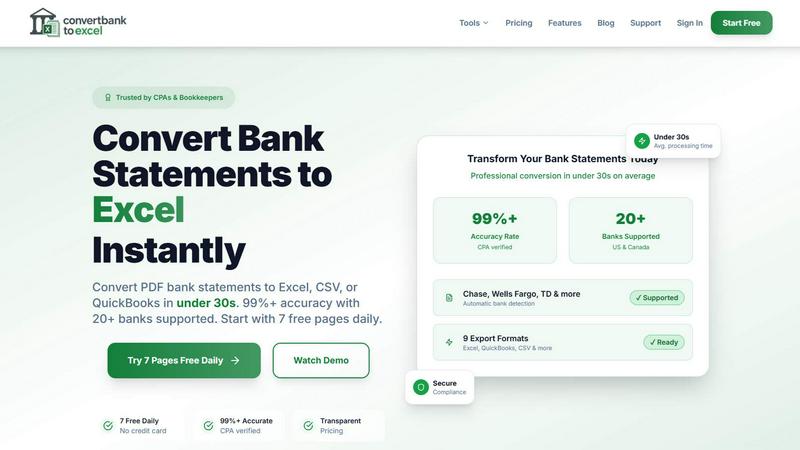
Effortlessly convert bank PDFs to Excel or CSV in under 30 seconds with 99% accuracy, trusted by professionals.
Last updated: February 28, 2026

Redbark
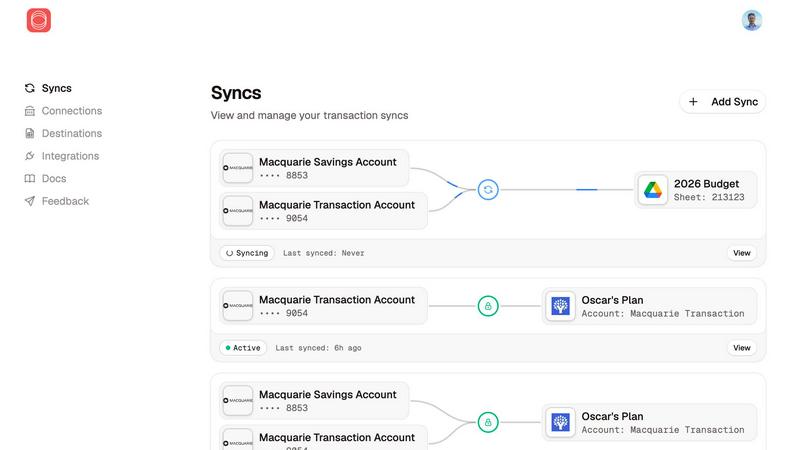
Redbark syncs your Australian bank and brokerage data directly to your favorite tools automatically.
Last updated: February 28, 2026
Visual Comparison
ConvertBankToExcel
Redbark
Feature Comparison
ConvertBankToExcel
99%+ Accuracy Rate
ConvertBankToExcel boasts a CPA-verified accuracy rate of over 99%, ensuring that the extracted transaction data from bank statements is reliable and precise. This level of accuracy minimizes errors that can occur with manual data entry, providing peace of mind for accounting professionals.
Fast Processing Time
Time is money, especially in the world of accounting. ConvertBankToExcel processes bank statements in under 30 seconds on average, allowing users to convert multiple files quickly and efficiently. This rapid turnaround time significantly improves productivity, enabling accountants to focus on higher-value tasks.
Multiple Export Formats
With support for nine different export formats, including Excel, CSV, and various QuickBooks formats (QBO, QFX, OFX, and IIF), ConvertBankToExcel provides flexibility for users to import their data into any accounting software seamlessly. This versatility is tailored to meet the diverse needs of accounting professionals.
AI-Powered OCR Technology
The platform utilizes advanced AI-powered Optical Character Recognition (OCR) technology to handle both digital and scanned PDFs. This means that users can convert statements from a variety of sources, ensuring that even scanned documents are accurately transformed into usable data.
Redbark
Secure, Regulated Data Access
Redbark doesn't scrape screens. It uses Australia's Consumer Data Right (CDR) framework via accredited partners for secure, bank-approved data access. This means transparent consent, minimal data collection, and your legal right to withdraw access at any time. For global brokerages and New Zealand banks, secure integrations via SnapTrade and Akahu provide the same level of reliable, official connectivity, moving beyond the fragility and security risks of legacy methods.
Pass-Through Data Architecture
Your privacy is non-negotiable. Redbark's core architecture is designed so your financial data flows directly from your bank or brokerage to your destination tool. We never store your transactions, balances, or account details on our servers. It's a secure conduit, not a data warehouse, ensuring your information remains under your control and is only seen where you intend it to be.
Multi-Destination & Smart Sync
Sync a single bank account to multiple tools simultaneously—like Google Sheets for custom analysis, YNAB for budgeting, and Notion for reporting—all at once. Redbark handles intelligent, ID-based deduplication with overlap buffers to catch late-posting transactions, so you never have duplicate rows. Updates are automated via webhooks, triggering background syncs the moment your bank reports new activity.
100+ Integrations & Portfolio Tracking
Connect to every major Australian bank, credit union, and a growing list of global brokerages and crypto exchanges. Redbark isn't just for transactions; it syncs your full investment portfolio holdings with live profit & loss and complete trade history. This holistic view means your net worth and investment performance are always up-to-date alongside your cash flow.
Use Cases
ConvertBankToExcel
Tax Preparation
During tax season, accounting professionals can use ConvertBankToExcel to quickly gather and organize financial statements, ensuring compliance with IRS requirements. This tool simplifies the process of preparing documents for tax filing, saving valuable time and effort.
Mortgage Applications
ConvertBankToExcel is an essential tool for preparing organized bank statements required by mortgage lenders. By providing clear and accurate financial information, accountants can expedite the approval process for their clients' mortgage applications.
Visa Applications
When applying for visas or immigration, applicants often need to submit detailed financial statements. ConvertBankToExcel enables users to convert bank statements swiftly, ensuring they meet the financial documentation requirements set by embassies or immigration offices.
Batch Processing for Multiple Files
For firms handling numerous client accounts, ConvertBankToExcel's batch processing feature allows users to convert multiple bank statements simultaneously. This capability streamlines workflows, making it easier to manage high volumes of documents without sacrificing accuracy.
Redbark
Automated Business Bookkeeping
Freelancers and small business owners can automate their bookkeeping by syncing business account transactions directly into a dedicated Google Sheet or Airtable base. This eliminates manual data entry, reduces errors, and provides a real-time view of cash flow, making reconciliation and expense tracking effortless and always current.
Live Investment Portfolio Dashboard
Active investors and traders can build a live, consolidated dashboard of their holdings across multiple brokerages (like CommSec and Stake) in Google Sheets or Notion. Automatically track live P&L, dividend income, and trade history without logging into each platform, enabling faster, data-driven investment decisions.
Streamlined Personal Budgeting
Individuals and families using budgeting apps like YNAB or Actual Budget can connect their everyday accounts, savings, and credit cards. Redbark automatically imports new transactions, categorizing them for review, so you can maintain an accurate budget without the tedious manual import of bank statements or CSV files.
Centralized Financial Reporting
Financial analysts, advisors, or anyone managing complex finances can centralize data from multiple banks, loans, and investment accounts into a single Notion page or master Google Sheet. This creates a unified source of truth for net worth tracking, custom reporting, and financial planning without manual aggregation.
Overview
About ConvertBankToExcel
ConvertBankToExcel is a revolutionary AI-powered platform designed specifically for accounting professionals who seek to streamline their workflow and eliminate the tedious task of manual data entry. This innovative tool automatically extracts transaction data from PDF bank statements, transforming them into easily accessible formats such as Excel, CSV, and various QuickBooks formats in under 30 seconds. With a remarkable accuracy rate of over 99%, verified by CPAs, ConvertBankToExcel is trusted by more than 50,000 CPAs, bookkeepers, and accounting experts. The platform supports over 20 major US and Canadian banks, ensuring seamless integration with the financial systems that professionals rely on. With a free tier offering daily conversions, ConvertBankToExcel empowers users to focus on what truly matters—providing value to their clients and enhancing their productivity.
About Redbark
Redbark is the game-changing financial data pipeline that finally connects your money to your productivity. It's the secure, automated bridge between your Australian bank accounts, global brokerage portfolios, and the tools where you actually manage your life—like Google Sheets, Notion, Airtable, YNAB, and Actual Budget. Forget manual exports, messy CSV files, and unreliable screen-scraping. Redbark leverages Australia's official Consumer Data Right (CDR) framework for bank-approved, regulated access to your data. Your transactions, balances, and investment holdings sync automatically on your schedule, flowing directly from your financial institution to your chosen destination in real time. With a foundational commitment to privacy, Redbark operates on a strict pass-through architecture, meaning your sensitive financial data is never stored on its servers. Built for the modern financial operator—freelancers, investors, small business owners, and spreadsheet power users—Redbark delivers a powerful, set-up-in-minutes automation that brings every account and every transaction into one, unified, and actionable place.
Frequently Asked Questions
ConvertBankToExcel FAQ
How does ConvertBankToExcel ensure data security?
ConvertBankToExcel employs bank-grade encryption to protect sensitive financial information during the conversion process. Additionally, all uploaded documents are automatically deleted after 24 hours to enhance user privacy and data security.
Can I convert scanned bank statements?
Yes! ConvertBankToExcel's advanced AI-powered OCR technology allows for the conversion of both digital and scanned PDF bank statements. This feature ensures that users can work with a variety of document types without hassle.
What types of banks are supported?
ConvertBankToExcel supports over 20 major US and Canadian banks, including Chase, Bank of America, Wells Fargo, and TD Bank. This extensive support ensures that users can convert statements from the financial institutions they utilize.
Is there a free trial available?
Absolutely! ConvertBankToExcel offers a free tier that allows users to convert up to 7 pages daily without requiring a credit card. This gives new users an opportunity to experience the platform's capabilities before committing to a paid plan.
Redbark FAQ
Is my financial data secure with Redbark?
Absolutely. Security is our foundation. We use Australia's regulated CDR framework for bank connections—it's not screen scraping. Our pass-through architecture means we never store your financial data. All credentials are encrypted with AES-256-GCM, and our entire infrastructure is 100% hosted in Australia, SOC 2 certified, and compliant with strict data sovereignty laws.
Which banks and brokerages do you support?
We support all major Australian banks (CommBank, Westpac, NAB, ANZ, Macquarie, ING, and more) via CDR Open Banking. We also connect to global brokerages and crypto exchanges via SnapTrade, and New Zealand banks via Akahu. You can view the full, growing list of connections on our website.
Do I need to be a tech expert to set this up?
Not at all! Redbark is built for simplicity. You can connect your accounts, choose your destinations (like Google Sheets), and set your sync schedule in just a few minutes with a straightforward, no-code interface. No programming or technical skills are required to start automating your financial data.
Can I sync data to multiple tools at once?
Yes! This is a powerful feature of Redbark. You can sync the same bank account or brokerage portfolio to multiple destinations simultaneously—for example, sending transactions to both Google Sheets for analysis and YNAB for budgeting at the same time. Each destination can have its own custom formatting rules.
Alternatives
ConvertBankToExcel Alternatives
ConvertBankToExcel is an innovative AI-powered platform designed specifically for accounting professionals to convert bank PDFs into Excel or CSV formats swiftly and accurately. As a productivity and management tool, it streamlines the often tedious process of manual data entry, allowing users to focus on more critical tasks. Users frequently seek alternatives to ConvertBankToExcel for various reasons, including pricing, specific feature sets, or particular platform compatibility. When searching for an alternative, it's essential to evaluate factors such as accuracy rates, processing speed, security measures, and customer support to ensure the chosen solution meets your unique accounting needs and enhances productivity.
Redbark Alternatives
Redbark is a modern financial data platform that securely connects your Australian bank accounts and global investment portfolios directly to your favorite productivity tools like Google Sheets, Notion, and Airtable. It operates in the fintech and data automation space, designed to eliminate manual data entry and give you a real-time view of your finances. People often explore alternatives for various reasons, such as needing different pricing plans, specific feature sets, or compatibility with other platforms and banks. Your choice depends on your unique workflow, the financial institutions you use, and the tools where you need your data to live. When evaluating other options, key considerations include the security model for accessing your bank data, the range of supported banks and brokerages, and the flexibility of automation. Look for a solution that respects your privacy, integrates seamlessly with your existing stack, and delivers reliable, scheduled updates without requiring technical expertise.