
Anymelo vs CutMP3

Anymelo
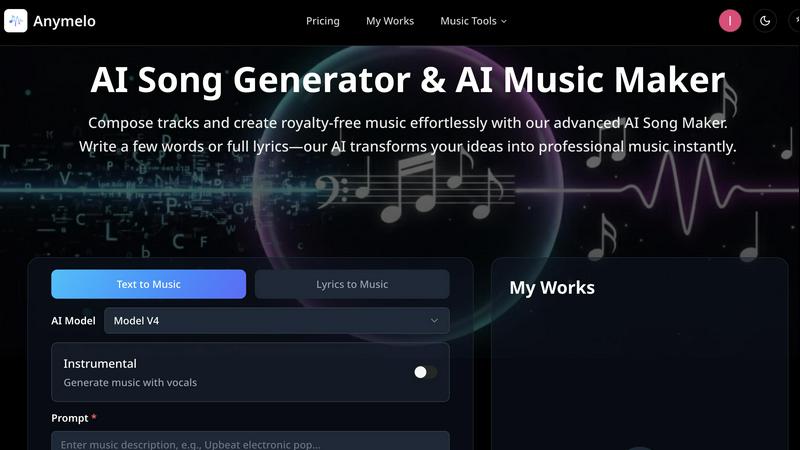
Anymelo instantly transforms your words into professional, royalty-free AI music for any project.
Last updated: February 28, 2026

CutMP3
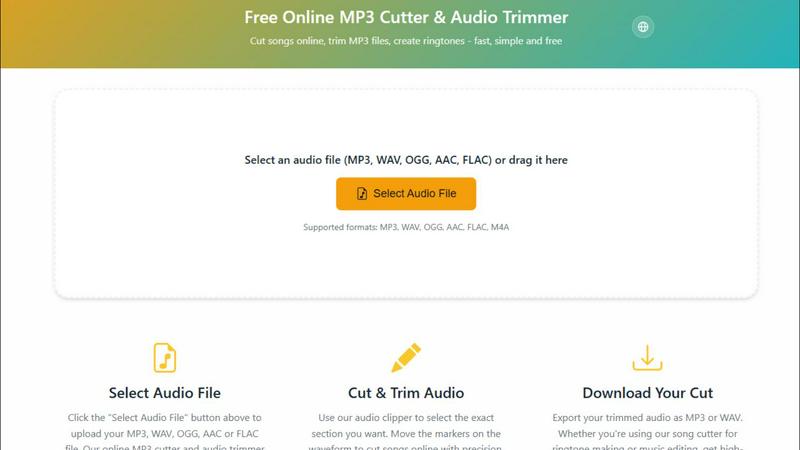
CutMP3 is a free and easy online tool to quickly trim and edit your MP3, WAV, and other audio files effortlessly.
Last updated: February 28, 2026
Visual Comparison
Anymelo
CutMP3
Feature Comparison
Anymelo
AI Song Generator
This is the heart of Anymelo. Input a text prompt or full lyrics, and the AI composes an entire track from scratch. It intelligently adds melodies, harmonies, drums, bass, and even AI-generated vocals that match the described style and mood. You can fine-tune generations with advanced controls for style weight, creativity, and audio quality, ensuring the output is exactly what you need, from a lo-fi beat to a full orchestral piece.
AI Music Extender
Have a great track but need it longer for your video's runtime? The AI Music Extender solves this seamlessly. Upload any audio file, and Anymelo's AI analyzes its structure, style, and key to intelligently extend it. It can add new choruses, develop instrumental bridges, or create a natural-sounding outro, perfectly preserving the original track's vibe and flow without any manual editing.
AI Song Cover Generator
Reimagine any song with AI-powered vocals. Upload an instrumental track, and this feature allows you to generate a cover with a customizable AI voice. Choose between different vocal genders and styles to transform the track into something entirely new, perfect for creating unique versions for content or exploring creative remixes without needing a singer.
AI Vocal Remover & Stem Splitter
Need a clean backing track or isolated vocals? Anymelo's precision audio splitting technology can separate any song into its individual stems. Instantly extract crystal-clear vocal tracks or instrumentals for karaoke, sampling, remixing, or practice. This professional-grade isolation empowers producers and creators with flexibility previously requiring complex software.
CutMP3
Visual Waveform Editing
CutMP3 allows users to utilize a visual waveform interface, making it easy to move markers and cut songs with extreme precision. This feature enables users to see exactly where they are cutting, ensuring accuracy and enhancing the overall editing experience.
Privacy Focused
With CutMP3, privacy is paramount. The tool processes all audio files locally, meaning there is no need to upload files to a server. Your audio remains on your device throughout the editing process, ensuring complete security and peace of mind.
Format Support
CutMP3 supports a wide range of audio formats, including MP3, WAV, OGG, AAC, FLAC, and M4A. This extensive format support enables users to work with virtually any audio file type, catering to various needs and preferences.
High-Quality Export
Once you have finished editing, CutMP3 allows for easy export of your audio files in high quality. Users can download their cut tracks in either MP3 or WAV format, ensuring that the final output meets their expectations for sound quality.
Use Cases
Anymelo
Content Creators & Video Producers
YouTubers, TikTokers, and filmmakers can generate unique, copyright-safe soundtracks in minutes. Describe the scene—"upbeat tech review intro" or "emotional documentary backdrop"—and get a perfect score that elevates your production value without licensing headaches or expensive composers.
Podcasters & Audio Storytellers
Enhance your podcast episodes with custom intro/outro music, transition jingles, and atmospheric beds that match your show's tone. Quickly create audio branding that sounds professional and is tailored specifically to your content, making your podcast stand out in any directory.
Game Developers & Indie Creators
Rapidly prototype and produce original soundtracks for games, apps, or interactive projects. Generate everything from energetic level music to ambient exploration tracks and tense boss fight scores, allowing small teams to have a dynamic, full audio landscape without a dedicated composer.
Social Media & Marketing Teams
Create engaging, brand-consistent audio for advertisements, Instagram Reels, YouTube Shorts, and commercial campaigns. Produce multiple variations of a jingle or background track A/B testing, ensuring your marketing content has the perfect sonic identity to capture audience attention.
CutMP3
Creating Ringtones
One of the most popular use cases for CutMP3 is creating personalized ringtones. Users can easily select a specific part of a song and cut it, allowing them to have unique ringtones that reflect their personal style.
Editing Podcasts
Podcasters can utilize CutMP3 to trim unnecessary segments from their recordings. Whether it’s removing long pauses or cutting out mistakes, this tool helps streamline the editing process and improve the overall quality of the podcast.
Social Media Clips
Users looking to share snippets of their favorite songs or audio on social media can benefit from CutMP3. The ability to quickly cut and export audio clips makes it perfect for Instagram reels, stories, and other social media content.
Voice Recordings
CutMP3 is also great for editing voice recordings. Users can cut out unwanted parts or clean up their audio messages, making it an excellent tool for anyone who wants to enhance the quality of their audio communications.
Overview
About Anymelo
Anymelo is the revolutionary AI music creation platform that shatters the barrier between idea and finished track. It's built for the modern creator—whether you're a video producer, podcaster, game developer, or digital content creator—who needs high-quality, original music fast, without the steep learning curve of traditional production software. At its core, Anymelo transforms simple text descriptions or raw lyrics into fully produced, studio-quality songs complete with vocals, layered instrumentals, and professional arrangements. The magic lies in its simplicity and power: you don't need a single note of music theory. Just describe a mood like "epic cinematic trailer with haunting female vocals" or paste your own lyrics, and Anymelo's advanced AI does the rest, generating royalty-free music tailored to your vision. With support for multiple genres and languages, it's your all-in-one suite to score any project instantly, turning creative sparks into polished soundtracks for anything from YouTube videos to mobile games.
About CutMP3
CutMP3.online is an innovative and user-friendly online audio editor designed for anyone looking to cut songs and create ringtones quickly and efficiently. Whether you are a casual user wanting to edit your favorite tracks or a professional needing precise audio cuts, CutMP3 has you covered. The platform stands out by processing all audio files locally within your browser, ensuring that your audio files remain private and secure. With support for multiple popular audio formats such as MP3, WAV, OGG, AAC, FLAC, and M4A, users can easily select their desired files for editing. The intuitive interface allows users to visualize waveforms and make precise cuts, while the high-quality export options ensure that your final product is ready to use. Best of all, CutMP3 is completely free, making it accessible to everyone, whether on desktop or mobile devices.
Frequently Asked Questions
Anymelo FAQ
Do I own the music I create with Anymelo?
Yes, you own the full rights to the music you generate on Anymelo. All tracks are royalty-free, meaning you can use them commercially in your videos, podcasts, games, and other projects without worrying about copyright claims or needing to pay additional licenses.
Do I need any musical experience to use Anymelo?
Not at all! Anymelo is specifically designed for creators with no musical background. The platform guides you to create music using simple text descriptions or lyrics. The AI handles all the complex aspects of composition, arrangement, and production, delivering a polished track ready to use.
What audio formats does Anymelo support for generation and upload?
Anymelo generates high-quality MP3 files for your finished tracks. For uploads to features like the Music Extender or Cover Generator, it supports common audio formats including MP3, WAV, and others, giving you flexibility to work with your existing audio files.
Can I customize the AI-generated music after it's created?
While the core generation happens automatically, Anymelo provides advanced controls before generation to guide the AI, including style weight, creativity, and vocal gender settings. For post-generation editing, you can use the Extender and Layering tools to modify and build upon your created tracks directly within the platform.
CutMP3 FAQ
How do I cut an MP3 file online?
To cut an MP3 file online using CutMP3, simply click the "Choose Audio File" button, select your desired MP3 file from your computer, and use the visual waveform editor to mark the sections you wish to cut.
Is this audio cutter free?
Yes, CutMP3 is completely free to use. There are no hidden costs or subscription fees, making it accessible for all users who want to edit audio files.
What audio formats are supported?
CutMP3 supports a wide variety of audio formats, including MP3, WAV, OGG, AAC, FLAC, and M4A, ensuring you can work with almost any audio file you have.
Can I create ringtones with this tool?
Absolutely! CutMP3 is perfect for creating custom ringtones from your favorite songs. Simply cut the desired section of the audio and download it for use on your device.
Alternatives
Anymelo Alternatives
Anymelo is a dynamic AI music generator in the speech and voice category, designed to turn simple text prompts into fully produced, professional-sounding tracks. It empowers creators to quickly score their videos, podcasts, and digital projects without needing any musical expertise. Users often explore alternatives for various reasons, such as finding a different pricing model, needing specific features like advanced audio editing, or requiring compatibility with other creative platforms. The search for the right tool is a natural part of finding the perfect creative fit for a project's unique demands. When evaluating other options, consider the core value: how effortlessly can you translate an idea into a polished track? Look for a balance of speed, output quality, and intuitive controls that match your workflow. The goal is to maintain that creative momentum without getting bogged down in complexity.
CutMP3 Alternatives
CutMP3 is a free online MP3 cutter and audio trimmer that empowers users to edit audio files effortlessly. Positioned in the audio and music category, it offers a streamlined and secure approach to cutting songs and creating ringtones directly in your browser. Many users seek alternatives to CutMP3 due to varying needs such as pricing, additional features, or compatibility with different platforms. Whether it's the desire for more advanced editing tools or a preference for software that caters to specific file formats, users often explore options that align with their unique audio editing requirements. When choosing an alternative, it's essential to consider factors such as privacy, ease of use, and the range of supported audio formats. Look for tools that maintain your file's security by processing locally, like CutMP3, and prioritize high-quality exports. Additionally, ensure the platform is accessible on both mobile and desktop devices, providing the flexibility you need to edit audio files whenever and wherever inspiration strikes.