
Editaimg vs Video to GIF Converter

Editaimg
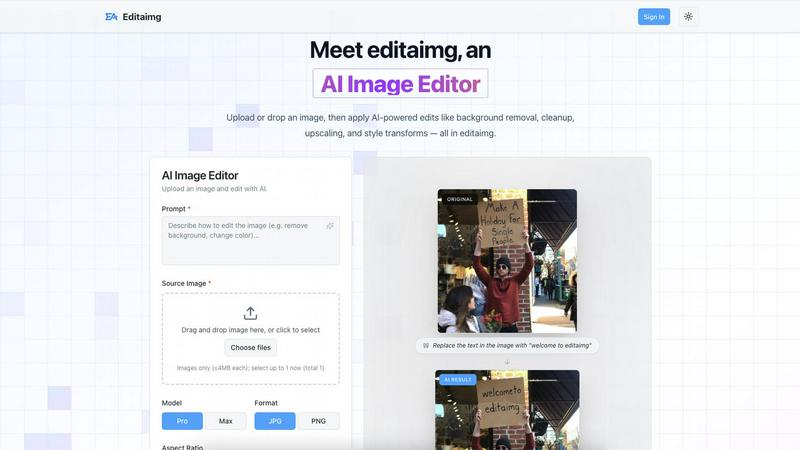
Editaimg is an AI image editor that transforms your photos with easy text commands for stunning, professional results.
Last updated: February 28, 2026

Video to GIF Converter
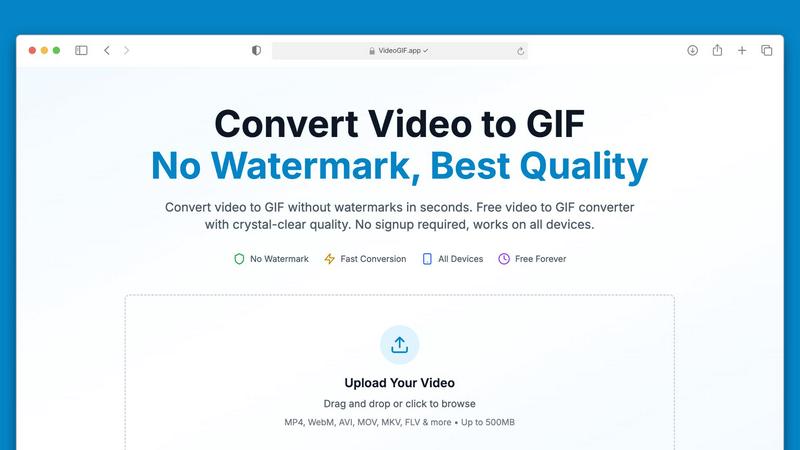
Effortlessly convert videos to high-quality GIFs in seconds, no watermarks ever.
Last updated: February 27, 2026
Visual Comparison
Editaimg
Video to GIF Converter
Feature Comparison
Editaimg
AI Image Editor
The AI Image Editor serves as the core functionality of Editaimg, allowing users to upload images and apply a variety of AI-powered edits. From background removal to cleanup and style transformations, this feature simplifies the editing process while providing professional results. Users can easily manipulate their images without needing extensive technical skills.
Add Someone to Photo
With the Add Someone to Photo feature, users can effortlessly integrate individuals into existing images. This tool uses advanced blending techniques to ensure that the added person looks natural within the new environment, making it perfect for creating personalized images or enhancing group photos.
AI Snow
The AI Snow feature allows users to add realistic snowfall effects to their images, creating a seasonal ambiance. With adjustable intensity and lighting options, users can customize the snowfall to fit the mood of their project, enhancing the visual storytelling of their images.
Gemini Watermark Remover
The Gemini Watermark Remover is a specialized utility designed to clean up AI-generated media by removing visible watermarks. This feature prioritizes privacy and quality, enabling users to export clean images without any distracting elements, making it ideal for professional presentations and marketing materials.
Video to GIF Converter
No Watermarks, Always Free
Say goodbye to watermarks! Our Video to GIF Converter guarantees that every GIF you create is completely watermark-free. You have full ownership of your GIFs, allowing you to use them commercially or personally without any restrictions or hidden fees.
Fast Video to GIF Conversion
Experience lightning-fast conversion speeds with our optimized processing technology. Most video files, including large ones up to 500MB, convert in under 30 seconds, saving you valuable time while ensuring consistent quality.
Crystal-Clear GIF Quality
Our advanced palette generation technology ensures that your GIFs are crisp and clear, closely preserving the quality of your original video. With four different quality presets to choose from, you can customize your GIFs to perfectly match your needs.
Optimized for Sharing
Sharing your creations is a breeze with our smart compression techniques that reduce file sizes without compromising quality. This makes your GIFs perfect for sharing on social media platforms, in emails, or via messaging apps like Discord and Slack.
Use Cases
Editaimg
E-commerce Product Photography
Editaimg is perfect for e-commerce businesses looking to enhance their product images. Users can transform simple product shots with clean backgrounds into realistic settings, such as placing a soap dispenser on a kitchen sink. This not only improves visual appeal but also helps in attracting customers.
Social Media Content Creation
For content creators, Editaimg streamlines the process of producing eye-catching visuals for social media platforms. Whether it involves background changes or text overlays, the AI-powered editing tools enable creators to produce high-quality content quickly and efficiently.
Travel Photo Enhancement
Travel enthusiasts can leverage Editaimg to improve their vacation photos. The tool allows for the removal of unwanted objects or people, ensuring that the focus remains on the beautiful landscapes and experiences captured during their travels.
Marketing Campaigns
Businesses can utilize Editaimg to create stunning marketing assets for their campaigns. By employing features like the AI Image Editor and Gemini Watermark Remover, companies can produce high-quality visuals that resonate with their target audience and effectively convey their brand message.
Video to GIF Converter
Marketing & Social Media
In the fast-paced world of social media, GIFs are a powerful tool for engagement. Convert video highlights into shareable GIFs that loop automatically in feeds, capturing attention and driving interaction on platforms like Twitter and Instagram.
Professional Communication
Transform video tutorials into step-by-step GIFs that autoplay in emails and chats, making it easier for colleagues and clients to understand complex processes without needing to watch full-length videos.
Gaming & Creative Projects
Gamers can create GIFs of their epic gameplay moments to share with friends or on forums. Creative professionals can turn visual concepts into animated GIFs, enhancing presentations and pitches with dynamic content.
Product Demos & Tutorials
Showcase your product features effectively by converting video walkthroughs into GIFs. These short animations can highlight key functionalities, making them great for marketing material and educational content.
Overview
About Editaimg
Editaimg is a revolutionary AI image editing platform tailored for those who seek professional-grade visual manipulation without the steep learning curve. Designed for developers, content creators, and businesses alike, it leverages generative intelligence to empower users to carry out complex edits with simple natural language commands. The standout feature is its text-driven editor, enabling seamless background replacements, object removals, and text alterations within images. With Editaimg, users can dramatically reduce the time and technical skills needed to produce high-quality marketing assets. Moreover, it offers a suite of specialized tools such as the Gemini watermark remover for cleaning AI-generated media, an AI Snow generator to add atmospheric effects, and a feature to realistically add people to existing photos. This browser-based platform eliminates creative bottlenecks and enhances the efficiency of high-resolution asset production, making it an indispensable tool for any digital project.
About Video to GIF Converter
Transforming your videos into captivating GIFs has never been easier with our Video to GIF Converter. Designed for both casual users and professionals, this intuitive online tool allows you to convert various video formats into high-quality animated GIFs in seconds. With no watermarks and no signup required, you can create and share your GIFs without any hassle. Whether you're a marketer looking to enhance your social media presence, a developer needing to create quick tutorials, or someone who simply wants to add flair to your messages, our converter delivers exceptional results every time. It processes videos up to 500MB efficiently, ensuring a fast and streamlined experience. Enjoy the freedom of using your GIFs anywhere, optimized for sharing across platforms like Discord, Twitter, and Slack. With our Video to GIF Converter, you get professional-quality GIFs that are 100% yours, all for free. Embrace creativity with full control over quality, size, and content privacy!
Frequently Asked Questions
Editaimg FAQ
How does Editaimg simplify the image editing process?
Editaimg simplifies the image editing process by using AI technology to automate complex tasks such as background removal and object replacement. Users can input simple text commands to achieve professional results without needing advanced skills.
Can I use Editaimg for commercial purposes?
Yes, Editaimg is suitable for commercial use. The platform is designed to assist businesses, content creators, and developers in producing high-quality visual content for various applications, including marketing and e-commerce.
Is Editaimg easy to use for beginners?
Absolutely! Editaimg is designed with user-friendliness in mind. Its intuitive interface and text-driven commands make it accessible for beginners and experienced users alike, allowing anyone to create stunning images effortlessly.
What types of images can I edit with Editaimg?
Editaimg supports a variety of image formats, allowing users to upload and edit most common file types. Whether you are working with product images, personal photos, or digital artwork, Editaimg provides the tools necessary to enhance them effectively.
Video to GIF Converter FAQ
What video formats can I convert to GIF?
Our Video to GIF Converter supports a wide range of video formats, including MP4, MOV, AVI, WebM, MKV, FLV, and more. This ensures you can convert virtually any video file you have into a GIF.
Is there a limit on the video file size I can upload?
Yes, you can upload video files up to 500MB for conversion. This capacity allows you to work with larger files without compromising on speed or quality.
Do I need to create an account to use the converter?
No! Our Video to GIF Converter is completely hassle-free. You can upload your video, convert it to GIF, and download it without needing to create an account or provide any personal information.
How secure is my data during the conversion process?
We prioritize your privacy and security by using 256-bit SSL encryption for all file processing. Additionally, we do not store your files after conversion, ensuring your data remains confidential.
Alternatives
Editaimg Alternatives
Editaimg is an innovative AI-powered image editing platform that harnesses generative intelligence to make professional-grade visual manipulation accessible to everyone. With its text-driven interface, users can effortlessly replace backgrounds, remove unwanted objects, and edit text in images using simple natural language commands. This all-in-one tool is perfect for developers, content creators, and businesses looking to streamline their workflow and enhance the quality of their marketing assets. Users often seek alternatives to Editaimg for various reasons, including budget constraints, specific feature requirements, or compatibility with their preferred platforms. When searching for an alternative, it’s essential to consider factors such as the ease of use, range of features offered, pricing structures, and the level of customer support. Finding a solution that aligns with your creative needs and workflow will ensure a more efficient editing experience.
Video to GIF Converter Alternatives
Video to GIF Converter is a versatile tool designed for converting videos into high-quality GIFs quickly and easily. As a part of the productivity and social media categories, it caters to users seeking to create animated GIFs without watermarks or complicated processes. Users often look for alternatives due to varying needs such as pricing, specific features, or compatibility with different devices and platforms. When choosing an alternative, it’s essential to consider factors like file size limits, output quality, ease of use, and whether or not the service requires an account for access.