
EditPhoto AI vs WatermarkCleaner

EditPhoto AI
Elevate your creativity with EditPhoto AI, the ultimate online photo editor powered by advanced AI tools and effects.
Last updated: February 28, 2026

WatermarkCleaner
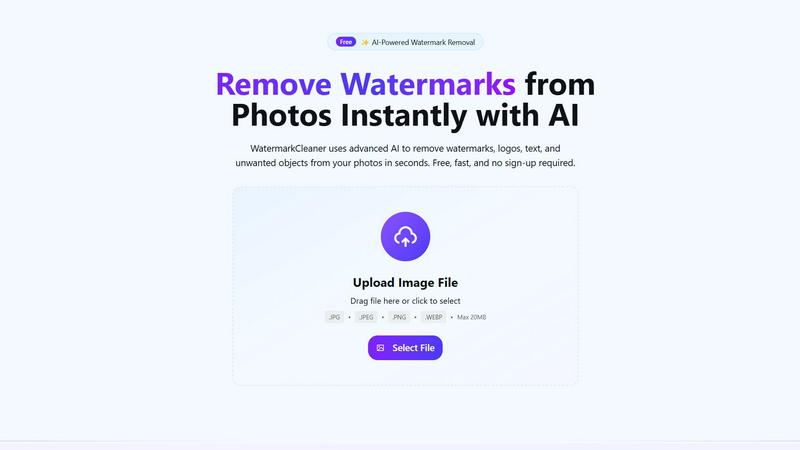
Effortlessly remove watermarks and unwanted elements from images in seconds with our AI-powered WatermarkCleaner tool.
Last updated: February 28, 2026
Visual Comparison
EditPhoto AI

WatermarkCleaner
Feature Comparison
EditPhoto AI
Text-to-edit
EditPhoto AI features a unique text-to-edit capability that allows users to perform edits using straightforward text prompts. For example, users can input commands like "remove background," "enhance eyes," or "change sky to sunset," and the AI will execute these tasks automatically, making photo editing intuitive and accessible.
Multiple AI models
The platform offers access to multiple AI models, each optimized for specific needs, such as speed, consistency, or high-resolution output. Users can choose from models like Nano Banana, Nano Banana Pro, Seedream, and Z Image Turbo, ensuring they get the best performance based on their requirements.
Multi-image reference
With the ability to upload up to 14 reference images, EditPhoto AI allows users to maintain consistent styles or merge elements from various photos. This feature is especially useful for designers and photographers who want to create cohesive visuals or blend different artistic ideas seamlessly.
High-resolution output
EditPhoto AI supports high-resolution output options of 1K, 2K, and 4K, which is essential for professionals needing high-quality images for print or online use. Additionally, AI upscaling enhances image quality, ensuring that every detail is crisp and clear.
WatermarkCleaner
AI-Powered Watermark Removal
With our advanced AI technology, WatermarkCleaner detects and removes watermarks, logos, texts, and other unwanted objects from your photos in mere seconds. This feature allows users to enjoy a hassle-free experience with no technical skills required.
Batch Processing Capability
Save precious time with our batch processing feature. WatermarkCleaner allows you to upload multiple images simultaneously and remove watermarks from all of them at once, making it an invaluable tool for photographers and businesses with large image collections.
Smart AI Detection
Our intelligent AI algorithms automatically analyze your images to detect watermarks and overlays, eliminating the need for manual selection. This ensures a quick and efficient removal process while preserving the integrity of your images.
Instant Preview Functionality
Before you download your cleaned images, WatermarkCleaner offers an instant preview feature that allows you to see real-time results. You can make adjustments as needed, ensuring that the final output meets your expectations perfectly.
Use Cases
EditPhoto AI
E-commerce and marketplaces
EditPhoto AI is an invaluable tool for e-commerce businesses looking to enhance their product listings. With one-click background removal and batch-friendly editing capabilities, users can quickly prepare images that attract more customers and improve sales.
Photographers and designers
For photographers and designers, EditPhoto AI streamlines the retouching process, allowing for fast edits, upscaling, and style transformations. The platform eliminates the need for complicated software, saving time and making it easier to focus on creativity.
Social media content creation
Content creators can leverage EditPhoto AI to produce stunning visuals for social media platforms. Whether it’s enhancing images with artistic filters, creating engaging posts, or preparing high-quality graphics for campaigns, this tool offers a quick and effective solution.
Old photo restoration
EditPhoto AI is perfect for restoring old or damaged photographs. Users can revive cherished memories by enhancing and repairing images, making them suitable for display or sharing with family and friends, thus preserving history with modern technology.
WatermarkCleaner
For Designers
Designers can utilize WatermarkCleaner to enhance their portfolios by removing distracting watermarks from stock images or other visuals. This helps create polished presentations and designs that resonate with clients and audiences.
For Marketers
Marketers often need high-quality images for campaigns and promotions. By using WatermarkCleaner, they can easily clean up promotional visuals, making them more appealing and professional without the interruptions of watermarks.
For Content Creators
Content creators, including bloggers and social media influencers, can leverage WatermarkCleaner to obtain pristine images for their posts and articles. This helps to maintain a high standard of visual content, attracting more viewers and engagement.
For Business Professionals
Businesses can benefit from WatermarkCleaner by preparing product images for e-commerce platforms or marketing materials. Removing watermarks allows for a clean presentation of their products, boosting their professionalism and appeal to potential customers.
Overview
About EditPhoto AI
EditPhoto AI is an innovative, free, browser-based AI image editor that redefines the way users approach photo editing. By transforming traditional editing into a prompt-driven workflow, it empowers users to upload images in various formats such as JPG, PNG, and WebP. With the ability to describe desired edits in natural language, the platform efficiently applies high-quality model-based operations. Users can engage in complex tasks like background removal, object removal, portrait retouching, and upscaling images to 4K resolution. EditPhoto AI caters to a diverse audience including e-commerce professionals, photographers, and graphic designers, fundamentally enhancing productivity and creativity. Its emphasis on privacy-first processing ensures that user data remains secure while delivering high-quality results. The platform is ideal for anyone looking to streamline their photo editing experience without the need for complex software, making professional-grade edits accessible to all.
About WatermarkCleaner
WatermarkCleaner is a revolutionary online tool crafted for those who need to remove watermarks from images swiftly and efficiently, without sacrificing quality. Whether you're a designer striving for perfection, a marketer looking to enhance promotional materials, or a content creator eager to utilize captivating visuals, WatermarkCleaner is your go-to solution. Our user-friendly platform operates seamlessly, allowing you to upload any image with a watermark and clean it instantly using cutting-edge AI technology. The process is not only fast and secure, but it is also completely free with no registration necessary. Supporting multiple image formats, including JPG, PNG, and WEBP, WatermarkCleaner ensures that you can restore your images to their original clarity and use them freely for personal or commercial purposes. Ideal for removing logos, text overlays, or copyright marks, WatermarkCleaner empowers users to reclaim their visual content effortlessly and efficiently, revolutionizing the way you handle image editing.
Frequently Asked Questions
EditPhoto AI FAQ
How do I use EditPhoto AI?
To use EditPhoto AI, simply upload your image in a supported format, describe the edits you want in plain language, and let the AI process your request. The results will be generated quickly, allowing you to download or further edit your image.
Is EditPhoto AI free to use?
Yes, EditPhoto AI is completely free to use. Users can access a range of powerful editing tools without any subscription fees, making it an ideal choice for anyone looking to enhance their images without incurring costs.
What file formats does EditPhoto AI support?
EditPhoto AI supports various file formats, including JPG, PNG, and WebP. This ensures that users can upload their images in the format that best fits their needs.
Is my data safe when using EditPhoto AI?
EditPhoto AI prioritizes user privacy and data security. The platform employs SSL encryption, isolated processing environments, and ephemeral storage, ensuring that your data is handled securely and in compliance with GDPR regulations.
WatermarkCleaner FAQ
How does WatermarkCleaner work?
WatermarkCleaner uses advanced AI algorithms to automatically detect and remove watermarks from your images. Simply upload your photo, and the AI takes care of the rest, offering a fast and efficient solution.
Is WatermarkCleaner free to use?
Yes, WatermarkCleaner is completely free to use. There is no registration required, and users can access all features without any hidden costs.
What image formats does WatermarkCleaner support?
WatermarkCleaner supports various image formats, including JPG, PNG, WEBP, and more. Users can upload their images in these formats and expect high-quality results.
Is my data safe with WatermarkCleaner?
Absolutely. WatermarkCleaner prioritizes user privacy and security. Your images are processed securely and are automatically deleted after processing, ensuring that your data is never stored or misused.
Alternatives
EditPhoto AI Alternatives
EditPhoto AI is a groundbreaking, browser-based AI photo editor designed to simplify the photo editing process through an intuitive prompt-driven workflow. Users can effortlessly upload images in various formats and describe their desired edits using natural language, making it accessible for anyone from casual users to professional photographers. As a powerful tool in the image and photo category, it offers features like background removal, portrait retouching, and style transfers, all enhanced by cutting-edge AI models. However, users often seek alternatives to EditPhoto AI for various reasons, such as pricing structures, specific feature sets, or compatibility with their existing workflows. When exploring alternatives, it’s essential to consider factors like ease of use, range of editing capabilities, output quality, and the level of customer support provided. These considerations will help users find a solution that best fits their unique needs and preferences.
WatermarkCleaner Alternatives
WatermarkCleaner is an innovative online tool designed to assist users in swiftly removing watermarks from images while maintaining their quality. As a part of the image and photo category, it caters to designers, marketers, and content creators who need a reliable solution for cleaning up their visuals. Users often seek alternatives due to various reasons such as pricing concerns, feature sets, or specific platform compatibility. As you explore options, consider factors like ease of use, security measures, and the range of supported image formats to find a tool that best fits your needs. When choosing an alternative, prioritize solutions that offer a seamless user experience and advanced technology for optimal results. Many users appreciate tools that are free and do not require registration, as these features enhance accessibility and convenience. Furthermore, ensure that the alternative you select can handle a variety of image types and provides fast processing to keep your workflow efficient and uninterrupted.