
Assentia vs File Studio

Assentia
Assentia enables seamless feedback on live websites while ensuring clear scope management between clients and freelancers.
Last updated: April 13, 2026

File Studio
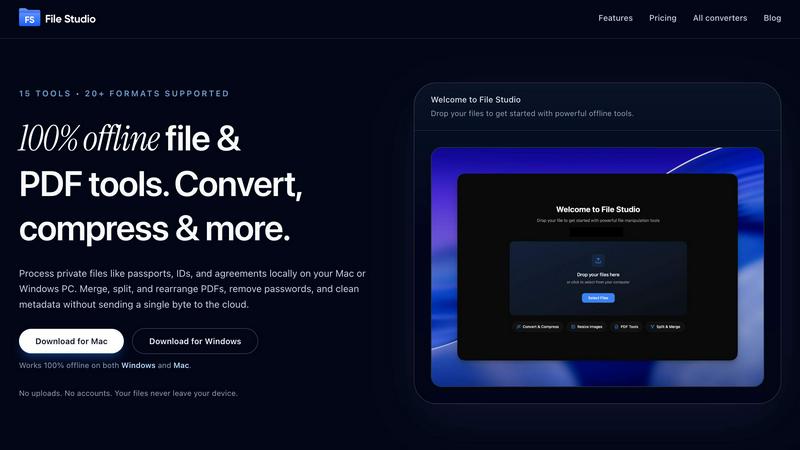
File Studio empowers you to process and manage files offline, keeping your sensitive documents secure and private.
Last updated: February 28, 2026
Visual Comparison
Assentia

File Studio
Feature Comparison
Assentia
Visual Feedback
With Assentia's visual feedback feature, clients can click anywhere on your live site to pin comments. This eliminates the need for lengthy email threads or Slack messages filled with vague references. Each feedback item is captured with automatic screenshots and context, making it crystal clear what changes are being requested. This streamlined process reduces confusion and enhances collaboration between clients and creators.
One-Click Scope Approval
The one-click scope approval feature allows you to send a clean approval link to your clients before commencing work. Clients can quickly approve the project scope with a single click, ensuring that both parties are aligned on what is included in the project. This professional sign-off process not only boosts transparency but also minimizes potential disputes regarding project deliverables.
AI-Powered Scope Generation
Assentia’s AI-powered scope generation can transform your project brief into a detailed deliverables list in under 30 seconds. Simply paste your brief into the platform, and the AI will generate a comprehensive list of tasks required to complete the project. This feature drastically reduces the time spent in scoping sessions, allowing you to focus on delivering quality work.
Scope Protection Mechanism
The scope protection mechanism ensures that every piece of feedback is checked against the approved project scope. If a feedback item falls outside of the agreed-upon scope, Assentia flags it, giving you the option to upsell additional services or decline the request. This feature helps you maintain control over your projects, reducing the risk of scope creep and ensuring you can manage client expectations effectively.
File Studio
100% Offline Processing
File Studio ensures that all file processing occurs locally on your device. Users can work on their sensitive documents without the risk of uploading files to the cloud, ensuring complete data privacy.
Comprehensive PDF Toolkit
With five specialized PDF tools, File Studio allows users to merge, split, edit, and unlock PDF documents effortlessly. This full PDF management solution enables you to manipulate your PDFs without the need for internet connectivity.
Versatile Image Tools
The application includes ten image tools that support over 20 formats, including HEIC and AVIF. Users can convert, resize, compress, crop, and create collages, empowering them to manage their images efficiently and effectively.
Batch Processing Capability
File Studio’s batch processing feature lets users handle hundreds of files at once. Whether converting, resizing, or compressing, this tool processes multiple files simultaneously to maximize efficiency and save time.
Use Cases
Assentia
Freelance Web Development
Freelance web developers can utilize Assentia to streamline the feedback process with their clients. By allowing clients to pin comments directly on the live site, developers can quickly address issues and concerns without the back-and-forth of traditional communication methods. This leads to faster project turnaround and enhanced client satisfaction.
Agency Project Management
Agencies can leverage Assentia to standardize their feedback and approval processes across multiple projects. With clear scope definitions and organized feedback, team members can collaborate more effectively, reducing delivery friction and ensuring that everyone is on the same page regarding project expectations.
UI/UX Design Projects
UI/UX designers can benefit from Assentia by using it to collect focused feedback on their designs. The ability to capture visual context allows designers to make informed adjustments based on client input, leading to a more refined design process and a product that meets client needs more effectively.
Client Training and Onboarding
Assentia can also be utilized in client training and onboarding processes. By allowing clients to interact with their live site and provide feedback, agencies can identify areas where clients may need additional training or support. This proactive approach not only enhances the client experience but also fosters long-term relationships.
File Studio
Personal Document Management
Users can seamlessly manage their personal documents, such as passports and IDs, with File Studio. The ability to edit and convert files offline ensures that sensitive information remains secure and confidential.
Professional PDF Handling
Freelancers and professionals can use File Studio for comprehensive PDF management, including merging contracts, splitting documents for client review, and removing passwords for easy access—all without any cloud interaction.
Image Optimization for Photographers
Photographers can rely on File Studio to convert RAW images to various formats, resize photos for web uploads, and compress files for easier sharing, all while maintaining image quality and detail.
Efficient Workflow for Remote Workers
Remote workers can streamline their document and image workflows with File Studio. The application allows for efficient batch processing of files, enabling users to optimize and manage their work without interruption.
Overview
About Assentia
Assentia is a game-changing feedback tool designed for web developers, freelancers, and agencies alike. It allows clients to leave direct feedback on live websites, fostering a seamless communication flow that eliminates confusion and misinterpretations. By capturing screenshots and context in real-time, Assentia ensures that every request is organized and managed effectively. The platform is built with a primary goal: to help users protect their project scope and manage client expectations. With features like one-click approvals and an automated scope-check system, Assentia empowers users to maintain control over their work, ensuring that they only deliver what has been agreed upon. This tool is perfect for anyone looking to streamline their feedback process, reduce scope creep, and enhance client satisfaction.
About File Studio
File Studio is an innovative desktop application designed to empower users by handling PDFs and images entirely offline on both Mac and Windows platforms. This powerful tool is perfect for individuals and professionals who handle sensitive documents, such as passports, identification cards, and contracts, ensuring that their private files never leave their device. With File Studio, you can merge multiple PDFs, split them into single pages, reorder and rotate layouts, remove passwords, and convert files to various image formats. Supporting over 20 formats, including HEIC, WebP, and 14 RAW types, this application allows users to resize, compress, crop, and watermark their images, create collages, and batch process entire folders effortlessly. The value proposition is clear: speed and privacy without the hassle of cloud-based services, accounts, or subscriptions. Ideal for photographers, freelancers, and remote workers, File Studio offers the perfect balance of functionality and security, making it an essential tool for anyone who values their privacy.
Frequently Asked Questions
Assentia FAQ
How does feedback collection work?
Clients can click directly on your live website to leave pinned comments. Assentia captures screenshot context automatically, ensuring that feedback is clear and actionable, which streamlines the revision process.
Can I prevent scope creep with this?
Yes. Assentia allows you to define and approve project scope, then systematically compares incoming requests against that scope. This feature ensures that you can decide what is included or billed as a change request, protecting your time and resources.
Do I need a credit card to start?
No, you can start with Assentia's free plan without needing to provide a credit card. You can upgrade to a paid plan only when your project volume increases, making it accessible for everyone.
Is this built for freelancers or agencies?
Assentia is designed for both freelancers and agencies. Solo freelancers can use it to keep their projects organized, while agencies can employ it to standardize approvals and reduce delivery friction across teams, making it versatile for all types of users.
File Studio FAQ
Is my data ever uploaded?
No. File Studio processes everything locally on your device. Your files never leave your computer, ensuring 100% offline processing and complete privacy.
Do you offer a free trial?
Yes. File Studio provides a free trial so users can explore its powerful features before committing to a purchase. Experience the benefits firsthand without any obligations.
Can I use File Studio on both Mac and Windows?
Absolutely! File Studio is designed to work seamlessly on both Mac and Windows platforms, making it a versatile tool for all users regardless of their operating system.
What is included in the lifetime plan?
The lifetime plan includes unlimited conversions, updates for one year, and access to all current tools. Once purchased, users enjoy on-device processing without any monthly fees or subscriptions.
Alternatives
Assentia Alternatives
Assentia is a cutting-edge tool designed to streamline feedback collection directly on live websites, making it an indispensable asset for freelancers and clients alike. This innovative solution not only simplifies communication but also helps manage project scope, ensuring that both parties remain aligned throughout the development process. Falling under categories like Chrome Extensions, Productivity & Management, and Web Development, Assentia is tailored to enhance collaboration and clarity. Users often seek alternatives to Assentia for various reasons, including pricing considerations, desired features, or specific platform compatibility. The quest for the perfect tool may stem from unique project needs or the desire for more robust functionality. When exploring alternatives, it’s essential to evaluate factors such as ease of use, integration capabilities, customer support, and the overall value provided to ensure that your chosen solution meets your project requirements.
File Studio Alternatives
File Studio is a robust desktop application designed for processing private files, specifically PDFs and images, entirely offline on both Mac and Windows systems. As a tool that prioritizes privacy and efficiency, it appeals to users who need to handle sensitive documents securely without the risk of cloud exposure. Users often seek alternatives to File Studio for various reasons, including pricing, specific feature requirements, or compatibility with particular platforms. When exploring alternatives, it's essential to consider factors like offline capabilities, one-time purchase options, and the range of supported file formats to ensure a suitable fit for your needs.