
File Studio vs Fill PDF from Excel

File Studio
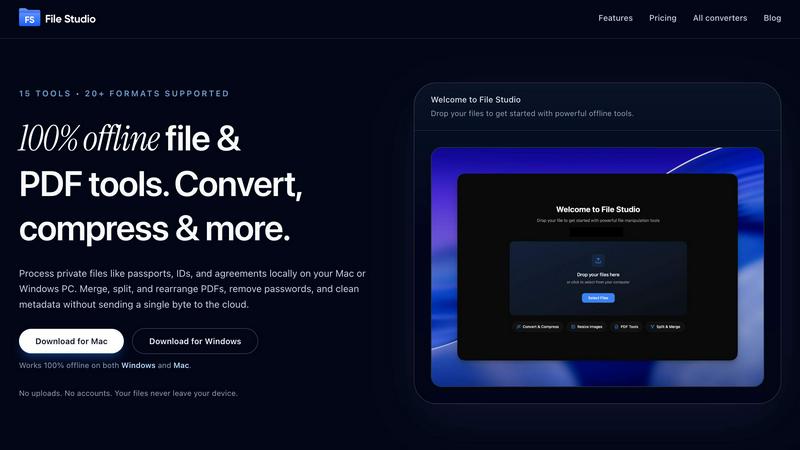
File Studio empowers you to process and manage files offline, keeping your sensitive documents secure and private.
Last updated: February 28, 2026

Fill PDF from Excel
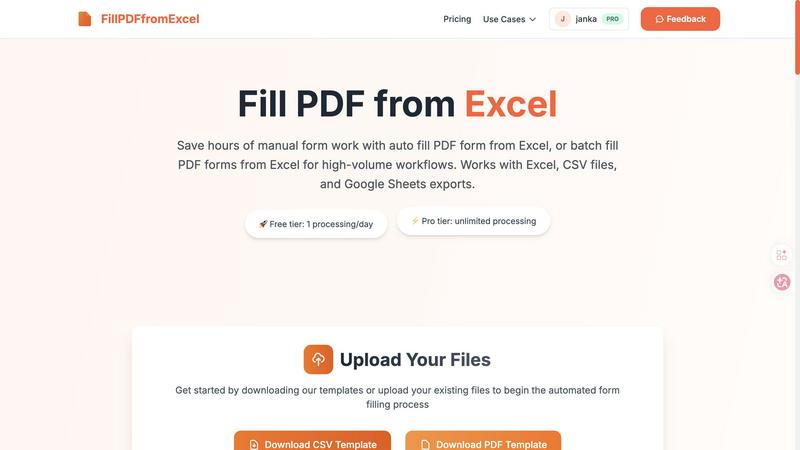
Effortlessly automate PDF form filling from Excel, saving time and boosting productivity for high-volume workflows.
Last updated: March 19, 2026
Visual Comparison
File Studio
Fill PDF from Excel
Feature Comparison
File Studio
100% Offline Processing
File Studio ensures that all file processing occurs locally on your device. Users can work on their sensitive documents without the risk of uploading files to the cloud, ensuring complete data privacy.
Comprehensive PDF Toolkit
With five specialized PDF tools, File Studio allows users to merge, split, edit, and unlock PDF documents effortlessly. This full PDF management solution enables you to manipulate your PDFs without the need for internet connectivity.
Versatile Image Tools
The application includes ten image tools that support over 20 formats, including HEIC and AVIF. Users can convert, resize, compress, crop, and create collages, empowering them to manage their images efficiently and effectively.
Batch Processing Capability
File Studio’s batch processing feature lets users handle hundreds of files at once. Whether converting, resizing, or compressing, this tool processes multiple files simultaneously to maximize efficiency and save time.
Fill PDF from Excel
Lightning Fast Processing
Experience the power of rapid data entry with Fill PDF from Excel. This feature allows you to auto-fill PDF forms in just minutes, even if your Excel sheet contains numerous rows. Say goodbye to time-consuming manual entry and hello to a streamlined workflow.
Smart Mapping Technology
Our intelligent field detection system automatically identifies and matches your Excel data columns to the corresponding PDF form fields. This smart mapping reduces the risk of errors and ensures that your data is accurately populated, saving you valuable time and effort.
Reliable Batch Processing
Designed for stability and repeatability, our batch processing feature allows you to fill multiple PDF forms at once. Whether you are working with hundreds or thousands of entries, Fill PDF from Excel handles high-volume workflows with ease and reliability.
User-Friendly Interface
Navigating Fill PDF from Excel is a breeze, thanks to its intuitive user interface. Upload your files, map your fields, and download your filled PDFs in just three simple steps. Our design prioritizes user experience, making automation accessible to everyone, regardless of technical skill.
Use Cases
File Studio
Personal Document Management
Users can seamlessly manage their personal documents, such as passports and IDs, with File Studio. The ability to edit and convert files offline ensures that sensitive information remains secure and confidential.
Professional PDF Handling
Freelancers and professionals can use File Studio for comprehensive PDF management, including merging contracts, splitting documents for client review, and removing passwords for easy access—all without any cloud interaction.
Image Optimization for Photographers
Photographers can rely on File Studio to convert RAW images to various formats, resize photos for web uploads, and compress files for easier sharing, all while maintaining image quality and detail.
Efficient Workflow for Remote Workers
Remote workers can streamline their document and image workflows with File Studio. The application allows for efficient batch processing of files, enabling users to optimize and manage their work without interruption.
Fill PDF from Excel
HR and Employee Management
HR professionals can utilize Fill PDF from Excel to efficiently process employee forms, such as onboarding documents and benefits enrollment. By automating the form-filling process, HR teams can focus on strategic initiatives rather than getting bogged down in paperwork.
Financial and Legal Documentation
Accountants and legal assistants can streamline their workflows by using Fill PDF from Excel to fill tax forms, client agreements, and compliance documents. This automation not only saves time but also minimizes the risk of human error in sensitive financial data.
Educational Administration
School administrators can benefit from this tool to manage student registrations, enrollment forms, and report cards. By automating the filling process, educational institutions can provide timely services without sacrificing accuracy or quality.
Event Management
Event organizers can leverage Fill PDF from Excel to handle registration forms and participant data efficiently. By automating these processes, event teams can enhance the attendee experience and ensure that all details are captured accurately and promptly.
Overview
About File Studio
File Studio is an innovative desktop application designed to empower users by handling PDFs and images entirely offline on both Mac and Windows platforms. This powerful tool is perfect for individuals and professionals who handle sensitive documents, such as passports, identification cards, and contracts, ensuring that their private files never leave their device. With File Studio, you can merge multiple PDFs, split them into single pages, reorder and rotate layouts, remove passwords, and convert files to various image formats. Supporting over 20 formats, including HEIC, WebP, and 14 RAW types, this application allows users to resize, compress, crop, and watermark their images, create collages, and batch process entire folders effortlessly. The value proposition is clear: speed and privacy without the hassle of cloud-based services, accounts, or subscriptions. Ideal for photographers, freelancers, and remote workers, File Studio offers the perfect balance of functionality and security, making it an essential tool for anyone who values their privacy.
About Fill PDF from Excel
Fill PDF from Excel is a revolutionary automation tool designed for professionals who need to streamline the tedious process of filling out PDF forms. By leveraging data from Excel, CSV, or Google Sheets, this innovative software enables users to auto-fill and batch-fill PDF forms swiftly and accurately. Ideal for HR professionals, accountants, educators, and various administrative roles, the tool dramatically reduces the time spent on manual data entry. With its intelligent mapping capabilities, users can easily match Excel columns to PDF fields, ensuring precise data transfer with minimal effort. The result? A seamless workflow that allows teams to redirect their focus from repetitive tasks to more strategic initiatives, enhancing overall productivity and efficiency.
Frequently Asked Questions
File Studio FAQ
Is my data ever uploaded?
No. File Studio processes everything locally on your device. Your files never leave your computer, ensuring 100% offline processing and complete privacy.
Do you offer a free trial?
Yes. File Studio provides a free trial so users can explore its powerful features before committing to a purchase. Experience the benefits firsthand without any obligations.
Can I use File Studio on both Mac and Windows?
Absolutely! File Studio is designed to work seamlessly on both Mac and Windows platforms, making it a versatile tool for all users regardless of their operating system.
What is included in the lifetime plan?
The lifetime plan includes unlimited conversions, updates for one year, and access to all current tools. Once purchased, users enjoy on-device processing without any monthly fees or subscriptions.
Fill PDF from Excel FAQ
What file formats do you support?
We support PDF forms as templates and accept Excel (.xlsx, .xls), CSV files, and Google Sheets exports as data sources. It is important to note that the PDF must have fillable form fields for the mapping to work correctly.
Do you store uploaded files?
No, we do not store uploaded PDF files as part of our core product feature. Uploaded files are processed to generate results for your immediate use and are not retained in our system.
Is there a limit to the number of rows I can process?
While our free tier allows for one processing per day, our Pro tier offers unlimited processing capabilities. This allows you to handle high-volume workflows efficiently without worrying about row limits.
How secure is my data while using this tool?
We prioritize the security of your data. All files uploaded for processing are handled with strict confidentiality, and we employ measures to ensure that no data is stored after processing, providing you with peace of mind.
Alternatives
File Studio Alternatives
File Studio is a robust desktop application designed for processing private files, specifically PDFs and images, entirely offline on both Mac and Windows systems. As a tool that prioritizes privacy and efficiency, it appeals to users who need to handle sensitive documents securely without the risk of cloud exposure. Users often seek alternatives to File Studio for various reasons, including pricing, specific feature requirements, or compatibility with particular platforms. When exploring alternatives, it's essential to consider factors like offline capabilities, one-time purchase options, and the range of supported file formats to ensure a suitable fit for your needs.
Fill PDF from Excel Alternatives
Fill PDF from Excel is an innovative automation tool that empowers users to effortlessly auto-fill and batch-fill PDF forms with data sourced from Excel, CSV, or Google Sheets. As part of the Productivity & Management category, it is designed to enhance efficiency and reduce the tedious nature of manual data entry, especially for professionals and teams dealing with high-volume form workflows. With intelligent mapping features, it streamlines the process, making it a must-have for organizations looking to optimize their operations. However, users often seek alternatives due to various reasons, including pricing constraints, specific feature sets, or compatibility with different platforms. When evaluating alternatives, it's essential to consider factors such as ease of use, integration capabilities, customer support, and overall value for money. Finding the right fit for your unique workflow can significantly boost productivity and ensure your data management tasks are handled seamlessly.