
File Studio vs SureThing.io

File Studio
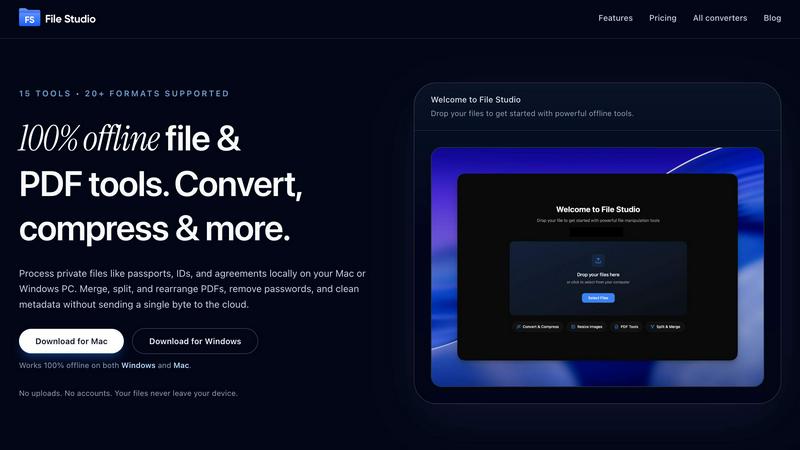
File Studio empowers you to process and manage files offline, keeping your sensitive documents secure and private.
Last updated: February 28, 2026

SureThing.io
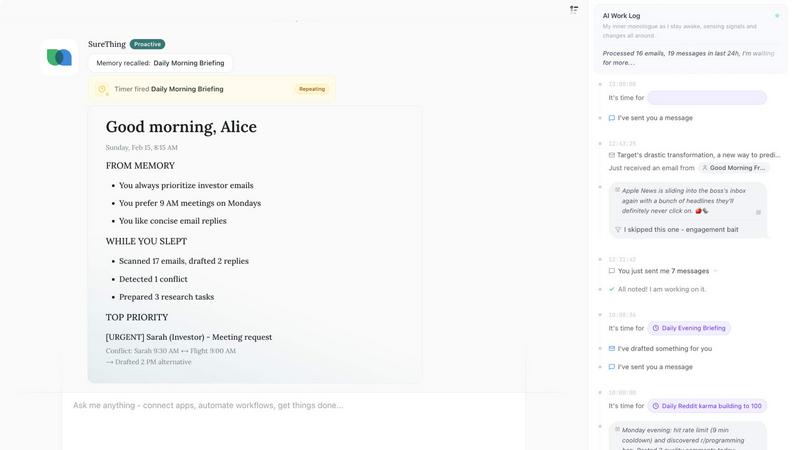
SureThing.io is your autonomous agent that learns your preferences and works tirelessly while you sleep, maximizing your productivity effortlessly.
Last updated: March 19, 2026
Visual Comparison
File Studio
SureThing.io
Feature Comparison
File Studio
100% Offline Processing
File Studio ensures that all file processing occurs locally on your device. Users can work on their sensitive documents without the risk of uploading files to the cloud, ensuring complete data privacy.
Comprehensive PDF Toolkit
With five specialized PDF tools, File Studio allows users to merge, split, edit, and unlock PDF documents effortlessly. This full PDF management solution enables you to manipulate your PDFs without the need for internet connectivity.
Versatile Image Tools
The application includes ten image tools that support over 20 formats, including HEIC and AVIF. Users can convert, resize, compress, crop, and create collages, empowering them to manage their images efficiently and effectively.
Batch Processing Capability
File Studio’s batch processing feature lets users handle hundreds of files at once. Whether converting, resizing, or compressing, this tool processes multiple files simultaneously to maximize efficiency and save time.
SureThing.io
Proactive Assistance
SureThing goes beyond traditional AI chatbots by actively monitoring your inbox and managing tasks without waiting for your instructions. It anticipates your needs, making it a proactive partner in your productivity journey.
State-of-the-Art Agentic Memory
With its advanced memory capabilities, SureThing retains your goals, preferences, and communication style over time. This ensures personalized interactions that evolve as you do, providing a seamless experience every step of the way.
Secure and Reliable
SureThing is built with security in mind, achieving SOC 2 certification and Google CASA Tier 2 compliance. This makes it not only a powerful productivity tool but also a reliable partner that you can trust with sensitive information.
Multi-Application Integration
SureThing seamlessly integrates with various apps, allowing it to take action across different platforms on your behalf. Whether it's scheduling meetings or sending reminders, it ensures that all your tools work harmoniously together to enhance your workflow.
Use Cases
File Studio
Personal Document Management
Users can seamlessly manage their personal documents, such as passports and IDs, with File Studio. The ability to edit and convert files offline ensures that sensitive information remains secure and confidential.
Professional PDF Handling
Freelancers and professionals can use File Studio for comprehensive PDF management, including merging contracts, splitting documents for client review, and removing passwords for easy access—all without any cloud interaction.
Image Optimization for Photographers
Photographers can rely on File Studio to convert RAW images to various formats, resize photos for web uploads, and compress files for easier sharing, all while maintaining image quality and detail.
Efficient Workflow for Remote Workers
Remote workers can streamline their document and image workflows with File Studio. The application allows for efficient batch processing of files, enabling users to optimize and manage their work without interruption.
SureThing.io
Streamlined Communication
For busy professionals, SureThing can manage email communications by drafting responses and prioritizing messages. This feature allows you to stay on top of your correspondence without the constant need to check your inbox.
Project Management Made Easy
Solo founders and small teams can leverage SureThing to track ongoing projects, set deadlines, and send reminders. This ensures that critical tasks are never overlooked, allowing you to focus on what truly matters.
Enhanced Scheduling
SureThing can manage your calendar by scheduling meetings, sending invitations, and even rescheduling conflicts automatically. This reduces the stress of managing multiple appointments and ensures you never double-book.
Tailored Personal Assistance
With its memory feature, SureThing becomes more than just a tool; it evolves into a personal assistant that understands your work habits and preferences. This results in a uniquely customized experience that enhances your productivity.
Overview
About File Studio
File Studio is an innovative desktop application designed to empower users by handling PDFs and images entirely offline on both Mac and Windows platforms. This powerful tool is perfect for individuals and professionals who handle sensitive documents, such as passports, identification cards, and contracts, ensuring that their private files never leave their device. With File Studio, you can merge multiple PDFs, split them into single pages, reorder and rotate layouts, remove passwords, and convert files to various image formats. Supporting over 20 formats, including HEIC, WebP, and 14 RAW types, this application allows users to resize, compress, crop, and watermark their images, create collages, and batch process entire folders effortlessly. The value proposition is clear: speed and privacy without the hassle of cloud-based services, accounts, or subscriptions. Ideal for photographers, freelancers, and remote workers, File Studio offers the perfect balance of functionality and security, making it an essential tool for anyone who values their privacy.
About SureThing.io
SureThing.io is an innovative autonomous AI agent designed to revolutionize how you manage your personal and professional life. By operating continuously in the background, SureThing takes on tasks that typically consume your time and energy. It doesn't just wait for your commands; it proactively monitors your inbox, drafts replies that sound just like you, manages your schedule, and tracks ongoing projects across various apps. Whether you're focusing on a big project or enjoying some downtime, SureThing works tirelessly on your behalf.
What truly sets SureThing apart is its state-of-the-art memory capability. It remembers your preferences, communication style, and goals, ensuring that every interaction is tailored to you. The longer you use it, the more it understands you, minimizing the need for constant explanations. Built for reliability, SureThing is SOC 2 certified and Google CASA Tier 2 compliant, making it the go-to choice for professionals and solo founders who need a trustworthy assistant. It's time to embrace the future of productivity with SureThing.io—the autonomous agent that truly remembers you and works while you sleep.
Frequently Asked Questions
File Studio FAQ
Is my data ever uploaded?
No. File Studio processes everything locally on your device. Your files never leave your computer, ensuring 100% offline processing and complete privacy.
Do you offer a free trial?
Yes. File Studio provides a free trial so users can explore its powerful features before committing to a purchase. Experience the benefits firsthand without any obligations.
Can I use File Studio on both Mac and Windows?
Absolutely! File Studio is designed to work seamlessly on both Mac and Windows platforms, making it a versatile tool for all users regardless of their operating system.
What is included in the lifetime plan?
The lifetime plan includes unlimited conversions, updates for one year, and access to all current tools. Once purchased, users enjoy on-device processing without any monthly fees or subscriptions.
SureThing.io FAQ
How does SureThing remember my preferences?
SureThing uses advanced agentic memory technology to remember your preferences, communication style, and goals. The more you interact with it, the better it understands your needs, ensuring personalized assistance.
Is SureThing secure to use for sensitive information?
Absolutely! SureThing is SOC 2 certified and Google CASA Tier 2 compliant, meaning it adheres to stringent security standards, making it a reliable choice for managing sensitive data.
Can SureThing integrate with my existing apps?
Yes, SureThing is designed to integrate seamlessly with a variety of applications. This allows it to automate tasks across platforms, enhancing your overall productivity and workflow efficiency.
Who is the ideal user for SureThing?
SureThing is perfect for busy professionals, solo founders, and anyone who needs a reliable assistant to help manage their workload. Its proactive nature and memory capabilities make it an invaluable tool for those seeking to optimize their time.
Alternatives
File Studio Alternatives
File Studio is a robust desktop application designed for processing private files, specifically PDFs and images, entirely offline on both Mac and Windows systems. As a tool that prioritizes privacy and efficiency, it appeals to users who need to handle sensitive documents securely without the risk of cloud exposure. Users often seek alternatives to File Studio for various reasons, including pricing, specific feature requirements, or compatibility with particular platforms. When exploring alternatives, it's essential to consider factors like offline capabilities, one-time purchase options, and the range of supported file formats to ensure a suitable fit for your needs.
SureThing.io Alternatives
SureThing.io is a cloud-first autonomous AI agent designed to enhance productivity and management by remembering user preferences and working proactively on their behalf. It stands out in the productivity category, allowing users to streamline their workflows with a tool that continuously adapts to their unique needs, rather than waiting for commands. Users often seek alternatives to SureThing.io for various reasons, including budget constraints, specific feature requirements, or compatibility with different platforms. When exploring alternatives, it’s essential to prioritize reliability, user-friendliness, and the ability to integrate seamlessly with existing tools and workflows to ensure that you find a solution that meets your needs effectively.