
Before After Photo Maker vs Image3D AI

Before After Photo Maker
Effortlessly create stunning before and after photo comparisons online with customizable layouts and high-quality exports.
Last updated: March 26, 2026

Image3D AI
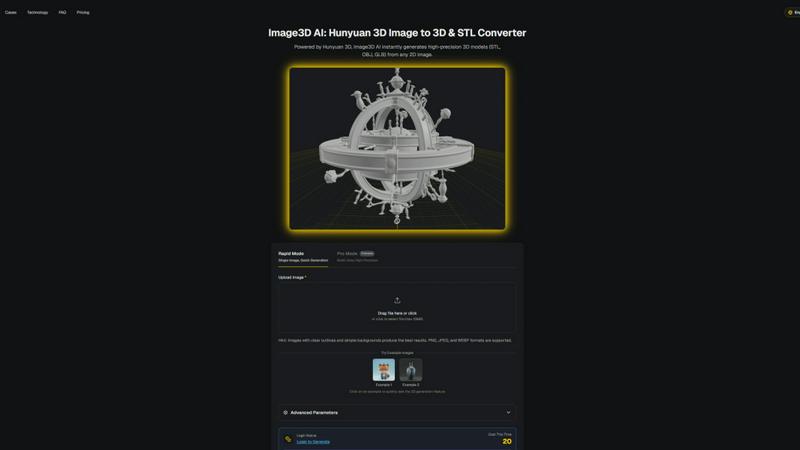
Transform any 2D image into stunning 3D models in minutes with Image3D AI's powerful and user-friendly conversion tool.
Last updated: February 28, 2026
Visual Comparison
Before After Photo Maker
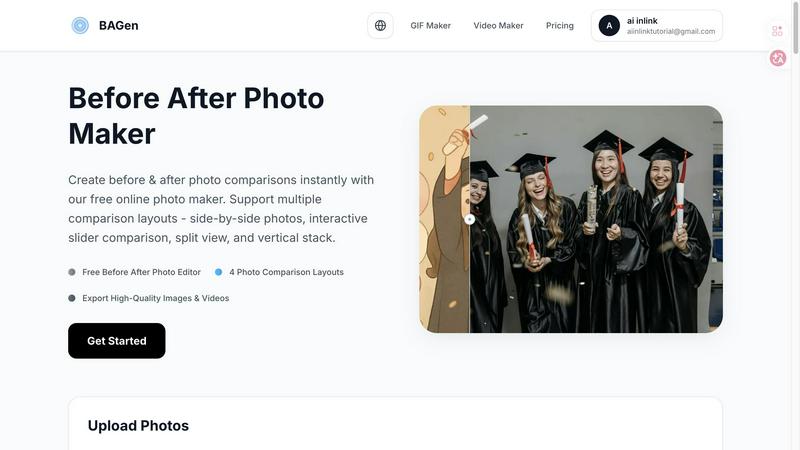
Image3D AI
Feature Comparison
Before After Photo Maker
Multiple Comparison Layouts
Before After Photo Maker offers four distinct layouts to choose from: side-by-side, interactive slider, split view, and vertical stack. This flexibility enables users to select the most effective visual representation for their specific needs, whether for social media or professional presentations.
High-Quality Export Options
Users can easily export their created comparisons in high-quality formats, including images and interactive videos. This ensures that the final product maintains clarity and professionalism, making it suitable for various platforms and uses.
Customizable Labels and Watermarks
The tool allows users to add customizable labels to their images, adjusting size and radius as needed. Additionally, users can upload a company logo to feature in their comparisons, enhancing brand visibility and recognition.
Live Preview Functionality
Before After Photo Maker includes a live preview feature, enabling users to see their edits in real-time. This immediate feedback loop ensures that adjustments can be made easily, allowing for a polished final product before export.
Image3D AI
Multi-Format Export
Image3D AI supports versatile export options, allowing users to download their 3D models in various formats including .STL for 3D printing, .OBJ for editing in popular software, and .GLB for WebAR and game applications. This flexibility ensures that your models can be used across different platforms and industries seamlessly.
PBR Material Generation
With automatic PBR (Physically Based Rendering) material generation, Image3D AI creates realistic textures and materials that enhance the visual quality of your 3D models. This feature eliminates the need for manual texturing, saving time and ensuring a professional finish for your assets.
Dual Modes
Image3D AI offers two distinct modes to cater to different needs: "Speed Mode" for rapid prototyping and "Pro Mode" for high-precision, multi-view reconstruction. This adaptability allows users to choose the best approach based on their project requirements, whether they need quick results or detailed accuracy.
Advanced Parameters
The tool provides advanced parameters that allow users to fine-tune their 3D generation process. By adjusting settings such as image quality and detail level, users can optimize their outputs for specific applications, ensuring that they achieve the best possible results for their unique needs.
Use Cases
Before After Photo Maker
Fitness Transformations
Fitness trainers and enthusiasts can utilize Before After Photo Maker to document and showcase their physical transformations or client progress. This visual documentation can serve as motivation for others and as a marketing tool for personal trainers.
Home Renovation Projects
Homeowners and contractors can use the tool to present dramatic renovations and improvements. By showcasing before and after images, they can effectively communicate their work's impact, making it an excellent resource for portfolios or social media.
Beauty and Skincare Results
Beauty professionals can utilize the tool to highlight the effectiveness of skincare regimens or cosmetic treatments. By presenting before and after images, they can build trust with potential clients and demonstrate the results of their services.
Digital Art and Creative Projects
Artists can leverage Before After Photo Maker to showcase their creative processes, from initial sketches to final pieces. This is especially useful for game developers and digital artists who want to illustrate their growth and progression over time.
Image3D AI
For Game Developers
Game developers can leverage Image3D AI to quickly generate 3D assets for their projects. With support for PBR materials, these assets can be seamlessly imported into popular game engines like Unity or Unreal Engine, streamlining the development process and enhancing gameplay experiences.
For E-commerce
E-commerce businesses can convert product images into interactive 3D models, providing customers with an engaging way to view products online. These models can be used for AR previews or on-site 3D showcases, improving user experience and boosting conversion rates.
For 3D Printing
Image3D AI serves as an efficient image to STL converter, delivering high-precision, print-ready files. This feature is essential for 3D printing enthusiasts who require watertight meshes, enabling them to bring their designs to life without complications.
For Architecture & Design
Architects can rapidly generate architectural models from images, significantly reducing the time required to create detailed designs from scratch. This capability enhances efficiency and allows for more time to focus on creativity and innovation within architectural projects.
Overview
About Before After Photo Maker
Before After Photo Maker is an innovative online tool designed to help users create stunning before and after photo comparisons in just minutes. Whether you're a fitness enthusiast wanting to showcase your transformation, a home renovator eager to display your project before and after images, or an artist documenting the evolution of your digital creations, this tool is perfect for you. It offers a user-friendly interface that allows for seamless photo uploading via drag and drop, making it accessible for everyone, regardless of technical skill. With multiple comparison layouts such as side-by-side, interactive slider, split view, and vertical stack, users can choose the best format to highlight their transformations effectively. The main value proposition lies in its ability to deliver high-quality image exports and interactive video outputs without the need for complex software or registration, making it an indispensable resource for anyone looking to present visual changes compellingly.
About Image3D AI
Image3D AI is a cutting-edge tool that leverages advanced artificial intelligence to revolutionize the way 3D models are created from 2D images. Designed for both professionals and hobbyists, this innovative software enables users to transform static images into high-quality, production-ready 3D models in mere seconds. Built on Tencent's powerful Hunyuan 3D engine, Image3D AI addresses the common challenges associated with 3D modeling, making it accessible to anyone, regardless of their technical expertise. Whether you are a 3D printing enthusiast seeking precision or a game developer in need of quick asset generation, Image3D AI simplifies your workflow and enhances creativity, allowing you to turn your ideas into stunning 3D representations effortlessly.
Frequently Asked Questions
Before After Photo Maker FAQ
How do I upload my images?
You can easily upload your before and after images by using the drag and drop feature or by clicking the upload button. The tool supports formats such as PNG, JPG, and GIF, with a maximum file size of 10MB.
Do I need to create an account to use the tool?
No, Before After Photo Maker is completely free to use without the need for registration. You can start creating your photo comparisons immediately after accessing the site.
Can I customize the labels in my comparisons?
Absolutely! The tool allows you to add customizable labels to your photos, adjusting their size and radius to fit your needs. You can also include a company logo to enhance brand visibility.
What export options are available?
You can export your completed comparisons in high-quality image formats or as interactive videos. This versatility ensures that your final product is suitable for various platforms, whether for online sharing or professional presentations.
Image3D AI FAQ
What types of images work best for generating 3D models?
Images with clear outlines and simple backgrounds produce the best results. High-contrast images are recommended, as they help the AI distinguish between different elements more effectively.
What formats can I export my 3D models in?
You can export your 3D models in various formats, including .STL for 3D printing, .OBJ for editing purposes, and .GLB for WebAR and game use. This versatility allows for seamless integration across different platforms.
How long does it take to generate a 3D model?
The processing speed for generating a 3D model is typically around 60 seconds. This rapid turnaround enables users to quickly iterate on their designs and speed up their workflows.
Do I need any prior 3D modeling skills to use Image3D AI?
No, Image3D AI is designed for users of all skill levels, requiring no prior 3D modeling experience. Anyone can create high-quality 3D models with just a few clicks, making it accessible to a wide audience.
Alternatives
Before After Photo Maker Alternatives
Before After Photo Maker is an innovative online tool designed to help users create stunning before-and-after photo comparisons effortlessly. As part of the Image & Photo category, it caters to diverse needs, from fitness transformations to home renovations and artistic progressions. Users often seek alternatives due to factors such as pricing, specific feature sets, platform compatibility, or the need for additional customization options. Finding the right alternative involves assessing the required layouts, ease of photo uploads, and any unique functionalities that may enhance the overall user experience. When searching for an alternative, it’s essential to consider features that align with your goals, such as various display formats like side-by-side comparisons or interactive sliders. Additionally, ensure that the platform you choose offers a user-friendly interface, robust photo upload capabilities, and the flexibility to showcase your transformations in the most impactful way possible. By evaluating these factors, you can find a solution that meets your creative needs and enhances your presentation of before-and-after visuals.
Image3D AI Alternatives
Image3D AI is an innovative tool in the realm of image and photo processing, designed to convert static 2D images into dynamic 3D models with the power of artificial intelligence. By leveraging Tencent's advanced Hunyuan 3D engine, it caters to a wide range of users, from hobbyists to professional developers, looking to streamline their 3D modeling processes. Users often seek alternatives to Image3D AI due to various reasons, including pricing structures, specific feature sets, and compatibility with different platforms. When exploring alternatives, it's essential to consider factors such as the quality of 3D models produced, the range of export formats offered, user friendliness, and the ability to generate realistic textures. Prioritizing these elements can help you find a solution that aligns perfectly with your 3D creation needs.