
EditPhoto AI vs ImagesArt

EditPhoto AI
Elevate your creativity with EditPhoto AI, the ultimate online photo editor powered by advanced AI tools and effects.
Last updated: February 28, 2026

ImagesArt
ImagesArt instantly creates stunning AI images and edits photos with just a text prompt.
Last updated: February 28, 2026
Visual Comparison
EditPhoto AI
ImagesArt
Feature Comparison
EditPhoto AI
Text-to-edit
EditPhoto AI features a unique text-to-edit capability that allows users to perform edits using straightforward text prompts. For example, users can input commands like "remove background," "enhance eyes," or "change sky to sunset," and the AI will execute these tasks automatically, making photo editing intuitive and accessible.
Multiple AI models
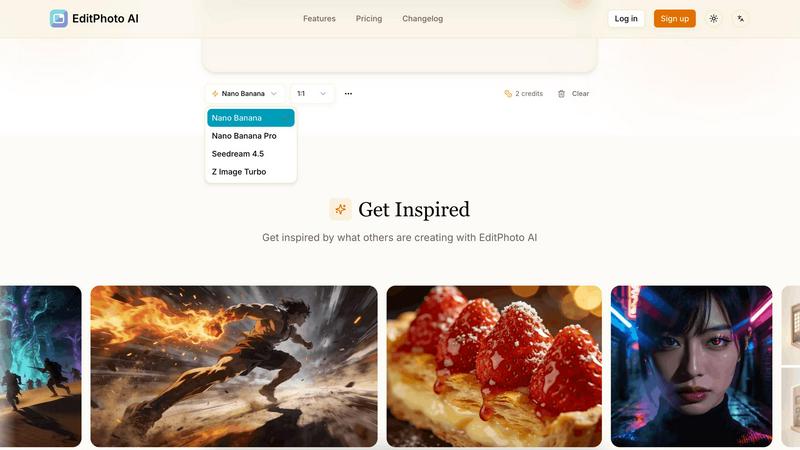
The platform offers access to multiple AI models, each optimized for specific needs, such as speed, consistency, or high-resolution output. Users can choose from models like Nano Banana, Nano Banana Pro, Seedream, and Z Image Turbo, ensuring they get the best performance based on their requirements.
Multi-image reference
With the ability to upload up to 14 reference images, EditPhoto AI allows users to maintain consistent styles or merge elements from various photos. This feature is especially useful for designers and photographers who want to create cohesive visuals or blend different artistic ideas seamlessly.
High-resolution output
EditPhoto AI supports high-resolution output options of 1K, 2K, and 4K, which is essential for professionals needing high-quality images for print or online use. Additionally, AI upscaling enhances image quality, ensuring that every detail is crisp and clear.
ImagesArt
Advanced Text-to-Image Generation
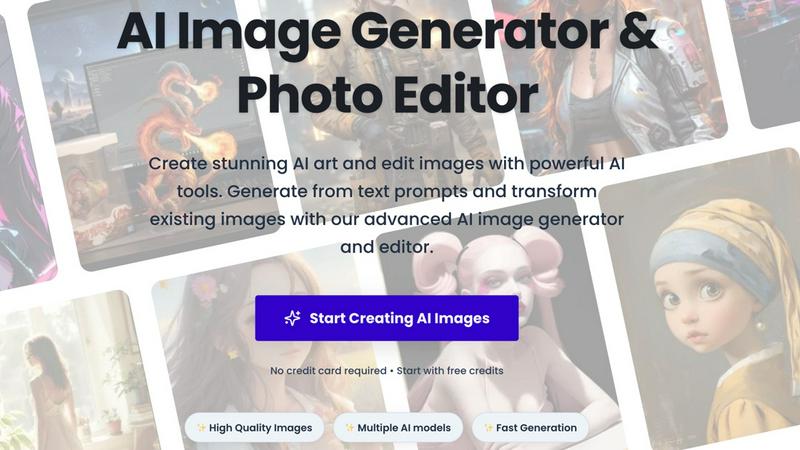
Harness the power of multiple cutting-edge AI models to generate breathtaking images from simple text descriptions. Describe any scene, concept, or style you can imagine, and watch as the AI creates high-resolution, detailed visuals in seconds. The platform excels in prompt understanding, ensuring your "majestic galleon at sunset" or "lone astronaut in a flower field" is rendered with stunning accuracy, consistent style, and photorealistic or artistic quality as you direct.
Creative AI Effect Filters
Transform any ordinary photo into extraordinary artwork with a single click using the specialized AI effect filters. Instantly convert portraits into authentic Pixar-style characters, captivating anime artwork, or fun cartoon avatars. Go beyond artistic styles with practical transformations like the AI Age Filter to see realistic age progression or the AI Smile Generator to add natural, authentic smiles to any photo, perfect for fixing group shots or professional headshots.
Professional AI Editing & Utility Tools
This is your all-in-one production suite for practical image manipulation. Remove or swap backgrounds instantly for e-commerce with the AI Background Remover. Experiment with virtual try-ons using the AI Clothes Changer or refine images with the comprehensive AI Image Editor that lets you alter objects and apply styles using text prompts. It even includes unique tools like the AI Buzz Cut Generator to visualize a new hairstyle.
Intelligent Prompt Engineering Tools
Reverse-engineer the creative process with tools designed to enhance your workflow. Use the Image to Prompt Generator to analyze any image and produce a detailed, descriptive text prompt you can reuse or modify. For bulk projects, the Batch AI Image to Prompt tool efficiently processes multiple images at once, allowing you to build a library of effective prompts and maintain stylistic consistency across all your AI-generated content.
Use Cases
EditPhoto AI
E-commerce and marketplaces
EditPhoto AI is an invaluable tool for e-commerce businesses looking to enhance their product listings. With one-click background removal and batch-friendly editing capabilities, users can quickly prepare images that attract more customers and improve sales.
Photographers and designers
For photographers and designers, EditPhoto AI streamlines the retouching process, allowing for fast edits, upscaling, and style transformations. The platform eliminates the need for complicated software, saving time and making it easier to focus on creativity.
Social media content creation
Content creators can leverage EditPhoto AI to produce stunning visuals for social media platforms. Whether it’s enhancing images with artistic filters, creating engaging posts, or preparing high-quality graphics for campaigns, this tool offers a quick and effective solution.
Old photo restoration
EditPhoto AI is perfect for restoring old or damaged photographs. Users can revive cherished memories by enhancing and repairing images, making them suitable for display or sharing with family and friends, thus preserving history with modern technology.
ImagesArt
Social Media & Content Creation
Create a constant stream of unique, on-brand visuals for Instagram, TikTok, YouTube thumbnails, and blog posts without hiring a designer or photographer. Generate original artwork for posts, transform selfies into engaging anime or cartoon avatars for profile pictures, and use the AI Background Remover to create clean, attention-grabbing product shots for promotional content, all in a matter of minutes.
Marketing & Advertising Creative Production
Rapidly prototype and produce high-quality advertising creatives, banner ads, and marketing visuals. Generate custom product scene images from text descriptions for campaigns, use AI models to create diverse model shots for A/B testing, and leverage the AI Clothes Changer for virtual fashion try-ons in ads. The print-ready quality ensures your visuals look professional across all platforms.
Personal Projects & Entertainment
Unleash your creativity for pure fun and personal expression. Turn family photos into a Pixar movie poster, imagine yourself as an anime hero, create hilarious or romantic scenes with the AI Kiss Generator, or visualize yourself with different hairstyles. It’s the perfect tool for creating custom gifts, unique party invitations, or simply exploring artistic ideas without any technical barriers.
E-commerce & Product Photography
Revolutionize your online store's visuals without expensive photoshoots. Generate lifestyle images of your products in various settings using text prompts. Use the AI Background Remover to get perfect transparent PNGs of products for clean catalogs. The AI Clothes Changer allows fashion retailers to showcase the same garment on multiple virtual models, dramatically increasing visual content while reducing costs.
Overview
About EditPhoto AI
EditPhoto AI is an innovative, free, browser-based AI image editor that redefines the way users approach photo editing. By transforming traditional editing into a prompt-driven workflow, it empowers users to upload images in various formats such as JPG, PNG, and WebP. With the ability to describe desired edits in natural language, the platform efficiently applies high-quality model-based operations. Users can engage in complex tasks like background removal, object removal, portrait retouching, and upscaling images to 4K resolution. EditPhoto AI caters to a diverse audience including e-commerce professionals, photographers, and graphic designers, fundamentally enhancing productivity and creativity. Its emphasis on privacy-first processing ensures that user data remains secure while delivering high-quality results. The platform is ideal for anyone looking to streamline their photo editing experience without the need for complex software, making professional-grade edits accessible to all.
About ImagesArt
ImagesArt.ai is the revolutionary all-in-one AI image generation and editing platform that's changing the game for creators everywhere. It's designed to instantly transform your imagination into stunning, professional-quality visuals with zero design skills required. Whether you're a marketer needing eye-catching ads, a designer seeking rapid inspiration, a content creator building your social feed, or just someone with a brilliant idea, ImagesArt is your creative co-pilot. The core magic lies in its powerful text-to-image engine, which interprets your prompts with incredible understanding and style consistency to generate exactly what you envision. But it doesn't stop there. The platform is packed with a massive suite of AI-powered tools for editing and transforming existing photos—from turning you into a Pixar character to changing outfits, removing backgrounds, or even generating the perfect smile. With support for multiple artistic styles, aspect ratios, and print-ready resolutions, ImagesArt consolidates the power of an entire creative studio into one intuitive, web-based platform. It’s built for speed, quality, and endless creative possibility, making high-end visual production accessible, fast, and fun for everyone.
Frequently Asked Questions
EditPhoto AI FAQ
How do I use EditPhoto AI?
To use EditPhoto AI, simply upload your image in a supported format, describe the edits you want in plain language, and let the AI process your request. The results will be generated quickly, allowing you to download or further edit your image.
Is EditPhoto AI free to use?
Yes, EditPhoto AI is completely free to use. Users can access a range of powerful editing tools without any subscription fees, making it an ideal choice for anyone looking to enhance their images without incurring costs.
What file formats does EditPhoto AI support?
EditPhoto AI supports various file formats, including JPG, PNG, and WebP. This ensures that users can upload their images in the format that best fits their needs.
Is my data safe when using EditPhoto AI?
EditPhoto AI prioritizes user privacy and data security. The platform employs SSL encryption, isolated processing environments, and ephemeral storage, ensuring that your data is handled securely and in compliance with GDPR regulations.
ImagesArt FAQ
Do I need any design experience to use ImagesArt?
Absolutely not! ImagesArt is built specifically for users with no prior design or editing skills. The interface is intuitive and user-friendly. To create an image, you simply type a description of what you want into the text prompt box. For editing, you just upload a photo and select the desired AI filter or tool, like "Cartoon Converter" or "Background Remover." The AI handles all the complex work, delivering professional results in seconds.
What are credits and how do I get them?
Credits are the currency used to generate images and use premium features on ImagesArt. Each image generation or AI transformation typically consumes one or more credits. The great news is you can start for free! New users receive free credits upon signing up (like the 10 free credits offered) to test the platform with no credit card required. After that, you can purchase additional credit packs or subscribe to a plan that offers a monthly credit allowance.
Can I use the images I create for commercial purposes?
Yes, generally you own the images you create with ImagesArt and can use them for commercial purposes, such as in marketing materials, on products, or in client work. However, it is always crucial to review the platform's specific Terms of Service for the latest and most detailed licensing information. These terms will outline any usage restrictions and confirm your commercial rights to the generated assets.
How does the AI Photo to Prompt Generator work?
This smart tool uses advanced AI to "read" and analyze any image you upload. It then reverse-engineers a detailed, descriptive text prompt that captures the key elements of the image—like subjects, style, lighting, composition, and mood. This generated prompt can be used directly in the text-to-image generator to create similar images, or it can be edited and refined to explore variations, making it an invaluable tool for learning prompt engineering and maintaining visual consistency.
Alternatives
EditPhoto AI Alternatives
EditPhoto AI is a groundbreaking, browser-based AI photo editor designed to simplify the photo editing process through an intuitive prompt-driven workflow. Users can effortlessly upload images in various formats and describe their desired edits using natural language, making it accessible for anyone from casual users to professional photographers. As a powerful tool in the image and photo category, it offers features like background removal, portrait retouching, and style transfers, all enhanced by cutting-edge AI models. However, users often seek alternatives to EditPhoto AI for various reasons, such as pricing structures, specific feature sets, or compatibility with their existing workflows. When exploring alternatives, it’s essential to consider factors like ease of use, range of editing capabilities, output quality, and the level of customer support provided. These considerations will help users find a solution that best fits their unique needs and preferences.
ImagesArt Alternatives
ImagesArt is a dynamic AI image generator and editor that transforms text prompts into stunning visuals or refines existing images with a few clicks. It's a powerhouse in the AI image generation category, designed to supercharge the creative workflow for anyone needing high-quality graphics fast. Creators often explore alternatives for various reasons. Maybe they need a different pricing model, specific features like a particular AI model, or a platform that integrates seamlessly with their other tools. The quest for the perfect tool is all about matching unique project demands and workflow preferences. When choosing an alternative, focus on what matters most for your projects. Consider the quality and style of image generation, the depth of editing tools, output flexibility for different platforms, and of course, the overall value for your investment. The right tool should feel like a natural extension of your creative process.