
Interactive Circle of Fifths vs The Ultimate Piano

Interactive Circle of Fifths
Master music theory with our interactive Circle of Fifths for instant scales, chords, and progressions.
Last updated: February 28, 2026

The Ultimate Piano
Practice piano online with interactive tools, real-time feedback, and a rich library of features to elevate your skills.
Last updated: March 3, 2026
Visual Comparison
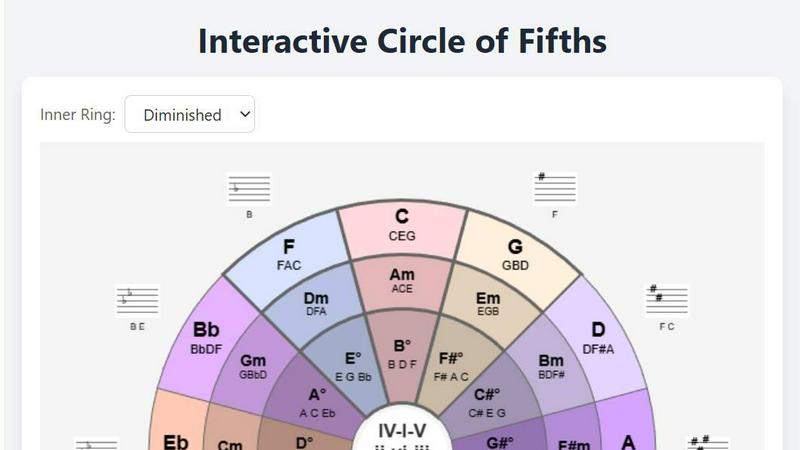
Interactive Circle of Fifths
The Ultimate Piano
Feature Comparison
Interactive Circle of Fifths
Dynamic Circle & Key Exploration
Click on any key around the circle to instantly reconfigure the entire tool. Watch as the inner rings, chord panels, and scale information update in real-time to reflect your chosen key. This allows for seamless exploration of all twelve major and minor keys, visually demonstrating their relationships and shared chords. It's the fastest way to understand modulation and the intrinsic structure of the Circle of Fifths itself, making key signatures and their connections crystal clear.
Multi-Instrument Visualizers (Piano & Guitar)
Go beyond theory and see exactly how to play. Integrated piano and guitar fingerboard visualizers light up to show you the precise notes and recommended fingerings for any selected chord or scale. This feature directly translates harmonic knowledge into muscle memory, helping beginners learn shapes and aiding advanced players in finding new voicings and positions across the neck or keyboard instantly.
Comprehensive Scale & Chord Library
Dive deep into harmonic building blocks with dedicated selectors for scales and chords. Instantly display and hear major, minor, and diminished chords. Explore essential scales like the Pentatonic, Blues, Diatonic, and Diminished scales directly from the inner ring. This library puts a universe of melodic and harmonic colors at your fingertips, encouraging experimentation and a deeper understanding of scale-chord relationships.
Harmonized Scale & Chord Sequencer Panel
This powerful panel displays all the diatonic chords (like C, Dm, Em, F, G, Am, B°) for your selected key, labeled with both their musical names and Roman numeral functions (I, ii, iii, etc.). Understand chord function, see what each chord "resolves to," and use this knowledge to build rock-solid or creatively unexpected progressions. It's the ultimate cheat sheet for songwriting and analyzing the music you love.
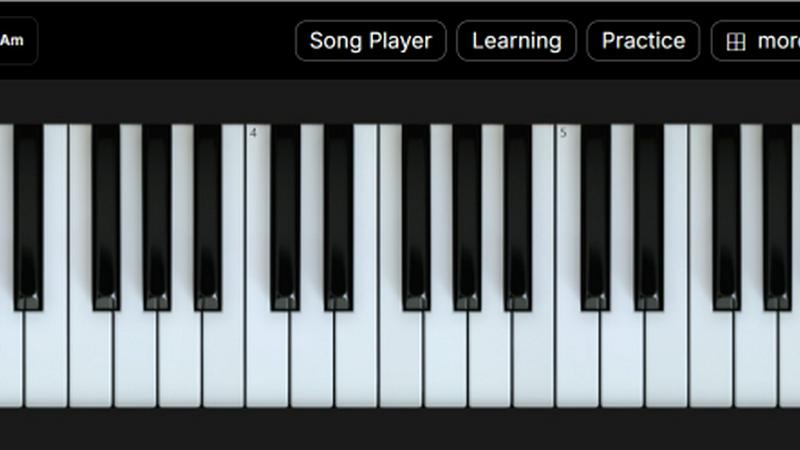
The Ultimate Piano
Play Piano Online
Experience the joy of playing piano directly in your web browser without the hassle of installations. Utilize your mouse, computer keyboard, or connect a MIDI keyboard to produce beautiful sounds with realistic piano samples, making practice sessions feel alive and engaging.
MIDI Player & Falling Notes
Load any MIDI file and watch as the notes light up on the keyboard in real time. This feature allows you to slow down the tempo, loop tricky sections, or step through notes one at a time—perfect for mastering challenging passages in your favorite tunes.
Chord Detection & Learning
As you play, The Ultimate Piano automatically recognizes and displays chord names in real time. This interactive feature helps users understand harmonic relationships while playing freely, making it an essential tool for building chord recognition skills.
Learning Modes
Engage with interactive support for learning chords and scales. Choose a specific scale, like the Blues Scale in Ab, and see it visualized on the keyboard as it plays. The Scale Trainer provides detailed performance analysis to help you track your progress and improve your skills effectively.
Use Cases
Interactive Circle of Fifths
Songwriting & Chord Progression Design
Break through creative blocks by using the Harmonized Scale panel and Chord Sequencer. Experiment with different diatonic chords (I, IV, V, vi) in any key, hear how they sound together, and discover smooth, functional progressions. The "Resolves To" function provides expert guidance on natural harmonic movement, helping you craft verses, choruses, and bridges that are both emotionally compelling and theoretically sound.
Instrument Learning & Practice
Ideal for students on piano or guitar. Use the visualizers to learn chord shapes and scale patterns in any key. A guitarist can practice the blues scale in A, while a pianist drills the diatonic chords in F# minor. It turns practice sessions into exploratory missions, reinforcing the connection between the notes on the screen, the sounds you hear, and the physical layout of your instrument.
Music Theory Education & Visualization
Teachers and self-learners can use the tool to visually demonstrate abstract concepts. Show how the circle is built, how relative minors work, or what makes a dominant seventh chord want to resolve. Watching the entire interface change with a single click makes theory tangible, accelerating comprehension far beyond textbook diagrams and rote memorization.
Improvisation & Solo Development
Select a backing chord from the sequencer and then explore compatible scales from the inner ring, like the Pentatonic or Blues scale. The visualizer shows you the "safe" notes to play over that chord across the entire fretboard or keyboard. This builds confidence and vocabulary for soloing, helping musicians move from playing memorized licks to creating meaningful, in-key melodic phrases on the fly.
The Ultimate Piano
Practice Alongside Your Favorite Songs
With the audio player, you can load any MP3 or audio file to play along with your favorite music. Adjust the playback speed to match your skill level, making it easier to learn complex pieces at your own pace.
YouTube Tutorial Integration
Utilize the YouTube Player to practice along with tutorials and performances. Simply paste a YouTube URL, slow down the playback for difficult sections, and set loop points to repeat specific parts, allowing for focused practice sessions.
Child-Friendly Learning
Children can enjoy learning piano with the Kids Mode, featuring adorable animal icons that represent each note. This visual aid helps young learners associate notes with fun characters, making the learning process enjoyable and engaging.
MIDI Recording for Self-Analysis
Capture your performances with the integrated MIDI recorder, which automatically saves your playing as a MIDI file. This feature allows you to revisit your performances, analyze your progress, and make necessary adjustments to improve your skills.
Overview
About Interactive Circle of Fifths
Unlock the secret language of music theory and supercharge your creativity with the Interactive Circle of Fifths! This isn't just a static diagram; it's a dynamic, hands-on music theory lab designed for musicians of all levels. Whether you're a songwriter battling writer's block, a beginner guitarist trying to understand chord progressions, or a seasoned pianist looking for fresh harmonic colors, this tool transforms abstract theory into an intuitive, visual, and auditory experience. Its core value is demystification: it makes complex relationships between keys, chords, and scales instantly understandable. See the connections, hear the harmonies, and apply the knowledge directly to your instrument. By integrating a fully interactive circle with real-time piano and guitar visualizers, it bridges the gap between theoretical knowledge and practical playability. Stop memorizing and start understanding. The Interactive Circle of Fifths is your all-in-one companion for composition, improvisation, practice, and deep musical exploration, turning the foundational wheel of harmony into your most powerful creative engine.
About The Ultimate Piano
The Ultimate Piano is a revolutionary browser-based practice tool designed specifically for pianists and music learners of all levels. With no downloads required, users can instantly connect their MIDI keyboards and dive into a comprehensive piano practice experience. This platform is not just about playing; it offers a rich suite of features tailored to enhance your musical journey. From real-time chord detection to an extensive scale trainer, Ultimate Piano empowers users to grasp music theory while honing their skills. It is perfect for musicians who seek an all-in-one solution to practice chords, learn scales, and develop ear training abilities. Whether you are a beginner looking to learn the basics or an advanced player aiming for detailed performance analysis, The Ultimate Piano provides the tools necessary to improve in a fun and interactive way. Additionally, it caters to a wide audience, including teachers who need effective visual aids and kids who want a playful learning environment.
Frequently Asked Questions
Interactive Circle of Fifths FAQ
Do I need to know music theory to use this tool?
Not at all! The Interactive Circle of Fifths is designed to teach you theory through interaction. You can start by simply clicking on keys and chords to hear them and see the fingerings. The visual relationships on the circle and panels will intuitively guide your understanding, making it perfect for absolute beginners while still being a powerful reference for advanced users.
Which instruments does this support?
The tool provides dedicated visualizers for both piano (keyboard) and guitar (fretboard). When you select a chord or scale, the corresponding notes are highlighted on both instrument diagrams, giving you the exact fingering. The core theory concepts apply universally to all instruments, from bass to vocals.
Can I use this to help me write a song in a specific key?
Absolutely. First, select your desired key on the outer circle. Then, use the Harmonized Scale panel to see all the chords naturally available in that key. The Chord Sequencer lets you audition different progressions (like I-V-vi-IV) and hear how they sound. It's the perfect tool for writing a pop song in C Major or a blues tune in E.
What is the "Resolves To" function?
This feature, found in the chord panel, teaches you about harmonic tension and release—a core concept in music. It shows you which chord(s) a selected chord naturally wants to progress to, based on traditional music theory. For example, the V chord (dominant) strongly "resolves to" the I chord (tonic). Using this guide helps you create chord progressions that sound satisfying and complete.
The Ultimate Piano FAQ
Do I need to install anything to use Ultimate Piano?
No, Ultimate Piano is entirely browser-based, meaning you can start practicing right away without any downloads or installations.
Can I connect my MIDI keyboard?
Absolutely! You can easily connect your MIDI keyboard to The Ultimate Piano, enhancing your practice experience with real-time feedback and interactive features.
What chords and scales can I learn?
The Ultimate Piano offers a variety of chords and scales to learn, including 14 different scale types and real-time chord detection, allowing you to explore harmonic relationships effortlessly.
Does Ultimate Piano have ear training?
Yes, it includes ear training features that help you develop your listening skills for intervals and chords, critical for any aspiring musician looking to improve their musical ear.
Alternatives
Interactive Circle of Fifths Alternatives
The Interactive Circle of Fifths is a dynamic music theory tool that reimagines a classic concept for the modern learner. It falls squarely into the education and learning category, transforming abstract theory into an interactive, visual, and auditory experience. Users can explore chord relationships, see instrument fingerings, and dive deep into scales directly from their device. People often seek alternatives for various practical reasons. Some may be looking for a different pricing model or a completely free option. Others might need specific features not covered, or require an app built for a different platform like mobile versus desktop. The search for the right tool is all about finding the perfect fit for one's individual learning journey and technical setup. When evaluating other options, focus on what matters most for your musical growth. Consider the depth of interactive features—can you hear the chords and see the fingerings? Check the range of theory covered, from basic chords to advanced scales. Also, assess the user experience; the best tools make complex theory intuitive and exciting to explore, not a chore to decipher.
The Ultimate Piano Alternatives
The Ultimate Piano is an innovative, browser-based practice tool designed specifically for pianists and music learners. It offers a unique blend of features that enhance practice sessions, such as real-time chord detection, scale training, ear training, and music theory visualization, all without the need for downloads. This makes it an accessible option for musicians eager to improve their skills in a digital environment. Users often seek alternatives to The Ultimate Piano due to various reasons, including pricing concerns, specific feature requirements, or compatibility with certain devices. When searching for an alternative, it's essential to consider factors such as the range of features offered, ease of use, and whether the platform meets your individual learning needs and preferences. The right tool should empower your musical journey, so take the time to explore the options available.