
Blueberry vs Mermaid Kit

Blueberry
Blueberry is the all-in-one workspace for AI-driven web app development and delivery.
Last updated: February 27, 2026

Last updated: February 28, 2026
Visual Comparison
Blueberry
Mermaid Kit
Feature Comparison
Blueberry
Integrated Workspace
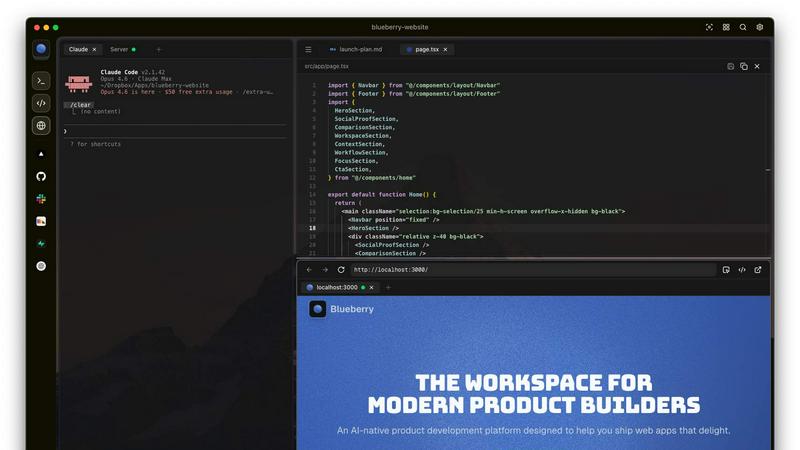
Blueberry combines a terminal, code editor, and preview browser into a single workspace, eliminating the need to switch between applications. This integration enables a fluid workflow where all your tools are accessible in one place, enhancing productivity and focus.
Contextual AI Interaction
With Blueberry's built-in MCP server, your AI can interact with the entire workspace. It has full context of your code, browser, and running apps, allowing it to provide intelligent suggestions and insights based on your current project state.
Pinned Apps
Keep essential tools like GitHub, Linear, Figma, and PostHog docked inside your Blueberry workspace. These pinned apps load alongside your project, sharing live context with your AI and providing a cohesive development experience without interruptions.
Screenshot & Element Selection
Blueberry allows you to capture screenshots or select elements directly from the preview browser, giving your AI visual context. This feature enhances the ability to provide feedback and suggestions based on actual interface elements, making development more intuitive.
Mermaid Kit
Instant Preview
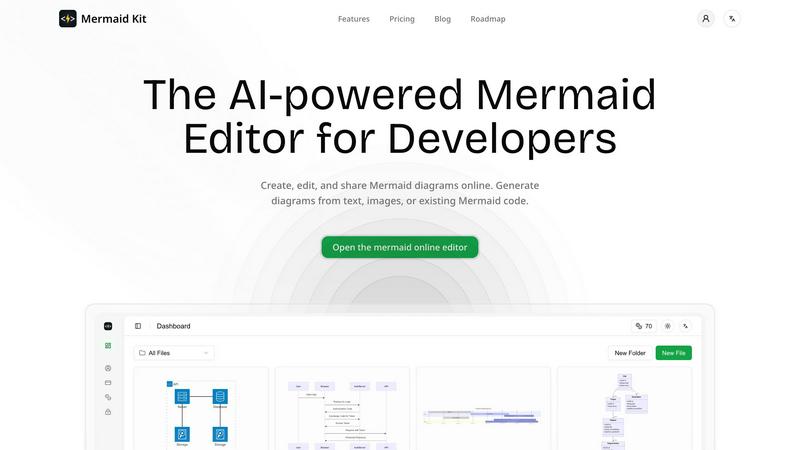
With Mermaid Kit, users can write Mermaid code and see the resulting diagrams in real-time. This immediate feedback mechanism allows developers to make quick adjustments and ensures that their diagrams accurately reflect their intentions without unnecessary delays.
AI-Assisted Diagram Generation
This feature allows users to input short textual descriptions, which the AI then converts into editable Mermaid diagrams. This not only saves time but also reduces the cognitive load on engineers, enabling them to focus on their core tasks rather than wrestling with syntax.
Whiteboard Photo Conversion
Mermaid Kit simplifies the preservation of design discussions by allowing users to convert whiteboard photos into Mermaid diagrams. This feature captures spontaneous brainstorming sessions and transforms them into structured diagrams, ensuring that valuable ideas are not lost.
AI-Assisted Analysis
The tool includes an intelligent analysis feature that scans diagrams for potential issues within architecture or flows. This proactive approach helps developers identify inconsistencies or flaws early in the design process, promoting better quality and reliability in technical documentation.
Use Cases
Blueberry
Collaborative Development
Teams can use Blueberry to streamline collaboration by keeping all project files, discussions, and design tools in one integrated workspace. This fosters real-time communication and reduces the time spent switching between different applications.
Rapid Prototyping
Developers can quickly prototype web applications using Blueberry's live preview feature. As you code, you can instantly see changes reflected in the browser, allowing for faster iterations and a more efficient development cycle.
Enhanced Debugging
With a terminal that provides live output and context-aware AI support, debugging becomes a more manageable task. Blueberry helps identify issues in real-time, enabling developers to fix bugs faster and improve overall code quality.
Educational Tool for Developers
Blueberry serves as an excellent educational platform for new developers. By providing integrated tools and contextual AI support, learners can receive immediate assistance while coding, making the learning process more engaging and effective.
Mermaid Kit
System Architecture Documentation
Engineers can use Mermaid Kit to create clear and concise diagrams that illustrate system architecture. By documenting these elements visually, teams can ensure everyone has a shared understanding of the system's structure and components.
Design Communication
When working on collaborative projects, teams can leverage Mermaid Kit to communicate design ideas effectively. The tool's ability to generate diagrams from text descriptions makes it easier to present concepts to stakeholders or team members who may not have a technical background.
Service Dependency Mapping
Backend engineers can utilize Mermaid Kit to map out service dependencies within applications. This visualization helps teams understand how various services interact and depend on one another, leading to more informed decision-making and architecture improvements.
Troubleshooting and Analysis
During the development process, potential issues can arise within architecture or flow diagrams. With Mermaid Kit's AI-assisted analysis, developers can identify and rectify these issues early, ensuring that the final product is robust and reliable.
Overview
About Blueberry
Blueberry is a revolutionary macOS application designed for modern product builders, seamlessly integrating your code editor, terminal, and browser into one focused workspace. Gone are the days of juggling multiple windows and losing context; Blueberry allows developers to focus on what truly matters—building exceptional web applications. With its AI-native capabilities, Blueberry connects to powerful models such as Claude, Codex, and Gemini via its built-in MCP server. This means your AI can see your files, understand terminal output, and provide live previews, all while you work. It's tailored for developers, designers, and product managers who want to streamline their workflow and enhance productivity. Experience the future of development with Blueberry, where your tools work together in harmony to help you ship web apps that delight users.
About Mermaid Kit
Mermaid Kit is an innovative online tool tailored specifically for developers who need to create and edit Mermaid diagrams efficiently. This platform is crafted to streamline technical diagramming, enabling engineers to incorporate diagrams seamlessly into their workflows. Traditional visual diagramming tools often add unnecessary complexity and slow down the process, but Mermaid Kit provides a unified workspace where users can write Mermaid code and instantly preview diagrams. This eliminates the hassle of switching between tools or navigating cumbersome interfaces. Furthermore, Mermaid Kit's AI-assisted generation feature converts short text descriptions into editable diagrams, ensuring that the diagrams produced are not only valid but also suitable for comprehensive technical documentation. By supporting the conversion of whiteboard photos into diagrams, it aids teams in preserving valuable design discussions. The tool also conducts AI-assisted analysis to identify potential issues in architectural or flow diagrams, making it an indispensable resource for independent developers, backend engineers, and software architects looking to document systems and communicate designs effectively.
Frequently Asked Questions
Blueberry FAQ
What is Blueberry?
Blueberry is a macOS application that integrates your code editor, terminal, and browser into one workspace, enhancing productivity for modern product builders.
How does Blueberry improve workflow?
By combining essential development tools into a single workspace, Blueberry minimizes the need to switch between applications, allowing developers to focus more on coding and less on managing multiple windows.
Is Blueberry suitable for team collaboration?
Absolutely! Blueberry's integrated workspace and pinned apps facilitate effective collaboration among team members, ensuring everyone has access to the same tools and context.
When will Blueberry be available after the beta period?
While specific details about the post-beta period are not yet available, Blueberry is currently 100% free during its beta phase, allowing users to explore its features without any financial commitment.
Mermaid Kit FAQ
What types of diagrams can I create with Mermaid Kit?
Mermaid Kit supports a variety of diagrams including flowcharts, sequence diagrams, Gantt charts, and more. This versatility allows developers to visualize different aspects of their projects effectively.
Is there a learning curve for using Mermaid Kit?
While there may be a slight learning curve for those unfamiliar with Mermaid syntax, the AI-assisted generation feature significantly reduces this barrier. Users can quickly generate diagrams from simple text descriptions, making it accessible for newcomers.
Can I collaborate with team members using Mermaid Kit?
Yes, Mermaid Kit allows for easy sharing of diagrams, enabling team members to collaborate effectively. Users can work together in real-time or share their diagrams for feedback and review.
What platforms does Mermaid Kit support?
Mermaid Kit is a web-based tool, meaning it can be accessed from any device with an internet connection. This flexibility allows users to create and edit diagrams from anywhere, enhancing productivity and collaboration.
Alternatives
Blueberry Alternatives
Blueberry is a cutting-edge macOS application designed to streamline the product building process by integrating your editor, terminal, and browser into a single focused workspace. This innovative tool falls within the Dev Tools category, catering to developers and creators looking to enhance their workflow and productivity. Users often seek alternatives to Blueberry for various reasons, such as exploring more competitive pricing, discovering additional features, or finding solutions that better align with their specific platform needs. When searching for an alternative to Blueberry, it’s essential to consider several factors, including the ease of integration with your current tools, the range of features offered, and the overall user experience. Look for options that enhance your workflow without adding unnecessary complexity, ensuring that you can maintain your focus and productivity just like you would with Blueberry.
Mermaid Kit Alternatives
Mermaid Kit is a cutting-edge AI-powered online tool designed specifically for developers to create and edit Mermaid diagrams efficiently. As part of the Dev Tools category, it streamlines the technical diagramming process, enabling engineers to visualize system architecture and service dependencies seamlessly. However, users often seek alternatives due to various factors such as pricing structures, specific feature sets, or compatibility with their existing workflows. When searching for an alternative, it's essential to consider aspects like ease of use, integration capabilities, the ability to generate diagrams quickly, and the level of AI assistance offered. Ultimately, a suitable alternative should enhance productivity while fitting naturally into a developer's unique workflow.