
BudgetSheet vs Money Visualiser

BudgetSheet
BudgetSheet effortlessly imports your bank transactions into Google Sheets, automating budgeting like never before.
Last updated: February 28, 2026

Money Visualiser
Transform any amount of money into interactive 3D bill stacks to visualize and compare real cash dimensions.
Last updated: February 28, 2026
Visual Comparison
BudgetSheet
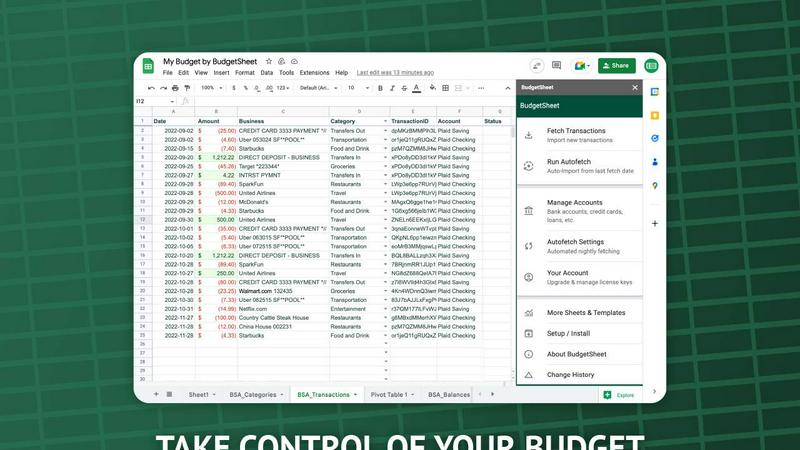
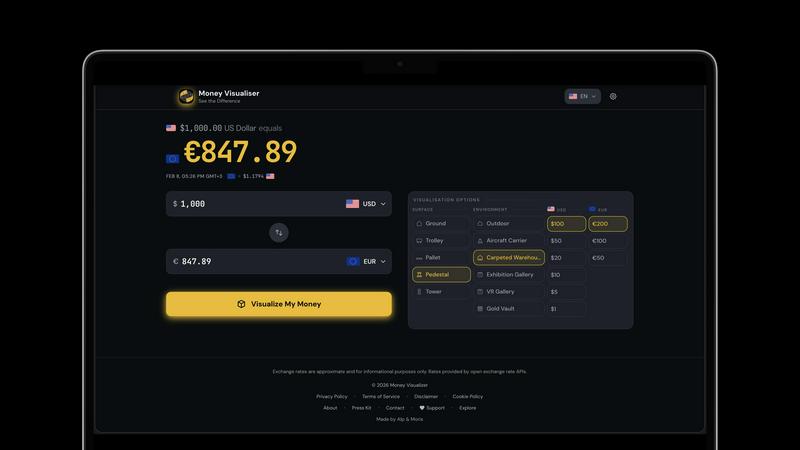
Money Visualiser
Feature Comparison
BudgetSheet
Live Bank Transactions
BudgetSheet allows users to connect their bank accounts securely and import live transactions directly into Google Sheets. This feature eliminates the need for manual data entry, ensuring that your financial records are always up to date and accurate.
Supports 10,000+ Financial Institutions
Whether you have a checking account, savings account, credit card, or investment account, BudgetSheet supports over 10,000 financial institutions. This extensive compatibility means you can manage all your financial data from one centralized location.
Secure Connections with Plaid
BudgetSheet utilizes Plaid to facilitate secure connections to your financial institutions. This means that your sensitive login credentials are never stored or handled by BudgetSheet, providing peace of mind when linking your bank accounts.
Custom Automation with Google Sheets
One of the standout features of BudgetSheet is the ability to automate your budgeting processes using Google Sheets' custom scripts and tools like Zapier. This flexibility allows you to create personalized solutions tailored to your financial needs.
Money Visualiser
Interactive 3D Bill Visualization
Money Visualiser offers an immersive experience by transforming monetary amounts into realistic 3D stacks of cash. Users can rotate, zoom, and explore the bill stacks from various angles, making it easier to comprehend the physical size of different amounts.
Real-Time Currency Comparison
With access to 82 world currencies, Money Visualiser allows users to select a source and target currency. Live exchange rates from the European Central Bank ensure that comparisons are accurate and up-to-date, providing a seamless way to understand currency values.
Customizable Bill Denominations
Users can switch between various bill denominations to see how the physical size of cash changes. This feature highlights the denomination effect, showcasing how $1,000,000 can take up drastically different space depending on whether it's in $100, $20, or $1 bills.
Shareable Visuals
Money Visualiser enables users to share their visualizations easily. By generating a unique URL for each comparison, users can showcase their findings on social media, in presentations, or on blogs, making financial education more engaging and accessible.
Use Cases
BudgetSheet
Personal Budgeting
BudgetSheet is ideal for individuals who want to create tailored budgets. By automatically importing transactions, users can easily track their income and expenses, ensuring they stay within their financial limits.
Small Business Financial Management
Small business owners can benefit from BudgetSheet by using it to monitor business expenses and revenues. The automation features help streamline financial reporting, making it easier to prepare for taxes or audits.
Investment Tracking
For those managing investment accounts, BudgetSheet offers a straightforward way to keep track of transactions and portfolio performance. Users can analyze their investments directly in Google Sheets, allowing for informed decision-making.
Family Budget Coordination
Families can use BudgetSheet to coordinate finances by sharing a single Google Sheet. This enables all family members to easily view and contribute to the family budget, promoting transparency and collaboration in financial planning.
Money Visualiser
Visualizing Salaries in Cash
Money Visualiser is an excellent tool for professionals wanting to see their annual salary represented in physical cash. By selecting their salary amount and comparing it across different currencies, users can gain insights into their earnings and how they stack up globally.
Understanding Large Amounts of Money
Curious about what a million dollars looks like? With Money Visualiser, users can instantly visualize $1,000,000 in various bill denominations, making the abstract concept of large sums much more tangible and relatable.
Educational Tool for Classrooms
Teachers can leverage Money Visualiser as an educational resource to help students grasp concepts of currency and value. By visualizing different amounts, students can better understand financial literacy in a fun and interactive way.
Social Media and Content Creation
Content creators on platforms like YouTube and TikTok can utilize Money Visualiser to produce eye-catching visuals. By capturing screenshots or sharing URLs, creators can engage their audiences with "what does X look like" scenarios, adding value to their content without any watermarks.
Overview
About BudgetSheet
BudgetSheet is a powerful Google Sheets add-on designed to streamline your financial management by importing live bank transactions directly into your spreadsheets. Gone are the days of tedious manual exports and cumbersome CSV files. With BudgetSheet, you can easily link to over 10,000 financial institutions, including checking accounts, savings accounts, credit cards, investment accounts, loans, and mortgages. This tool is perfect for anyone looking to take control of their personal finances, from budgeting enthusiasts to busy professionals seeking an efficient way to track expenses. By harnessing the secure connectivity of Plaid, BudgetSheet ensures that your sensitive data remains safe while providing you with a user-friendly interface to manage your finances. With BudgetSheet, you gain full autonomy over your budgeting process, allowing you to customize your spreadsheets to fit your unique financial goals and strategies.
About Money Visualiser
Money Visualiser is a groundbreaking web application designed to transform monetary values into stunning interactive 3D representations of banknotes. It allows users to visualize any amount of money in real time, selecting from 82 different currencies. Imagine entering an amount and instantly seeing a stack of bills rendered to scale, based on authentic central-bank specifications. This tool is perfect for anyone curious about the physical representation of currency, whether for educational purposes, financial planning, or simply satisfying curiosity. With no signup required, users can effortlessly explore the dimensions of their wealth, compare different currencies, and share their findings with others. Money Visualiser not only enhances financial understanding but also creates an engaging visual experience that captures the true scale of money.
Frequently Asked Questions
BudgetSheet FAQ
How does BudgetSheet ensure my bank data is secure?
BudgetSheet uses Plaid for secure bank connections, meaning your bank login credentials are never stored or handled by BudgetSheet. All sensitive data is encrypted, ensuring your information remains safe.
Can I try BudgetSheet before purchasing?
Absolutely! BudgetSheet offers a 15-day free trial with no credit card required. This allows you to explore all features and see how it fits your financial management needs.
What types of accounts can I connect with BudgetSheet?
BudgetSheet supports a wide range of account types, including checking accounts, savings accounts, credit cards, investment accounts, and loans. You can check the list of supported banks to see if yours is included.
Is BudgetSheet easy to set up?
Yes! Setting up BudgetSheet is straightforward. Simply enable the add-on in Google Sheets, link your bank accounts, and start importing transactions. The user-friendly interface makes it accessible for everyone, regardless of tech-savviness.
Money Visualiser FAQ
What is Money Visualiser?
Money Visualiser is a free web-based tool that allows users to visualize any amount of money as interactive 3D stacks of banknotes. With no need for registration, this tool makes it easy to explore various currencies and their physical representations.
How does Money Visualiser determine currency dimensions?
Money Visualiser uses the official dimensions of banknotes as specified by central banks. This ensures that the 3D representations are accurate and reflect the true size of currency, allowing for realistic comparisons and visualizations.
Can I use Money Visualiser on my mobile device?
Yes, Money Visualiser is designed to be responsive and can be used on various devices, including smartphones and tablets. Users can easily visualize and compare currencies on the go.
Is there a limit to how much money I can visualize?
No, Money Visualiser allows users to enter any amount from $1 up to $999,999,999,999. This flexibility enables users to visualize both small and large sums of money in various currencies.
Alternatives
BudgetSheet Alternatives
BudgetSheet is an innovative tool designed to streamline your personal finance management by integrating live bank transactions directly into Google Sheets. It eliminates the hassle of manual exports and tedious copy-pasting from CSV files, making financial tracking easier and more efficient than ever. Users typically seek alternatives to BudgetSheet for various reasons, including pricing structures, specific feature sets, or compatibility with different platforms. When searching for an alternative, consider what functionalities are essential for your financial management needs. Look for seamless integrations, user-friendly interfaces, and robust automation features that can enhance your budgeting experience while fitting your unique requirements.
Money Visualiser Alternatives
Money Visualiser is an innovative tool designed to transform how users perceive and interact with currency. It offers an engaging experience by allowing users to explore interactive 3D representations of bill stacks across 82 currencies, showcasing real dimensions and real-time exchange rates. As a product that falls under the Business & Finance and Content Creation categories, it caters to those interested in understanding currency value visually and contextually. Users often seek alternatives to Money Visualiser for various reasons, such as pricing, specific features, or compatibility with different platforms. It's essential to consider factors like user interface, currency selection, and the ability to share comparisons when searching for an alternative. A good option should not only meet your functional needs but also provide a user-friendly experience that enhances your financial insights.