
Money Visualiser vs ProcessBankStatement

Money Visualiser
Transform any amount of money into interactive 3D bill stacks to visualize and compare real cash dimensions.
Last updated: February 28, 2026

ProcessBankStatement
Convert your PDF bank statements to clean CSVs in seconds with ProcessBankStatement—fast, secure, and hassle-free data extraction.
Last updated: March 11, 2026
Visual Comparison
Money Visualiser
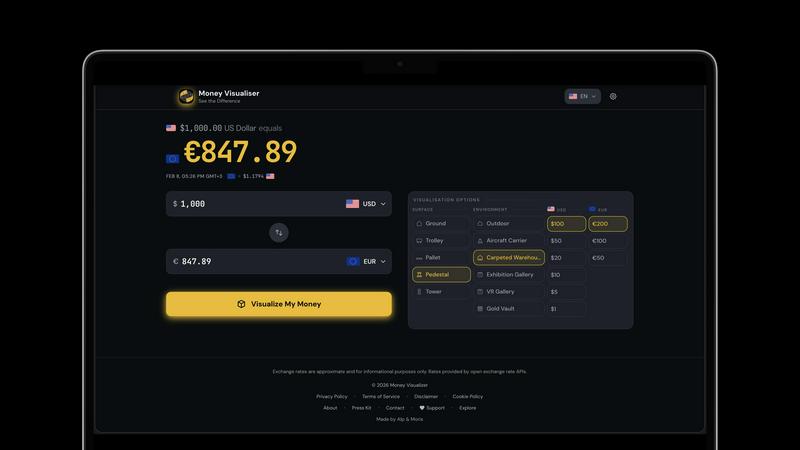
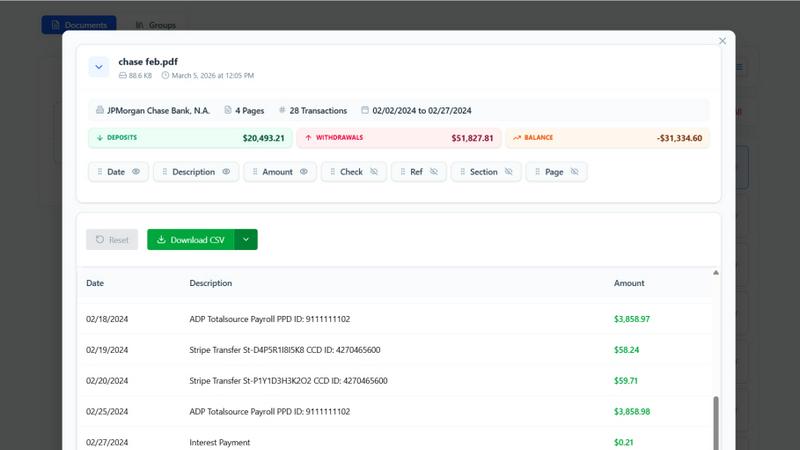
ProcessBankStatement
Feature Comparison
Money Visualiser
Interactive 3D Bill Visualization
Money Visualiser offers an immersive experience by transforming monetary amounts into realistic 3D stacks of cash. Users can rotate, zoom, and explore the bill stacks from various angles, making it easier to comprehend the physical size of different amounts.
Real-Time Currency Comparison
With access to 82 world currencies, Money Visualiser allows users to select a source and target currency. Live exchange rates from the European Central Bank ensure that comparisons are accurate and up-to-date, providing a seamless way to understand currency values.
Customizable Bill Denominations
Users can switch between various bill denominations to see how the physical size of cash changes. This feature highlights the denomination effect, showcasing how $1,000,000 can take up drastically different space depending on whether it's in $100, $20, or $1 bills.
Shareable Visuals
Money Visualiser enables users to share their visualizations easily. By generating a unique URL for each comparison, users can showcase their findings on social media, in presentations, or on blogs, making financial education more engaging and accessible.
ProcessBankStatement
Fast & Effortless Data Conversion
With ProcessBankStatement, users can upload their PDF bank statements and receive clean, structured CSV data in seconds. There is no complicated setup or time-consuming processes involved. The streamlined workflow allows users to focus on what matters most instead of getting bogged down with manual entries.
Enhanced Security & Privacy
Data security is a key feature of ProcessBankStatement. All uploaded files are encrypted during transit, ensuring that sensitive financial information remains safe from prying eyes. Users can also delete their files at any time, maintaining total control over their data and privacy.
Smart Data Extraction
The intelligent parsing engine of ProcessBankStatement is designed to accurately detect transactions and clean up formatting. This feature guarantees that the extracted data is structured and ready for immediate use in popular software like QuickBooks and Excel, making it easy to integrate into existing workflows.
Flexible Upload Options
ProcessBankStatement supports a variety of PDF file types, including multi-page and scanned documents. Users can easily upload their bank statements without needing to worry about special formatting, making the process as simple as drag and drop.
Use Cases
Money Visualiser
Visualizing Salaries in Cash
Money Visualiser is an excellent tool for professionals wanting to see their annual salary represented in physical cash. By selecting their salary amount and comparing it across different currencies, users can gain insights into their earnings and how they stack up globally.
Understanding Large Amounts of Money
Curious about what a million dollars looks like? With Money Visualiser, users can instantly visualize $1,000,000 in various bill denominations, making the abstract concept of large sums much more tangible and relatable.
Educational Tool for Classrooms
Teachers can leverage Money Visualiser as an educational resource to help students grasp concepts of currency and value. By visualizing different amounts, students can better understand financial literacy in a fun and interactive way.
Social Media and Content Creation
Content creators on platforms like YouTube and TikTok can utilize Money Visualiser to produce eye-catching visuals. By capturing screenshots or sharing URLs, creators can engage their audiences with "what does X look like" scenarios, adding value to their content without any watermarks.
ProcessBankStatement
Streamlined Bookkeeping
For accountants and bookkeepers, ProcessBankStatement offers a way to streamline the bookkeeping process. By converting multiple bank statements into structured CSV files, professionals can save significant time and reduce errors associated with manual data entry.
Efficient Financial Analysis
Financial analysts can leverage the power of ProcessBankStatement to quickly convert bank statements into usable data formats. This allows for rapid analysis, enabling them to derive insights and make informed decisions without the hassle of sorting through unstructured data.
Simplified Client Onboarding
Financial consultants can integrate ProcessBankStatement into their client onboarding process. Clients can easily upload their bank statements, and consultants receive immediate access to structured data, enhancing efficiency and improving service delivery.
Hassle-Free Tax Preparation
During tax season, individuals and small business owners can use ProcessBankStatement to convert their bank statements into clean CSV files. This simplifies the tax preparation process, making it easier to gather necessary financial information and reducing the stress of meeting tax deadlines.
Overview
About Money Visualiser
Money Visualiser is a groundbreaking web application designed to transform monetary values into stunning interactive 3D representations of banknotes. It allows users to visualize any amount of money in real time, selecting from 82 different currencies. Imagine entering an amount and instantly seeing a stack of bills rendered to scale, based on authentic central-bank specifications. This tool is perfect for anyone curious about the physical representation of currency, whether for educational purposes, financial planning, or simply satisfying curiosity. With no signup required, users can effortlessly explore the dimensions of their wealth, compare different currencies, and share their findings with others. Money Visualiser not only enhances financial understanding but also creates an engaging visual experience that captures the true scale of money.
About ProcessBankStatement
ProcessBankStatement is an innovative tool designed to transform the way individuals and businesses handle their financial data. It simplifies the tedious task of manual data entry by allowing users to upload any PDF bank statement and instantly receive a downloadable CSV file. This service is perfect for accountants, small business owners, financial consultants, and anyone who needs a quick and efficient way to manage bank statements. With support for major U.S. banks such as Chase, Bank of America, and Wells Fargo, the tool ensures comprehensive compatibility. Security is a top priority; all data is encrypted, and users maintain full control over their files, with the option to delete them at any time. ProcessBankStatement is not just a time-saver; it empowers users to focus on analysis rather than data entry, making financial management seamless and hassle-free.
Frequently Asked Questions
Money Visualiser FAQ
What is Money Visualiser?
Money Visualiser is a free web-based tool that allows users to visualize any amount of money as interactive 3D stacks of banknotes. With no need for registration, this tool makes it easy to explore various currencies and their physical representations.
How does Money Visualiser determine currency dimensions?
Money Visualiser uses the official dimensions of banknotes as specified by central banks. This ensures that the 3D representations are accurate and reflect the true size of currency, allowing for realistic comparisons and visualizations.
Can I use Money Visualiser on my mobile device?
Yes, Money Visualiser is designed to be responsive and can be used on various devices, including smartphones and tablets. Users can easily visualize and compare currencies on the go.
Is there a limit to how much money I can visualize?
No, Money Visualiser allows users to enter any amount from $1 up to $999,999,999,999. This flexibility enables users to visualize both small and large sums of money in various currencies.
ProcessBankStatement FAQ
What file types are supported?
Currently, ProcessBankStatement supports PDF bank statements, which can be either text-based or scanned. This flexibility ensures that users can work with a wide variety of document types.
Can I upload scanned images or photos?
Yes! ProcessBankStatement fully supports scanned PDFs and image-based statements, allowing users to convert various formats without any issues.
Is there a free trial available?
Absolutely! Guests can process 3 pages per day for free, while registered users enjoy 5 pages per day without charge, making it easy to test the tool's capabilities before committing.
Is my data secure with ProcessBankStatement?
Yes, the security of your data is paramount. All files are encrypted during transmission, and users have complete control over their data, including the ability to delete files at any time for added peace of mind.
Alternatives
Money Visualiser Alternatives
Money Visualiser is an innovative tool designed to transform how users perceive and interact with currency. It offers an engaging experience by allowing users to explore interactive 3D representations of bill stacks across 82 currencies, showcasing real dimensions and real-time exchange rates. As a product that falls under the Business & Finance and Content Creation categories, it caters to those interested in understanding currency value visually and contextually. Users often seek alternatives to Money Visualiser for various reasons, such as pricing, specific features, or compatibility with different platforms. It's essential to consider factors like user interface, currency selection, and the ability to share comparisons when searching for an alternative. A good option should not only meet your functional needs but also provide a user-friendly experience that enhances your financial insights.
ProcessBankStatement Alternatives
ProcessBankStatement is an innovative tool designed for effortless data extraction from PDF bank statements, making it a valuable asset in the Business & Finance category. Users often seek alternatives due to factors such as pricing, desired features, or specific platform compatibility. When exploring options, it is essential to consider factors like data security, ease of use, and the ability to integrate with existing software solutions to ensure a seamless experience.