
BlitzCut vs Motion Control AI

BlitzCut
Transform raw videos into engaging posts in minutes with AI-powered silence removal and.
Last updated: February 27, 2026

Motion Control AI
Animate characters effortlessly by transferring real movements from any video in under 60 seconds with Motion Control.
Last updated: February 28, 2026
Visual Comparison
BlitzCut
Motion Control AI
Feature Comparison
BlitzCut
Automatic Silence Removal
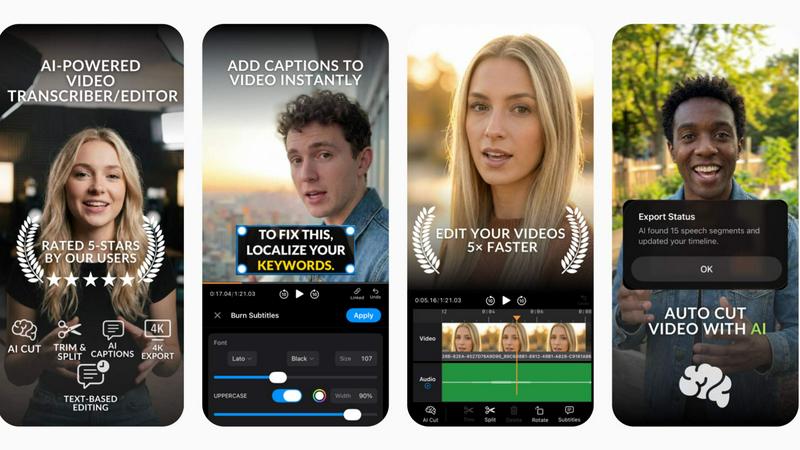
BlitzCut's Automatic Silence Removal feature utilizes advanced AI algorithms to detect and eliminate silent pauses from your videos instantly. This means you can say goodbye to the tedious manual editing that often takes 15-20 minutes. With just a single tap, the AI processes your video, ensuring a smooth and engaging viewing experience without dead air.
AI Captions
Creating captions has never been easier! BlitzCut's AI Captions feature boasts over 95% accuracy and incorporates trendy, viral styles that resonate with viewers. This feature not only saves time but also enhances your video’s accessibility and engagement, making it a must-have for creators who want to keep their audience hooked.
Text-Based Editing
With BlitzCut's Text-Based Editing, you can now edit your videos directly from the transcription. Simply delete sentences or phrases that you do not want, and let the AI handle the adjustments. This intuitive approach streamlines the editing process, allowing creators to make quick changes without having to scrub through the video timeline.
2-Minute Workflow
BlitzCut is designed for speed. The 2-Minute Workflow allows users to import their raw clips, remove silence, add captions, and export the final product in under two minutes. This rapid process empowers creators to produce high-quality content quickly, ensuring that they can maintain a consistent posting schedule without sacrificing quality.
Motion Control AI
Motion Transfer
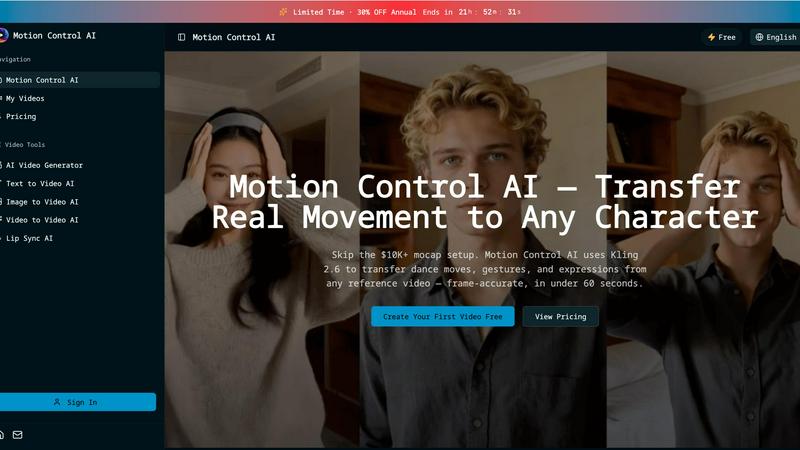
Motion Transfer is the cornerstone feature that allows users to upload any reference video, extracting skeletal motion data frame-by-frame. This feature enables the seamless transfer of full-body movements, including dance choreography and athletic motions, to animated characters while preserving their unique identities.
Gesture Control
Gesture Control addresses a common challenge in video generation—hand tracking. With Kling 2.6 technology, this feature precisely captures intricate finger movements, pointing, sign language, and hand gestures. This level of detail enhances the realism of character animations, making them more relatable and engaging for viewers.
Expression Sync
Expression Sync is designed to solve the uncanny valley problem by mapping facial expressions from source videos directly onto characters. Whether it’s a smile, frown, or eye movement, this feature ensures that emotional authenticity is maintained, allowing audiences to connect with characters on a deeper level.
Cinematic Realism
Cinematic Realism elevates the output quality of animations, generating broadcast-ready videos at up to 1080p and 30fps. This feature includes full camera controls, allowing for smooth pans, dynamic tilts, and controlled zooms, all while incorporating professional lighting and composition into every frame.
Use Cases
BlitzCut
Daily Social Media Posting
BlitzCut is perfect for creators who need to produce daily content for platforms like TikTok and Instagram. With its quick editing capabilities, users can turn around multiple videos in a day, keeping their content fresh and engaging without overwhelming themselves with editing tasks.
Content for Marketing Campaigns
Businesses looking to enhance their marketing efforts can leverage BlitzCut to create promotional videos swiftly. The automatic captioning and silence removal features allow marketers to focus on strategy and creativity rather than getting bogged down by the technical aspects of video editing.
Educational Video Creation
Educators and online instructors can utilize BlitzCut to create instructional videos. The text-based editing feature enables them to refine their content easily, ensuring that their lessons are concise and impactful, enhancing the learning experience for students.
Vlog Production
Vloggers can benefit immensely from BlitzCut's features, allowing them to edit their content on-the-go. With the mobile-first design and rapid workflow, they can capture, edit, and share their adventures in real-time, maximizing their engagement with viewers.
Motion Control AI
Content Creation for Social Media
Content creators on platforms like TikTok and Instagram can leverage Motion Control AI to produce character animations quickly and efficiently. With the ability to transfer dance moves and gestures, creators can generate engaging short clips that resonate with their audiences in under 60 seconds.
Film and Animation Production
Film studios can significantly reduce production time and costs with Motion Control AI. By transferring live actor performances to animated characters, filmmakers can create high-quality animations in a fraction of the time, opening new avenues for storytelling and visual effects.
Marketing Campaigns
Marketers can use Motion Control AI to enhance their advertising strategies by creating character animations for product demonstrations, brand mascots, and explainer videos. This tool has been shown to increase click-through rates by over 35%, making campaigns more effective and engaging.
Educational Content
Educators can utilize Motion Control AI to create dynamic instructional videos that include animated characters demonstrating concepts and procedures. This interactive approach can enhance learning experiences, making complex ideas more accessible and entertaining for students.
Overview
About BlitzCut
BlitzCut is a revolutionary AI-powered video editing application designed to make professional video editing accessible to every content creator. Whether you are a seasoned videographer or a novice looking to enhance your social media presence, BlitzCut offers a fast, mobile-first solution tailored for TikTok, Instagram Reels, and YouTube Shorts. Its primary value proposition lies in its ability to automate time-consuming tasks like silence removal and caption generation, allowing creators to focus on what truly matters—creating engaging content. With BlitzCut, users can transform raw footage into polished, post-ready videos in just two minutes, making daily posting not just feasible but effortless.
About Motion Control AI
Motion Control AI is a revolutionary video tool that redefines character animation by leveraging reference motion for precise control over outputs. Unlike conventional text-based animation generators, Motion Control AI allows creators to upload a reference video, enabling them to guide the movement of characters in a predictable and repeatable manner. This innovative approach streamlines the animation process, making it accessible to short-form creators, content studios, marketers, and indie teams who require character-driven clips without the need for complex rigging or lengthy production cycles. With Motion Control AI, users can effortlessly transform authentic human movements, gestures, and expressions into animated characters, all while maintaining a consistent character look across multiple iterations. In less than a minute, creators can produce high-quality animations that are perfect for social media, advertisements, and various digital platforms.
Frequently Asked Questions
BlitzCut FAQ
How does BlitzCut's Automatic Silence Removal work?
BlitzCut uses advanced AI to identify silent gaps in your video and removes them automatically, drastically reducing editing time from 15-20 minutes to mere seconds.
Can I use BlitzCut on multiple devices?
Yes, BlitzCut is built specifically for iPhone, iPad, and Mac, offering a seamless mobile-first experience that allows you to edit videos anytime, anywhere.
What types of videos can I create with BlitzCut?
BlitzCut is designed primarily for social media videos, including TikToks, Instagram Reels, and YouTube Shorts, making it ideal for any content creator looking to enhance their online presence.
Is there a cost associated with using BlitzCut?
BlitzCut is free to download and use, making it accessible for all creators. There is no need for an account, and you can start editing videos right away without any upfront costs.
Motion Control AI FAQ
How does Motion Control AI work?
Motion Control AI works by allowing users to upload a reference video that contains the desired movements. The tool extracts motion data frame-by-frame and applies it to animated characters, enabling precise control over their movements and expressions.
What file formats are accepted for reference videos and character images?
For reference videos, Motion Control AI accepts MP4, MOV, and MKV formats with a maximum file size of 100MB and a duration of up to 10 seconds. Character images can be uploaded in JPEG or PNG formats, with a maximum size of 10MB.
Can I create longer videos with Motion Control AI?
Yes! While the basic functionality allows for short clips, Pro+ users can create character animations with motion reference videos that are up to 30 seconds long, providing greater flexibility for storytelling.
Is there a free trial available for Motion Control AI?
Absolutely! Motion Control AI offers users the opportunity to create their first video for free, allowing them to explore the tool's capabilities before committing to a subscription plan.
Alternatives
BlitzCut Alternatives
BlitzCut is a cutting-edge AI video editing tool designed specifically for content creators, focusing on making professional video editing accessible and efficient. By automating time-consuming tasks like silence removal and captioning, BlitzCut enables creators to produce high-quality social media content in a fraction of the time. However, users often seek alternatives for various reasons, such as pricing, specific feature requirements, or compatibility with different platforms. When searching for an alternative, it's essential to consider factors like the speed of the editing process, the accuracy of AI features, and the overall user experience. Look for tools that align with your specific editing needs while still offering a seamless workflow that allows you to focus on creativity rather than tedious tasks.
Motion Control AI Alternatives
Motion Control AI is an innovative video tool that allows users to animate characters by utilizing reference motion from any video. As part of the content creation and video categories, it empowers creators to produce character-driven clips with a focus on controlled outputs, making it an essential tool for short-form creators and marketers alike. However, users often seek alternatives due to various factors such as pricing, feature sets, and specific platform compatibility that better align with their unique production needs. When choosing an alternative, consider aspects like ease of use, the flexibility of features, the ability to maintain character consistency, and the overall speed of the workflow to ensure it meets your creative demands.